avatarTeri Radichel

Free AI web copilot to create summaries, insights and extended knowledge, download it at here

4319

Abstract

KmiQ.png)"></div> </div> </div> </a> </div><p id="7f40">The thing is, a VPN will encrypt your traffic so spying eyes can’t see it, but it will still protect your DNS requests in transit over external networks to a point. You need to think about where the encryption starts and stops and if it protects all or some of the data (as is the case with a split tunnel VPN) to fully understand what is and is not protected.</p><p id="9e3f">But your DNS requests can still be visible to your network security appliances in that case, which allows you to block traffic to known bad domain names that are serving up maliciousness.</p><p id="fb8e">By denying DNS over HTTPS you can also eliminate attacks like this one, where Chinese hackers disguised their dirty work with it:</p><div id="9a94" class="link-block"> <a href="https://www.bleepingcomputer.com/news/security/chinese-hackers-use-dns-over-https-for-linux-malware-communication/"> <div> <div> <h2>Chinese hackers use DNS-over-HTTPS for Linux malware communication</h2> <div><h3>The Chinese threat group 'ChamelGang' infects Linux devices with a previously unknown implant named 'ChamelDoH,'…</h3></div> <div><p>www.bleepingcomputer.com</p></div> </div> <div> <div style="background-image: url(https://miro.readmedium.com/v2/resize:fit:320/0*c8JxNX3HzgK-hwM3)"></div> </div> </div> </a> </div><p id="6b61">For extra DNS security, use free DNS services that block bad domains such as this CloudFlare service:</p><div id="dfab" class="link-block"> <a href="https://readmedium.com/easy-dns-change-to-prevent-attacks-5b6708f287b3"> <div> <div> <h2>Easy DNS Change To Prevent Attacks</h2> <div><h3>1.1.1.2 and 1.1.1.3 for Safer Home and Small Business Networks</h3></div> <div><p>medium.com</p></div> </div> <div> <div style="background-image: url(https://miro.readmedium.com/v2/resize:fit:320/1*-h1_PD7dfQQ_hX7fEETPbw.png)"></div> </div> </div> </a> </div><p id="ab37">When the service doesn’t return a valid response for a domain it could be the site is down, or it is serving up something you don’t want.</p><p id="c9ac">Beware that some application (and malware) will try to bypass your DNS settings, so you won’t get the above protections. Like Google Chrome.</p><div id="f7b4" class="link-block"> <a href="https://readmedium.com/google-chrome-dns-security-bypass-9a1e10e02114"> <div> <div> <h2>Google Chrome DNS Security Bypass</h2> <div><h3>Google Chrome overrides system DNS settings in some cases, possibly bypassing third-party security services and tools.</h3></div> <div><p>medium.com</p></div> </div> <div> <div style="background-image: url(https://miro.readmedium.com/v2/resize:fit:320/1*-Rg5EbXuIDifiSsezJr1FA.png)"></div> </div> </div> </a> </div><p id="bc85">In that case you can use a firewall and NAT to make sure your DNS requests are directed to your preferred DNS servers at the network layer, instead of relying on hosts and insecure things.</p><div id="3d51" class="link-block"> <a href="https://readmedium.com/redirect-iot-devices-to-preferred-dns-b0cbaa49aa69"> <div> <div> <h2>Redirect IoT Devices to Preferred DNS</h2> <div><h3>Leveraging PFSense Nat Rules to redirect DNS requests when the device itself won’t let you</h3></div> <div><p>medium.com</p></div> </div> <div> <div style="background-image: url(https://miro.readmedium.com/v2/resize:fit:320/1*LJHagEoSNHOLzzxDzyxLAg.png)"></div> </div> </div> </a> </div><p id="0b82">This is just one more reason why network security matters. You can’t always rely on the host (or the network). You need a multi-layered approach.</p><p id="ec87">When you’re looking at yo

Options

ur network traffic you will commonly see DNS requests to the following IP addresses from various devices and software:</p><div id="b276"><pre><span class="hljs-number">8.8.8.8</span> <span class="hljs-number">8.8.4.4</span> <span class="hljs-number">1.1.1.1</span> <span class="hljs-number">1.0.0.1</span></pre></div><p id="10b7">You may see traffic to odd ports like:</p><div id="2d9e"><pre><span class="hljs-number">853</span> <span class="hljs-symbol">53 </span>TCP <span class="hljs-symbol">443 </span>+ DNS Server</pre></div><p id="0d54">These may all be an indication of an attmept to use DNS over HTTPS. You can block all that to and from the Internet, do a reject for devices on the local network, or possibly redirect it but the redirect likely won’t work.</p><p id="c6af">There are some reasons to use 53 + TCP for zone transfers but that is not something you want exposed to the Internet or even random servers on your network. Use a zero-trust network model for that and make sure the traffic is what you think it is.</p><p id="9e79">There may be some way to MITM (man in the middle or monkey in the middle if you prefer) the DNS over HTTPS traffic somehow so you can continue to inspect it. Hmm. A quick look is not yielding answers but it seems like that should be possible. Something to explore later. But blocking it works fine for me.</p><p id="531e">By the way I also noticed Facebook trying to send DoH queries to their own DNS servers. They were piloting something with CloudFlare a while back — not sure where this stands now.</p><div id="4631" class="link-block"> <a href="https://engineering.fb.com/2018/12/21/security/dns-over-tls/"> <div> <div> <h2>DNS over TLS: Encrypting DNS end-to-end</h2> <div><h3>Facebook and Cloudflare are piloting DNS over TLS to better understand how the protocol behaves in a production…</h3></div> <div><p>engineering.fb.com</p></div> </div> <div> <div style="background-image: url(https://miro.readmedium.com/v2/resize:fit:320/0*mWLqjwQl5BHr-iB_)"></div> </div> </div> </a> </div><p id="22f7">You can find all these lovely insights if you take control of your DNS requests — what goes were, what breaks, and what gets blocked when you start forcing all the devices to use the DNS servers you want them to use. When you see something odd you can try to inspect the DNS queries if you can, or just block it if you can’t. If you see a request to some strange domain name you can do some detective work to see if the traffic is legitimate or if you have a compromised device.</p><p id="9055">Follow for updates.</p><p id="4a3a">Teri Radichel | <i>© <a href="https://2ndsightlab.com/?source=post_page---------------------------">2nd Sight Lab</a> 2023</i></p><div id="8b5f"><pre><span class="hljs-section">About Teri Radichel:

⭐️ Author: Cybersecurity Books
⭐️ Presentations: Presentations by Teri Radichel
⭐️ Recognition: SANS Award, AWS Security Hero, IANS Faculty
⭐️ Certifications: SANS ~ GSE 240
⭐️ Education: BA Business, Master of Software Engineering, Master of Infosec
⭐️ Company: Penetration Tests, Assessments, Phone Consulting ~ 2nd Sight Lab</pre></div><div id="caae"><pre><span class="hljs-section">Need Help With Cybersecurity, Cloud, or Application Security?
~~~~~~~~~~~~~~~~~~~~~~~~~~~~~~~~~~~~~~~~~~~~~~~~~~~~~~~~~~~~~</span>
🔒 Request a penetration test or security assessment
🔒 Schedule a consulting call
🔒 Cybersecurity Speaker for Presentation</pre></div><div id="5a42"><pre>Follow <span class="hljs-keyword">for</span> more stories like <span class="hljs-keyword">this</span>:

❤️ Sign Up my Medium Email List ❤️ Twitter: <span class="hljs-meta">@teriradichel</span> ❤️ LinkedIn: https:<span class="hljs-comment">//www.linkedin.com/in/teriradichel</span> ❤️ Mastodon: <span class="hljs-meta">@teriradichel</span><span class="hljs-meta">@infosec</span>.exchange ❤️ Facebook: 2nd Sight Lab ❤️ YouTube: @2ndsightlab</pre></div><figure id="faf5"><img src="https://cdn-images-1.readmedium.com/v2/resize:fit:800/0*H9Ew1KCl-29nZiPR.jpeg"><figcaption></figcaption></figure></article></body>

Check DNS Requests — but only if you’re not using DNS over HTTPS

How to determine if your machine is contacting something it shouldn’t be

~~~~~~~~~~~~~~~~~~~~~~~~~~~~~~~~~~~~~~~~~~~~~~~~~~~~~

⚙️ Check out my series on Automating Cybersecurity Metrics | Code.

🔒 Related Stories: DNS Security | Network Security | Cybersecurity

💻 Free Content on Jobs in Cybersecurity | ✉️ Sign up for the Email List

~~~~~~~~~~~~~~~~~~~~~~~~~~~~~~~~~~~~~~~~~~~~~~~~~~~~~
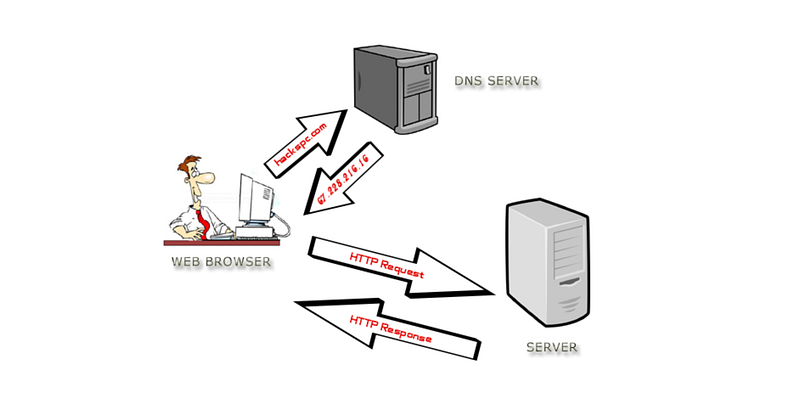
Image from wikimedia: https://commons.wikimedia.org/wiki/File:Dns-server-upload.png

This is a quick post to reiterate that if you are using DNS over HTTPS you won’t be able to inspect traffic (at least not easily) and see what your devices are requesting and to which domains they are connecting.

Now on the one hand, in some environments, you may want DNS over HTTPS. You don’t want your ISP to see what you’re connecting to, for instance. Or a government. Or your employer if you’re using a personal device on their network — but then why do you need to do that and why do they allow it?

But on my home network, I want to see what my devices are trying to connect to by looking at the domain names they request. I wrote about reverse engineering what a UDM pro connects to here:

I did that by inspecting DNS traffic to see what DNS queries were going through my firewall and the DNS responses coming back. What IP addresses were those domain names responding to?

I also wrote why a VPN is helpful in this post (and yes I am aware of — and testing — alternative options). It basically puts ALL your traffic in a tunnel if it is an IPSEC VPN (not so much with an SSL VPN):

The thing is, a VPN will encrypt your traffic so spying eyes can’t see it, but it will still protect your DNS requests in transit over external networks to a point. You need to think about where the encryption starts and stops and if it protects all or some of the data (as is the case with a split tunnel VPN) to fully understand what is and is not protected.

But your DNS requests can still be visible to your network security appliances in that case, which allows you to block traffic to known bad domain names that are serving up maliciousness.

By denying DNS over HTTPS you can also eliminate attacks like this one, where Chinese hackers disguised their dirty work with it:

For extra DNS security, use free DNS services that block bad domains such as this CloudFlare service:

When the service doesn’t return a valid response for a domain it could be the site is down, or it is serving up something you don’t want.

Beware that some application (and malware) will try to bypass your DNS settings, so you won’t get the above protections. Like Google Chrome.

In that case you can use a firewall and NAT to make sure your DNS requests are directed to your preferred DNS servers at the network layer, instead of relying on hosts and insecure things.

This is just one more reason why network security matters. You can’t always rely on the host (or the network). You need a multi-layered approach.

When you’re looking at your network traffic you will commonly see DNS requests to the following IP addresses from various devices and software:

8.8.8.8
8.8.4.4
1.1.1.1
1.0.0.1

You may see traffic to odd ports like:

853
53 TCP
443 + DNS Server

These may all be an indication of an attmept to use DNS over HTTPS. You can block all that to and from the Internet, do a reject for devices on the local network, or possibly redirect it but the redirect likely won’t work.

There are some reasons to use 53 + TCP for zone transfers but that is not something you want exposed to the Internet or even random servers on your network. Use a zero-trust network model for that and make sure the traffic is what you think it is.

There may be some way to MITM (man in the middle or monkey in the middle if you prefer) the DNS over HTTPS traffic somehow so you can continue to inspect it. Hmm. A quick look is not yielding answers but it seems like that should be possible. Something to explore later. But blocking it works fine for me.

By the way I also noticed Facebook trying to send DoH queries to their own DNS servers. They were piloting something with CloudFlare a while back — not sure where this stands now.

You can find all these lovely insights if you take control of your DNS requests — what goes were, what breaks, and what gets blocked when you start forcing all the devices to use the DNS servers you want them to use. When you see something odd you can try to inspect the DNS queries if you can, or just block it if you can’t. If you see a request to some strange domain name you can do some detective work to see if the traffic is legitimate or if you have a compromised device.

Follow for updates.

Teri Radichel | © 2nd Sight Lab 2023

About Teri Radichel:
~~~~~~~~~~~~~~~~~~~~
⭐️ Author: Cybersecurity Books
⭐️ Presentations: Presentations by Teri Radichel
⭐️ Recognition: SANS Award, AWS Security Hero, IANS Faculty
⭐️ Certifications: SANS ~ GSE 240
⭐️ Education: BA Business, Master of Software Engineering, Master of Infosec
⭐️ Company: Penetration Tests, Assessments, Phone Consulting ~ 2nd Sight Lab
Need Help With Cybersecurity, Cloud, or Application Security?
~~~~~~~~~~~~~~~~~~~~~~~~~~~~~~~~~~~~~~~~~~~~~~~~~~~~~~~~~~~~~
🔒 Request a penetration test or security assessment
🔒 Schedule a consulting call
🔒 Cybersecurity Speaker for Presentation
Follow for more stories like this:
~~~~~~~~~~~~~~~~~~~~~~~~~~~~~~~~~~~~~~~~~~~~~~~~~~~~~~~~~~~~~ 
❤️ Sign Up my Medium Email List
❤️ Twitter: @teriradichel
❤️ LinkedIn: https://www.linkedin.com/in/teriradichel
❤️ Mastodon: @teriradichel@infosec.exchange
❤️ Facebook: 2nd Sight Lab
❤️ YouTube: @2ndsightlab

DNS
Dns Security
Dns Over Https
Inspect Dns Traffic
Security
Recommended from ReadMedium