
Login to a Virtual Machine using Azure AD Account on Linux
Follow up on my blogs regarding Azure AD (Microsoft Entra ID) login to Azure Virtual Machines
- Login to a Virtual Machine using Azure AD Account on Linux
- [Terraform] Deploy Azure Virtual Machine with AAD enabled
- AzureAD support for Azure VMSS (virtual machine scale set)
- Azure Centralized Bastion Solution
- Configure Local Group Policy to Disable NLA in Windows Server 2019 for AzureAD-Ready Logins.
Security benefits
Show you the solution for the requirement of Virtual Machine Security Compliance without Public IP, local user or SSH Keys
- Simplified Authentication: Azure AD credentials are used for logging in to Azure Linux VMs, eliminating the need to distribute SSH keys or configure SSH public keys on deployed VMs. This reduces the risk of unauthorized access via outdated SSH keys.
- Reduced Reliance on Local Accounts: The reliance on local administrator accounts, which can be vulnerable to credential theft or weak passwords, is minimized.
- Enhanced Password Security: Azure AD-configured password complexity and lifetime policies bolster the security of Linux VMs.
- Azure RBAC Control: Employ Azure role-based access control (RBAC) to specify which users can log in as regular users or administrators. This facilitates easy updates to access permissions when team members join or leave, ensuring the right level of access.
Two approaches are presented: Azure AD-based SSH Login and Azure AD-based Windows Login (RDP). This article primarily focuses on the former for Linux systems.
Solution & Diagrams
With Azure Bastion Managed Service
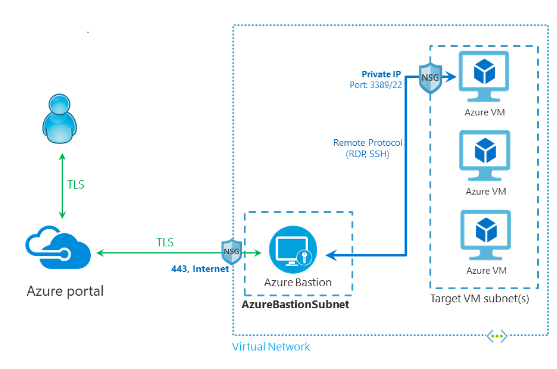
Without Azure Bastion
Azure Bastion is costly, about $200 per month and it can’t be stopped to save cost when you don’t need it. So if you have VPN login and you open the Network security group to allow private IPs from VPN to the virtual machine with port 22, then you are free to ssh it with AzureAD directly.
Setup steps with Details
- Install AzureBastion Service in the vNET (for solution with Azure Bastion only)
- A spare IP space
/26need be available in the virtual network where Azure Bastion service is going to be created. - Create AzureBastion Service, Azure Backup service will create subnet AzureBastionSubnet with IP space
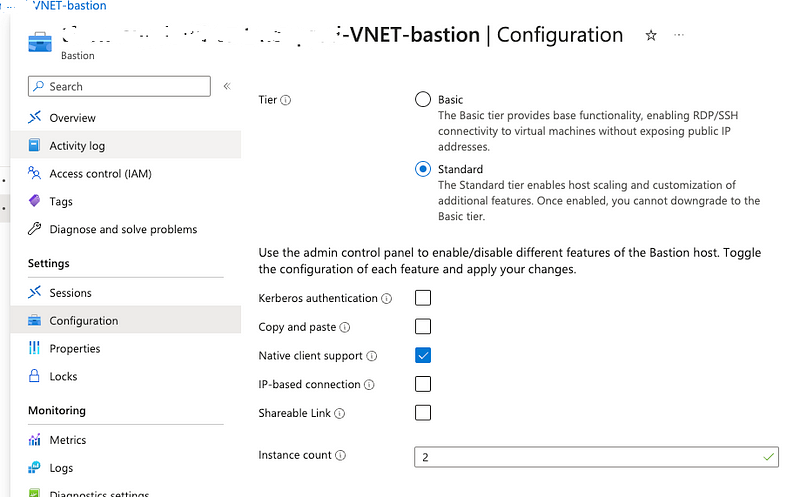
/26, this subnet name can’t be changed to others, it is hard coded by Azure. - The Bastion Service need be Standard SKU, with Native client support enabled.
2. Install Azure Command line (az cli)
Refence Azure official document: https://learn.microsoft.com/en-us/cli/azure/install-azure-cli
3. To allow a user or group to log in to a VM over SSH, you must assign the Virtual Machine Administrator Login or Virtual Machine User Login role on the resource group that contains the VM and its associated virtual network, network interface, public IP address, or load balancer resources.
4. add Extension “AADSSHLogin” after VM is created

You can run azuer cli to add extension, such as
az vm extension set \
    --publisher Microsoft.Azure.ActiveDirectory \
    --name AADSSHLoginForLinux \
    --resource-group AzureADLinuxVM \
    --vm-name myVM
Linux servers cannot be listed as devices in Azure Active Directory, even if they have been enabled for AAD
5. need allow outbound traffic
Commands to ssh login the Linux VM with your AzureAD account
Login with Azure Bastion Service
(Notes: auth-type need be set to AAD)
bastionName="MyBastionHost"
bastionRG="MyResourceGroup"
vmId="vmResourceId"

az network bastion ssh --name ${bastionName} --resource-group ${bastionRG} \
  --target-resource-id ${vmId} --auth-type AAD
Sample output
$ az network bastion ssh --name demo-VNET-bastion --resource-group Demo-RG --target-resource-id /subscriptions/xxxxxxxx-xxxx-xxxx-xxxx-xxxxxxxxxxxx/resourceGroups/linux-demo-rg/providers/Microsoft.Compute/virtualMachines/linux-demo --auth-type AAD
/var/folders/qd/_xlflc8s2zl4795wfxhk92xxxxxxxx/T/aadsshcert1qikvexx contains sensitive information (id_rsa, id_rsa.pub). Please delete once this certificate is no longer being used.
Generated SSH certificate /var/folders/qd/_xlflc8s2zl4795wfxhk92xxxxxxxx/T/aadsshcert1qikvexx/id_rsa.pub-aadcert.pub is valid until 2023-08-21 14:19:31 in local time.
Activate the web console with: systemctl enable --now cockpit.socket

Register this system with Red Hat Insights: insights-client --register
Create an account or view all your systems at https://red.ht/insights-dashboard
Last login: Sat Aug 19 12:17:15 2023 from 10.0.0.30
[bill.wang@example.com@linux-demo ~]$  id
uid=1560626(bill.wang@example.com) gid=1560626(bill.wang@example.com) groups=1560626(bill.wang@example.com),10(wheel),1001(aad_admins) context=unconfined_u:unconfined_r:unconfined_t:s0-s0:c0.c1023
Login without Azure Bastion Service (from VPN private IP)
subscription=<subscription_id>
az account set -s ${subscription}
az account show

vmName="<vm_name>"
vmRG="<vm_resource_group_name>"

az ssh vm -n ${vmName} -g ${vmRG}
Sample output
$ az ssh vm -n linux-demo -g linux-demo-rg
No public IP detected, attempting private IP (you must bring your own connectivity).
Use --prefer-private-ip to avoid this message.
OpenSSH_9.0p1, LibreSSL 3.3.6
Activate the web console with: systemctl enable --now cockpit.socket

Register this system with Red Hat Insights: insights-client --register
Create an account or view all your systems at https://red.ht/insights-dashboard
Last login: Sun Aug 13 12:10:31 2023 from 10.0.0.30
[bill.wang@example.com@linux-demo ~]$  id
uid=1560626(bill.wang@example.com) gid=1560626(bill.wang@example.com) groups=1560626(bill.wang@example.com),10(wheel),1001(aad_admins) context=unconfined_u:unconfined_r:unconfined_t:s0-s0:c0.c1023
Limitation for this solution
- Azure Bastion does not currently support Linux server AAD login via Azure Portal and does not offer AAD as an authentication type.
- PowerShell, including PowerShell ISE, does not support Linux login via Azure Bastion service.
Summery


