avatarBill WANG

Free AI web copilot to create summaries, insights and extended knowledge, download it at here

2916

Abstract

images-1.readmedium.com/v2/resize:fit:800/1*FF55ruYtM9sjJB14pKfcFg.png"><figcaption></figcaption></figure><h1 id="3556">Verify permissions</h1><p id="7d9d">Verify the following permissions when working with this architecture:</p><ul><li>Ensure you have <b>read</b> access to both the target VM and the peered VNet.</li><li>Check your permissions in <b>YourSubscription | IAM</b> and verify that you have read access to the following resources:</li><li>Reader role on the virtual machine.</li><li>Reader role on the NIC with private IP of the virtual machine.</li><li>Reader role on the Azure Bastion resource.</li><li>Reader role on the virtual networks of the target virtual machines.</li></ul><h1 id="1076">Setup</h1><ul><li>Delete existing Azure Bastion Service in spoke Vnet</li><li>Delete subnet <code>AzureBastionSubnet</code> in spoke Vnet</li><li>(optional) <a href="https://readmedium.com/login-to-a-virtual-machine-using-azure-ad-account-on-linux-e595894739cb">Setup Virtual Machines access with AzureAD accounts</a>. one is linux and the other is Windows system</li><li>Choice one Vnet as Hub Vnet, in this sample, we choice <code>central-nonprod</code> as the hub vnet</li><li>Create a Vnet peering <b>(single way is enough) </b>from <code>central-nonprod</code> subscription to all spoke Vnet</li></ul><figure id="47a0"><img src="https://cdn-images-1.readmedium.com/v2/resize:fit:800/1*uv2MM1Jx8CR9lTh0_QSzcA.png"><figcaption></figcaption></figure><h1 id="29f5">Test #1 — Linux VM</h1><p id="d66d">VM: created on <b>dev01-nonprod</b></p><p id="7a18">Bastion: created in <b>central-nonprod</b></p><p id="fac8">You can login as normal from Azure Portal with local account</p><p id="9e10"><b>You can’t login from Azure Portal with AAD for linux VM</b>. So you need run Azure CLI to login Linux with AAD (Microsoft Entra ID) account.</p><div id="5001"><pre>$ <span class="hljs-built_in">cat</span> dev01-linux.sh

subscription=dev01-nonprod az account <span class="hljs-built_in">set</span> -s <span class="hljs-variable">${subscription}</span> az account show

bastionName=<span class="hljs-string">"central-nonprod-VNET-bastion"</span> bastionRG=<span class="hljs-string">"vnet-RG"</span> bastionSubID=<span class="hljs-string">"xxxxxxxx-xxxx-xxxx-xxxx-xxxxxxxx"</span>

vmName=<span class="hljs-string">"test-linux-rhel9"</span> vmRG=<span class="hljs-string">"test-linux-rhel9-rg"</span>

vmId=(az vm list --resource-group <span class="hljs-variable">{vmRG}</span> --query <span class="hljs-string">"[?name=='<span class="hljs-variable">vmName</span>'].id"</span> --output tsv) <span class="hljs-built_in">echo</span> <span class="hljs-variable">vmId</span>

az network bastion ssh --name <span class="hljs-string">"<span class="hljs-variable">{bastionName}</span>"</span> --resource-group <span class="hljs-string">"<span class="hljs-variable">{bastionRG}</span>"</span> --subscription <span clas

Options

s="hljs-variable">{bastionSubID}</span> --target-resource-id <span class="hljs-string">"<span class="hljs-variable">{vmId}</span>"</span> --auth-type AAD

$ ./cat dev01-linux.sh</pre></div><h1 id="dd6a">Test #2 — Windows VM</h1><p id="3749">VM: created on <b>dev01-nonprod</b></p><p id="bebc">Bastion: created in<b> central-nonprod</b></p><ul><li>(optional) Enable AAD on the windows VM following Azure official document</li><li>If login as AAD, login username would be <code>AzureAD/<your_mailbox></code></li></ul><p id="a8f3">When you login the windows VM by Bastion, it will automatically choice the bastion from subscription <code>central-nonprod</code></p><h1 id="3705">Extra test reports with summary</h1><ul><li>I can login a Linux VM (created in dev01) from Bastion (in <code>central-nonprod</code>) <b>with AAD</b> by vpc peering enabled.

  • Need login via Azure CLI command.
  • It is fine to login with local account
  • It is fine to login with AAD account</li><li>Got similar result with Windows VM
  • it is fine to login with local account
  • it is fine to login with AAD as well
  • copy & paste text is fine
  • <b>can’t</b> copy & paste fiiles
  • need login with browser incognito mode</li></ul><h1 id="c347">Bastion with IP-based connection</h1><p id="5f31">The business is not in favor of the <a href="https://learn.microsoft.com/en-us/azure/bastion/connect-ip-address">Bastion IP-Based connection solution</a>. This is primarily due to the requirement for all end users to log in to VMs exclusively from the <code>central-nonprod</code> subscription. Additionally, the IP-Based connection necessitates a Virtual Hub network, and while our environment has set up a virtual hub, obtaining VM IPs is often challenging and inconvenient. Furthermore, the IP-Based connection lacks support for logging in with DNS names or VM names.</p><p id="a08a">As a result, we have decided to abandon this design.</p><p id="9c8f">But I still run the tests and report here.</p><ul><li>I can login Window VM with AAD by its IP address, but end users need subscription permission to login VM in <code>central-nonprod</code></li><li>I <b>can’t login</b> Windows VM by normal way, such as, directly login via Azure Portal in VM’s subscription.</li><li>I can login Linux VM with AAD by its IP address by azure command line</li><li>I can login Linux VM with AAD by its ID (name) by azure command line</li><li>I <b>can’t login</b> with hostname or private DNS name by IP-Based connection</li></ul><h1 id="aa5f">Reference</h1><p id="68e5"><a href="https://learn.microsoft.com/en-us/azure/bastion/vnet-peering">https://learn.microsoft.com/en-us/azure/bastion/vnet-peering</a></p><p id="79b0"><a href="https://learn.microsoft.com/en-us/azure/virtual-network/tutorial-connect-virtual-networks-portal">https://learn.microsoft.com/en-us/azure/virtual-network/tutorial-connect-virtual-networks-portal</a></p></article></body>

Azure Centralized Bastion Solution

Follow up on my blogs regarding Azure AD (Microsoft Entra ID) login to Azure Virtual Machines

Background

  • To enable Azure AD login support, the Azure Bastion needs to be in the Standard tier. Opting for a centralized bastion solution could result in substantial savings, approximately $200 plus support and GST per subscription per month. Given that my company manages around 100 Azure subscriptions, this approach has the potential to save a total of approximately $20,000 per month if the solution performs as expected.
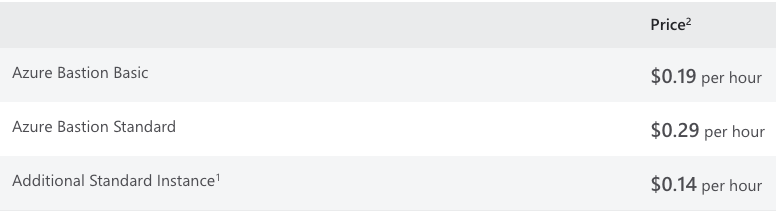
  • Additionally, adopting a centralized bastion solution eliminates the need for a /26 IP space in each spoke subscription, as the subnet AzureBastionSubnet is no longer required in the Spoke VNET.
  • It’s crucial to note that Azure Bastion within a Virtual WAN hub is currently not supported.

  • Another noteworthy discovery is that multiple bastion hosts in same VNet are not permitted in Azure.
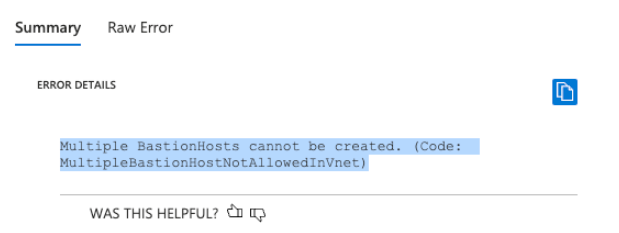
  • security complaince — we need to ensure that there is compliance with security standards.

Design

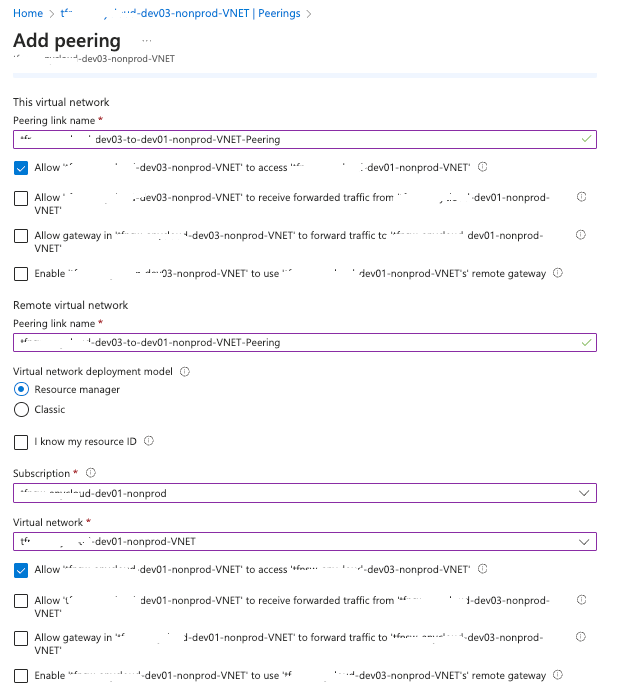
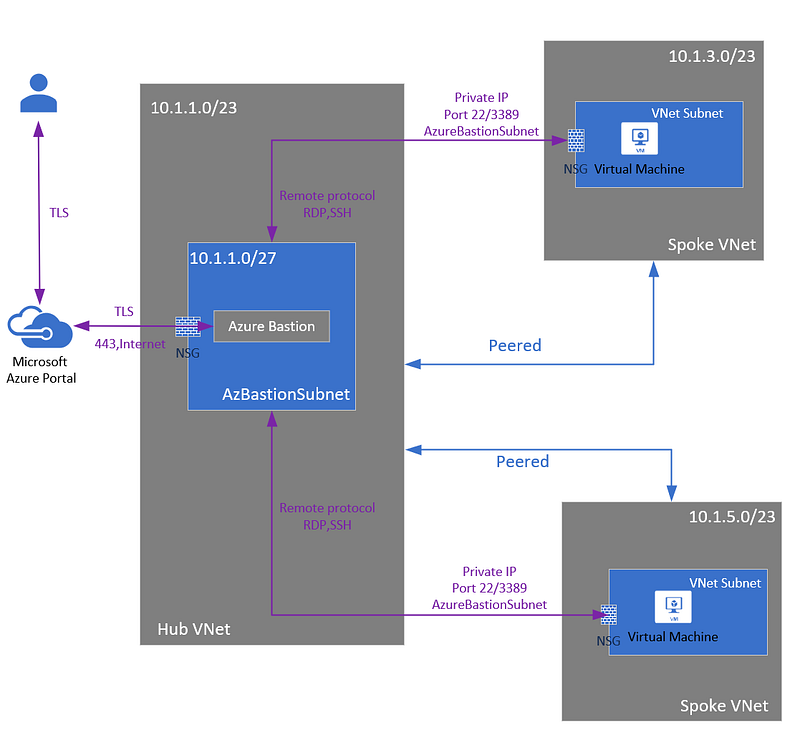
  • Need setup VNET peering (one-way only) on all spoke VNETs to Hub VNET
  • Only one Bastion need be created. If you have bastion created in spoke Vnet, you need delete them
Verify permissions

Verify the following permissions when working with this architecture:

  • Ensure you have read access to both the target VM and the peered VNet.
  • Check your permissions in YourSubscription | IAM and verify that you have read access to the following resources:
  • Reader role on the virtual machine.
  • Reader role on the NIC with private IP of the virtual machine.
  • Reader role on the Azure Bastion resource.
  • Reader role on the virtual networks of the target virtual machines.

Setup

  • Delete existing Azure Bastion Service in spoke Vnet
  • Delete subnet AzureBastionSubnet in spoke Vnet
  • (optional) Setup Virtual Machines access with AzureAD accounts. one is linux and the other is Windows system
  • Choice one Vnet as Hub Vnet, in this sample, we choice central-nonprod as the hub vnet
  • Create a Vnet peering (single way is enough) from central-nonprod subscription to all spoke Vnet

Test #1 — Linux VM

VM: created on dev01-nonprod

Bastion: created in central-nonprod

You can login as normal from Azure Portal with local account

You can’t login from Azure Portal with AAD for linux VM. So you need run Azure CLI to login Linux with AAD (Microsoft Entra ID) account.

$ cat dev01-linux.sh

subscription=dev01-nonprod
az account set -s ${subscription}
az account show

bastionName="central-nonprod-VNET-bastion"
bastionRG="vnet-RG"
bastionSubID="xxxxxxxx-xxxx-xxxx-xxxx-xxxxxxxx"

vmName="test-linux-rhel9"
vmRG="test-linux-rhel9-rg"

vmId=$(az vm list --resource-group ${vmRG} --query "[?name=='$vmName'].id" --output tsv)
echo $vmId

az network bastion ssh --name "${bastionName}" --resource-group "${bastionRG}" --subscription ${bastionSubID} --target-resource-id "${vmId}" --auth-type AAD

$ ./cat dev01-linux.sh

Test #2 — Windows VM

VM: created on dev01-nonprod

Bastion: created in central-nonprod

  • (optional) Enable AAD on the windows VM following Azure official document
  • If login as AAD, login username would be AzureAD/<your_mailbox>

When you login the windows VM by Bastion, it will automatically choice the bastion from subscription central-nonprod

Extra test reports with summary

  • I can login a Linux VM (created in dev01) from Bastion (in central-nonprod) with AAD by vpc peering enabled. - Need login via Azure CLI command. - It is fine to login with local account - It is fine to login with AAD account
  • Got similar result with Windows VM - it is fine to login with local account - it is fine to login with AAD as well - copy & paste text is fine - can’t copy & paste fiiles - need login with browser incognito mode

Bastion with IP-based connection

The business is not in favor of the Bastion IP-Based connection solution. This is primarily due to the requirement for all end users to log in to VMs exclusively from the central-nonprod subscription. Additionally, the IP-Based connection necessitates a Virtual Hub network, and while our environment has set up a virtual hub, obtaining VM IPs is often challenging and inconvenient. Furthermore, the IP-Based connection lacks support for logging in with DNS names or VM names.

As a result, we have decided to abandon this design.

But I still run the tests and report here.

  • I can login Window VM with AAD by its IP address, but end users need subscription permission to login VM in central-nonprod
  • I can’t login Windows VM by normal way, such as, directly login via Azure Portal in VM’s subscription.
  • I can login Linux VM with AAD by its IP address by azure command line
  • I can login Linux VM with AAD by its ID (name) by azure command line
  • I can’t login with hostname or private DNS name by IP-Based connection

Reference

https://learn.microsoft.com/en-us/azure/bastion/vnet-peering

https://learn.microsoft.com/en-us/azure/virtual-network/tutorial-connect-virtual-networks-portal

Azure
DevOps
Cloud
Best Practices
Solutions
Recommended from ReadMedium