
Writing school for the best (that’s you)
How to Tag People in the Comments

I’m a professional tagger.
Ask my Grandma or read the following article; it includes a screenshot of my tagger diploma.
My credibility established, let me tagsplain you how to tag people in the comments.
Step 1: Use the desktop version
As much as I love the new layout, there’s one tiny drawback: it’s not possible to tag people in the comment using the app. You’ll have to use the web version.
I like to call it desktop because opening the web version on my phone isn’t something I’m willing to do. I prefer to get anal probed by Doctor Funny.
Step 2: Write an article
Yes, it’s most unfortunate, but after extensive research, it appears it’s not possible to tag someone in the replies of a story that you didn’t publish.
Step 3: Magic
Do not open the comment section from your story by clicking on the comment bubble thingy. Don’t do that. It doesn’t work. At all. I warn you in such details for one single reason: reading time.
Open the comment from the notifications bell thingy.
This is the kind of screen you should get after clicking on the comment from the notifications:
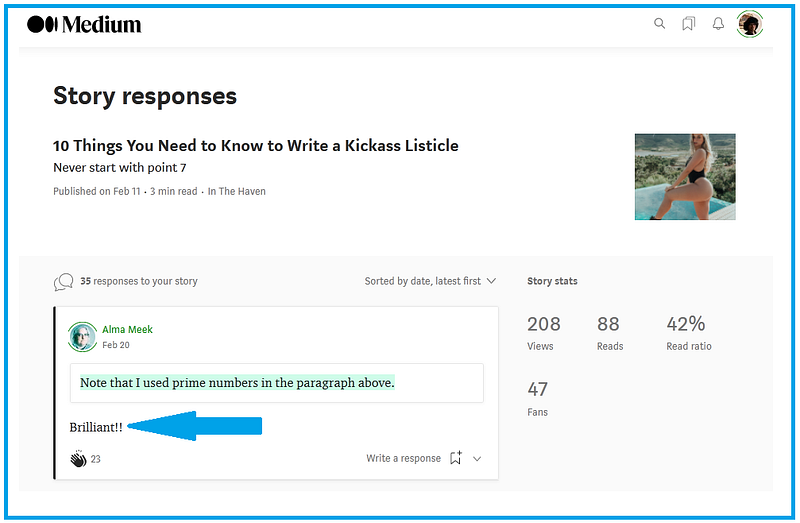
Step 5: Write a response
Click on write a response and tag someone the way you always do. That’s using the arobase key (@). Tag Me!
That’s it!
See you next week for another installment of the “writing school for the best (that’s you).”
It hurts my fingers to write it, but I have to thank the very funny Kristen Stark for the idea of writing this article. Here’s the proof:
Maybe I should also thank Eckhart since Kristen commented on one of his many replies to my insightful article about listicles (it includes a sexy picture to make people click).
Smillew is a writer⁴², blablabla, use my referral link, buy me a coffee, but I’ll drink vodka instead — hahaha very funny, send me money, subscribe to my newsletter so that I can ask you to send me money, buy my course so that I can pretend I gave you some value in exchange for your money, blablabla.


