
Reactjs
How to pass parameters in react-router-dom Link?
Pass data from one component to another component with react-router (v5) Link Component.

Hey, my name is Rajdeep Singh. In this react post, I’m telling you How to pass a parameter, state, props, and value in the react-router-dom Link Component.
{/* Link tag With out parameter in reactjs */}<Link to="/about">About</Link>More Read About Link Component: Click Here Github for download code: Click Here Demo and Download Code on Codesandbox.io
Demo:
Latest blog post on react-router v6
Let’s Start
pass parameters in react-router-dom Link Component with two basic steps.
Step:1. Declare Step:2. Access
Step:1.
Declare mean how to write code and pass parameter, state, props, and value.
How is it possible?
Simple when Creating a link component to react, inside to=”/about” we pass an object. In this object, we pass some properties.
- pathname: A string representing the path to link.
- search: A string representation of query parameters.
- hash: A hash to put in the URL, e.g.
#a-hash. - state/any name: Inside State to value.
In my case, I pass state, But you pass any value.
Example:
{/* Link component Without parameter */}
 {/* <Link to="/about">About</Link> */}

<Link   to={
  {/* this object inside the  tag */}
       {
         pathname: '/read',
         state:this.state
        }
  }>
<Card.Link  >Another Link</Card.Link>
</Link>
Step:2.
Access means how to access Link Component State we Declare previous.
But How to Access it?
It is straightforward. We use a react-router-dom hook to access the state. In the first step, we import the useLocation Hook. The inside hook shows all properties. After accessing all properties with the object. check out code
Check out with console.log()
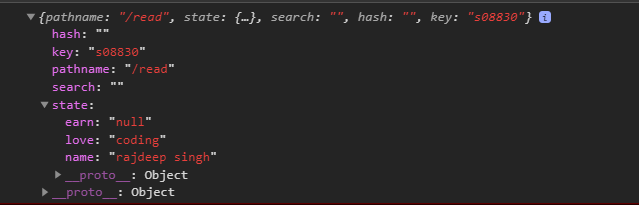
code
import React from "react";import Card from "react-bootstrap/Card";import CardGroup from "react-bootstrap/CardGroup";import {Link, useLocation} from "react-router-dom";function Read() {let location = useLocation();console.log(location);return (<><Link to="/"><Card.Link> <h1 className="mt-3">Back... </h1></Card.Link></Link><CardGroup><Card><Card.Imgvariant="top"style={{width: "100%", height: "400px", margin: "auto"}}src="https://source.unsplash.com/random"/><Card.Body><Card.Title className="mt-5">Card by read</Card.Title><Card.Text>{location.pathname} <br />{location.state.earn} <br />{location.state.love} <br />{location.state.name} <br />This is a wider card with supporting text below as a naturallead-in to additional content. This content is a little bitlonger.
</Card.Text></Card.Body></Card></CardGroup></>);}
export default Read;Read More:
Demo here
demo with code sandbox live app
First demo: Click Here Second demo: Click Here
Conclusion:
Sometimes our requirement passes value and props inside the link Component. use react-router-dom useLocation hook access all properties
Check My Second Demo With a real-life senior. In this project, I pass the id inside the link Component after accessing that Id. Uses Axios to get data based on Id.


