avatarRajdeep Singh

Free AI web copilot to create summaries, insights and extended knowledge, download it at here

1296

Abstract

a">First setup environment for Angular development using the <a href="https://angular.io/cli">Angular CLI tool</a>. Use the CLI, create an initial workspace and starter app, and running that app locally to verify your setup.</p><h1 id="5b1b">Step 1:Install the Node.JS</h1><p id="bb84">First, install node.js on your machine. Make sure Node.js version 10.9.0 or latest.</p><ul><li>To check your version, run node -v in a terminal/console window.</li><li>To get Node.js, go to <a href="https://nodejs.org/">nodejs.org</a> download it.</li></ul><h1 id="33fd">Step 2: Install the Angular CLI</h1><p id="83f4">You use the Angular CLI tool to create a project, generate application and library code, and perform various ongoing development tasks such as testing, bundling, and deployment.</p><p id="4f1c">Make sure to install the Angular CLI globally.</p><p id="40d0">To install the CLI using npm command:</p><div id="70ed"><pre><span class="hljs-built_in">npm</span> install -g @angular/cli</pre></div><h1 id="5473">Step 3: Create the first App:</h1><p id="5452">To create a new workspace or app:</p><ol><li>run the CLI command in terminal ng new and provide the name my-app, as shown here:</li></ol><div id="e978"><pre>ng <span class="hljs-keyword">new</span> <span class="hljs-type">my</span>-app</

Options

pre></div><h1 id="8326">Step 4: Run the application.</h1><p id="af69">The Angular CLI includes a server so that you can easily run an app on the browser.</p><ol><li>Go to the workspace folder (my-app).</li><li>Launch the server by using the CLI command ng serve, with the — open option.</li></ol><div id="6dd3"><pre><span class="hljs-keyword">cd</span> my-<span class="hljs-keyword">app</span></pre></div><div id="aeb5"><pre>ng serve <span class="hljs-comment">--open</span></pre></div><p id="6250">The — open (or -o) option automatically opens your app in the browser (default ) to <a href="http://localhost:4200/.">http://localhost:4200/.</a></p><p id="dece">Note: First, go to the workspace folder, then use the ng serve command.</p><p id="66fb">Angular 8 home page in your browser.</p><figure id="a20e"><img src="https://cdn-images-1.readmedium.com/v2/resize:fit:800/1*O_JY0vzcjazWFjt9O2fXqw.png"><figcaption></figcaption></figure><h2 id="cba6">Contact me:</h2><ul><li><a href="https://www.facebook.com/officialrajdeepsingh/">https://www.facebook.com/officialrajdeepsingh/</a></li><li><a href="https://www.officialrajdeepsingh.dev/">https://www.officialrajdeepsingh.dev/</a></li><li><a href="mailto:[email protected]">[email protected]</a></li></ul></article></body>

What isAangular.js

Angular.js is a javascript library framework written in typescript.

TypeScript open-source web application framework. The Angular Team uses the typescript language.

Angular base on Component uses the angular Component to create a responsive web layout.

Angular feature:

  1. Component
  2. Directives
  3. Modules
  4. Forms
  5. Services
  6. Http
  7. And many more

What is the angular version?

Angular version numbers have three parts:

1. major

2. minor

3. patch

Example: version 7.2.11

version:

October November 2019 ^8.0.0

May 2020 ^9.0.0

More version details

How to Install angular?

First setup environment for Angular development using the Angular CLI tool. Use the CLI, create an initial workspace and starter app, and running that app locally to verify your setup.

Step 1:Install the Node.JS

First, install node.js on your machine. Make sure Node.js version 10.9.0 or latest.

  • To check your version, run node -v in a terminal/console window.
  • To get Node.js, go to nodejs.org download it.

Step 2: Install the Angular CLI

You use the Angular CLI tool to create a project, generate application and library code, and perform various ongoing development tasks such as testing, bundling, and deployment.

Make sure to install the Angular CLI globally.

To install the CLI using npm command:

npm install -g @angular/cli

Step 3: Create the first App:

To create a new workspace or app:

  1. run the CLI command in terminal ng new and provide the name my-app, as shown here:
ng new my-app

Step 4: Run the application.

The Angular CLI includes a server so that you can easily run an app on the browser.

  1. Go to the workspace folder (my-app).
  2. Launch the server by using the CLI command ng serve, with the — open option.
cd my-app
ng serve --open

The — open (or -o) option automatically opens your app in the browser (default ) to http://localhost:4200/.

Note: First, go to the workspace folder, then use the ng serve command.

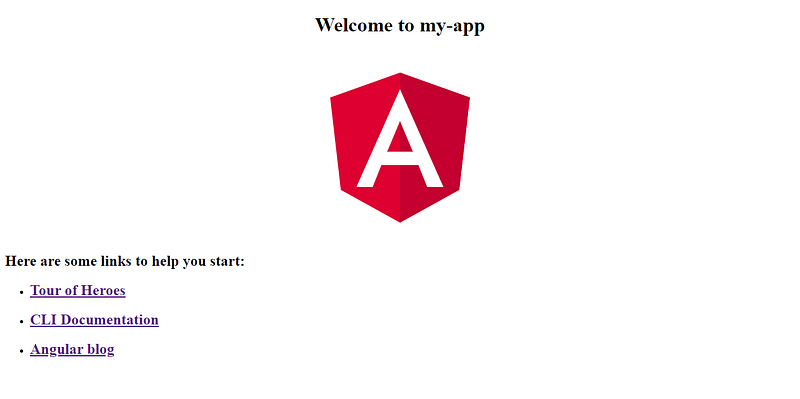
Angular 8 home page in your browser.
Contact me:

JavaScript
Angular
Angular8
Typescript
Angularjs Web Development
Recommended from ReadMedium