
#React.js
How to read local JSON files in React.js?

Hey everybody, my name is Rajdeep Singh. In this post, I’m telling you How to read the JSON file in react.js within a simple step.
Demo And Code Here
Requirement
- No Need for Axios or Fetch
- Import File
- Map() Method ( Function)
- QNA
Look Like this Example:

Step: 1
Import the JSON file. On your work file, uses the Import method.
import data from ‘./data/data.json’;

Step: 2
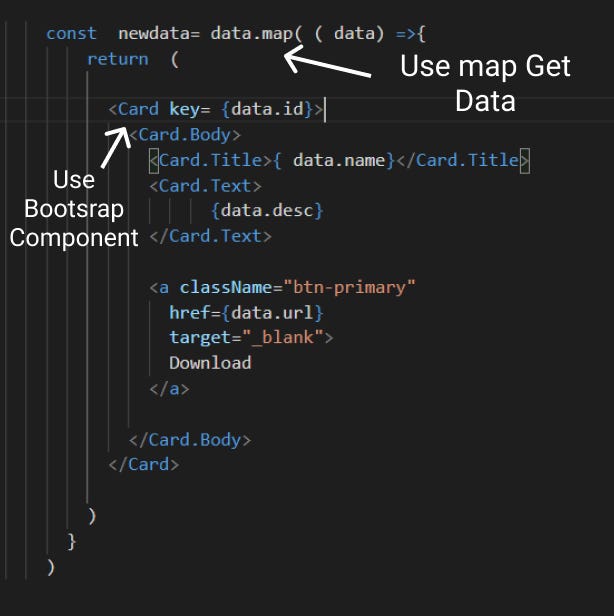
when you import after using the map() method, loop all the items in the JSON file.
Interesting fact map() method used only for the array. But in our JSON file Format object type, you Say Rajdeep. You're a mistake. but I’m not …

Tips: use an array when creating a JSON Object file that looks like this:
Use my tips after using map() other wish show an error on your browser.
Why did you not use Axios or Fetch?
Axios or Fetch is used to get or post data into the server. In our case, we read on the local folder file, so we use map().
Note: most important, when using Axios and Fetch, we need URL parameter compulsory.
Why do you use the map() Method?
I use a map() because it may be easy for me if you use any other method like every(), forEach() other maybe work.
End off part any question asks to Feel free Any Suggestion plz tell Us. Other queries tell me…
Read On My Blog:
Read Locally txt File Use Fetch Method In JavaScript.
Read Locally JSON File Use Fetch Method In JavaScript.
Read Locally JSON File Use Fetch Method In ReactJs.
Read More On Medium
Conclusion:
I hope you understand How to read the local JSON file in react js. if Any queries, mistakes, and Suggestions plz, tell me in the comment box after we update our article
Contact us:
Facebook Page:https://www.facebook.com/officialrajdeepsingh/ Website:https://www.officialrajdeepsingh.dev/ Facebook Javascript Group: https://www.facebook.com/groups/JavaScriptcode/ Facebook Python Group: https://www.facebook.com/groups/pythoncodejoin/ Gmail: [email protected]


