
Reactjs
How to pass state or data in react-router v6
Pass data from one component to another component with react-router (v6) Link Component.

The react-router is the best library to handle routing in reactjs. With a react-router, you pass state or data from one component to another component to use the react-router Link component.
Data pass more quickly in the new version of react-router (v6). For example, you can pass an object's data from one component to another.
You can play with code in code sandbox Browser base Ide.
Steps
- Pass Data
- Access data
Pass Data
- First step
- Second step
- Third step
First Step
The first step import the Link Component in react-router-dom
import { Link } from "react-router-dom";Second Step
In the second step, I create a state with the useState hook in reactjs and pass the default data in useState.
const [data, setData] = useState({ id: "1t4", title: " How to pass state in react-router-dom", tag: ["reactjs", "react-router-dom"]}); // first exampleconst [data, setData] = useState(false); second exampleNote
You can pass anything in the react-router-dom Link component. I’m pass a object and boolean value for example purpose.
Third step
In the third step, we pass the state as an object from one component to another. in other words, we pass data present to the child.
// you pass state form of object
<Link to="/apple" state={{ data: data }} className="link"> Apple</Link>Note
Pass state as a object in react-router v6. if pass a state as a string, you a face a error.
Access data
Access data in the child component, the react-router (v6), provides a hook for accessing the data.
- Import hook
- Access data
Import hook
First, you import a useLocation hook, which component you access the data or state.
import { useLocation } from "react-router-dom";Access data
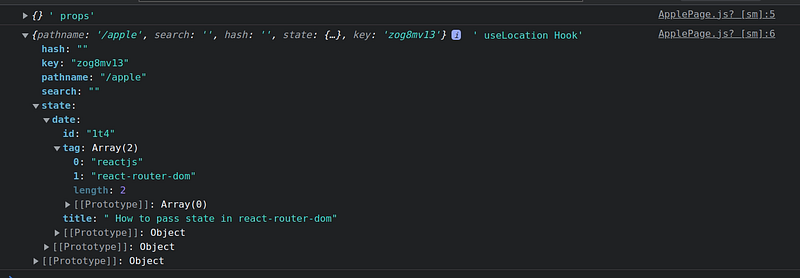
Use the useLocation react-router hook to access the state present to the child component.
import React from "react";
import { useLocation } from "react-router-dom";
export default function ApplePage(props) {const location = useLocation();console.log(props, " props");
console.log(location, " useLocation Hook");const data = location.state?.data;return ( <div className="page"> 🍎 Page <h1> {data ? data.title : "Go to Home"} </h1> </div>);}
Note
Most of the time, new people pass state in link component and access to the props. So it is not working in react-router.
Tips
- You cant access the state directly to the child component. Instead, you see an undefined hook in the console.
- You cant access the react-router state in props.
References
Conclusion
I hope my article solves your problem. If you have any queries, ask me in the comment section.
Feel free to like and share my article with others if you like my writing. You also tag on Twitter official_R_deep.
Read More content on the frontend web. Sign up for a free newsletter and join the frontend web community on Medium.
Note
For explanation, I use a code sandbox template and modify it according to my article.


