
Construct a Knowledge Graph on the Neo4j Cloud
How to store your CAZy knowledge in AuraDB
Our world is full of data and information. But it takes effort and time to turn them into knowledge and ultimately wisdom. And one of the key processes is the formatting of data. Suitable formats ease our understanding and make discovery easy. And knowledge graph is one such format.
A knowledge graph is a network that represents knowledge in a specific domain. It is also called a semantic network because it connects nodes of diverse types, e.g. objects, people, or locations, via semantic relations into one web. Even though a knowledge graph can contain different things, it is intuitive, because its organization is similar to how we think. So a user can quickly grasp what it represents. Furthermore, it is visual and searchable. So a user can gain a quick overview by browsing the network interactively or learning about the specifics via database queries.
We are witnessing the explosive growth of knowledge graphs across industries. It puts contents into the infoboxes in Google’s result pages. And Amazon uses knowledge graphs on Amazon.com, Amazon Music, Prime Video, and Alexa. So does Walmart. These companies use knowledge graphs to discover new insights, make recommendations, and develop semantic searches.
In my previous articles, I have written about how to transfer three public medical knowledge graphs into a chatbot called Doctor.ai. And later, I have made an NLP pipeline that uses GPT-3 to extract relationships out of raw texts (here and here). In this article, I am going to use that pipeline to make a CAZy knowledge graph on the Neo4j cloud — AuraDB.
CAZy stands for Carbohydrate-Active enZYmes (CAZy). It is a web portal that provides information about enzymes (CAZymes) that synthesize, modify or degrade carbohydrates (from the enzyme’s perspective, carbohydrates here are substrates). A year ago, I have written an article about analyzing its content in Neo4j. Here I am going to extend that project. I will extract substrates and enzymatic interactions from public research articles and add them to the CAZy data to form a new knowledge graph (Figure 1). And finally, I will create a voice chatbot frontend so that the user can query the knowledge graph in plain English. The chatbot is based on my previous project Doctor.ai.
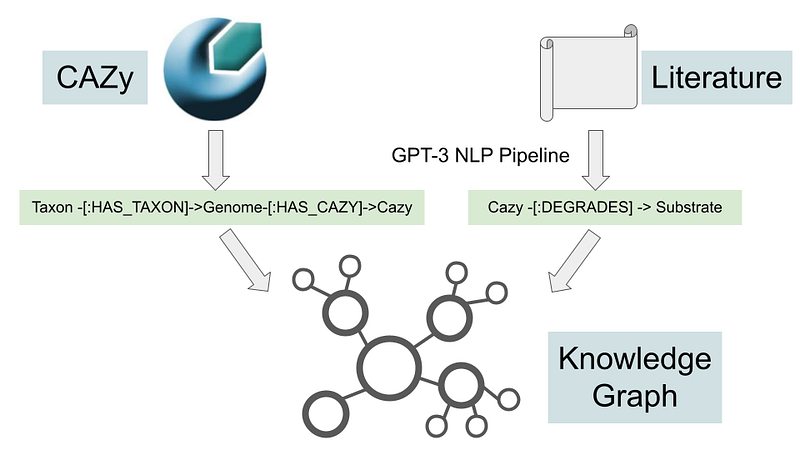
The Python code for this project is hosted on my GitHub repository here.
The NLP pipeline for text extraction is based on my previous project. In this project, I have updated the repository with a training file for CAZy relations.
And the chatbot frontend is hosted as a branch called “cazy_kg” under my doctorai_eli5 repository.
Finally, the data model with data for Aura’s Data Importer is hosted here.
https://1drv.ms/u/s!Apl037WLngZ8hhB5Ay287gTrOzvh?e=JyYuPJ
1. The data
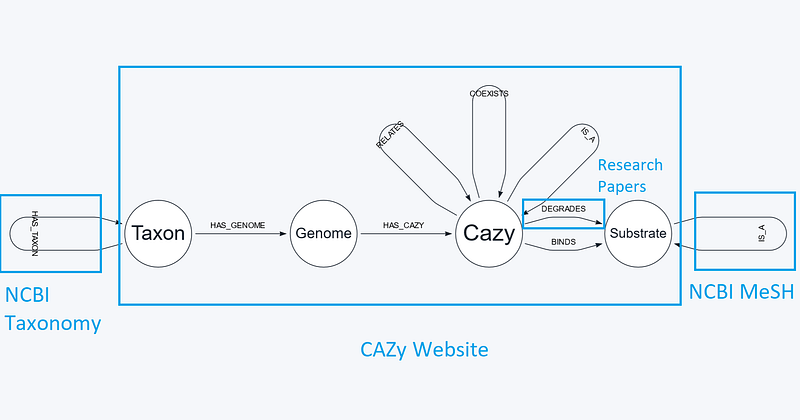
Even though the knowledge graph is small, it consists of many small pieces (Figure 2). There are four types of nodes and nine types of relations. I have downloaded the newest CAZy data via the DOWNLOAD CAZY function on its website. Please note that the flat file has quality issues and its content does not agree fully with the CAZy website. Within this data, we get the genome and CAZy nodes, and the Genome -[:HAS_CAZY]->Cazy relations. Furthermore, we can deduce several relations there: the synteny and homology of some CAZy modules (Cazy -[:COEXISTS]-> Cazy and Cazy -[:RELATES]-> Cazy), the subfamily and family pairs (Cazy -[:IS_A]-> Cazy), and the CAZy-substrate binding pairs (Cazy -[:BINDS]-> Substrate). Finally, I collected four example research articles and extracted the Cazy-[:DEGRADES]-> Substrate relations with my NLP pipeline (description in Section 2). I included the Digital Object Identifier (DOI) of each information source for each relation. I also indicated whether the information source is primary (reports of original findings and ideas) or secondary (general works that are based on primary sources).
The download contains 205,462 genomes and many more relationships. Because the free tier Aura only allows 50,000 nodes and 175,000 relationships, we need to downsize our dataset a bit. In this project, I only keep the 650 genomes from the phylum Bacteroidetes. Bacteroidetes are a group of Bacteria. They are important polysaccharide degraders in the biosphere. A large contingent of their genomes are dedicated to the breakdown of polysaccharides. Members such as Prevotella are regular inhabitants in the rumen of cattle, sheep, and also in the human oral cavities and large intestines. Other members such as Formosa and Zobellia are found in the sea, and they degrade algal polysaccharides there.
Aside from CAZy, we need other data sources to augment the knowledge graph, too. For example, I downloaded the ontology of polysaccharides from NCBI MeSH for the Substrate -[:IS_A]-> Substrate relationships. The data contains the grouping of different polysaccharides. It is worth noting that there are different grouping methods and each polysaccharide can belong to multiple groups. For example, alginic acid is a type of alginates. But it is also a member of hexuronic acids, glucuronic acid, and so on. Here I only consider the grouping of “polysaccharides” in MeSH.
2. The NLP pipeline
I have adjusted my NLP pipeline for this project. First, I provided new training prompts for GPT-3. As for the engine, I changed the text-davinci-002 engine to the cheaper text-curie-001, because to my surprise, the latter generated fewer noises and hence better results. I used it twice in this project. First it was used to extract the three CBM-related relationships: BINDS, COEXISTS and RELATES. And then I used it to extract the DEGRADES relations from the example research articles. The results were good but not perfect. So a small amount of manual curations were necessary in the end.
Inspired by Tomaz Bratanic’s article, I also added the entity linking function in my NLP pipeline. Its task is to disambiguate nouns. For example, both vitamin C and ascorbic acid will be converted to ascorbic acid. Under the hood, it uses NCBI MeSH to do the conversion over the internet and caches the results. The function will then first consult the caches before it goes to NCBI. This brings two benefits. On the one hand, it saves bandwidth. On the other hand, the user can examine the entity linkages and make the necessary changes. For example, according to MeSH, the most relevant hit for xyloglucan is xyloglucan endotransglycosylase instead of xyloglucan itself. But I can simply correct this error in the cache.tsv file and the pipeline will return the right entity from now on.
3. Create a Neo4j project in Aura and import data
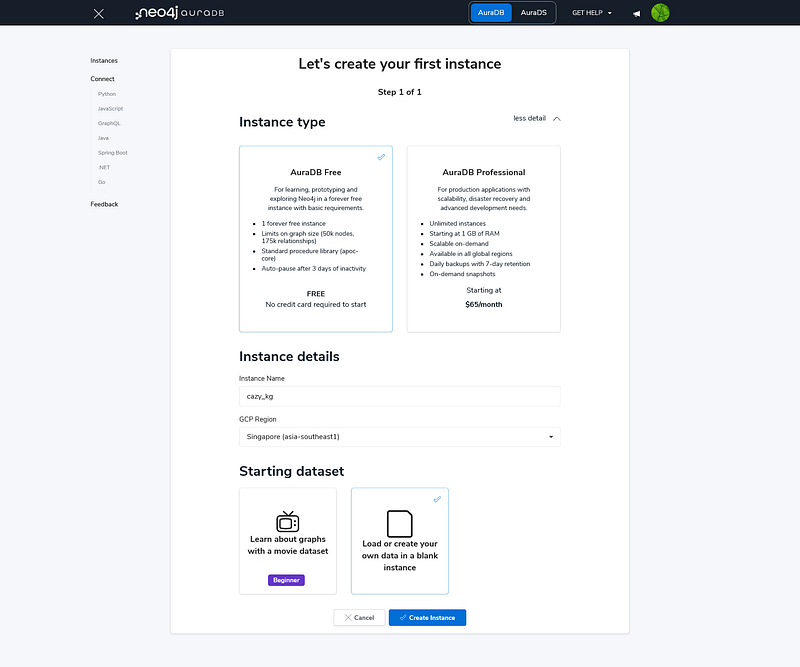
Once all the files are ready, we can import them into Aura. First, create an empty Aura instance (Figure 3). Secure your password in a password manager for later use.
Afterwards, select the Data Importer and drag all the CSV and TSV files into the Files panel. Then create four types of nodes: Taxon, Genome, Cazy and Substrate and nine types of relations (Figure 4). You can find the data model with data in my link.
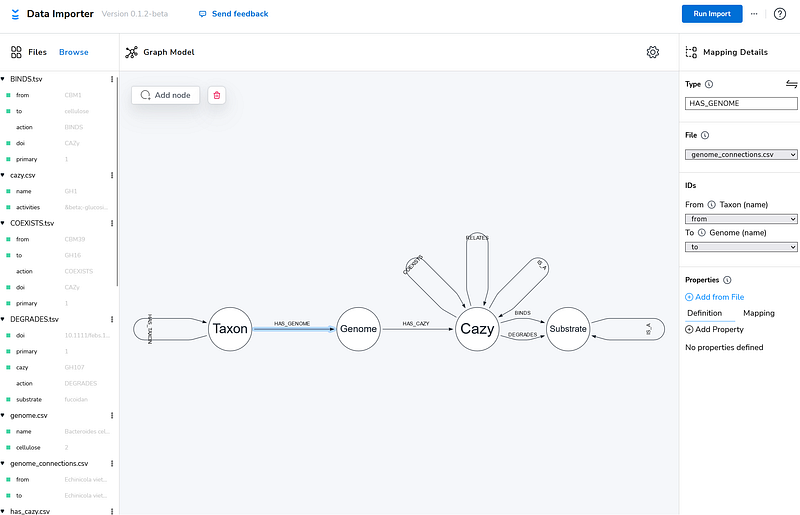
When everything is set, click the Run Import button and Aura should import all the data in one minute.
4. Explore the CAZy knowledge graph
After the import, we can open Bloom by clicking the Explore button. In Bloom, we can explore the CAZy knowledge graph freely. For example, I can visualize all the BINDS relations with the following query.
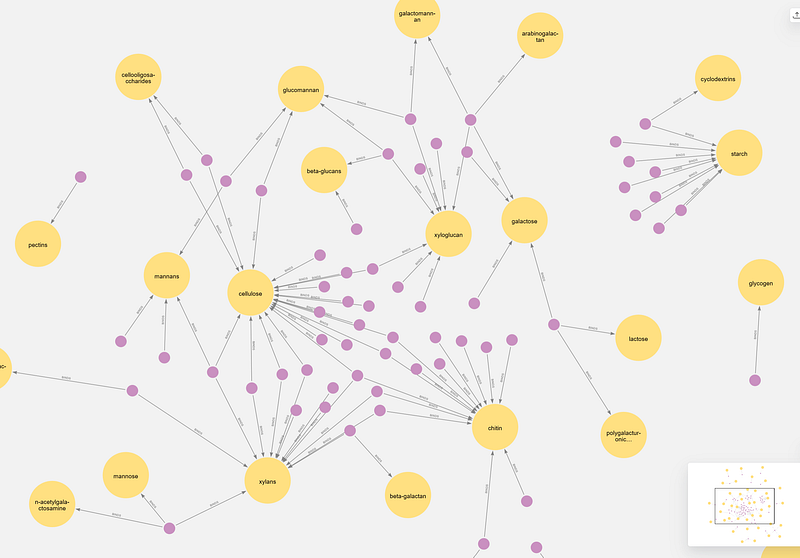
Among all the six CAZy categories, only the CBM modules have the BINDS relations. And this query makes it immediately clear that the structural and storage polysaccharides in plants form two separate clusters. The larger one consists of structural polysaccharides such as cellulose, xylans and glucomannan. They are found in close proximity inside the plant cell wall. Cellulose, xylans and mannan are all chained together via the tough beta linkages. So it makes sense that we can find so many CBMs that bind more than one of these polysaccharides. Interestingly, CBM1, 2, 3, 37 and 54 even connect chitin to the cluster. Chitin is found in the exoskeletons of arthropods and the fungal cell walls. Outside this cluster, starch established its own cluster with nine CBMs. Starch is the storage compound in plants. In contrast to the structural polysaccharides mentioned above, starch is chained via the alpha linkages.
We can also get the list of Bacteroidetes that can potentially degrade cellulose because they possess the cellulose-degrading CAZy families, which were in turn extracted from the four research papers. Since there are 340 of them, I only show the first 10.
The second column shows whether the organism is known to be a cellulose degrader. “0” stands for negative, while “2” stands for unknown. So the last two in the list, Cellulophaga algicola DSM 14237 and Chitinophaga pinensis DSM 2588, cannot degrade cellulose according to their strain descriptions. Based on this result, is CAZy a good input data source for predicting polysaccharide metabolisms? In my opinion, because CAZy is a sequence-similarity-based system, it is not a direct proxy for metabolic functions. So the appearance of a single CAZy family is a weak indication of cellulose degradation. But if a genome possesses multiple families that can do the same thing, then we can be more certain about the prediction. But since sequence similarity is easy to compute, it is a good first step to creating your cellulose degrader candidate list. Afterwards, you can do lab tests or search the literature to confirm the findings.
Finally, we can count how many Bacteroidetes encode GH16. Many CAZymes in this family degrade marine polysaccharides such as laminarin and agar.
The answer is 71. This is a surprisingly small number given that a large proportion of GH16 CAZymes during algal blooms in the North Sea could be traced back to Bacteroidetes based on this previous study.
5. Add a chatbot frontend
Navigating the knowledge graph with Cypher is fun, but that is a privilege reserved only for the few who can program. However, we can set up a GPT-3-based chatbot (Figure 6) so that everybody can access the knowledge graph in English. Essentially, the chatbot translates the natural language into Cypher and gets the answers from the database.
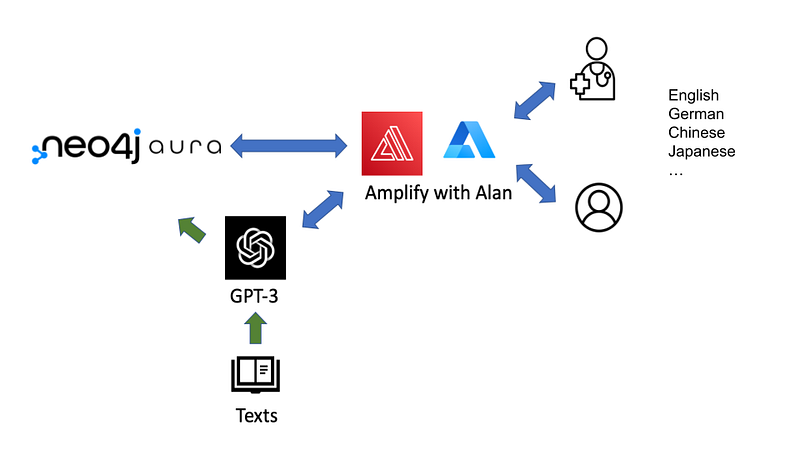
It is quite easy to set up the chatbot. We can borrow the code from Doctor.ai and just modify the GPT-3 prompt. It is amazing that with the following prompt, GPT-3 can generate the correct Cypher queries even without any knowledge of our data model.
The frontend is hosted on AWS Amplify. You can read the instructions in my previous article here and here. You need to fill in six environment variables. The REACT_APP_NEO4JURI can be a bit tricky. Click the instance on your Instances page, and you can find the value next to Connection URI. It should look like this:
neo4j+s://[random_string].databases.neo4j.ioOnce the frontend is up and running, you can converse with the chatbot and get some answers from the knowledge graph through it.
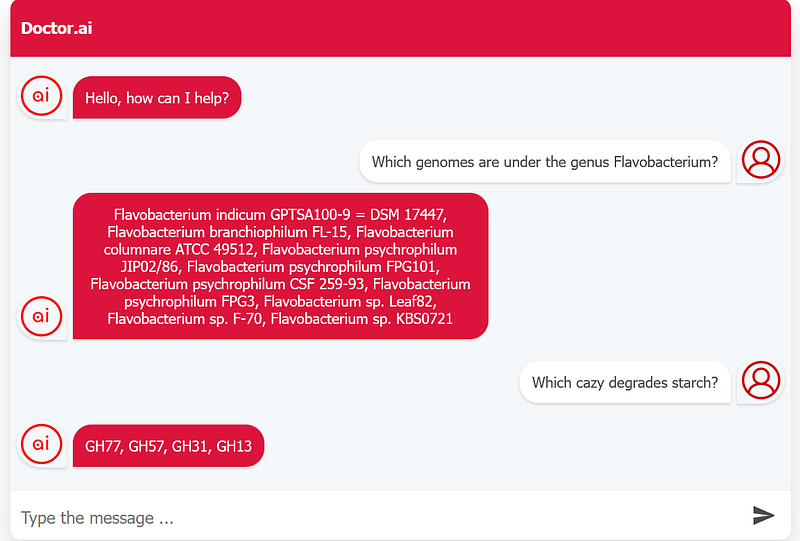
As you can see in Figure 7, I made a query about the member genomes of the genus Flavobacterium. I also asked for the CAZy families that can degrade starch and the Doctor.ai chatbot gave me the answers that I have extracted from the research articles.
Conclusion
Crafting your own knowledge graph is a very satisfying experience. You are basically summarizing and digitalizing your knowledge of a particular domain. It is your personal knowledge base. When you host it on the cloud, you can view its information whenever you are online. With a GPT-3-based chatbot, you can effectively voice-navigate the knowledge graph. As Annie Murphy Paul pointed out in her book The Extended Mind, by offloading our memory and knowledge on external media, we can free up more mental capacities for creative thoughts. As a result, knowledge graphs can help us to discover new insights into old data. Plus, it is browsable, searchable, and sharable. You can even set up GraphQL or REST APIs to expose your data to your coworkers and even the world.
This project is just a primer. I only imported a fraction of the available genomes into Aura because its free tier has set limits on the graph size. You can use its professional version to host a larger graph. For example, you can incorporate other gene annotations such as MEROPS, KEGG, and COG into the graph, too. You can also create your own knowledge graph of other domains, such as geography, politics, and logistics.
You can also add more values to an existing graph by using the Graph Data Science library (GDS). Why not use graph machine learning to predict some node properties, such as cellulose degradation? You can then add the prediction results to the graph.
And above all, have fun with your knowledge graphs.


