
Do You Know How To Score A “Great Job” On Grammarly?
Most of us use Grammarly to check for correctness. However, the tool offers us so much more. I wonder, how many actually know how to get the maximum value out of the free version of the tool?

I was introduced to Grammarly by Liam Ireland. It started as a string of private notes attached to various stories of mine, reminding me to do my due diligence and quality checks on my stories before hitting the “Submit” button to ILLUMINATION.
He must have been frustrated reading my stories and correcting juvenile errors on my behalf. So, he sent me a private note in good faith, praying hard that I would reciprocate and abandon my recalcitrant ways.
His repeated messages finally penetrated my thick skin. I remembered thinking that I have to up my game. Thus, I created an account and started using the software tool as the first-cut clean-my-writing-poop check before Liam starts rejecting my stories.
For the 1st month, I focused on the basic errors that would have made my primary school teacher so proud. The tool classified them into “Correctness”/“Clarity”/“Engagement”/“Delivery” categories.
I focused on the errors picked up by the tool. The commas, the propositions, the adjectives, the singular-plural definition, the tug-o-war between the “a” and “the” words, and whatnot.
It is fascinating to learn from red lines, pop-ups, and yellow lines. If only English classes were so exciting.
And then, there is the scoring system. During the initial days of using the tool, I thought a score of 99 points meant I stood next to Stephen King. I never knew there were more.
I accidentally discovered that a score of 99 points isn’t the apex. “Great Job!” is. This story shows how we can close the gap between 99 points to a writer’s nirvana.
The first step is to correct all alerts arising from fundamental errors. This typically means clearing all errors that come with red underlines when we use the Grammarly web application.
They are the low hanging fruits that we can correct rather easily because all we have to do is to click on the alert notification and accept the proposed correction. I find that spelling errors and language variants (Between Standard English and American English) are easy to accept as there is nothing to debate.
Expression, pronoun, verb need a second look.
Once we are done with the red lines, we move on to the second step.
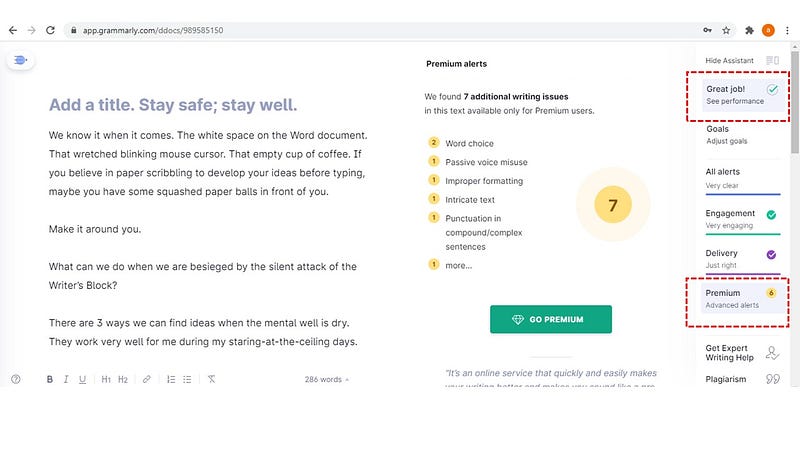
Mouse over to the Grammarly assistant on the right panel and look for the “Premium” category, which is conveniently featured before the “Delivery” category. Click on the “Premium” zone, and all advance alerts will be displayed on the main screen.
The trick is not to focus on the number of advance notifications. Instead, run through the entire document to search for all yellow underlines. Then proceed to neutralize all of them.
When we manage to, our story score will move from 99 points to “Great Job!”.
That is how we can get a leg up.
If you are interested in an analysis of your writing provided by the tool, mouse-over and hit on the “Great Job!” zone. A pop-up notification will display at the center of the laptop screen. You cannot miss it.
Grammarly provides a free preliminary report for cheapskates like me. One interesting marker is the reading time and speaking time required from start to end.
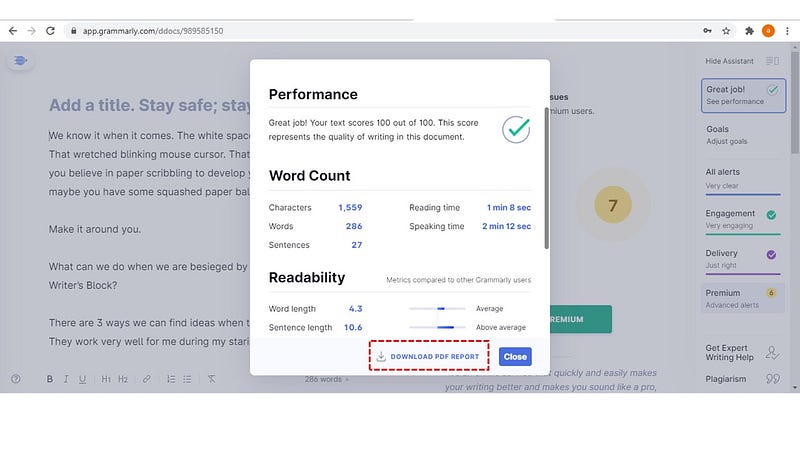
You might find that the reading time indicated in Grammarly deviating from the one computed by Medium.
That is because our story drafts on Medium include images, attached stories, and our boilerplate statements at the bottom. Yes, they add up to the reading time on Medium.
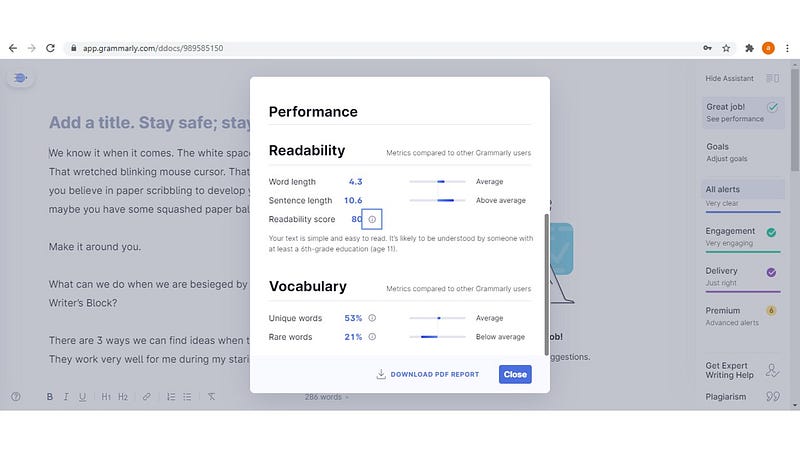
You might also find the analysis on Grammarly interesting because it measures readability, the use of rare words, and others. I am pretty torn between the 2 metrics as a writer. I routinely score high of ease of reading and simultaneous rank below average for the use of rare words.
I guess I don’t have issues with written communication, at the very least.
Of course, there is always room for improvement.
And we have to understand the tool enough to have it generate actionable insights for us to improve further.
There Is More Than The Tool Is Offering!
Aldric
Related Stories from the Author.
About the Author:
As a content contributor, I write my observations from daily life and my business exposure.
Because our life experience is the bedrock of our unique perspectives.
As a Consultant by training, I believe in making the complex simple.
Because simplicity adds value.
And with clarity — We grow.
Follow me for my stories on Medium!
This is more “About Me”.


