
Deploying Lambda Functions with AWS CDK Python
This is the way!
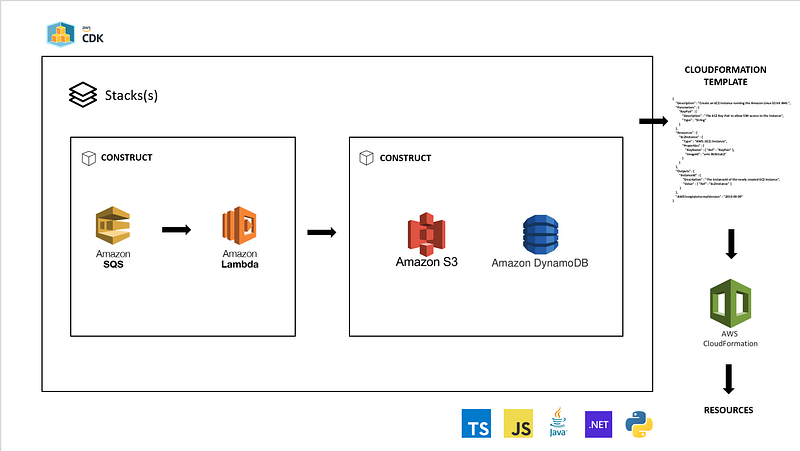
Infrastructure as code (IaC) enables management and provisioning of infrastructure through machine-readable definition files. IaC provides consistency by having files as descriptive models be the single source of truth.
For cloud providers such as AWS, CloudFormation is the IaC enabler. CloudFormation helps model resources by describing them in templates that can be deployed as stacks. It provides the ability to easily build, manage, change, and destroy resources in your infrastructure through resource definition files.
Unfortunately, despite all the advantages CloudFormation bring to the table, designing complex infrastructures using CloudFormation templates becomes a tedious process with manual actions and long yaml/json files that are difficult to review and maintain.
That is where AWS Cloud Development Kit (AWS CDK) comes in. AWS CDK is a software development framework to define your cloud application resources using familiar programming languages.
AWS CDK provides high-level components called constructs that preconfigure cloud resources with proven defaults. Under the hood, it enables the provision of resources in a safe, repeatable manner through AWS CloudFormation.
Let’s see how simply it is to provision an AWS resource such as Lambda using AWS CDK.
Building with AWS CDK
The AWS CDK development workflow is similar to the workflow already used by developers, with the exception of a few extra steps to synthesize your stack to an AWS CloudFormation template and deploy it.
Steps to build and deploy your AWS CDK implementation:
- Create the app from a template provided by the AWS CDK.
- Add code to the app to create resources within stacks.
- Synthesize one or more stacks in the app to create an AWS CloudFormation template.
- Deploy one or more stacks to your AWS account.
Prerequisites
To work with the AWS CDK, you must have an AWS account and credentials. Additional you need to install Node.js and the AWS CDK Toolkit.
Python AWS CDK applications require Python 3.6 or later. If you don’t already have it installed, download a compatible version.
The Python package installer, pip, and virtual environment manager, virtualenv, are also required.
Initialize AWS CDK
Once the requirements are met, we can start by creating the App.
mkdir demo-python-cdk
cd demo-python-cdk
Please keep in mind that you need an empty directory in order to initialize cdk.
Now initialize the app using the cdk init command, specifying the desired template (“app”) and programming language.
cdk init app --language pythonThe cdk init command generates a number of files and folders inside the demo-python-cdk directory to help you organize the source code for your AWS CDK app.
After initializing the project, activate the project’s virtual environment. This allows the project’s dependencies to be installed locally in the project folder, instead of globally.
source .venv/bin/activateInstall the app’s standard dependencies:
python -m pip install -r requirements.txtManaging AWS Construct Library modules
Use the Python package installer, pip, to install and update AWS Construct Library modules for use by your apps, as well as other packages you need.
python -m pip PIP-COMMANDThe AWS CDK core module is named aws-cdk.core. AWS Construct Library modules are named like aws-cdk.SERVICE-NAME. For instance, let’s install 2 services that will be needed by our application. The command below installs the modules for AWS IAM and AWS Lambda.
python -m pip install aws-cdk.aws-lambda aws-cdk.aws-iamCreating Lambda Stack
Now let’s start creating our Lambda stack.
To start with a clean project I normally delete the folder and content automatically created by cdk. Delete the folder demo_python_cdk.
Create a folder called lambda and add a file lambda_code.py with the content:
This is the python code of our AWS lambda function. It will be invoked once the resource is triggered.
Now comes the time to create the stack, the unit of deployment in the AWS CDK. It is important to understand that any AWS resources defined within the scope of a stack are provisioned as a single unit. Let’s create a folder called LambdaStack and add a LambdaStack.py file with the following content. Git repo can be found in: https://github.com/ramonmarrero/demo-python-cdk.git
lambda_role is the first construct we’ve seen, so let’s take a closer look. Like all constructs, the Role class takes three parameters.
- scope: Tells the Role that the stack is its parent: it is defined within the scope of the stack. You can define constructs inside of constructs, creating a hierarchy (tree).
- Id: The logical ID of the Role within your AWS CDK app. This uniquely identifies the Role across deployments so the AWS CDK can update it if you change how it’s defined in your app. Roles can also have a name, which is separate from this ID.
- props: A bundle of values that define properties of the role. Here we’ve defined 3 properties: assumed_by (
IPrincipal) – The IAM principal (i.e.new ServicePrincipal('lambda.amazonaws.com')) which can assume this role. role_name (Optional[str]) – A name for the IAM role. managed_policies (Optional[List[IManagedPolicy]]) – A list of managed policies associated with this role.
In this example, lambda_role will create an IAM role that can be assumed by a Lambda resource. Additionally, it will provide managed policies with 2 service roles:
- AWSLambdaVPCAccessExecutionRole: Permission to manage elastic network interfaces to connect your function to a virtual private cloud.
- AWSLambdaBasicExecutionRole: Permission to upload logs to CloudWatch.
With the role already created we can now focus on creating the lambda resource. The cdk_lambda construct create a lambda resource using the Function class. The following parameters can be provided:
Parameters
- scope (
Construct) - id (
str) - code (
Code) – The source code of your Lambda function. You can point to a file in an Amazon Simple Storage Service (Amazon S3) bucket or specify your source code as inline text. In this example we use ./lambda to reference our code in the lambda folder. - runtime (
Runtime) – The runtime environment for the Lambda function that you are uploading. In this example we use Runtime.PYTHON_3_7. - handler (
str) – The name of the method within your code that Lambda calls to execute your function. The format includes the file name. It can also include namespaces and other qualifiers, depending on the runtime. - environment (
Optional[Mapping[str,str]]) – Key-value pairs that Lambda caches and makes available for your Lambda functions. Use environment variables to apply configuration changes, such as test and production environment configurations, without changing your Lambda function source code. - role (
Optional[IRole]) – Lambda execution role.
The Lambda stack is now complete. As you can see, additional things have been added to the stack. The first one is a Tag; is an informational key-value element that you can add to constructs in your AWS CDK app. A tag applied to a given construct also applies to all of its taggable children. Tags are mainly used to identify and categorize resources, simplifying management, cost allocation, and access control.
The Tags class includes the static method of(), through which you can add tags to, or remove tags from, the specified construct.
Tags.of(SCOPE).add()applies a new tag to the given construct and all of its children.
The second one is an output of the resource created using the CfnOutput construct. It is for informational purposes.
To define the previous stack within the scope of a CDK application, it is necessary to use the App construct. Let’s instantiate the newly created Lambda stack. Edit the app.py file and add the following.
Deploying the stack
We are ready to deploy our Lambda resource. To deploy the stack using AWS CDK, go to the console and type cdk deploy from the main folder.
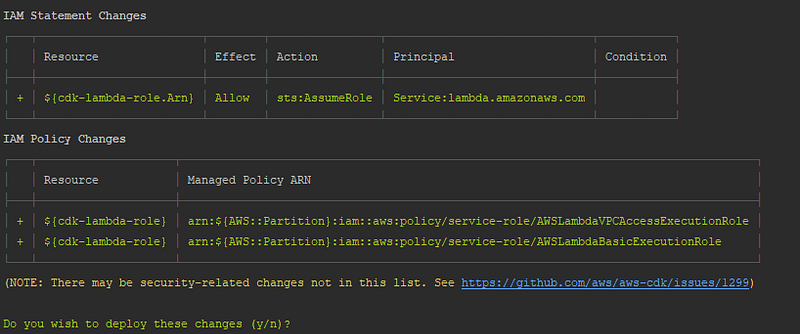
AWS CDK will provide an overview of the resources that will be deployed. In this case, you will see the roles and policies that will be added along with the Lambda resource to be created.
If you proceed with the changes provided, the lambda will be deployed and the IAM roles and policies will be created and added to the resource.
Conclusion
In this article, we witnessed how a process such as deploying AWS Lambda that normally requires to perform manual actions, write custom scripts and templates, can be simplified using a few lines of code in a familiar programming language. AWS CDK enable us to provision resources in a safe, reproducible way through AWS CloudFormation. It allows to create and share custom constructs that incorporate organization’s requirements, enabling us to start new projects faster.
Happy coding! Do not forget to follow me or subscribe via email here. You can also support my writing by joining Medium using the following link.
For more AWS content
For a vibrant cloud community with more content, you can visit:


