
Deploying AWS Lambda layers with Python
Learn to easily deploy a Lambda Layer via AWS CDK and Python.
AWS Lambda is an event-driven solution that enables developers to run code in a serverless manner. There is no need to provision or manage infrastructure to run your code.
With AWS Lambda, you can automatically respond to code execution requests at any scale. The service is ideal for file processing, stream processing, web applications, mobile backends and even machine learning use cases.
To create an AWS Lambda function, first you need to package your function code into a deployment package. As of today, Lambda supports two types of deployment packages: container images and .zip file archives.
In many cases, when creating our Lambda functions, we need to package additional libraries and dependencies that are required by our application to work as intended. For this purpose, the AWS Lambda service allows developers to create a Lambda Layer.
A Lambda layer is package that can contain additional dependencies or data. As per the AWS website, a layer can contain libraries, a custom runtime, data, or configuration files.
In this post, we will explore how to deploy AWS Lambda layers using the Cloud Development Kit (CDK). We will use Python as the programming language for the AWS Lambda function and we will take advantage of the AWS CDK to easily deploy our AWS service.
The Cloud Development Kit
AWS CDK is an open source software development framework to define cloud application resources via familiar programming languages. It provides high-level components (constructs) that preconfigure cloud resources with proven defaults, enabling the provision of resources in a safe, repeatable manner through AWS CloudFormation.
Installing AWS CDK
Prerequisites
To set up AWS CDK properly, we will need:
- An AWS account and credentials.
- Node.js.
- Python 3.6 or later.
- Python package installer, pip, and virtual environment manager, virtualenv.
Install the AWS CDK using the following Node Package Manager command.
npm install -g aws-cdkTo verify the correct installation and print the version number of the AWS CDK, run the following command:
cdk --versionInitialize AWS CDK
Let’s start using AWS CDK by creating the App.
cd ~
mkdir aws-lambda-layer-cdk
cd aws-lambda-layer-cdk
cdk init app --language pythonImportant: You need an empty directory in order to initialize cdk and make sure you have provided your AWS credentials via the AWS CLI.
The name of the project folder will be used by cdk init to name various elements of the project. This includes: classes, subfolders, and files.
Another step after initializing the project is to activate the project’s virtual environment.
source .venv/bin/activateThe template includes a batch file,
source.bat, that allows the same command to be used on Windows. For Windows execute.venv\Scripts\activate.bat.
The next step is to install the app’s standard dependencies:
python -m pip install -r requirements.txtAs we need to create a Lambda function, we can proceed to install the AWS Construct Library module for AWS Lambda by executing:
python -m pip install aws-cdk.aws-lambdaWith this steps completed, we have installed and prepared the fundamental building blocks for our CDK application.
Creating the project structure
Now it is time to create our folder structure. I prefer to rename the directory and content automatically created by CDK. Make sure you are in the main directory:
cd ~/aws-lambda-layer-cdkFind the directory by the same name aws-lambda-layer-cdk and rename it to LambdaStack.
Modify the file aws_lambda_layer_cdk_stack.py and add the code below:
This code is creating the following resources on AWS:
- Role for your Lambda function
- Lambda function
Create a folder to store the Lambda function code and the dependencies for the Layer.
cd ~/aws-lambda-layer-cdk
mkdir lambda/layer
mkdir lambda/code
Inside this new code directory add a file named my_lambda_code.py with the following content.
With these changes, the project structure is ready. Now let’s install and include the Flask library and dependencies.
Creating the Lambda Layer
It is time to create our Lambda layer. Let’s install the libraries and dependencies first. If you remember, in the previous section we created a directory called layer under the ~/aws-lambda-layer-cdk/lambda directory.
For this example, we will use the Flask library. We can install the library to an specific location as follows:
pip3 install Flask --target ~/aws-lambda-layer-cdk/lambda/layer/python/lib/python3.7/site-packagesOnce the command completes, make sure the layer folder has new content with the library and dependencies.
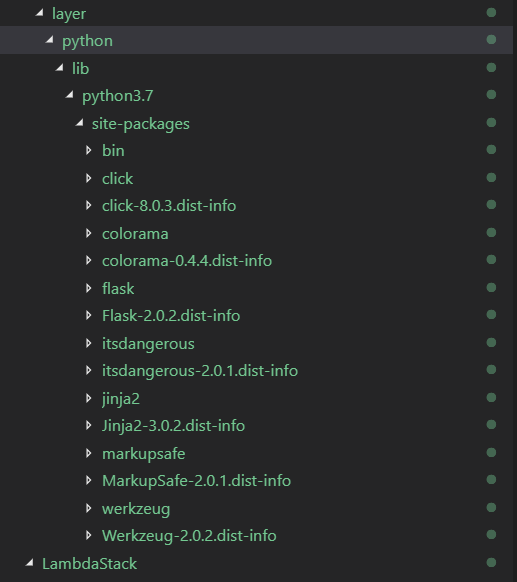
After installing the library, it is time to incorporate the layer in our lambda function. We can do this by incorporating the code below in the stack aws_lambda_layer_cdk_stack.py.
This piece of code will enable us to create the layer based on the libraries and dependencies previously installed in the lambda/layer folder. Add the code after creating the role.
The lambda function resource has to change as well. It needs to include the new layer we have created. Update the code in the lambda function resource to reflect the change in the code below:
Notice the layers = [lambdaLayer]. This part reference the layer previously created.
The final code from the stack should look like this:
Deploying the stack
And with this, we are now ready to deploy our Lambda function, which includes a layer for additional libraries and dependencies. To deploy the stack using AWS CDK, go to the console and type the command below:
cdk deployYou will see an overview of the AWS resources that will be deployed. In this case, the roles, policies, layers that will be added along with the Lambda resource to be created.
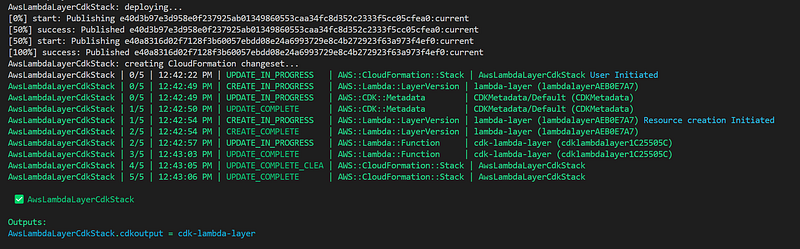
You can now go to the AWS console and test your newly created AWS Lambda function.
As you have witnessed, it is pretty simple to add a layer to an AWS Lambda function using AWS CDK. I am looking forward to hearing your ideas on how it was able to help you tackle different challenges on your individual projects.
Happy coding! Do not forget to follow me or subscribe via email here. You can also support my writing by joining Medium using the following link.
For more AWS content
For a vibrant cloud community with more content, you can visit: