
Deploying a Lambda running a Container using CloudFormation
ACM.298 Leveraging ECR and our prior VPC with NAT deployment
~~~~~~~~~~~~~~~~~~~~~~~~~~~~~~~~~~~~~~~~~~~~~~~~~~~~~~~~~
⚙️ Part of my series on Automating Cybersecurity Metrics. The Code.
🔒 Related Stories: Container Security. Lambda. Deploying a Static Website
💻 Free Content on Jobs in Cybersecurity | ✉️ Sign up for the Email List
~~~~~~~~~~~~~~~~~~~~~~~~~~~~~~~~~~~~~~~~~~~~~~~~~~~~~~~~~
In the last post I was taking a hiatus to discuss a few web security issues and explained what man-in-the-middle attacks along with how they relate to TLS (formerly SSL) and HSTS.
Now back to finishing what I started so I can get my web site deployment system up and running. In the post prior to my AppSec hiatus, I modified the ECR policy to allow Lambda to pull container images from it.
In this post I’m going to deploy a Lambda that leverages a container using CloudFormation. I will admit, I got stuck on this post a bit because I am trying to figure out how to make things easier in the long run. But I need to work through the process and think about it a bit more before I come up with a final solution. Consider this one of a number of blog posts that will result in hopefully a reusable solution in the end. But with this post you’ll have a working template.
I will pull the image that I uploaded to ECR for testing purposes and then try to execute the Lambda function. The initial Lambda function should not need any network access for simplicity of testing the basic functionality of pulling and running a container from ECR.
Here’s the CloudFormation for a Lambda Function.
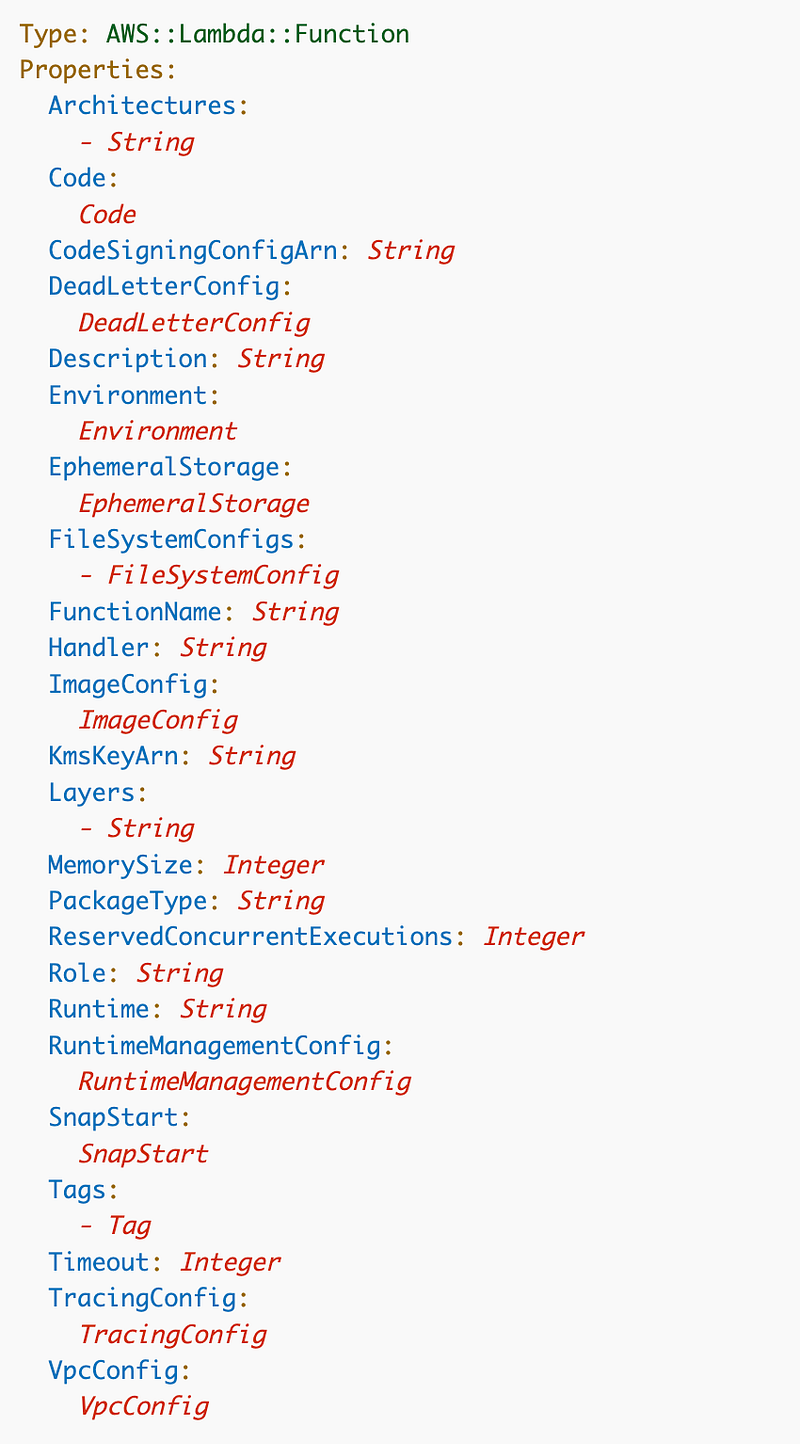
Let’s take a look.
N/A for this test: Code, Environment, EphemeralStorage, FileSystemConfigs, KMSKeyArn (no environment variables), Handler, Runtime, RuntimeManagementConfig, Tags, Timeout
Will probably cover these in a separate post: CodeSigningConfigArn, DeadLetterQueue, Layers, SnapStart, TracingConfig
I’m going to use defaults for these: Architectures: (x86), MemorySize
I’ll set these properties: FunctionName, Description, PackageType, Role, and VPCConfig
Not needed unless overriding entrypoint, arguments, and working directory: ImageConfig
I’m using the container in this post and I don’t think I need to override anything but will test it out.
Property Values
Here are the property values I need to set.
FunctionName: (Name of function)
PackageType: Image
Code: URI of container in ECR. I’m going to try to align the URL with the function name.
ImageConfig: Specify Command, EntryPoint, and WorkingDirectory if needed.
Role: I already have a service role which I can reuse for this function. I started a policy but need to finish it. The role name matches the function name + LambdaRole and policy name is function name + LambdaPolicy.
VpcConfig: We’ll specify the VPC I set up in a prior post with a NAT so the Lambda function can reach restricted locations on the Internet.
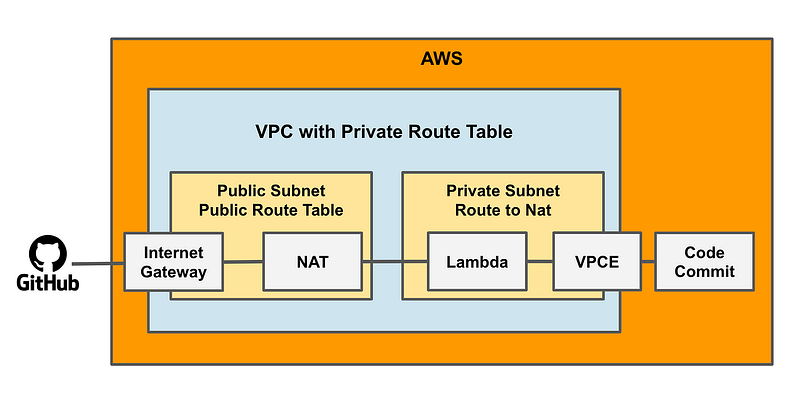
The VCPConfig looks like this:
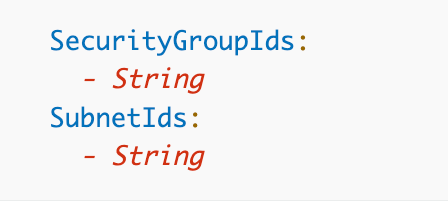
I’m going to hardcode this security group name for this test: NATVPCGithub. Recall that I can look up IDs by name with the outputs I’ve created.
Recall that the private subnet name is: NATVPCNATRouteSubnet and I can look that up as well.
So here’s what I have in pseudocode:
Lambda Function
Parameters:
NameParam:
  Type:String
Env:
  Type:String
  AllowedValues:
    - "sandbox"

Resources:

Lambda:
Type: Lambda
  FunctionName: !Ref NameParam
  PackageType: Image
  Code:
    Uri: !Sub....!Ref Name
  RoleName: !ImportValue !Sub ${NameParam}LambdaRole
  VPCConfig
    SecurityGroup: !ImportValue NATVPCGithub
    Subnet: !ImportValue NATVPCNATRouteSubnet

Output:
  Name: !Ref NameParam
  Value: !Ref Lambda
Deploy Script
Here’s the pseudocode for my deploy script based on the above.
#pseudocode

environment="sandbox"
functioname="dockertest"

change_dir 'Role'
deploy_role $functioname'LambdaRole'
deploy_policy $functionname'LambdaPolicy'

#I want to deploy a function specific security group in the future
#change_dir 'Network'
#deploy_security_group $functionname 'SecurityGroup'

change_dir 'App'
deploy_lambda $env $functionname
Where does my deploy script go? Well developers are likely going to be deploying new functions and using predefined, approved scripts from other directories and eventually repositories. The apps are deployed from my Apps folder. So the deploy script goes there. Although the above script shows the developer deploying the function role and security group, they may or may not be able to edit the CloudFormation templates used for those deployments in a particular organization. That’s another benefit of separating the configuration from the deployment.
I’ve moved Lambda functions here for now:
/SecurityMetricsAutomation/Apps/Lambda/stacksI’m going to create a folder for the function I’m calling ContainerTest.
/SecurityMetricsAutomation/Apps/Lambda/stacks/ContainerTestI’m going to put my deploy script in that folder.
I’ve moved container test files here:
/SecurityMetricsAutomation/Apps/Containers/stacks/dockertestThe next question is, if I’m trying to create one reusable Lambda template where does that go? That question led to another change. I’m going to add a cfn folder and a functions folder to my Lambda directory:
/SecurityMetricsAutomation/Apps/Lambda/stacks/cfn/Lambda.yaml
/SecurityMetricsAutomation/Apps/Lambda/stacks/functions/ContainerTest
I rebuilt and retested pushing my container to ECR and gave it the name dockertest. To use the image with Lambda we need to get the URI from the registry. Click on the Copy URI link.
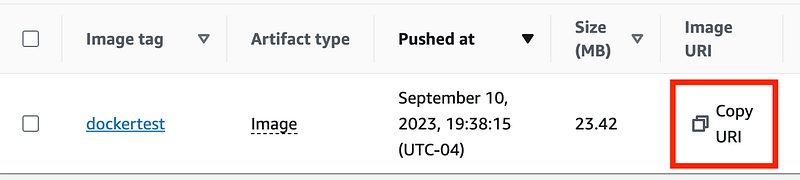
Now ultimately I want my function name and my image names to match. So I’ll go ahead and change the folder name ContainerTest above to dockertest.
SecurityMetricsAutomation/Apps/Lambda/stacks/functions/dockertestNow what would be really nice here is if we can someone push an image to ECR with CloudFormation and then reference it with an Output. But recall that “push” is an action not a static definition of a resource. To have CloudFormation build a container seems a bit beyond what it should do, but in theory you could define an image with a DockerFile and an ECR repository and the image could be built and pushed to ECR by CloudFormation. I haven’t really thought through all the implications of that. It’s just a thought at the top of my head at the moment.
But anyway that’s not our option so we need another way to get the name of the image in our CloudFormation template. If you look at the format of the URI, but using the same name for the function as the container name we can formulate the URI, presuming we have a different registry for each environment. A different registry for each environment adds more complexity for integrity checking. I’m still pondering this. But for now, we’ll go with it. We can be more free with pushes to a non-prod registry than a production registry if we keep them separate. We can lock down production registries in between deployments.
Here’s how we can formulate the URI:
!Sub "${AWS::AccountId}.dkr.ecr.${AWS::Region}.amazonaws.com/${EnvParam}:${NameParam}"Here’s the Lambda Function:
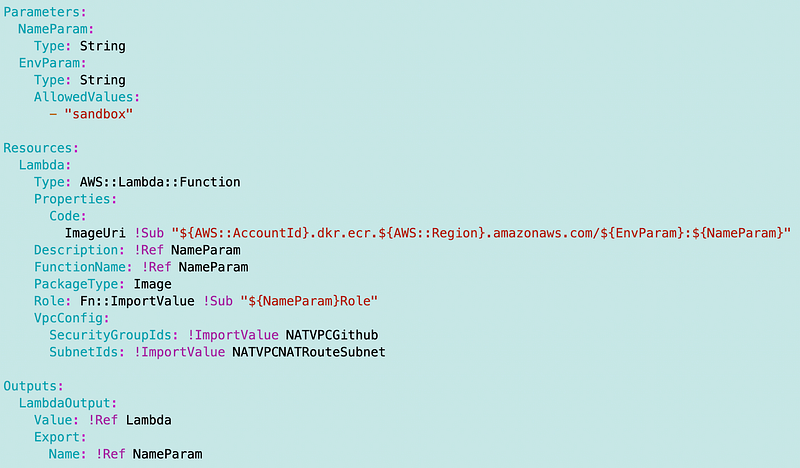
As mentioned I want to update the networking later.
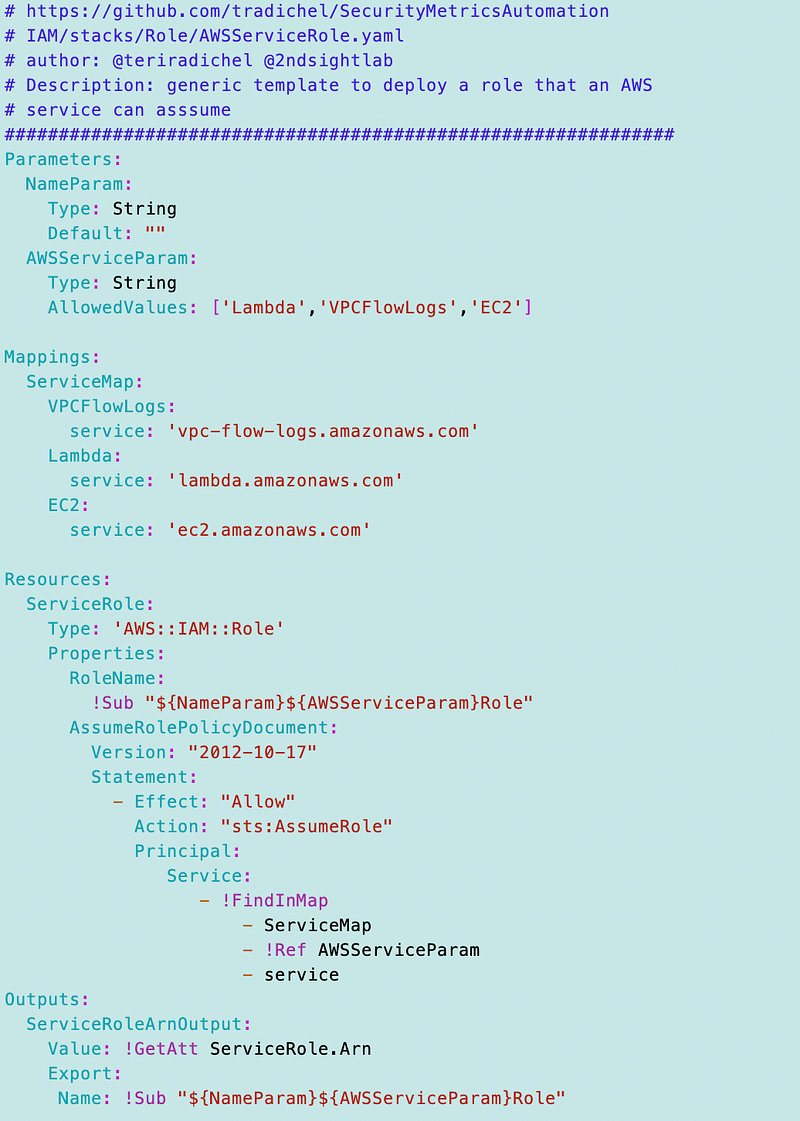
Now we need a role with that name for our Lambda function. As a reminder from the prior post I’m using the generic role for a service (Lambda) but we want to give it the same name as our function with “Role” at the end.
I did make a couple of changes to the service role template. I always want to know what service is allowed to use a role so I incorporated that into the role name as shown below:
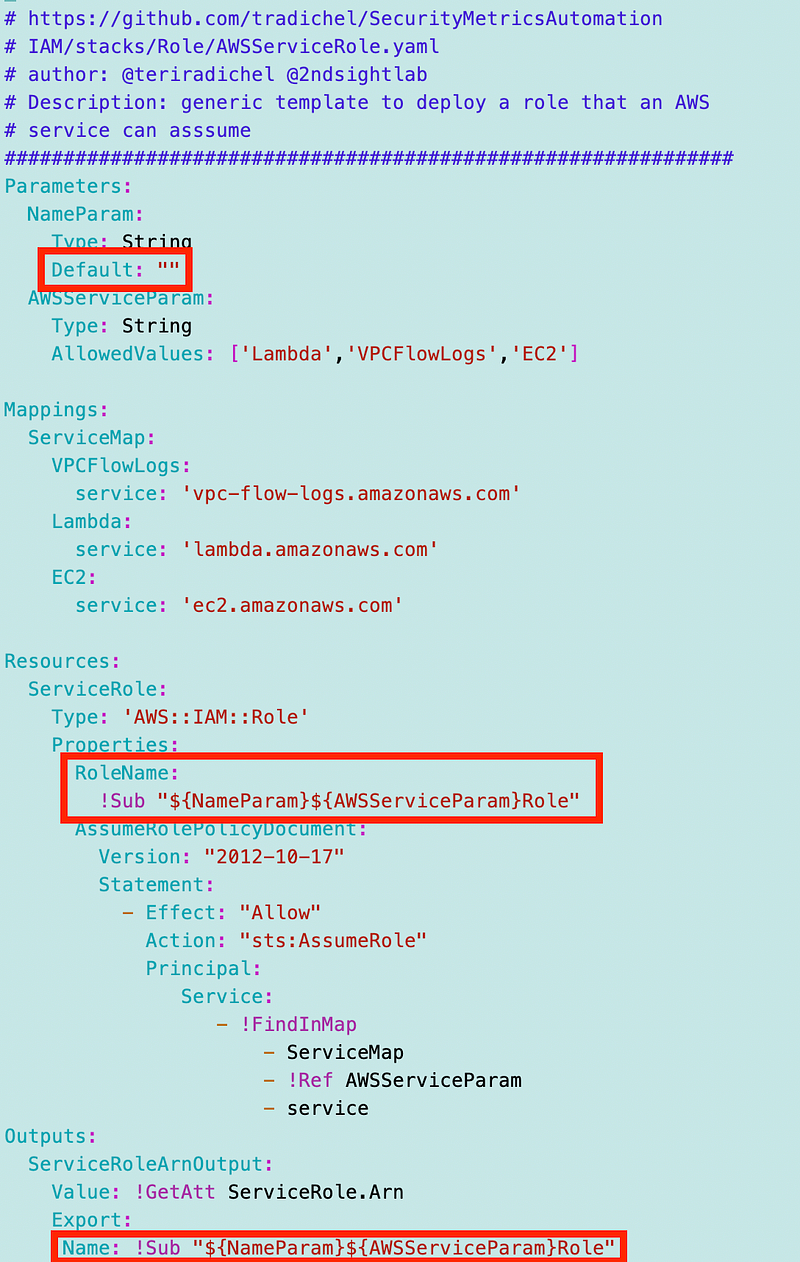
The above changes make it easy to search on “Lambda” or whatever service for my custom roles and see which service is allowed to use them.
Using the reusable template above to deploy the role was simple:
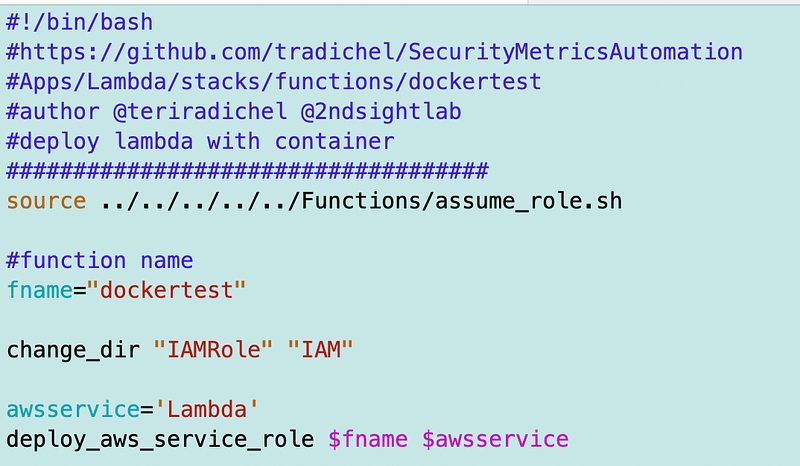
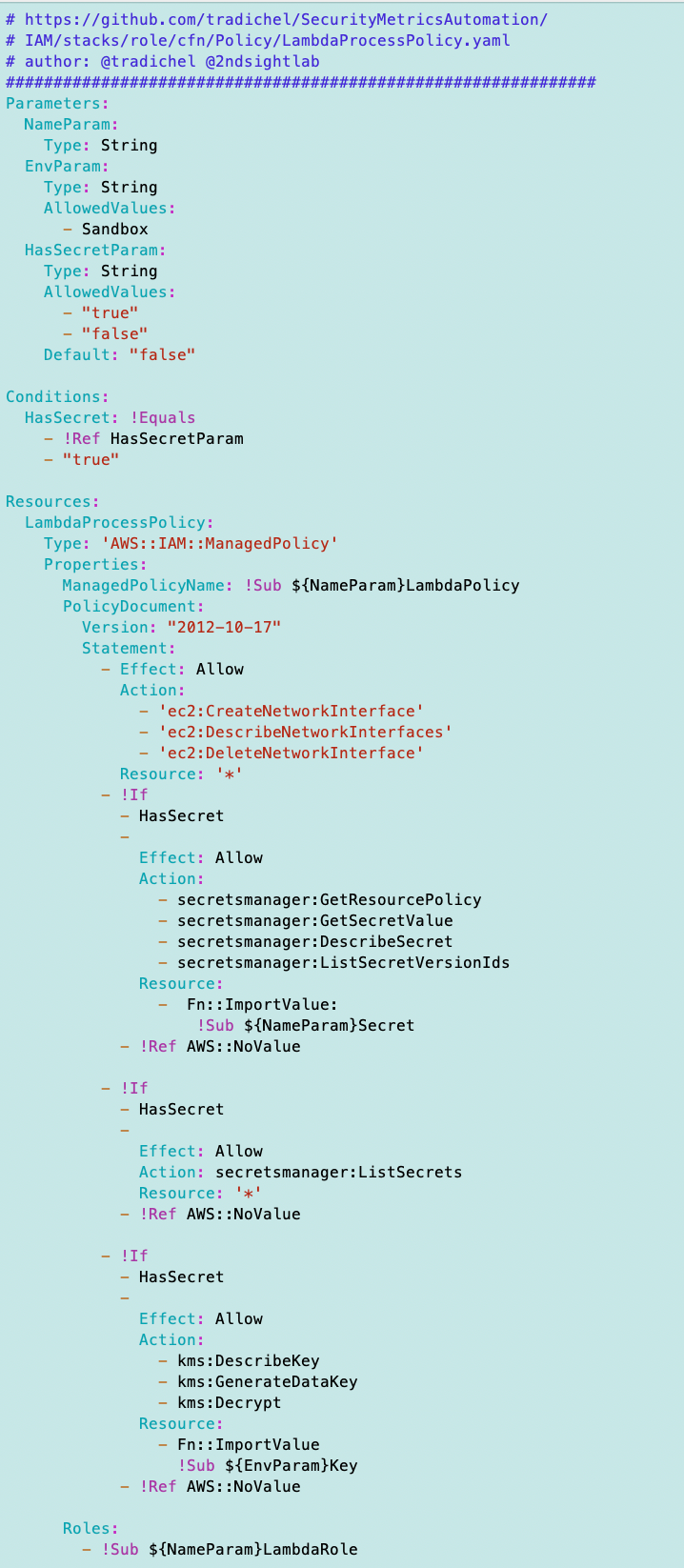
Now for the policy. I started creating this policy in another post. But I do need to align the name with the role name. Now something about that reusable template — I haven’t created a secret or key for this function. Does that matter? If I don’t create them then someone could add them in the future and the function would have access to them. Does that matter? Maybe. Let’s see if we can even deploy the template as is.
I had to add a new function, similar to the role deployment function, to leverage the new LambdaPolicy.yaml reusable policy template:
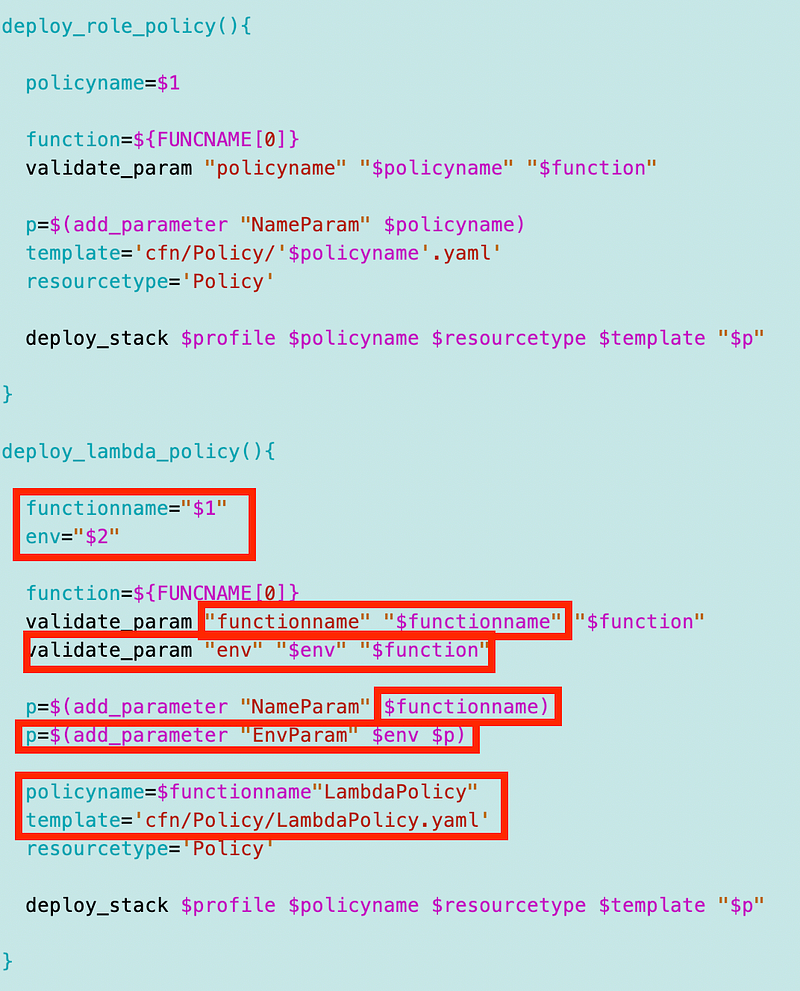
I had to make a few changes to the policy template I started in another post:
- Aligned the name of policy

- Aligned the name of the role

- Added an optional HasSecretParam and HasSecret condition
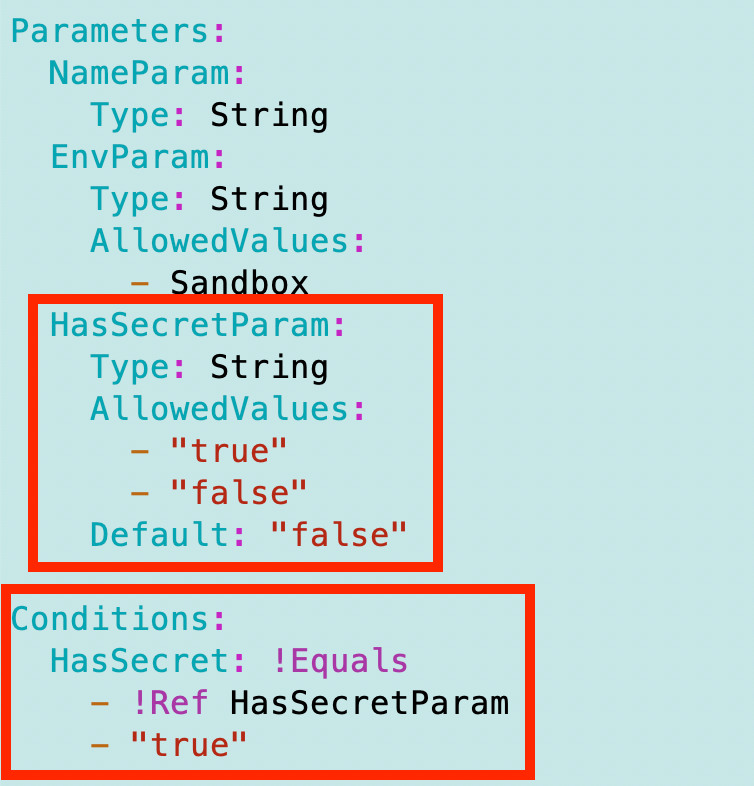
- Only add the statements pertaining to the secret and encryption key if the Lambda function has an associated secret.
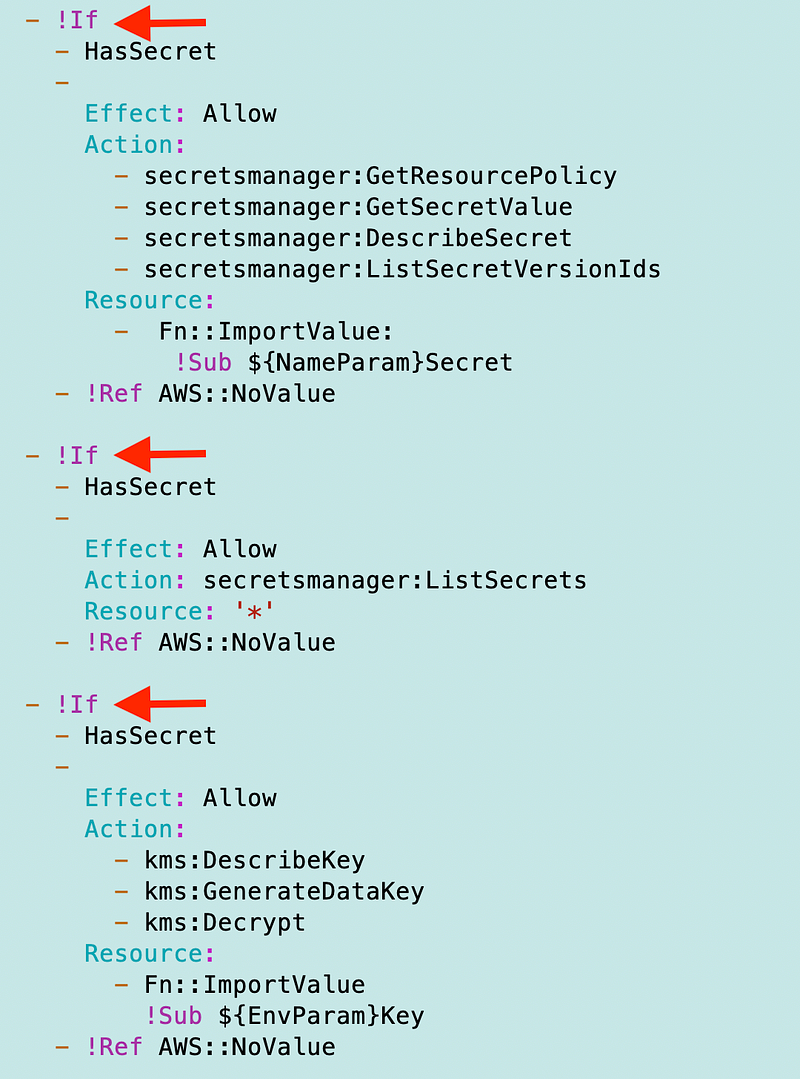
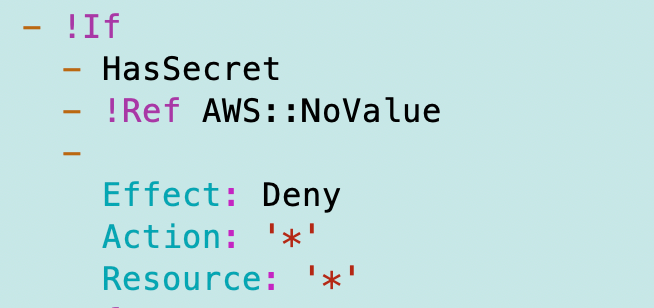
- Otherwise deny all actions
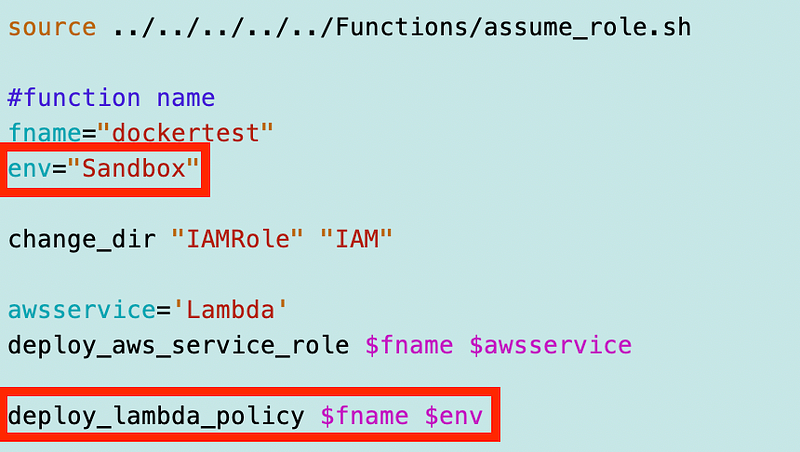
I can easily deploy the policy now with two additional lines of code in the deploy script:
Next I can add a bash function to deploy the Lambda function. I’m going to create a new file in the root of my Lambda folder named lambda_functions.sh as per usual.
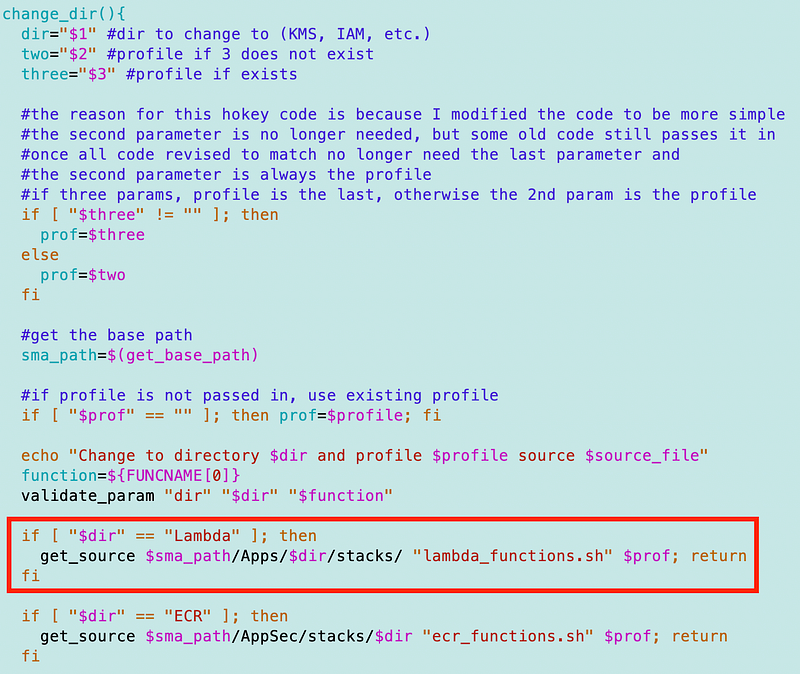
SecurityMetricsAutomation/Apps/Lambda/stacks/lambda_functions.shI need to add Lambda to my change_dir function. From a prior post, recall that this is my work around for bash includes. I don’t intend to use bash long term but it works.
I got an error related to the Lambda role and using Sub in ImportValue. Typos, Typos.
Next, my URI calculation for the image was wrong. Why? Because I am inconsistently using “sandbox” and “Sandbox”. The latter is better for use of the environment in my naming convention, so I deleted the repository and renamed it with uppercase.
It was at some point while testing adding and removing the registry that I realized that CloudFormation will not redeploy the registry if it has been deleted behind the scenes. It seems like CloudFormation should do a drift detection check on redeployment and fix anything that is misaligned with the template. But anyway, I tried to redeploy the ECR registry to align with my naming convention and template.
Oh. But No. ECR registries have to start with a lowercase letter apparently.
Ugh. If you take a look at the above deployment script, we’re going to have inconsistencies. Great. But to keep the environment name consistent we’ll add a mapping to the template for ECR repository name.
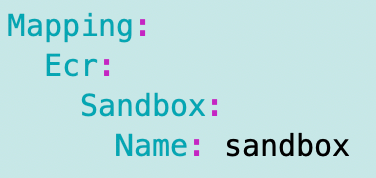
And a messy Join statement which took a while to sort out. Yuck.
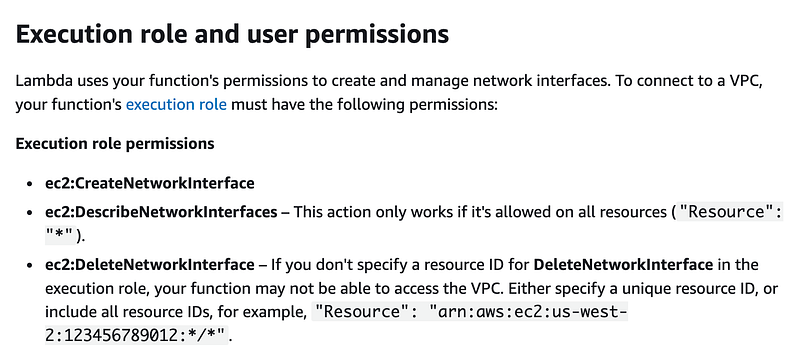
This leads me to the next error. I forgot what permissions a Lambda function requires. This is helpful:
The provided execution role does not have permissions to call CreateNetworkInterface on EC2
Oh yeah. I need to add that permission to the Lambda Policy. From the documentation:
Well, I don’t love that the Lambda function policy doesn’t have a good way out of the box to limit the deletion of network interfaces to the one assigned to it. I wish AWS would fix this. It seems like it would be easy to name the network interface the same name as the lambda function with network interface at the end. But for now I’m going to use the guidance above. For, I am going to use an asterisk in the policy. I plan to revisit this later and show you how to improve the security as time and resources allow.
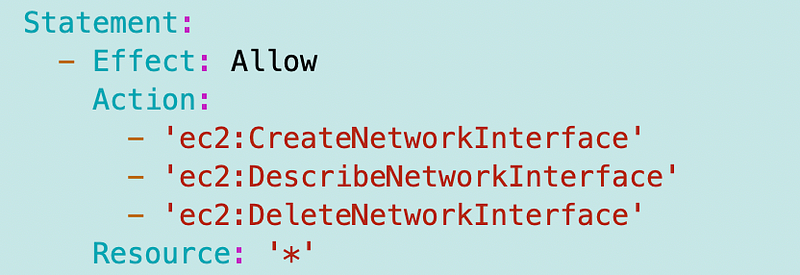
Typo above — should have an s at the end of DescribeNetworkInterafaces.
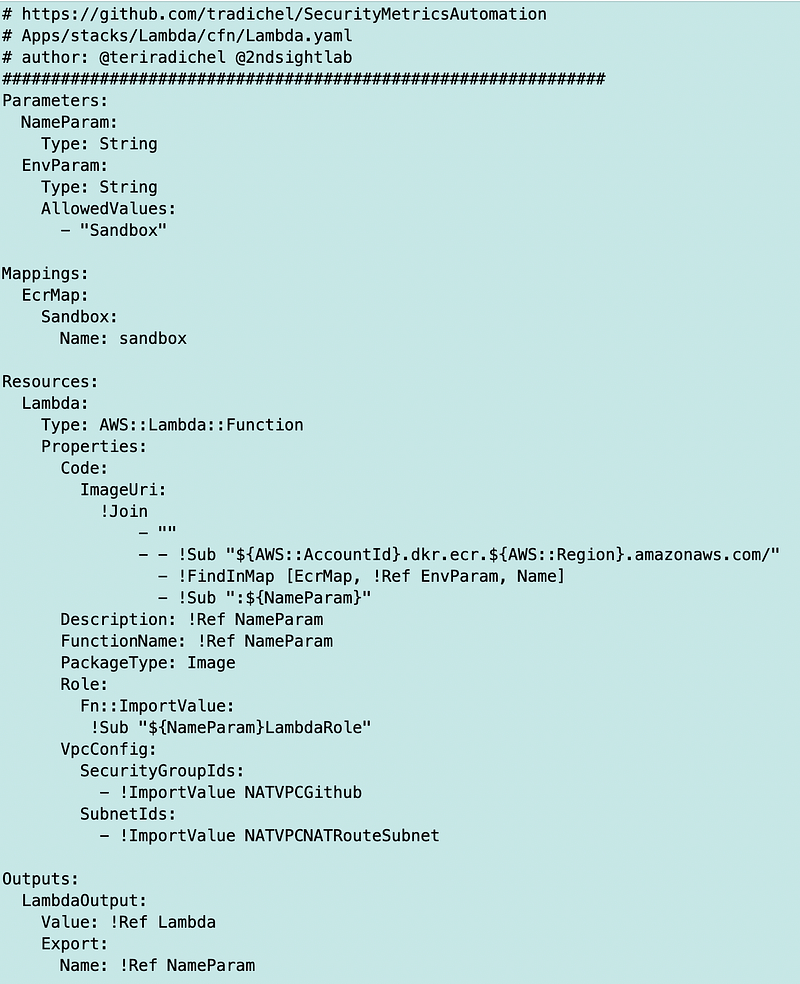
Anyway, after this and ensuring that the docker container existed in the repository, the stars aligned. The Lambda function deployed. It took a very long time to deploy. But it worked. Final code:
Lamba.yaml
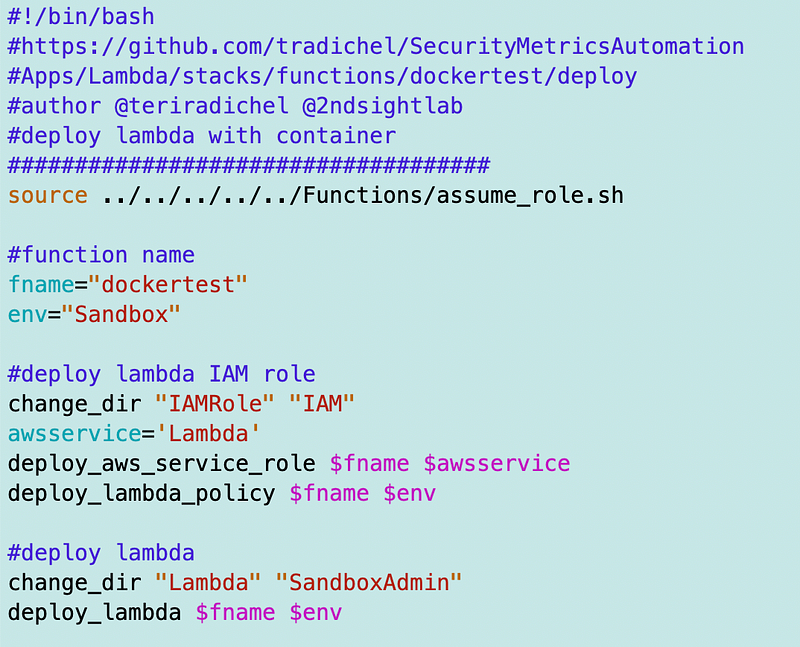
Deploy script for each Lambda function. Recall this is using a lot of reusable code that will eventually end up in my GitHub repo if it’s not already there. But this is all it takes to deploy a new Lambda function with a common template so far, if you’re following my naming convention.
Service Role:
Lambda Policy (which still needs updates. See next post.)
Updates for logging in this post:
Now, I spent more time on this than required because remember my goal is not to only deploy a Lambda function with a container. I’m trying to create a reusable template so that in the future I can just create a container and easily deploy a Lambda function with minimal CloudFormation deployment changes.
Although I got this to deploy, I need to test it. I need to see if my container can reach out through the NAT as required. I’m going to show you that something is missing in our network configuration. Does logging work? I’ve been debating using command line options versus something like the GitHub API. I’ll tell you what I think I’m going to do, pending testing, in the next post and why. I also want to make the networking a bit more generic and easy to understand across environments.
Also, I’ll be pushing all this to GitHub when it’s complete and cleaned up.
Right now my puppy is mad at me for taking too long on this and he needs a walk. I’ll test out the Lambda function and container in the next post.
Follow for updates.
Teri Radichel | © 2nd Sight Lab 2023
About Teri Radichel:
~~~~~~~~~~~~~~~~~~~~
⭐️ Author: Cybersecurity Books
⭐️ Presentations: Presentations by Teri Radichel
⭐️ Recognition: SANS Award, AWS Security Hero, IANS Faculty
⭐️ Certifications: SANS ~ GSE 240
⭐️ Education: BA Business, Master of Software Engineering, Master of Infosec
⭐️ Company: Penetration Tests, Assessments, Phone Consulting ~ 2nd Sight Lab
Need Help With Cybersecurity, Cloud, or Application Security?
~~~~~~~~~~~~~~~~~~~~~~~~~~~~~~~~~~~~~~~~~~~~~~~~~~~~~~~~~~~~~
🔒 Request a penetration test or security assessment
🔒 Schedule a consulting call
🔒 Cybersecurity Speaker for PresentationFollow for more stories like this:
~~~~~~~~~~~~~~~~~~~~~~~~~~~~~~~~~~~~~~~~~~~~~~~~~~~~~~~~~~~~~
❤️ Sign Up my Medium Email List
❤️ Twitter: @teriradichel
❤️ LinkedIn: https://www.linkedin.com/in/teriradichel
❤️ Mastodon: @teriradichel@infosec.exchange
❤️ Facebook: 2nd Sight Lab
❤️ YouTube: @2ndsightlab


