
Different Types of Man-In-The-Middle Attacks
ACM.297 Different points of MITM attack and how they can affect victims and websites
~~~~~~~~~~~~~~~~~~~~~~~~~~~~~~~~~~~~~~~~~~~~~~~~~~~~~~~
⚙️ Check out my series on Automating Cybersecurity Metrics | Code.
🔒 Related Stories: AWS Security | Secure Code | Data Breaches
💻 Free Content on Jobs in Cybersecurity | ✉️ Sign up for the Email List
~~~~~~~~~~~~~~~~~~~~~~~~~~~~~~~~~~~~~~~~~~~~~~~~~~~~~~~
Often people will talk about a Man in the Middle (MITM) or sometimes called Monkey-in-the-middle attack and say that it is required for a particular attack to work. But what does that actually mean?
There are different points at which these attacks can occur. In order to properly evaluate the risk and defend against MITM attacks you need to understand where they can occur and the implications of the different types of MITM attacks. In some cases the risks associated with the malware that enabled the MITM attack itself are greater than the vulnerability facilitated by it.
In other cases, malware is not required for an MITM attack. The traffic can be inspected simply because it is unencrypted and passing over a particular network device. There are different ways to address these different points of attack.
Although MITM is related to encrypted traffic, HTTPS, HSTS and other types of attacks, understanding the point of attack and how it works will help you understand if a particular security control is relevant for that particular attack. It will also help you understand the level of risk and where to spend your efforts when addressing a particular type of attack.
MITM on your laptop
Malware can get onto your laptop or home computer. In this scenario an attacker can read any unencrypted traffic you send over the network using a sniffer.
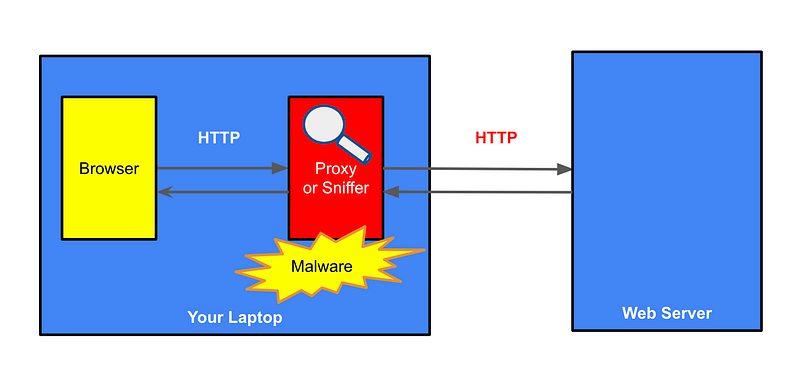
Not only can they read the traffic, they can alter the traffic sent back to your browser. Perhaps they will send malware back to your browser. This doesn’t make a lot of sense if they already have malware on your system. But consider how this might be useful when the malware is positioned at the other locations described later in the post where the malware does’t have access to the system memory, unencrypted data on the host, and so on. In those cases, the MITM might help them insert something into a response sent back to your system that allows an attacker positioned on a network appliance to install malware onto your machine.
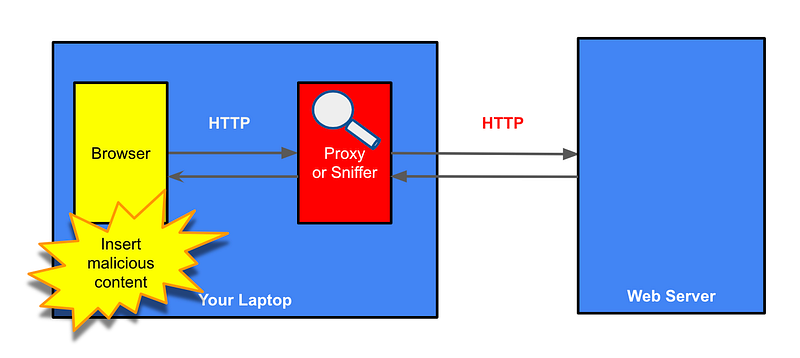
Now before we get into all the details of websites and HTTPS, consider that if malware is on your laptop, it may have installed a key logger, making HTTPS irrelevant. It may have inserted itself into memory, be copying your clipboard, or inspecting traffic other than HTTPS traffic.
Also consider that HTTPS traffic is only one type of traffic sent from your machine to the Internet or other devices on your network. If you are using an SSL VPN (which should now be called a TLS VPN), it might not be protecting all your traffic, only the HTTPS and HTTP related traffic.
So if you have malware directly on your laptop you probably have a problem that transcends HTTP and HTTPS traffic sent to websites, but for the sake of understanding an MITM attack on your laptop let’s go through the scenarios of how it might affect you when visiting websites. Then I’ll move on to other points where MITM attacks may exist between your laptop and the intended web server.
Malware sniffing network traffic
If malware gets onto your laptop it may be sniffing your network traffic. I wrote about sniffing traffic in this post. A sniffer like tcpdump can see all traffic set to a particular network interface. However, if that traffic is encrypted web traffic, the sniffer may only see gibberish.
A sniffer may be operating on your laptop or somewhere else on the network. I wrote about how a VPN may or may not help here:
And as a side note, why you should be careful with DNS over HTTPS here:
Malware acting as a proxy
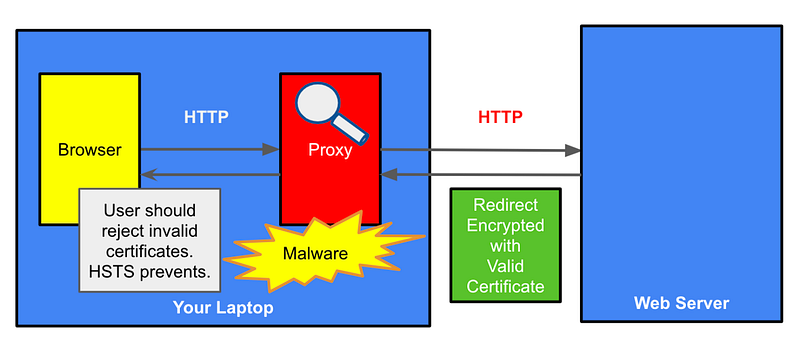
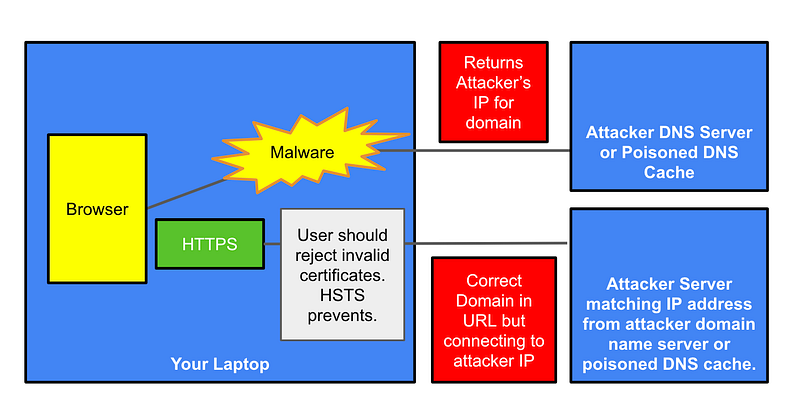
In addition to a network packet sniffer, an attacker might install proxy software which can intercept and then forward your traffic to web servers. In that case, an attacker can also inspect any unencrypted traffic to and from web servers. It will only be looking at HTTP and HTTPS traffic, whereas a network sniffer can potentially see all traffic sent by your system.
As mentioned, one of the differences is that with a network sniffer won’t be able to see payloads of traffic encrypted with HTTPS. However, a proxy intercepting the traffic might be able to trick a user into accepting an invalid TLS certificate. After accepting the rogue TLS certificate the user may think they are are only sending traffic securely to the requested website, but they are actually sending encrypted traffic to the malware.
From that point, the malware views the contents of the web requests and forwards the request, possibly altered, to the web server using the valid web server certificate. It might pass along user credentials, for example, the the user provided in the request to the malware. Then the malware returns a response to the user. The user may never know that an attacker intercepted the traffic once the invalid certificate is accepted.
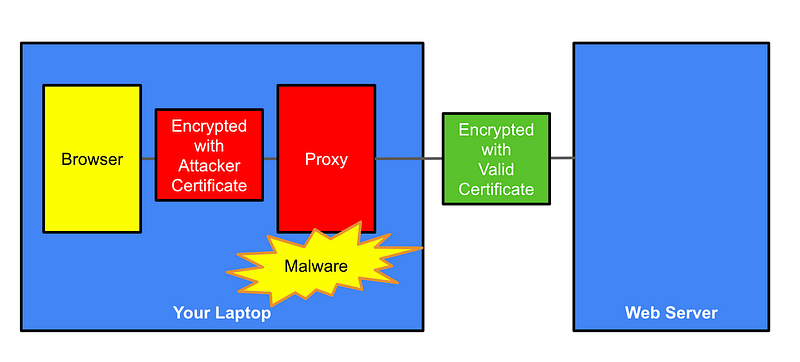
Besides returning malware for a website, an MITM attack might return invalid content, for example, directing users to an invalid phone number or email address or a rogue link. But again, in order to do that, the attacker has to be in a position to intercept and change the content as it traverses the Internet. In addition to malware on a user’s machine, I’ll go over some other points at which this can occur below.
Web servers can return an HSTS header which disallows a browser from accepting an invalid certificate for that site.
To summarize:
If an attacker can get a MITM attack on a host AND can convince you to accept an invalid certificate AND the website allows you to accept an invalid certificate, then it doesn’t matter whether the web server uses HTTPS or not. The malware can decrypt the traffic and make it’s own connection to the web server as shown above.
To prevent this:
- Keep your software up to date on systems.
- Only visit websites using HTTPS links.
- Use a browser that automatically directs you to HTTPS before sending a request, when it is available.
- Do not accept any invalid certificates if you get a warning message.
- Use HSTS on your website to disallow users from accepting invalid certificates for your website.
Malware and redirection
If an attacker can intercept an HTTP only request before it is redirected to HTTPS the attacker could inject content or redirect the user to an alternate site.
Let’s look at how that might work:
- If a user requests a website using HTTP and the user is redirected before ever getting a response from the web server, and the browser doesn’t check to see if that website is available via HTTPS and redirects before sending the request, then the user will never get a HSTS header back from the intended web server. The HSTS header doesn’t help if the user never gets a response from the intended web server.
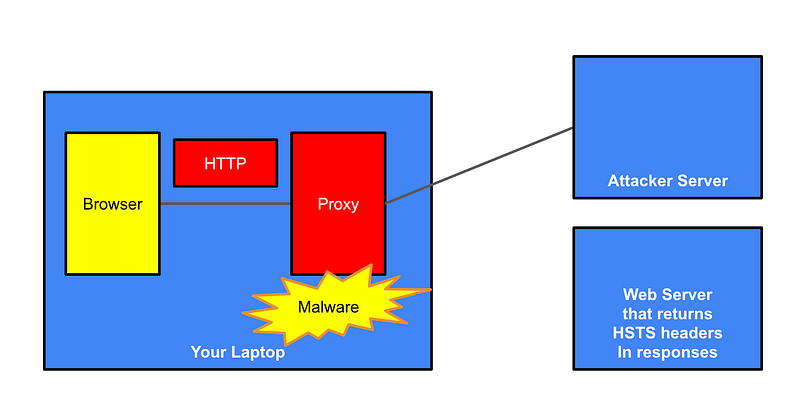
- If the web server redirects to HTTPS then the attacker cannot alter the content sent back to the user without getting them to accept the invalid certificate.
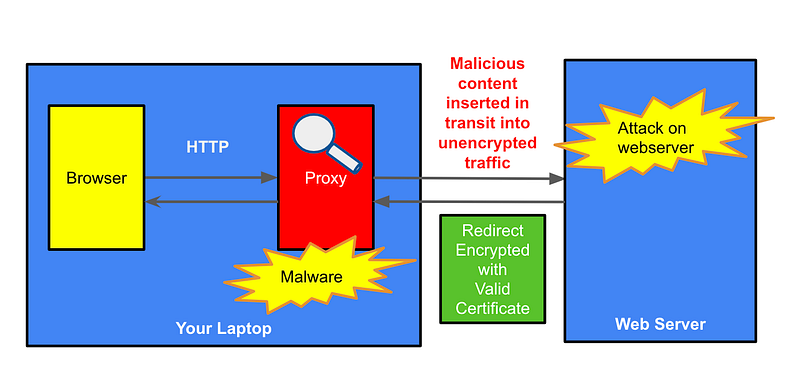
- However, the attacker might send something malicious to the web server that allows them to perform an attack that looks like it is coming from the user. If the website has such a vulnerability that is generally a problem with or without an MITM attack unless the web server restricts to something specific to the web request coming from the original user in the initial web request that the attacker wouldn’t have without access to that request.
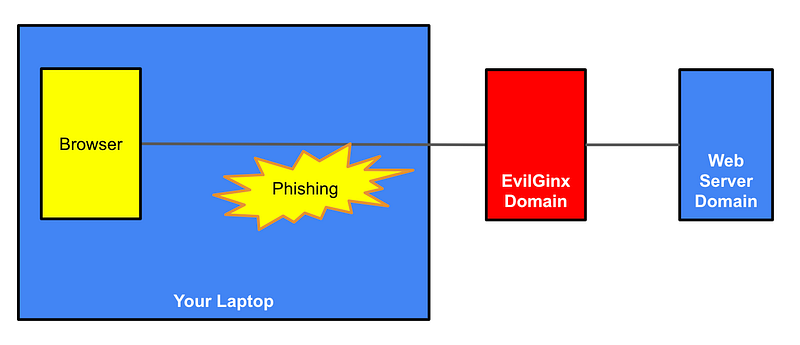
- If the attacker redirects the user to a different website, then the user should see a different URL in their browser. Users don’t always notice this but it should help them figure out something suspicious is happening. Unfortunately, based on a recent string of phishing attacks on Okta it is too easy for this to go unnoticed. To protect against phishing attacks use hardware MFA keys as I explained in this post:
- In the above post I mentioned EvilGinx which essentially makes a copy of a valid website and steals the credentials as it forwards traffic to a legitimate web application, like Okta. This type of attack was likely used in the Oktapus breaches.
- If the DNS server settings on the system have changed or the DNS cache is poisoned, the attacker could return their own IP address for a domain instead of the correct IP address.
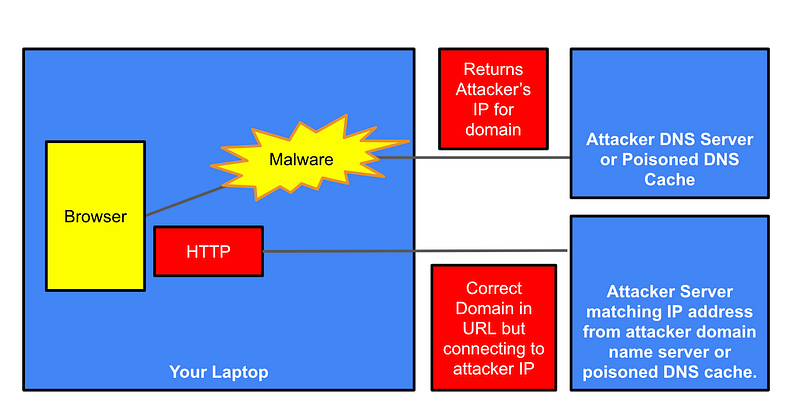
If an attacker can spoof a domain IP address, you have much bigger problems than HTTPS or HSTS. See these posts for information on securing DNS.
- If the user visits a page with an HTTPS URL and malicious DNS responses have changed that IP to an invalid one the user should get a certificate error. Do not accept invalid certificates.
MITM on your firewall
Now consider all the attacks above. Most of them still work if you move that attack to another device on the network. Let’s say the malware is on your firewall. I can sniff traffic on my network using my pfSense as I demonstrated in this post. If there’s any unencrypted traffic traversing my firewall I can see the payloads. An attacker that gets malware onto the firewall can too.
If an attacker can install malware on the firewall, it can potentially do all the things that it could do above but from a different vantage point. It can’t see the memory on your laptop or the traffic before it ever gets encrypted. The attacker would need to trick you into accepting some rogue certificate or visit an invalid site using attacks similar to the above.
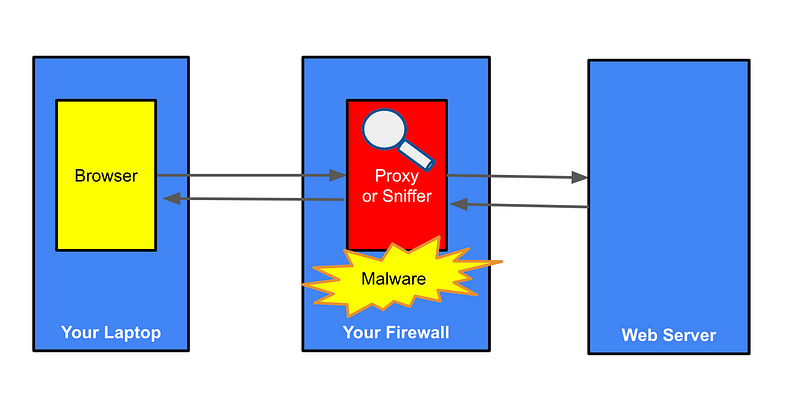
Note that some network administrators MITM traffic sent over firewalls intentionally to inspect the traffic you send over the network to protect systems against malware and other threats. As I wrote about in another post, network devices cannot inspect encrypted traffic.
On your wifi router
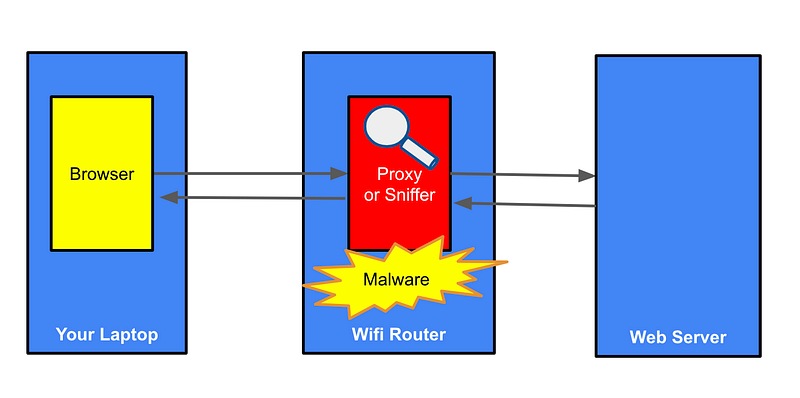
An attacker or rogue administrator could be inspecting your traffic as it traverses a wifi router. This includes your wifi router, that hotel or free wifi router to which you connected, or an Evil Twin look alike access point that is impersonating a correct router set up using a Wifi Pineapple or some other similar mechanism. If you are connecting to websites with valid HTTPS certificates you are protected against many attacks, however, as mentioned above, HTTPS is only one of the types of traffic sent from your laptop. An IPSEC VPN will tunnel more of your traffic than a TLS VPN that only protects HTTPS traffic.
Your Mobile Phone
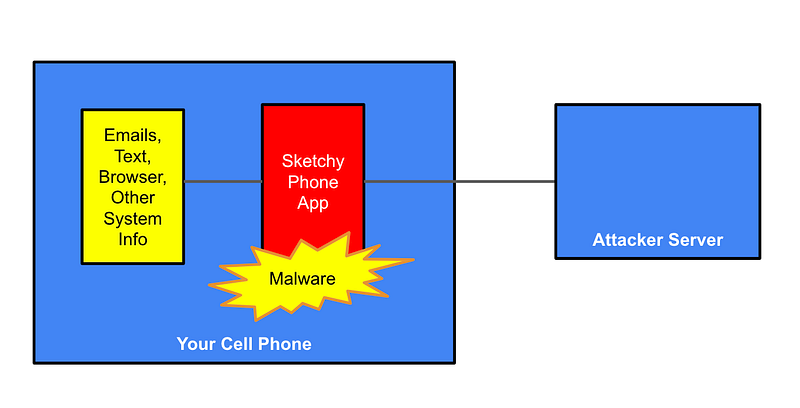
Any mobile application that has a vulnerability or that you download from a sketchy source may be able to get access to your information, or the information on your phone. If you willingly install an application from a source known for hacking into systems and stealing data you may be at risk.
I reiterate the problems with certain governments that have a history of attacking resources in the Untited States, if you are a US citizen. If you are in another country you may have the opposite viewpoint about US sources:
Recently Apple patched a large number of what are called zero days (see my book at the bottom of this post if you don’t know what those are.) If you have installed an application on your device and a known vulnerability is announced, an application on your device might be able to take advantage of that vulnerabililty more easily and intercept, read, or change your data.
This is why, in part, the US government has an issue with TikTok, besides the social engineering impact. Did you know that in China, most TikTok content is educational, unlike content in the US? Did you know that videos have been the source of data breaches such as the video sent to Jeff Bezos’ cell phone to breach his private messages? Are you aware that videos from TikTok are included in your Facebook feeds and automatically run at the time of this writing?
Any vulnerability in the systems we use can take advantage of flaws that let attackers access our data, or simply change what you see to try to influence your opinions — sometimes in favor of what a foreign government wants you to believe. I could write volumes on this topic alone but I’ll leave it at that.
By the way Temu, which offers you cheap products, is also a Chinese company. I looked into making a purchase with Temu as I’m not against buying goods from China. But I became a bit suspicious when I was required to install an app to make the purchase. Why can’t I just purchase on the website? Hopefully people are carefully monitoring what these applications are doing.
Any network device
There may be many other types of devices in between you and a web server that may be infected, intentionally or not, with MITM software of some kind. In some cases, a malicious insider can inspect the traffic on the network without installing any malicious software due to their access to the systems and the logs, the same way I was able to inspect my own network’s traffic via my firewall in the post above.
- Your corporate office might run a proxy server to inspect and allow or disallow certain domains.
- The web server itself may be accessed to inspect traffic to and from web visitors.
- Anything the host that runs the hypervisor for virtual machines can see may be visible as traffic leave the VM and traverses the hypervisor host to access the Internet.
- A load balancer forwarding traffic.
- Routers that pass your traffic from one network to the next.
That’s why there’s so much concern about vendors like Huawei that exist in a country where the government basically demands that any vulnerabilities are reported to them first before anyone else — a country known for not only spying to protect itself but also corporate espionage.
If a government or organization can leverage a known vulnerability to get onto a network device it can intercept your traffic as it traverses the Internet. That includes traffic sent through your Internet Service Provider to some other location.
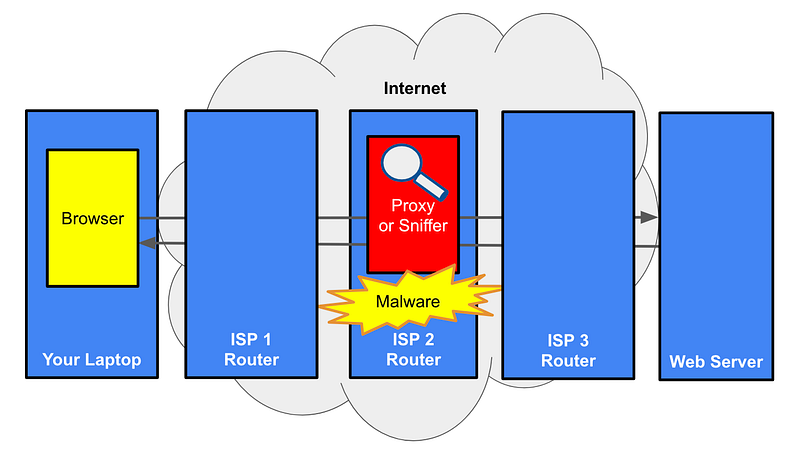
Beyond HTTPS and HSTS to protect against MITM
The above scenario is why companies often want to restrict traffic to private networks. For example, you can restrict traffic between your company and another vendor to the AWS network using AWS Private Link.
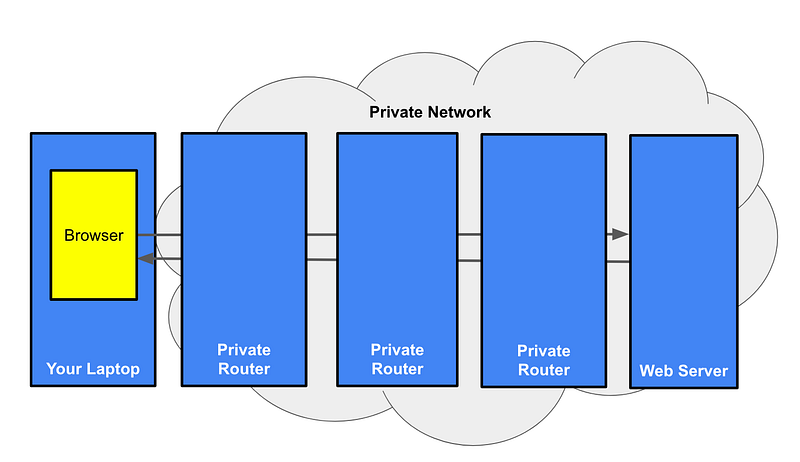
Unfortunately not all vendors support that. I mentioned that at the time of this writing, Okta doesn’t support that option.
All three major cloud providers have similar private network offerings, as well as offerings to send traffic from your data center directly to the cloud provider networks, without any intermediary routers on the Internet as shown in the image above. For non-cloud environments companies can create private networks between themselves and vendors using private lines and other types of software defined network options.
How does all this relate to securing your website?
In my last post, I was considering the risk associated with certain configuration options related to my website. One of the missing security headers was HSTS. As you may recall my site is completely static. No cookies for authentication or authorization or even tracking. No JavaScript. No forms or data collection of any kind. There’s nothing to steal if a user happened to visit one of my pages via HTTP.
Not only that, modern, secure browsers and the site itself redirect to HTTPS. Perhaps an attacker could keep a user on an HTTP connection by never visiting the server hosting my webpage, but in that case an HSTS header isn’t going to help anyway since the connection is never made to the server to get the header. If they ever tried to change to HTTPS with my domain but the wrong IP address, a certificate error would pop up.
All the risk associated with that missing header seems very low, but it’s easy to add so I’ll add it in a future post. I could spend time proving or disproving whether an attack is possible, but it will take me less time to simply add the header.
Note that if I am running Burp or ZAP and intercepting my own traffic with a certificate configured to intercept traffic — I can deface any website. That doesn’t prove anything.
What does matter is if, in transit to my web server via HTTP for the initial web request, some rogue network device between the client and my website redirects the client to an HTTP only website. If an attacker changes the destination in transit to an alternate domain the customer would see something other than:
It’s a low risk, but still, an attack is possible, so I’ll go ahead and fix that HTTP header. It would take me more time to prove there is or is not a problem than to just fix it. I might go ahead and demonstrate the attack in a separate post.
For any customers who want to verify they are dealing with me and not some rogue third party intercepting traffic, I always ask all customers to connect with me on LinkedIn prior to doing business and to validate any communication. I also generally set up a phone call with clients prior to doing business. Validating you are communicating with the correct person through multiple channels is generally a good idea when doing business over the Internet.
Follow for updates.
Teri Radichel | © 2nd Sight Lab 2023
About Teri Radichel:
~~~~~~~~~~~~~~~~~~~~
⭐️ Author: Cybersecurity Books
⭐️ Presentations: Presentations by Teri Radichel
⭐️ Recognition: SANS Award, AWS Security Hero, IANS Faculty
⭐️ Certifications: SANS ~ GSE 240
⭐️ Education: BA Business, Master of Software Engineering, Master of Infosec
⭐️ Company: Penetration Tests, Assessments, Phone Consulting ~ 2nd Sight Lab
Need Help With Cybersecurity, Cloud, or Application Security?
~~~~~~~~~~~~~~~~~~~~~~~~~~~~~~~~~~~~~~~~~~~~~~~~~~~~~~~~~~~~~
🔒 Request a penetration test or security assessment
🔒 Schedule a consulting call
🔒 Cybersecurity Speaker for PresentationFollow for more stories like this:
~~~~~~~~~~~~~~~~~~~~~~~~~~~~~~~~~~~~~~~~~~~~~~~~~~~~~~~~~~~~~
❤️ Sign Up my Medium Email List
❤️ Twitter: @teriradichel
❤️ LinkedIn: https://www.linkedin.com/in/teriradichel
❤️ Mastodon: @teriradichel@infosec.exchange
❤️ Facebook: 2nd Sight Lab
❤️ YouTube: @2ndsightlab


