
Why The Stream Rules Don’t Work in Suricata on pfSense
Vendors not following specifications, misconfigured devices, false positives, and rule implementation issues
~~~~~~~~~~~~~~~~~~~~~~~~~~~~~~~~~~~~~~~~~~~~~~~~~~~~~~~
⚙️ Check out my series on Automating Cybersecurity Metrics | Code.
🔒 Related Stories: Network Security | pfSense | Cybersecurity
💻 Free Content on Jobs in Cybersecurity | ✉️ Sign up for the Email List
~~~~~~~~~~~~~~~~~~~~~~~~~~~~~~~~~~~~~~~~~~~~~~~~~~~~~~~
I mentioned I’ve turned on Suricata on pfSense and Suricata flagged some rules using the default ruleset.
In order to take a closer look at the alerts, navigate to:
Services > Suricata > Alerts
Here you can see some of the traffic that is causing Suricata to send alerts.
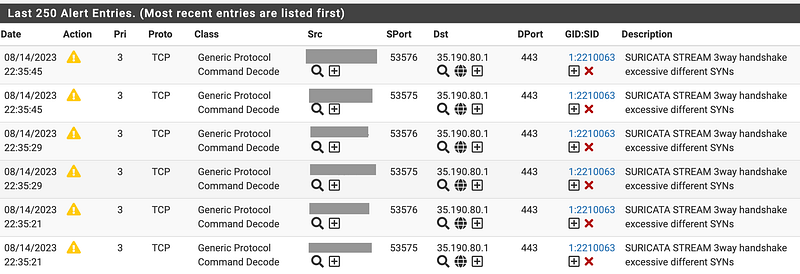
As expected, the traffic is coming from Google. I explained how to look up owners of IP addresses at ARIN.net and other registries in some of my other posts on network security. This particular traffic is destined for (I presume) Google Cloud Platform (GCP).
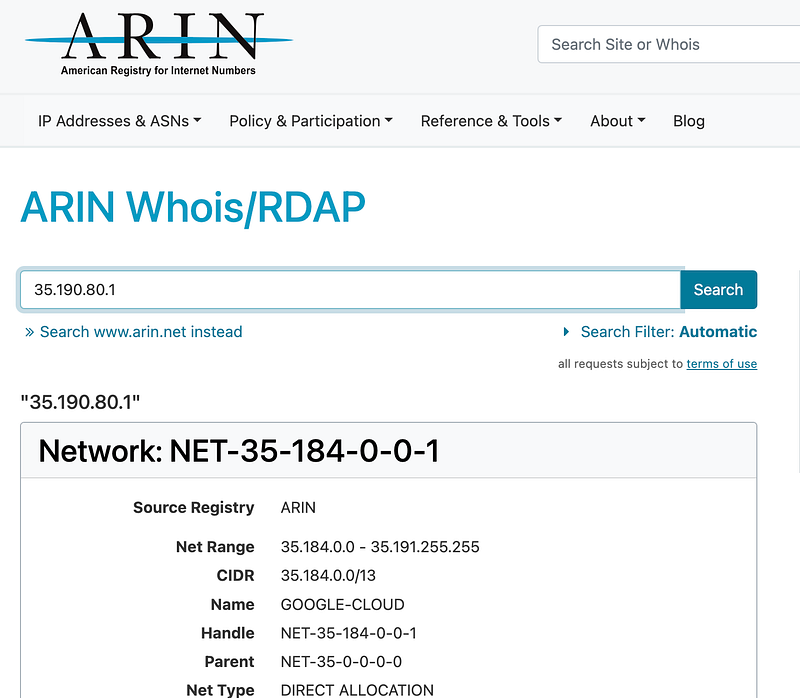
Google has a history of sending traffic in non-standard ways that cause problems for network devices as I have written about in the past.
Google Cloud’s network implementation is also unique, shall we say, but it has some good features too. It just seems like Google engineers are more well-versed at the application layer than the network layers from what I can tell.
Although QUIC is often giving me grief, if you take a look at the protocol, it’s TCP not UDP, so this isn’t QUIC. We also know that from the “3way handshake” in the description which indicates a TCP issue, not UDP, the protocol used by QUIC. You can see the differences between QUIC and TCP on this slide:
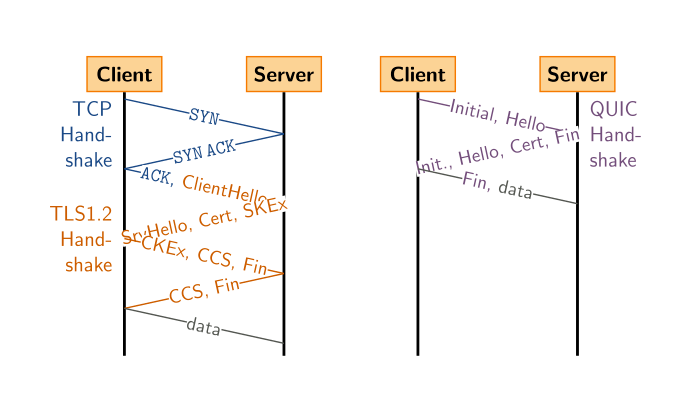
Yay cool. QUIC is faster. But is it secure? I’ll leave that debate for another time. I’ve already written about how this protocol messes with your attempt to create secure firewall rules.
But, I digress. What is this Google traffic doing now? And is it Google? Or is it a Google customer?
Well we can click on the rule number to look at the rule:
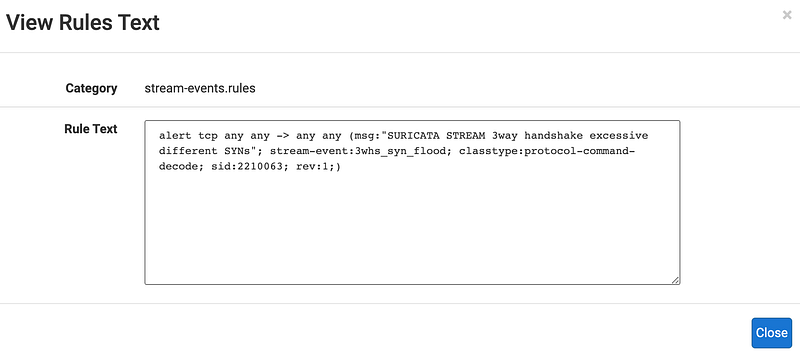
OK so it’s a stream-event rule. It’s a rule that tries to figure out if the source sending the traffic is following the TCP specification properly, otherwise it will reject the rule.
And this is where breaking the rules of the TCP protocol becomes a headache for network security administrators. By not following established specifications, rules to detect malicious traffic becomes more difficult. Rules that used to work don’t work anymore and users don’t understand why — they just want to watch their soccer or moves or whatever.
In fact, Google is actively trying to change the specifications to make things “faster” and “more efficient” but not necessarily “more secure.” What is touted as “more secure” is not always “more secure” if you don’t understand the complete picture.
I wrote about that form of faulty logic here.
Anyway, we can find these rules on GitHub.
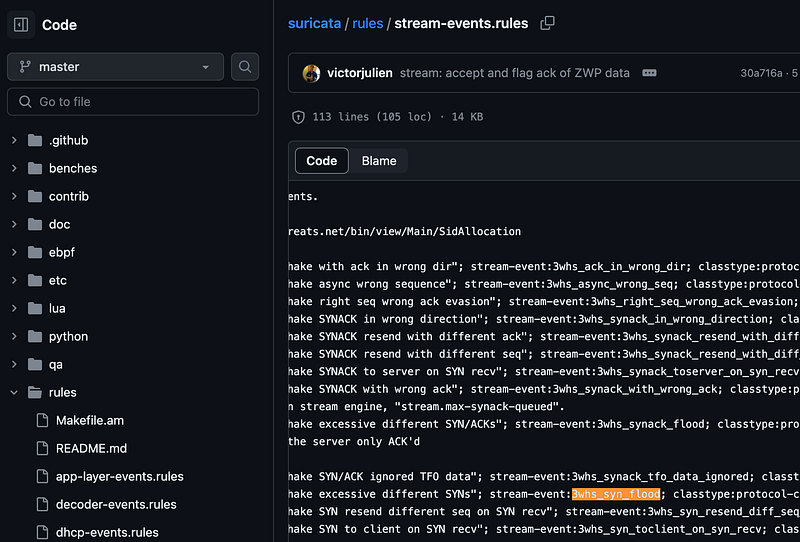
However, that list does not get into the nitty-gritty of exactly how the TCP rules work and what is causing this SYN flood. These rules seem to reference something that is baked into Suricata. But I’m not going to that level of detail in this post.
What is a SYN flood anyway?
The TCP handshake works by sending a SYN packet, followed by an SYN-ACK packet and then an ACK packet (or something like that depending on who is sending the traffic. (Others have also broken some rules in this regard, by the way. Take a look at the 4-WAY handshake if you are curious to get into that.)
Anyway if you are not familiar with TCP flags they are bits that get flipped in a packet to indicate whether the packet has the SYN flag set, the ACK flag set, etc. If you want to know more about bits and flags in packets you can start by checking out this series on cybersecurity math. I go into a few of the details on the bits in packets but I don’t remember how extensively I covered TCP flags. I can write more on that later if people are interested.
Without going into all of it, the TCP handshake is supposed to follow a certain pattern, but sometimes attackers will send a SYN packet but they never send the final ACK in the expected handshake protocol. They may send a whole bunch of SYN packets to tie up your machine so it’s waiting for a response to the SYN-ACK your systems send in return. So your system is flooded with SYNS and it’s waiting for responses that never come and it gets maxed out so it can’t accept any more packets.
The logic to evaluate the TCP handshake is baked into Suricata somewhere and these rules reference that logic. In theory, they should work. A SYN flood should mean that an attacker is bombarding your system with SYNs. But when companies come along and don’t follow the specifications, the rules don’t work anymore, and they are not easy to fix since they are baked into Suricata code, not a rule you can easily manipulate.
Is this traffic malicious or not?
Is my system being attacked by a SYN flood? Or is this simply the case of Google Cloud Platform (GCP) or something on Google Cloud Platform not following the rules established for TCP in the specification? How would I know?
In order to know if this is an attacker, a misconfiguration, or a false positive, we need to dig into the traffic to see who is sending the SYN packet that are triggering the rule and why. It could be Google. It could be a misconfigured internal system that is incorrectly sending a bunch of SYNs. It could be a malfunctioning rule in our firewall or Suricata. It could be traffic that doesn’t abide by the expected protocol. We don’t know until we dig into the packets.
Well, I could use the packet inspection feature on pfSense to take a look at the packets more in depth. You can get to that here presuming the packets are still occuring.
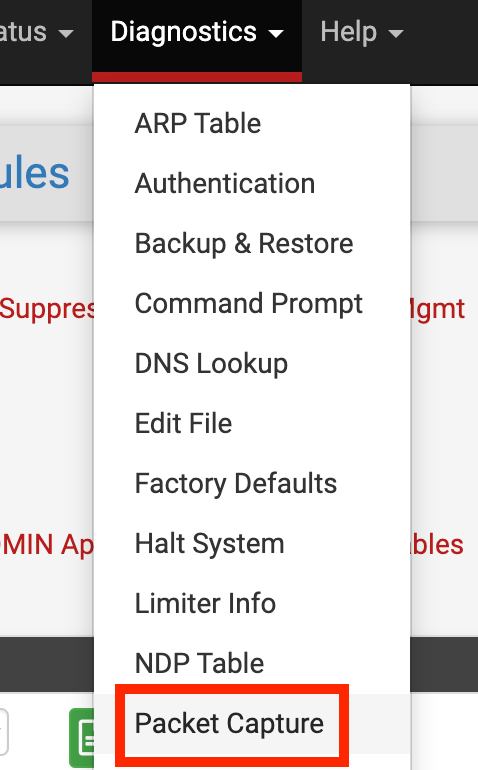
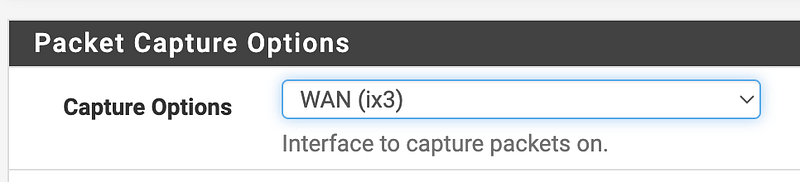
Choose the interface associated with the alerts you want to inspect.
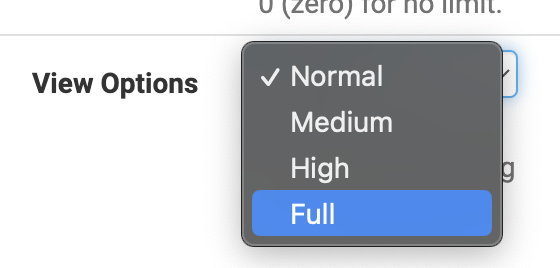
I use Full for view options:
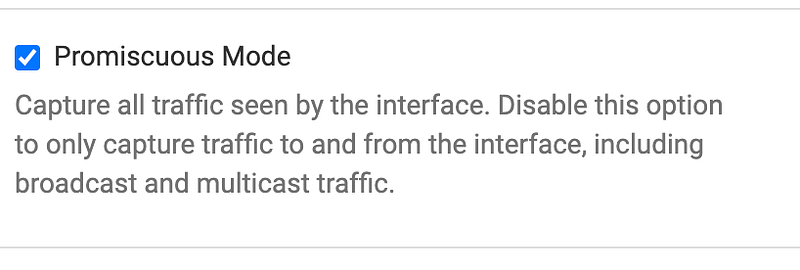
I leave promiscuous on:
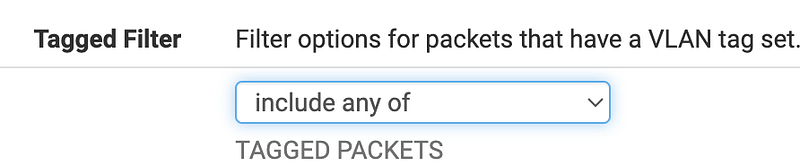
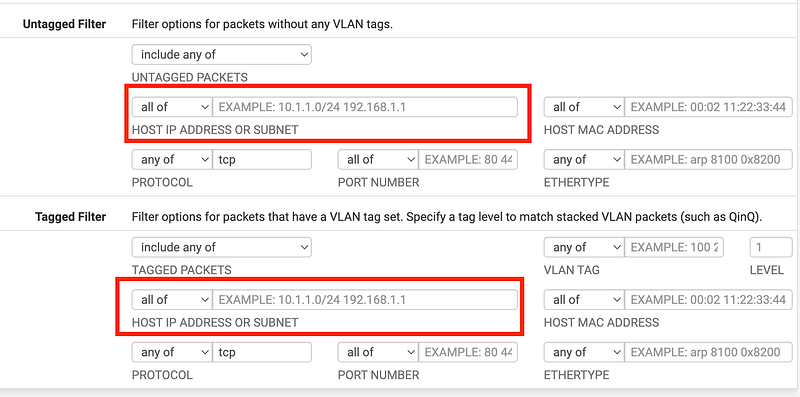
I choose all for the Tagged filter. You may or may not need this but I’m just making sure I see everything.
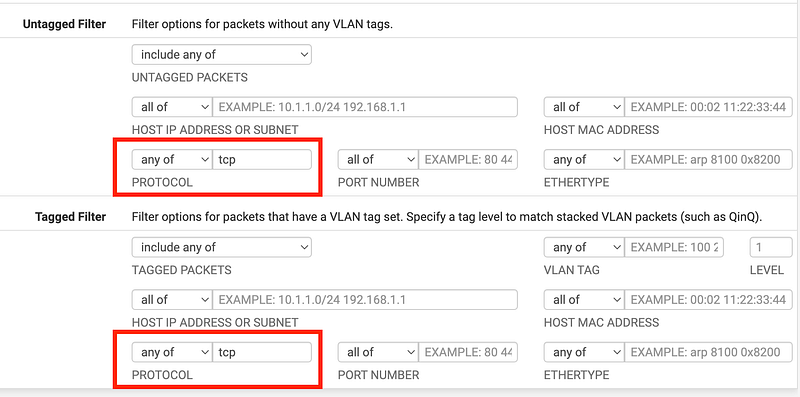
In this case we can limit the traffic to TCP traffic.
Alternatively choose [TCP] from the drop down list:
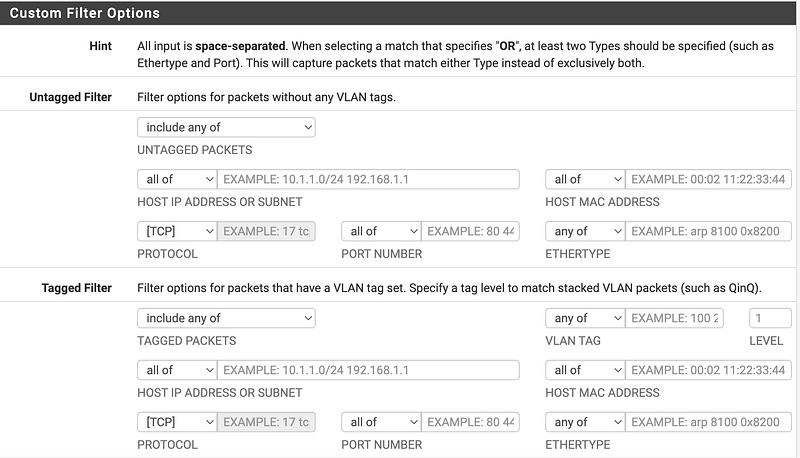
You could further limit the traffic to a specific IP address, but the thing about some Google functionality is that the IP addresses are always changing. If you have many hosts on your own network you can limit to the specific offending host if that makes sense or the MAC address of a particular machine or whatever other parameter limit the traffic to specifically what you seek.
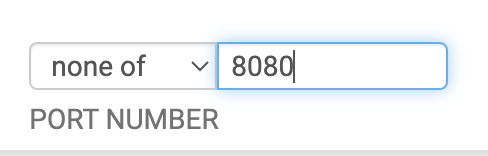
You can also exclude a port number or other values you don’t want to see:
Click the start button.

You’ll start to see some traffic appear in the window if there is any.
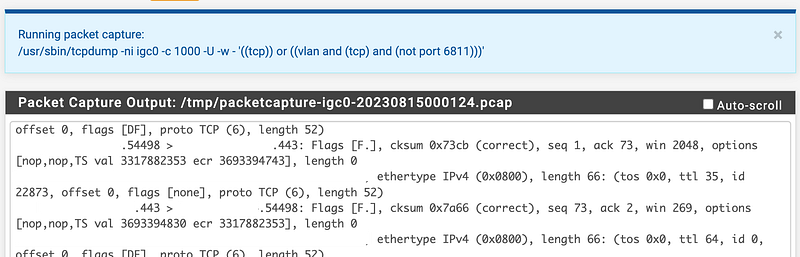
You can look at that traffic as is. However, we can also download the traffic and inspect it in Wireshark. Click the stop button.
Click the Download button. A Dialog window pops up. Save the file.

Open the file in Wireshark. I wrote a bit about Wireshark here:
To see all the SYN flags in Wireshark you can use this filter:
tcp.flags.syn==1
Now if you wanted to see what is in one of those TCP streams you can follow the stream like this:
Right click on the stream, choose Follow > TCP Stream.
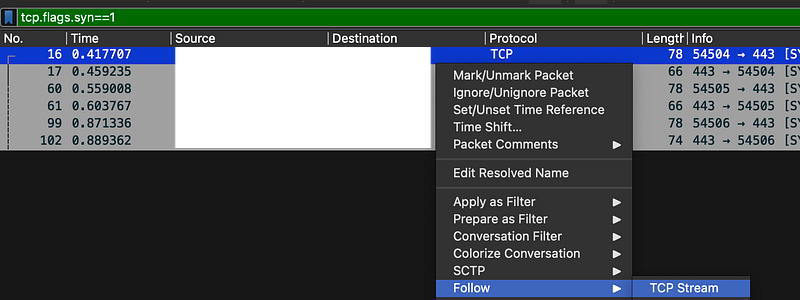
This is where you’ll find out more often than not that the stream is encrypted. That’s why your networking tools can’t understand and block information in the payload unless you figure out a way to man-in-the-middle the traffic as I wrote about in the last post.
However, you might see a few useful bits of text when you follow a stream. In my case, I could see that the stream I viewed was being sent to a particular domain name.
But the part that concerns us is that if you close the popup window you’ll see all the entries associated with that stream based on the query generated for you. In my case the query was:
tcp.stream eq 2If you look at the top three lines and the protocol specification was properly implemented for TCP IPv4 you should see three records indicating:
- SYN in the first packet.
- SYN ACK in the second packet.
- ACK in the third packet.

Here’s a closeup so you can see the flags:
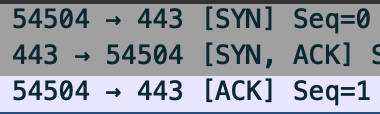
Whatever is generating the Suricata alerts is not following that standard apparently. So you can dig into the traffic, figure out the source of the traffic, and how it is not following the specification properly.
Alternatively, you may actually have a SYN flood on your hands, in which case you should alert the offending network to get it to stop. A SYN flood would be a bunch of SYNs followed by your network sending a SYN ACK and not final ACK sent to your network.
And…when you find that there’s no way around the problem because so much traffic is coming from Google networks that don’t follow the specification or are using a new mangled specification that does’t align with the prior TCP specification, you have a couple of options.
You can block the traffic, likely making users on a home or business network mad at you and no they don’t want to read this article and don’t care. They just want to watch their movies. And in some cases it may be traffic from services your business needs.
You could also separate this network traffic onto a separate interface as I’ve shown you in other posts with rules to keep the traffic separate from your sensitive production data and networking that does follow the rules. Turn Suricata TCP stream rules on for the network that does follow the rules and leave them off for the interface and network that does not follow the rules.
Also be aware that network specifications and protocols are changing a I write this. If you are concerned about the behavior of network protocols get involved so you can ensure someone who doesn’t really understand how network security appliances work does’t break the security of your networks completely and create a protocol that all new devices must follow, even if it is less secure.
So what happened in my case?
I am starting to wonder if blocking HTTPS caused my system to send a bunch of SYNs and because the traffic was disallowed, it never got a response and therefore my system never sent an ACK for all those SYNs when it was trying to connect.
To prove that theory I started to test in more detail by looking at the traffic to find the offending IP addresses. I put those specific IP addresses into my query so I could find the specific traffic generating excessive SYNS.
Basically my theory was right. I think there is a flaw in the way that Suricata implement this rule, not in the way that vendors are sending traffic — at least in this instance. My system is just trying to connect. It sends 5 packets and then stops. I’m not sure if there’s a way to distinguish that from an attacker.
But in the case of pfSense, the firewall should know it blocked the traffic and not send it to Suricata for evaluation. That is also a waste of system resources. The traffic is already blocked, so why are you further evaluating it?
What is happening is that I block a particular port I don’t want to use on one of my interfaces. When applications try to send packets to that port on pfSense it gets blocked. However, the SYN is recorded as blocked and then sent to Suricata. Let’s say the application tries to send the packets five time and fails. Suricata alerts on the fact that my host is sending excessive SYNs. But in fact, this is all expected behavior because I want applications to get blocked that are sending that traffic. I don’t always have control of the applications sending that traffic and it may not be malicious. It’s just that I don’t want that traffic going to a particular source, or using a particular protocol.
Here’s another problem besides the fact that pfSense should not send those packets to Suricata.
Edit the rules for the particular interface you are having issues with and select stream-event.rules.
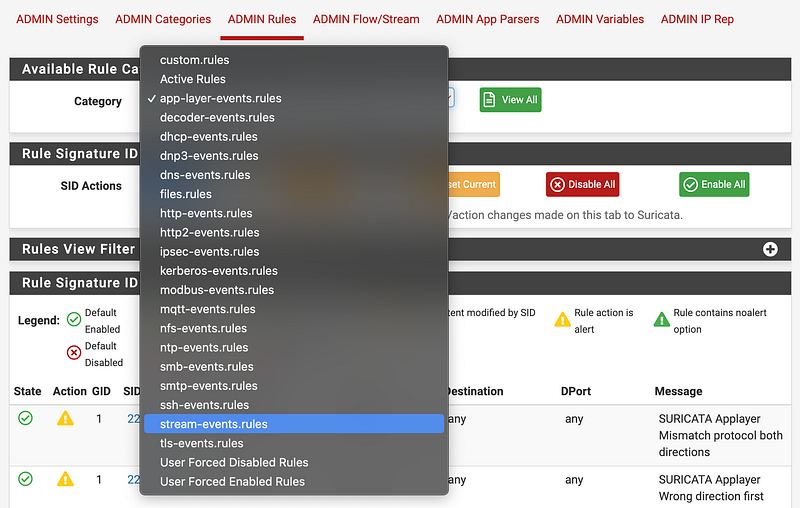
It would be cool if I could easily apply each rule to external or internal traffic without having to edit the rule itself. I also cannot modify the rule here. I also don’t see a simple way to add a new rule. I’m sure you can modify the underlying rule file or host and point to a new rule source but it would be nice if this was easy to modify quickly here or create your own new rules that don’t get overridden. I’m sure there’s a way I just want it to be simpler and more obvious on this screen. :)
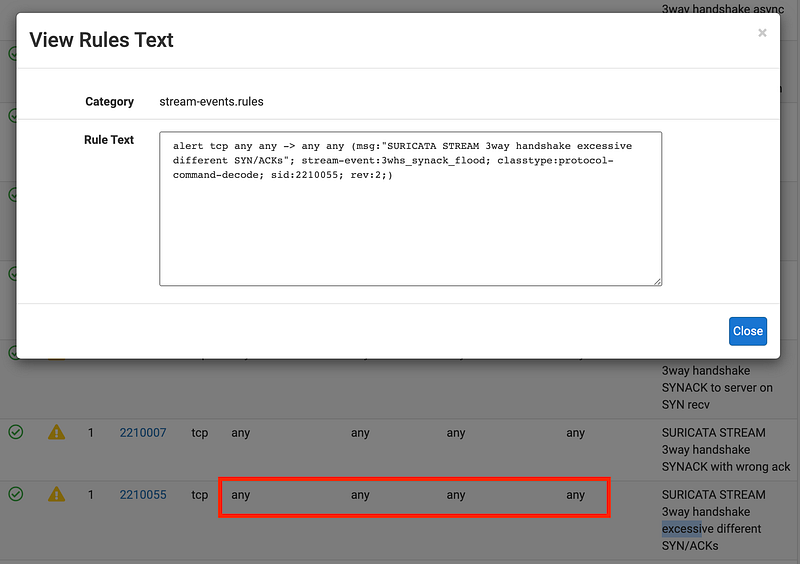
So again, my options are at the moment to completely turn off the rule in this case, or move the offending device to it’s own interface so I can create separate rules for it.
However, I have a few other options now that I see the problem. I can block that port on my localhost firewall and that will prevent the trigger on the network firewall.
I could also try to change the rule to only evaluate inbound traffic and not block excessive SYNs from the local network.
Well, that was fun. This particular network has a tightly controlled machine so that was the only rule I had to figure out.
Update: But wait! There’s more.
After fixing that I turned back on blocking rule. That’s when I hit this lovely problem. Apparently Suricata overrides the admin no-lockout rule. Is this by design? Clearly there’s some kind of problem here with retransmissions which are likely caused by the Suricata rule I’ll write about next. But the anti-lockout rule is there for a reason and Suricata should not override it — or there should be an option to disallow Suricata from overriding it. Did I miss that? In any case I got locked out and had to reboot the firewall to get back into it.

The question is, was that problem above actualy caused by the two prior alerts? In which case, Suricata is facilitating a denial of service attack? Because of the prior two denials, my laptop tries to rertransmit packets and that leads to complete lockout? But these packets came from Google not from my local host to Suricata. I’m not sure what caused the retransmissions. Something to look into later.
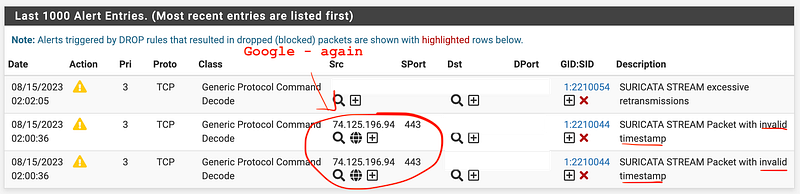
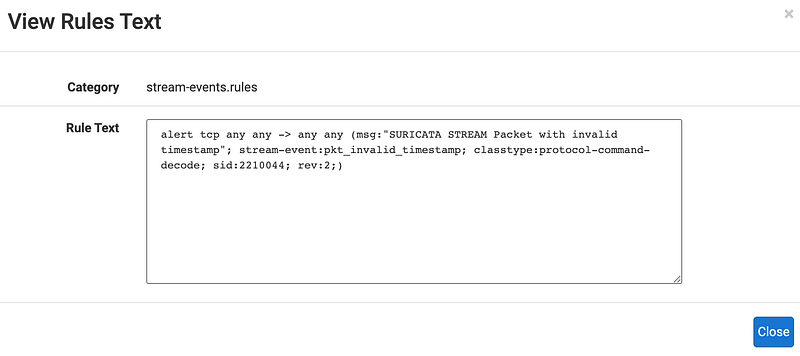
Why do the Google packets have an invalid timestamp and what does that mean exactly? Here’s the rule. Once again you’ll need to dig into the Suricata code.
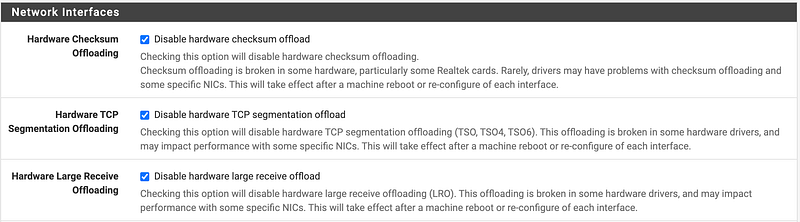
If you see this warning when in blocking mode:

Make sure these boxes are checked. I initially thought unchecking disabled because… um…I wasn’t paying proper attention. You CHECK the box to DISABLE which feels so backwards to me.
Now I’m back to a bunch of these messages from a Google IP address.
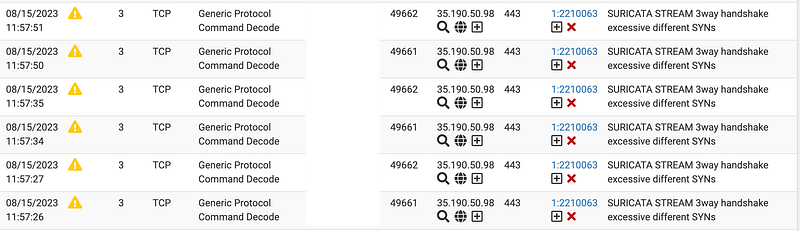
That address resolves to Google user content.
dig -x 35.190.50.98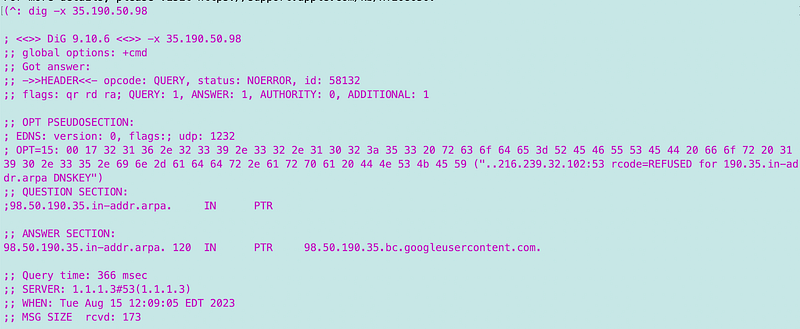
I want to know what the domain name is for that IP address. I know that the way I have my network configured there has a to be a domain name and a TLS record associated with that IP address. I’m going to us the packet capture above again and this time filter on port 53.
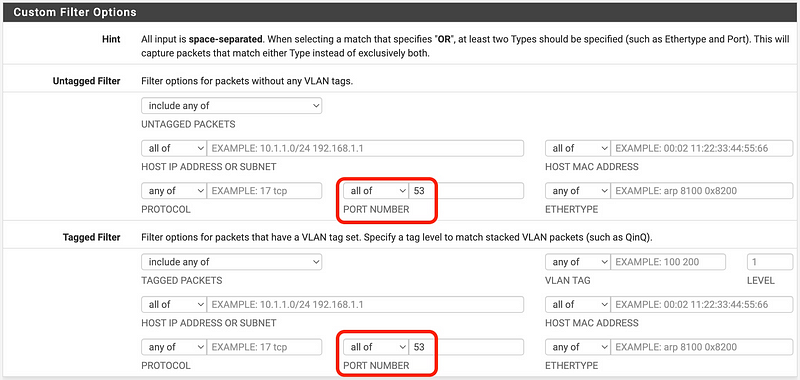
Well, as soon as I tried to do that ^ I got a Suricata alert about a stream overlap while trying to copy and past that image to Medium. The Medium site failed and said it could not upload the image. I’ve seen that issue a number of times before in relation to Medium and images. Is it Medium? Google? My network? Who has time to troubleshoot all these things?
My firewall (pfSense) completely locked up again and once again I needed to reboot. I didn’t see this before when I had the offloading options checked. Coincidence?
The overlap issue is caused by a CloudFlare IP. I have long felt that there is something wrong with how Medium and CloudFlare interact but can’t put my finger on it just yet. There’s something weird about Medium caching functionality.

Here’s the text for that rule:
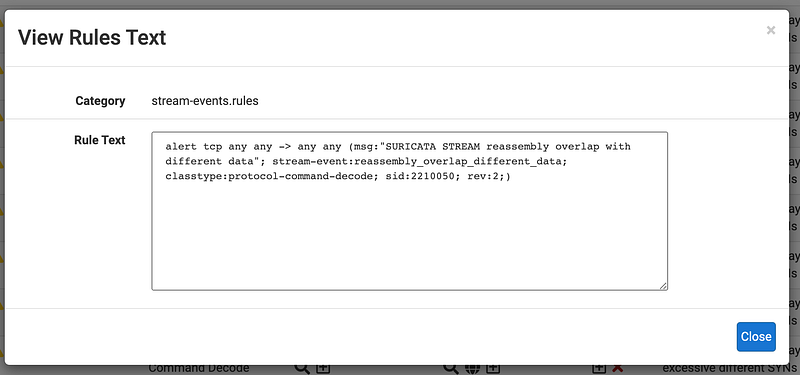
Once again it has to do with how Suricata programmed that check. Curious.
And now I’m back to a number of these errors. Hmm.
SURICATA STREAM 3way handshake excessive different SYNs
But I was looking at domain names when all this broke. Let’s get back to that. Now why do we have to capture DNS requests when we already know the DNS record from the reverse query above? I just realized you can also get this information by clicking on the globe icon in the alert.
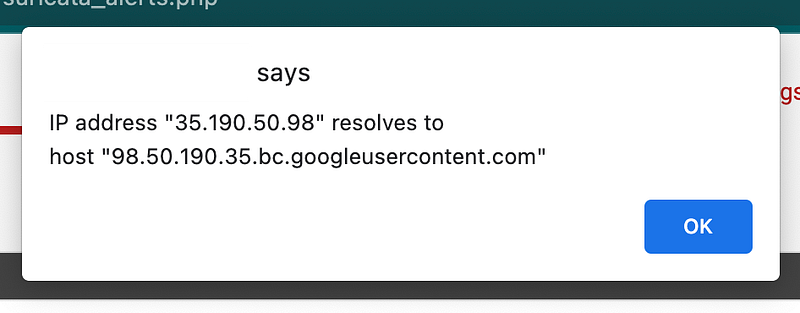
Because that’s recording the DNS name the server hosting the content returns from a reverse DNS lookup. It is not the query the user made to a specific bit of content. I wrote about that here:
That concept applies to content Google is hosting for users as well.
Here are some of the IP addresses and the errors caused trying to reach them:
- 74.125.141.94 | fonts.gstatic.com | SURICATA STREAM Packet with invalid timestamp
- 173.194.213.93 | youtube-ui.l.google.com | SURICATA STREAM Packet with invalid timestamp ~ this also
- 35.190.50.98 | sentry.io | I figured out what this was because I had a properly labeled firewall rule specific to this domain name. I had blocked it while investigating what it’s doing. Once again, it seems that evaluating blocked IPs with Suricata is a waste of firewall resources. I wonder if there’s a way to fix that.
- 74.125.196.95 | safebrowsing.googleapis.com | SURICATA STREAM Packet with invalid timestamp
- 74.125.141.190 | sb.l.google.com | SURICATA STREAM Packet with invalid timestamp
For the moment the alerts have chilled out a bit. I’ll have to keep watching them to see what happens next.
On to the IoT network…there we have a few more issues.
I’m getting an invalid checksum which I believe is related to the fact that I am redirecting DNS traffic to my desired DNS servers.
I wonder why pfSense doesn’t fix those checksums if that is the problem. Or perhaps this has something to do with offloading as this stopped happening after I turned off the offloading options above. Then again, I think all the TVs are turned off. We’ll have to see if this continues when the army of things is redeployed.
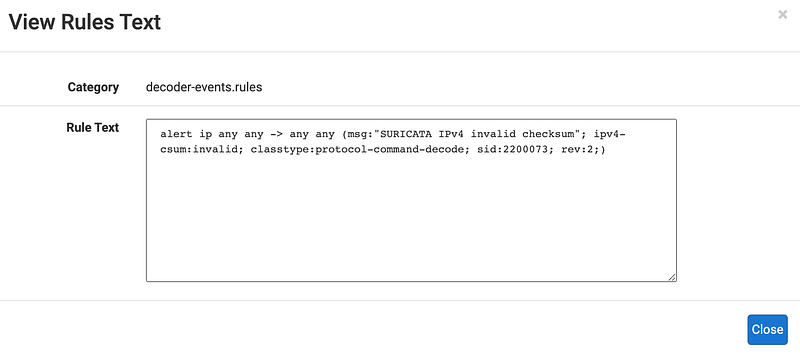
I’ll have to figure out what is going on exactly by inspecting the packets the same way I showed you above and look into the details.
I saw some other alerts as well but this one is currently bombarding the alerts log once the TV was turned on, so I’ll have to figure out which device is trying to do that and configure the DNS servers appropriately if I can. Then I’ll have to decide what to do about that alert and decipher any others that appear once I resolve that one.
Follow for updates.
Teri Radichel | © 2nd Sight Lab 2023
About Teri Radichel:
~~~~~~~~~~~~~~~~~~~~
⭐️ Author: Cybersecurity Books
⭐️ Presentations: Presentations by Teri Radichel
⭐️ Recognition: SANS Award, AWS Security Hero, IANS Faculty
⭐️ Certifications: SANS ~ GSE 240
⭐️ Education: BA Business, Master of Software Engineering, Master of Infosec
⭐️ Company: Penetration Tests, Assessments, Phone Consulting ~ 2nd Sight Lab
Need Help With Cybersecurity, Cloud, or Application Security?
~~~~~~~~~~~~~~~~~~~~~~~~~~~~~~~~~~~~~~~~~~~~~~~~~~~~~~~~~~~~~
🔒 Request a penetration test or security assessment
🔒 Schedule a consulting call
🔒 Cybersecurity Speaker for PresentationFollow for more stories like this:
~~~~~~~~~~~~~~~~~~~~~~~~~~~~~~~~~~~~~~~~~~~~~~~~~~~~~~~~~~~~~
❤️ Sign Up my Medium Email List
❤️ Twitter: @teriradichel
❤️ LinkedIn: https://www.linkedin.com/in/teriradichel
❤️ Mastodon: @teriradichel@infosec.exchange
❤️ Facebook: 2nd Sight Lab
❤️ YouTube: @2ndsightlab


