avatarTeri Radichel

Free AI web copilot to create summaries, insights and extended knowledge, download it at here

4421

Abstract

s://cdn-images-1.readmedium.com/v2/resize:fit:800/1*b8CaKUxwfn-YnlmjmpYvJg.png"><figcaption></figcaption></figure><p id="5a2c">Now there’s one tidbit in the instructions I find a bit strange. I would prefer that AWS would not change customer policies (for the same reason I don’t like the random changes to my KMS key policies when a user or role in the policy gets deleted.)</p><blockquote id="d947"><p>If the Amazon ECR repository does not include these permissions, Lambda adds <code>ecr:BatchGetImage</code> and <code>ecr:GetDownloadUrlForLayer</code> to the container image repository permissions. Lambda can add these permissions only if the principal calling Lambda has <code>ecr:getRepositoryPolicy</code> and <code>ecr:setRepositoryPolicy</code> permissions.</p></blockquote><p id="ee5c">If you are running the deployment with a user that has the appropriate permissions as stated then your ECR repository will automatically be changed. What if someone didn’t want that permission in their ECR registry and didn’t understand this was going to happen? What if that led to some kind of security incident? Would the liability for the incident lie with AWS or the customer? I don’t know. I’m not a lawyer.</p><div id="ffdb" class="link-block"> <a href="https://readmedium.com/what-are-awss-security-responsibilities-anyway-88061ee281e7"> <div> <div> <h2>What are AWS’s Security Responsibilities, Anyway?</h2> <div><h3>ACM.144 A deeper dive into the shared responsibility model</h3></div> <div><p>medium.com</p></div> </div> <div> <div style="background-image: url(https://miro.readmedium.com/v2/resize:fit:320/0*0c8f3otFyNVyDlRE.jpg)"></div> </div> </div> </a> </div><p id="fb7b">The other problem here is that if you’re trying to add all your policies to your own git repository now things are out of sync. I think AWS should not change customer policies behind the scenes without a customer actively accepting that policy, but that’s just my take.</p><p id="f7ea">Anyway, hopefully we will add the policy correctly ourselves and this won’t affect us. It seems pretty simple. But nothing is simple. I get this error:</p><figure id="d502"><img src="https://cdn-images-1.readmedium.com/v2/resize:fit:800/1*CumVpsQvYpXv6wgO-p9diQ.png"><figcaption></figcaption></figure><blockquote id="32ef"><p>CloudFormation cannot update a stack when a custom-named resource requires replacing. Rename sandbox and update the stack again.</p></blockquote><p id="a098">Just when I thought I’d seen every CloudFormation error…I see a new one. What is the “custom named resource”? So this means I have to rename my repository to something new or rename the sandbox repository — which means I have to upload my container again.</p><p id="1f6f">Now, in my case, it’s a minor annoyance. When an organization already has a lot of containers in their repository, this is kind of an ordeal. I hope AWS will fix this #AWSWishList.</p><p id="db3a">Here’s more information about the error:</p><div id="0a29" class="link-block"> <a href="https://repost.aws/knowledge-center/cloudformation-custom-name"> <div> <div> <h2>Update a CloudFormation stack when a custom-named resource requires replacing</h2> <div><h3>When I try to update an AWS CloudFormation stack, I get an error message similar to the following: "CloudFormation…</h3></div> <div><p>repost.aws</p></div> </div> <div> <div style="background-image: url(https://miro.readmedium.com/v2/resize:fit:320/0*LH3hXpmaVR0qQGJi)"></div> </div> </div> </a> </div><p id="f085">Well I looked at the repository I have in the console and I can’t rename that. The error message is unclear. I guess you have to rename sandbox in the template. I don’t really want to rename sandbox. I want the name to match my environment name. But anyway we’re just testing first (good thing, eh?) So I rename the sandbox registry to sandboxreg in my deploy script.</p><figure id="adef"><img src="https://cdn-images-1.readmedium.com/v2/resize:fit:800/1*6g0zZZcyn6Xrjc57JhnvUA.png"><figcaption></figcaption></figure><p id="4f1b">I got a couple of other errors. I forgot to set

Options

the key id passed into the above function. I was also looking and using the account ID in my principal ARNs. Now for that latter message, the error gave me the infamous “invalid policy” type error with no explanation. A better error message would have told me specifically that my principals were invalid.</p><p id="c3ee">But anyway, in the meantime I deployed the policy with the lambda permissions only and that worked.</p><p id="5153">Here’s the problem, as expected. I get a new registry.</p><figure id="409c"><img src="https://cdn-images-1.readmedium.com/v2/resize:fit:800/1*3y37YjU24dzWHQ68jWnKvg.png"><figcaption></figcaption></figure><p id="e239">My new registry has no images in it. The image I uploaded is still in the sandbox registry. That’s not super cool. I hope AWS will fix that issue.</p><p id="baba">I just want to delete those two stacks and start over. But before I can do that I have to delete the image I uploaded. I did that manually in the console. Renamed back to sandbox registry. Redeployed. Worked.</p><p id="5c73">Here’s the code. Looks like I still need to edit the description.</p><figure id="c050"><img src="https://cdn-images-1.readmedium.com/v2/resize:fit:800/1*JYg4VYy2_w-Aj5Vak0yELQ.png"><figcaption></figcaption></figure><p id="ac6d">Now I have to re-upload my container to the repository. I did that originally in this post:</p><div id="199e" class="link-block"> <a href="https://readmedium.com/pushing-a-container-to-the-aws-elastic-container-registry-6d4f4ac9c0f"> <div> <div> <h2>Pushing a Container to the AWS Elastic Container Registry</h2> <div><h3>ACM.287 A few simple commands to get our Docker container into ECR</h3></div> <div><p>medium.com</p></div> </div> <div> <div style="background-image: url(https://miro.readmedium.com/v2/resize:fit:320/1*agkzjAKdJojHYqRAcS3XNA.png)"></div> </div> </div> </a> </div><p id="28c7">Luckily I created a script for that because I just re-ran it and it worked. Also a good thing that I wrote all that down because I forgot where I put the script. 😆</p><p id="4b56">Now that Lambda should be able to access the image in ECR, we should be able to test deploying a Lambda function that uses that container.</p><p id="b46c">I failed to mention in the original post that you may also be able to restrict access to specific Lambda ARNs. I have not tested this out yet.</p><figure id="3bb4"><img src="https://cdn-images-1.readmedium.com/v2/resize:fit:800/1*WKwsJKytDba_ss_nUj-fCA.png"><figcaption></figcaption></figure><p id="a61a">Note that there are some additional permissions you must add for cross-account access to ECR. I’ll address that later.</p><p id="db1c">Follow for updates.</p><p id="4a3a">Teri Radichel | <i>© <a href="https://2ndsightlab.com/?source=post_page---------------------------">2nd Sight Lab</a> 2023</i></p><div id="8b5f"><pre><span class="hljs-section">About Teri Radichel:

⭐️ Author: Cybersecurity Books
⭐️ Presentations: Presentations by Teri Radichel
⭐️ Recognition: SANS Award, AWS Security Hero, IANS Faculty
⭐️ Certifications: SANS ~ GSE 240
⭐️ Education: BA Business, Master of Software Engineering, Master of Infosec
⭐️ Company: Penetration Tests, Assessments, Phone Consulting ~ 2nd Sight Lab</pre></div><div id="caae"><pre><span class="hljs-section">Need Help With Cybersecurity, Cloud, or Application Security?
~~~~~~~~~~~~~~~~~~~~~~~~~~~~~~~~~~~~~~~~~~~~~~~~~~~~~~~~~~~~~</span>
🔒 Request a penetration test or security assessment
🔒 Schedule a consulting call
🔒 Cybersecurity Speaker for Presentation</pre></div><div id="5a42"><pre>Follow <span class="hljs-keyword">for</span> more stories like <span class="hljs-keyword">this</span>:

❤️ Sign Up my Medium Email List ❤️ Twitter: <span class="hljs-meta">@teriradichel</span> ❤️ LinkedIn: https:<span class="hljs-comment">//www.linkedin.com/in/teriradichel</span> ❤️ Mastodon: <span class="hljs-meta">@teriradichel</span><span class="hljs-meta">@infosec</span>.exchange ❤️ Facebook: 2nd Sight Lab ❤️ YouTube: @2ndsightlab</pre></div><figure id="faf5"><img src="https://cdn-images-1.readmedium.com/v2/resize:fit:800/0*H9Ew1KCl-29nZiPR.jpeg"><figcaption></figcaption></figure></article></body>

Allow Lambda to Pull Containers From Elastic Container Registry

ACM.295 Add a policy to ECR to allow lambda to access images with a few caveats

~~~~~~~~~~~~~~~~~~~~~~~~~~~~~~~~~~~~~~~~~~~~~~~~~~~~~

⚙️ Check out my series on Automating Cybersecurity Metrics | Code.

🔒 Related Stories: Lambda | Container Security | Application Security

💻 Free Content on Jobs in Cybersecurity | ✉️ Sign up for the Email List

~~~~~~~~~~~~~~~~~~~~~~~~~~~~~~~~~~~~~~~~~~~~~~~~~~~~~

In the last post in this series, I revised my KMS key policy to better handle permissions for services and users — both of which may need access to a KMS key.

In this post, we’ll add a policy to our Elastic Container Registry (ECR) so we can deploy a Lambda function with the container I deployed in an earlier post.

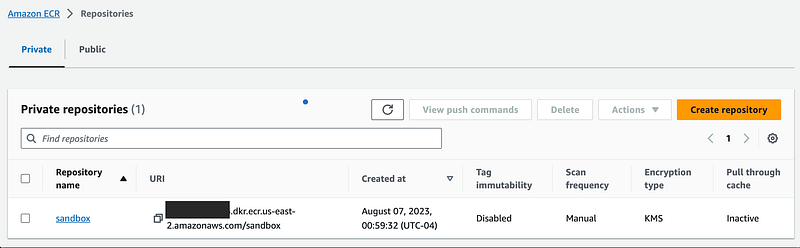
If you head over to the ECR dashboard recall that I created a repository.
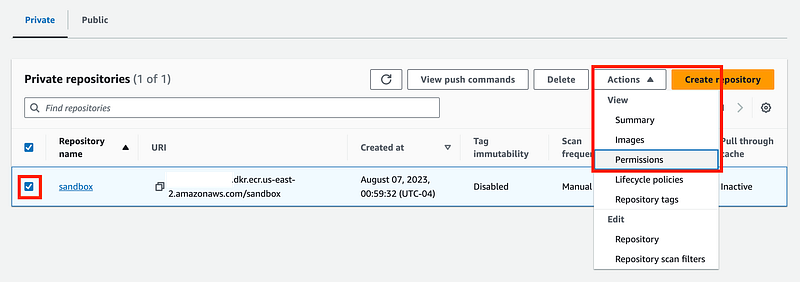
Click the checkbox and choose permissions from the drop down.
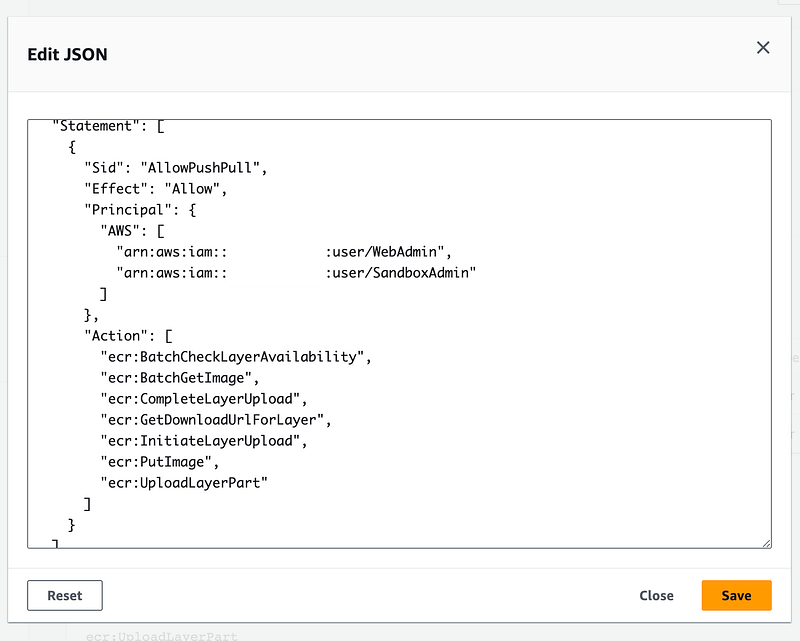
Click Edit Json Policy. I prefer to view the code that aligns with the policy I applied to this resource (and I wish I could display and deploy it in YAML, but I digress.)

This is the policy we deployed to allow users to take actions related to this repository, specifically our WebAdmin and SandboxAdmin users. I would rather give this permission to roles but this is only for testing purposes at the moment.
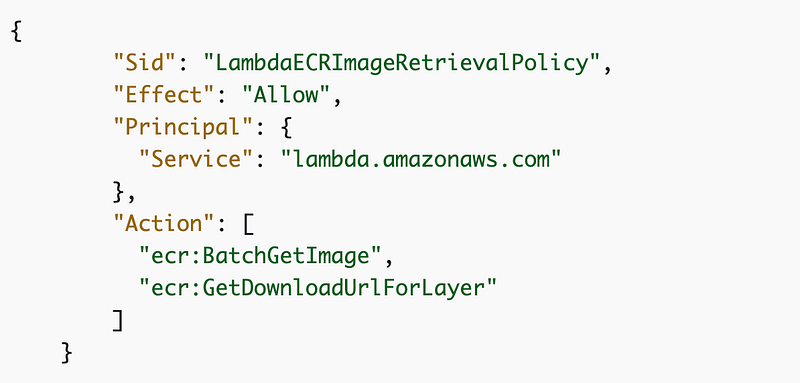
To use a container with Lambda we need to add some permissions to the repository. You can find the instructions here:

We care about the section under this heading for the purposes of this post: Amazon ECR repository policies.

We need to add the following statement to allow Lambda to retrieve the container we added to ECR.
Now there’s one tidbit in the instructions I find a bit strange. I would prefer that AWS would not change customer policies (for the same reason I don’t like the random changes to my KMS key policies when a user or role in the policy gets deleted.)

If the Amazon ECR repository does not include these permissions, Lambda adds ecr:BatchGetImage and ecr:GetDownloadUrlForLayer to the container image repository permissions. Lambda can add these permissions only if the principal calling Lambda has ecr:getRepositoryPolicy and ecr:setRepositoryPolicy permissions.

If you are running the deployment with a user that has the appropriate permissions as stated then your ECR repository will automatically be changed. What if someone didn’t want that permission in their ECR registry and didn’t understand this was going to happen? What if that led to some kind of security incident? Would the liability for the incident lie with AWS or the customer? I don’t know. I’m not a lawyer.

The other problem here is that if you’re trying to add all your policies to your own git repository now things are out of sync. I think AWS should not change customer policies behind the scenes without a customer actively accepting that policy, but that’s just my take.

Anyway, hopefully we will add the policy correctly ourselves and this won’t affect us. It seems pretty simple. But nothing is simple. I get this error:

CloudFormation cannot update a stack when a custom-named resource requires replacing. Rename sandbox and update the stack again.

Just when I thought I’d seen every CloudFormation error…I see a new one. What is the “custom named resource”? So this means I have to rename my repository to something new or rename the sandbox repository — which means I have to upload my container again.

Now, in my case, it’s a minor annoyance. When an organization already has a lot of containers in their repository, this is kind of an ordeal. I hope AWS will fix this #AWSWishList.

Here’s more information about the error:

Well I looked at the repository I have in the console and I can’t rename that. The error message is unclear. I guess you have to rename sandbox in the template. I don’t really want to rename sandbox. I want the name to match my environment name. But anyway we’re just testing first (good thing, eh?) So I rename the sandbox registry to sandboxreg in my deploy script.
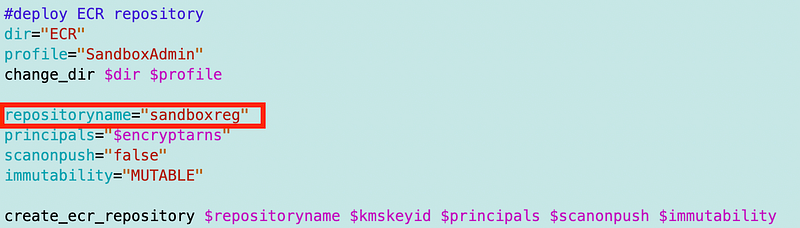
I got a couple of other errors. I forgot to set the key id passed into the above function. I was also looking and using the account ID in my principal ARNs. Now for that latter message, the error gave me the infamous “invalid policy” type error with no explanation. A better error message would have told me specifically that my principals were invalid.

But anyway, in the meantime I deployed the policy with the lambda permissions only and that worked.

Here’s the problem, as expected. I get a new registry.
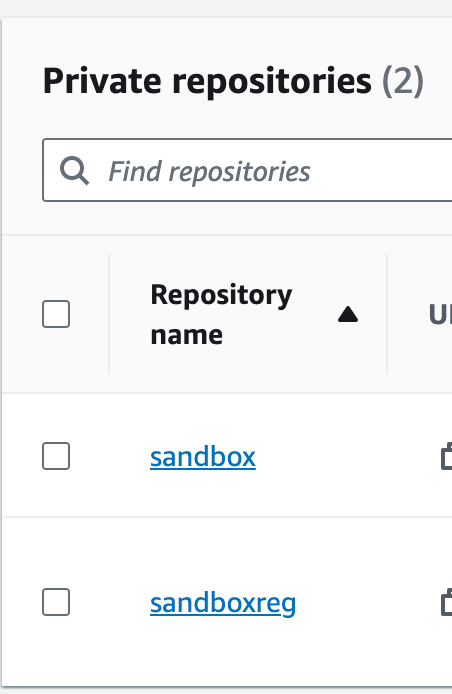
My new registry has no images in it. The image I uploaded is still in the sandbox registry. That’s not super cool. I hope AWS will fix that issue.

I just want to delete those two stacks and start over. But before I can do that I have to delete the image I uploaded. I did that manually in the console. Renamed back to sandbox registry. Redeployed. Worked.

Here’s the code. Looks like I still need to edit the description.
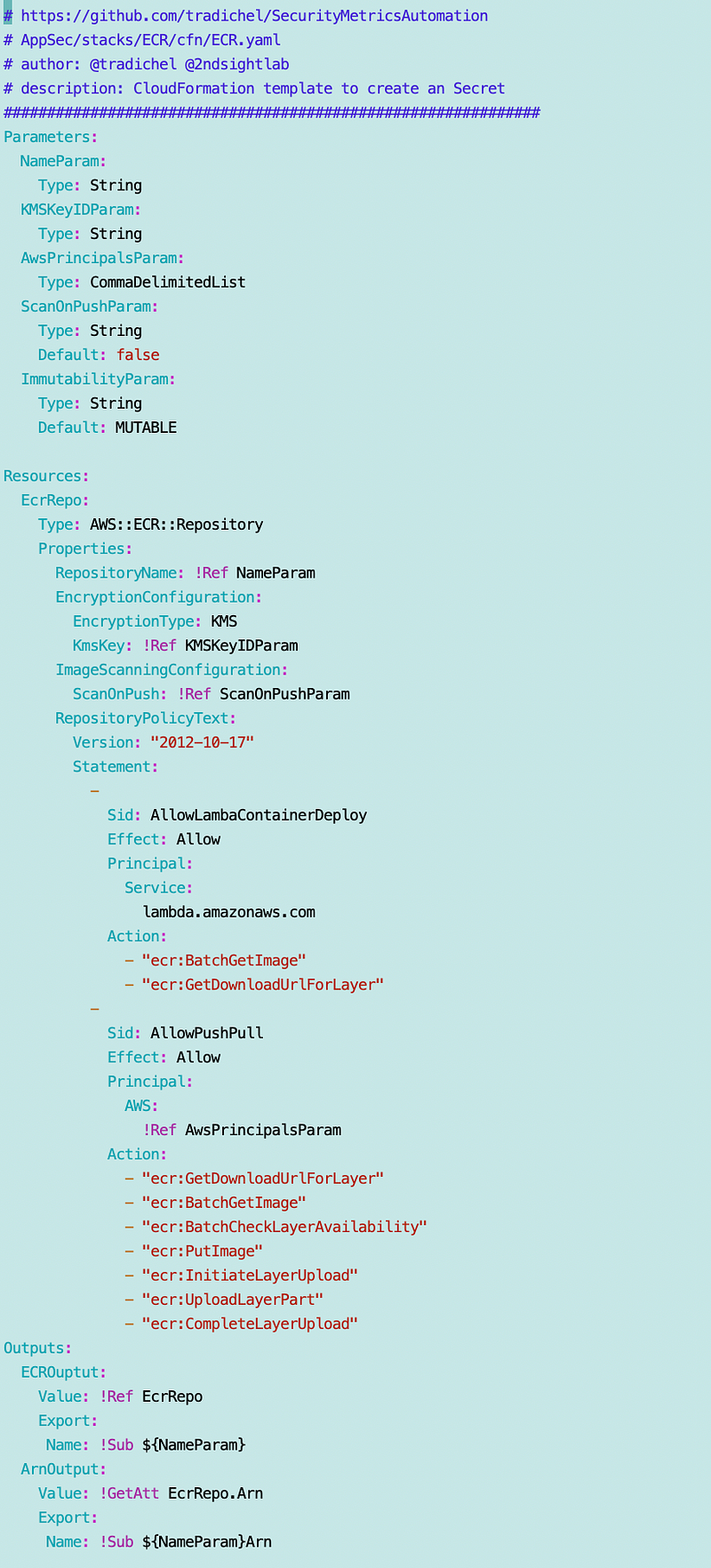
Now I have to re-upload my container to the repository. I did that originally in this post:

Luckily I created a script for that because I just re-ran it and it worked. Also a good thing that I wrote all that down because I forgot where I put the script. 😆

Now that Lambda should be able to access the image in ECR, we should be able to test deploying a Lambda function that uses that container.

I failed to mention in the original post that you may also be able to restrict access to specific Lambda ARNs. I have not tested this out yet.
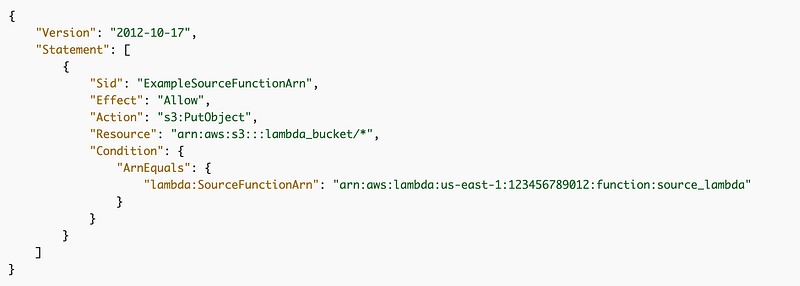
Note that there are some additional permissions you must add for cross-account access to ECR. I’ll address that later.

Follow for updates.

Teri Radichel | © 2nd Sight Lab 2023

About Teri Radichel:
~~~~~~~~~~~~~~~~~~~~
⭐️ Author: Cybersecurity Books
⭐️ Presentations: Presentations by Teri Radichel
⭐️ Recognition: SANS Award, AWS Security Hero, IANS Faculty
⭐️ Certifications: SANS ~ GSE 240
⭐️ Education: BA Business, Master of Software Engineering, Master of Infosec
⭐️ Company: Penetration Tests, Assessments, Phone Consulting ~ 2nd Sight Lab
Need Help With Cybersecurity, Cloud, or Application Security?
~~~~~~~~~~~~~~~~~~~~~~~~~~~~~~~~~~~~~~~~~~~~~~~~~~~~~~~~~~~~~
🔒 Request a penetration test or security assessment
🔒 Schedule a consulting call
🔒 Cybersecurity Speaker for Presentation
Follow for more stories like this:
~~~~~~~~~~~~~~~~~~~~~~~~~~~~~~~~~~~~~~~~~~~~~~~~~~~~~~~~~~~~~ 
❤️ Sign Up my Medium Email List
❤️ Twitter: @teriradichel
❤️ LinkedIn: https://www.linkedin.com/in/teriradichel
❤️ Mastodon: @teriradichel@infosec.exchange
❤️ Facebook: 2nd Sight Lab
❤️ YouTube: @2ndsightlab

Ecr
Cloudformation
Policy
Lambda
Container
Recommended from ReadMedium