
Day 60: 60 days of Data Science and Machine Learning Series
Transfer learning and Text Classification…
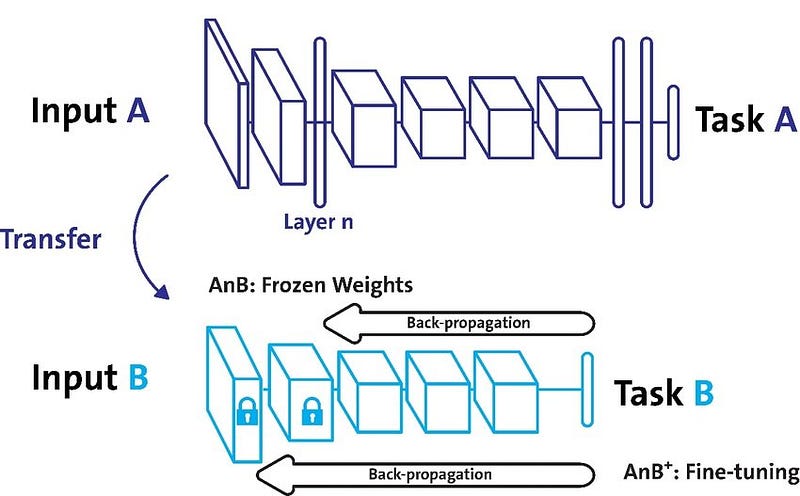
Tensorflow is an open source platform for machine learning and deep learning developed by Google Brain Team and written in C++, Python, and CUDA created for large numerical computations and deep learning. It ingests the data in the form of tensors which are nothing but multi-dimensional arrays of higher dimensions to handle large amounts of data. It works on the data flow graphs that have nodes and edges and supports both CPUs and GPUs. It works by preprocessing the data, building the model, training and estimating the model.
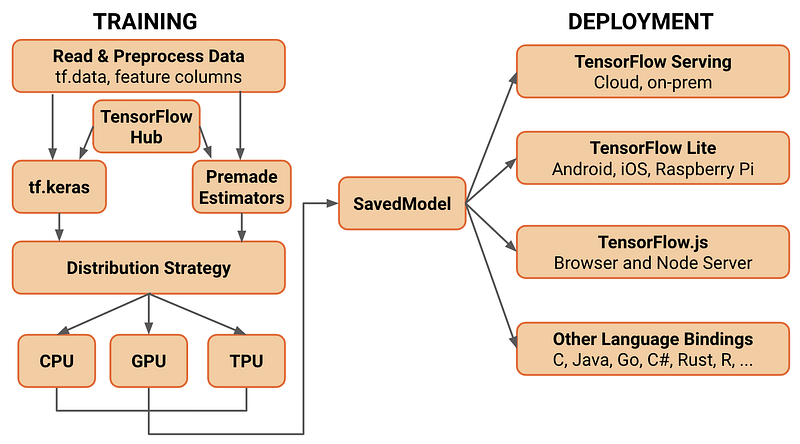
A good reference to Tensorflow ( used in this project as well ) —
Natural Language Processing is a branch of linguistics, AI and CS for manipulation, translation of natural language which gives the machines an ability to read, understand and derive meaning from human language.
Some of the other best Series —
100 days : Your Data Science and Machine Learning Degree Series with projects
Complete Data Visualization and Pre-processing Series with projects
Projects Videos —
All the projects, data structures, SQL, algorithms, system design, Data Science and ML , Data Analytics, Data Engineering, , Implemented Data Science and ML projects, Implemented Data Engineering Projects, Implemented Deep Learning Projects, Implemented Machine Learning Ops Projects, Implemented Time Series Analysis and Forecasting Projects, Implemented Applied Machine Learning Projects, Implemented Tensorflow and Keras Projects, Implemented PyTorch Projects, Implemented Scikit Learn Projects, Implemented Big Data Projects, Implemented Cloud Machine Learning Projects, Implemented Neural Networks Projects, Implemented OpenCV Projects,Complete ML Research Papers Summarized, Implemented Data Analytics projects, Implemented Data Visualization Projects, Implemented Data Mining Projects, Implemented Natural Leaning Processing Projects, MLOps and Deep Learning, Applied Machine Learning with Projects Series, PyTorch with Projects Series, Tensorflow and Keras with Projects Series, Scikit Learn Series with Projects, Time Series Analysis and Forecasting with Projects Series, ML System Design Case Studies Series videos will be published on our youtube channel ( just launched).
Subscribe today!
Tech Newsletter —
If you are interested, you can join my newsletter through which I send tech interview tips, techniques, patterns, hacks — Software Development, ML, Data Science, Startups and Technology projects to more than 30K readers. You can subscribe to Tech Brew :
According to Pan and Yang (2010) — Transfer learning involves the concepts of a domain and a task. A domain DD consists of a feature space XX and a marginal probability distribution P(X)P(X) over the feature space, where X=x1,⋯,xn∈XX=x1,⋯,xn∈X. For document classification with a bag-of-words representation, XX is the space of all document representations, xixi is the ii-th term vector corresponding to some document and XX is the sample of documents used for training.
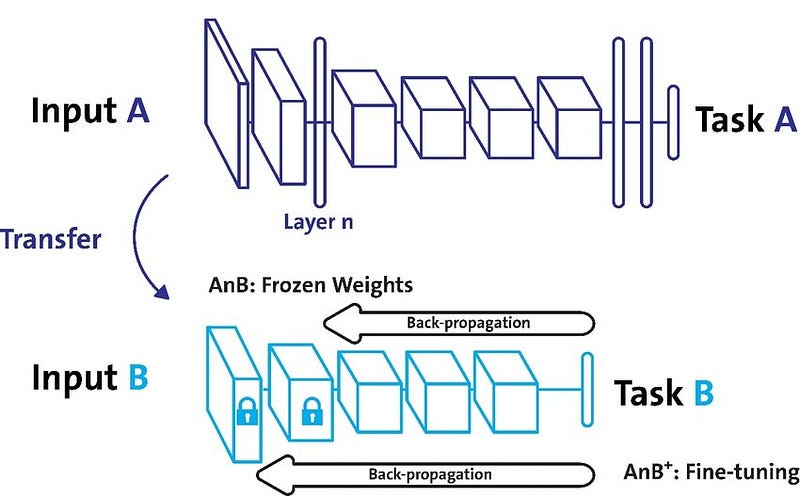
A good reference point to understand the vastness of Transfer learning and why’s it’s considered to be the next frontier of ML —
In this project we are going to learn how to use transfer learning to fine-tune models, use pre-trained NLP text embedding models from TensorFlow Hub.
Let’s dive in!
Import necessary libraries
import numpy as np
import pandas as pd
import tensorflow as tf
import tensorflow_hub as hub
import tensorflow_datasets as tfdsimport matplotlib.pyplot as plt
plt.rcParams['figure.figsize'] = (12, 8)
from IPython import displayimport pathlib
import shutil
import tempfile!pip install -q git+https://github.com/tensorflow/docsimport tensorflow_docs as tfdocs
import tensorflow_docs.modeling
import tensorflow_docs.plotsprint("Version: ", tf.__version__)
print("Hub version: ", hub.__version__)
print("GPU is", "available" if tf.config.list_physical_devices('GPU') else "NOT AVAILABLE")logdir = pathlib.Path(tempfile.mkdtemp())/"tensorboard_logs"
shutil.rmtree(logdir, ignore_errors=True)
from sklearn.model_selection import train_test_splitOutput —
Version:  2.7.0
Hub version:  0.12.0
GPU is available
Download the Dataset and split the data to train and test
df = pd.read_csv('Path to data file/data.csv.zip',
                 compression='zip',low_memory=False)
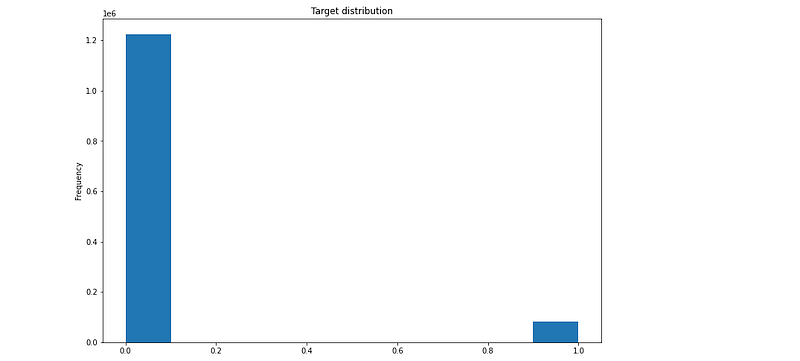
df['target'].plot(kind='hist',title='Target distribution')

train_df, r = train_test_split(df,random_state=42,train_size=0.01,stratify=df.target.values)
valid_df, _ = train_test_split(r,random_state=42,train_size=0.001,stratify=r.target.values)
Output —
Build and Compile Models
def train_and_evaluate_model(module_url, embed_size, name, trainable=False):
  hub_layer = hub.KerasLayer(module_url,input_shape=[],output_shape=[embed_size],dtye=tf.string,trainable=trainable)
  m = tf.keras,models.Sequential(
      [
         hub_layer,
        tf.keras.layers.Dense(256,activation='relu'),
        tf.keras.layers.Dense(64,activation='relu'),
        tf.keras.layers.Dense(1,activation ='sigmoid')
]
)
model.compile(optimizer = tf.keras.optimizers.Adam(learning_rate=0.0001),
loss = tf.losses.BinaryCrossentropy(),
metrics = [tf.metrics.BinaryAccuracy(name='accuracy')]
)history = model.fit(train_df['question_text'], train_df['target'],epochs=100,batch_size=32,validation_data = (valid_df['question_text'],valid_df['target'])
verbose=0
)
return historyTrain Text Classification Models
hs= []
module_url = "https://tfhub.dev/google/tf2-preview/gnews-swivel-20dim/1" #@param ["https://tfhub.dev/google/tf2-preview/gnews-swivel-20dim/1", "https://tfhub.dev/google/tf2-preview/nnlm-en-dim50/1", "https://tfhub.dev/google/tf2-preview/nnlm-en-dim128/1", "https://tfhub.dev/google/universal-sentence-encoder/4", "https://tfhub.dev/google/universal-sentence-encoder-large/5"] {allow-input: true}
hs['nnln-en-dim50'] = train_and_evaluate_model(module_url,embed_size=20,name='nnln-en-dim50')
Accuracy vs Loss
plt.rcParams['figure.figsize'] = (12, 8)
plotter = tfdocs.plots.HistoryPlotter(metric = 'accuracy')
plotter.plot(histories)
plt.xlabel("Epochs")
plt.legend(bbox_to_anchor=(1.0, 1.0), loc='upper left')
plt.title("Accuracy Curves for Models")
plotter = tfdocs.plots.HistoryPlotter(metric = 'loss')
plotter.plot(histories)
plt.xlabel("Epochs")
plt.legend(bbox_to_anchor=(1.0, 1.0), loc='upper left')
plt.title("Loss Curves for Models")
Learnings —
How to perform transfer learning to fine-tune models, use pre-trained NLP text embedding models from TensorFlow Hub.
The End!
Follow and Stay tuned. Keep coding :)
For other projects, tune to —
Build Machine Learning Pipelines( With Code)
Recurrent Neural Network with Keras
Clustering Geolocation Data in Python using DBSCAN and K-Means
Facial Expression Recognition using Keras
Hyperparameter Tuning with Keras Tuner
Custom Layers in Keras
That’s it fellas. Peace out and keep coding :)
Happy new year 2022!
Stay Tuned and of-course let me end this post with a quote by Grace Hopper ( a female pioneer of computer programming, helped built UNIVAC I, the first commercial electronic computer, and naval applications for COBOL)
“A ship in harbor is safe — but that is not what ships are built for.”


