Free AI web copilot to create summaries, insights and extended knowledge, download it at here
9400
Abstract
//readmedium.com/day-1-of-30-days-of-machine-learning-ops-7c299e4b09be?sk=4ab48350a5c359fc157109e48b1d738f">MLOps </a>and <a href="https://readmedium.com/day-1-of-60-days-of-deep-learning-with-projects-series-4a5caa305cf6?sk=89f3d43dd450035546bf3a8cf85bb125">Deep Learning</a>, <a href="https://readmedium.com/60-days-of-applied-machine-learning-with-projects-series-cd975641da0a?sk=09cf1f30e912774cba6501c8bac5edde">Applied Machine Learning with Projects Series</a>, <a href="https://readmedium.com/30-days-of-pytorch-with-projects-series-737941e5aa4f?sk=d0ead140034be9f1fff27d059b525221">PyTorch with Projects Series</a>, <a href="https://readmedium.com/30-days-of-tensorflow-and-keras-with-projects-series-f52e0815d696?sk=945bb73c32bc967b7e056f894fab7626">Tensorflow and Keras with Projects Series</a>, <a href="https://readmedium.com/day-1-of-30-days-of-scikit-learn-series-with-projects-76341935e5fd?sk=44a6845c53109c2482c368bdb7924e46">Scikit Learn Series with Projects</a>, <a href="https://readmedium.com/day-1-of-15-days-of-time-series-analysis-and-forecasting-with-projects-series-5ba3b6cf7528?sk=7a5826927d95b8fd22deae9ee53bc54d">Time Series Analysis and Forecasting with Projects Series</a>, <a href="https://readmedium.com/day-1-of-ml-system-design-case-studies-series-ml-system-design-basics-dbf7765b3c0c?sk=9ce5aee0a8b5208be05ac5284872e91b">ML System Design Case Studies Series</a> videos will be published on our youtube channel ( just launched).</i></b></p><p id="4b19"><b><i>Subscribe today!</i></b></p><div id="1520" class="link-block">
<a href="https://www.youtube.com/@ignito5917/about">
<div>
<div>
<h2>Ignito</h2>
<div><h3>Excited to share that we have launched our Youtube channel — Ignito to cover all the projects and coding exercise for …</h3></div>
<div><p>www.youtube.com</p></div>
</div>
<div>
<div style="background-image: url(https://miro.readmedium.com/v2/resize:fit:320/0*N9OmxhpEw0AuQEey)"></div>
</div>
</div>
</a>
</div><h2 id="9083">Tech Newsletter —</h2><blockquote id="8abe"><p>If you are interested, you can join my newsletter through which I send tech interview tips, techniques, patterns, hacks — Software Development, ML, Data Science, Startups and Technology projects to more than 30K readers. You can subscribe to <b>Tech Brew :</b></p></blockquote><div id="8d5c" class="link-block">
<a href="https://naina0405.substack.com/">
<div>
<div>
<h2>Ignito</h2>
<div><h3>Data Science, ML, AI and more… Click to read Ignito, by Naina Chaturvedi, a Substack publication. Launched 7 months…</h3></div>
<div><p>naina0405.substack.com</p></div>
</div>
<div>
<div style="background-image: url(https://miro.readmedium.com/v2/resize:fit:320/0*_ER1J-h50iqAjH70)"></div>
</div>
</div>
</a>
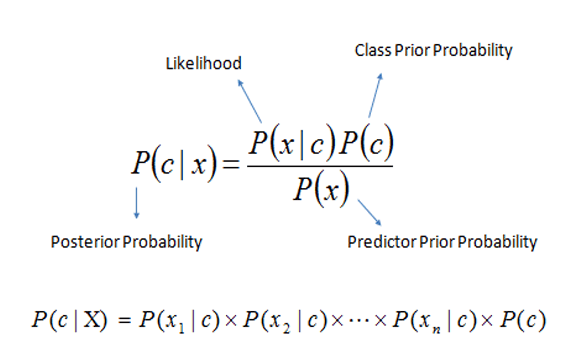
</div><h2 id="c2f6">Bayes Theorem —</h2><p id="b932">It’s a method which is used to determine conditional probabilities which means the probability of one event occurring given that another event has already occurred.</p><p id="6d61">The conditional probability can be calculated as follows —</p><p id="09d1"><b>P(A | B) = P(A, B) / P(B)</b></p><p id="2a29">Bayes theorem is extensively used in the medical sciences ( to calculate the likelihood ratio if some one has a disease or not). Nevertheless, it’s also used in the other applications — filtering spam. Naive Bayes classifiers are extremely fast compared to more sophisticated algos/methods.</p><p id="8cb6">NB classifiers are a set of classification algorithms based on Bayes’ Theorem.</p><p id="9080">A good reference to understand the vastness of Naive Bayes —</p><div id="ad59" class="link-block">
<a href="https://scikit-learn.org/stable/modules/naive_bayes.html">
<div>
<div>
<h2>1.9. Naive Bayes</h2>
<div><h3>Naive Bayes methods are a set of supervised learning algorithms based on applying Bayes’ theorem with the “naive”…</h3></div>
<div><p>scikit-learn.org</p></div>
</div>
<div>
<div style="background-image: url(https://miro.readmedium.com/v2/resize:fit:320/0*2_TJGntwn_ufvKjZ)"></div>
</div>
</div>
</a>
</div><div id="0862" class="link-block">
<a href="https://scikit-learn.org/stable/modules/generated/sklearn.naive_bayes.GaussianNB.html">
<div>
<div>
<h2>sklearn.naive_bayes.GaussianNB</h2>
<div><h3>Examples using sklearn.naive_bayes.GaussianNB: Comparison of Calibration of Classifiers Comparison of Calibration of…</h3></div>
<div><p>scikit-learn.org</p></div>
</div>
<div>
<div style="background-image: url(https://miro.readmedium.com/v2/resize:fit:320/0*B-w-dYxYevv-_4EE)"></div>
</div>
</div>
</a>
</div><div id="310b" class="link-block">
<a href="https://scikit-learn.org/stable/modules/generated/sklearn.naive_bayes.MultinomialNB.html#sklearn.naive_bayes.MultinomialNB">
<div>
<div>
<h2>sklearn.naive_bayes.MultinomialNB</h2>
<div><h3>Examples using sklearn.naive_bayes.MultinomialNB: Out-of-core classification of text documents Out-of-core…</h3></div>
<div><p>scikit-learn.org</p></div>
</div>
<div>
<div style="background-image: url(https://miro.readmedium.com/v2/resize:fit:320/0*K6uYsibmHvfDsDw_)"></div>
</div>
</div>
</a>
</div><p id="333e">Let’s dive in!</p><h2 id="a0fd">Import necessary libraries</h2><div id="8610"><pre><span class="hljs-keyword">import</span> pandas <span class="hljs-keyword">as</span> pd
<span class="hljs-keyword">import</span> numpy <span class="hljs-keyword">as</span> np
<span class="hljs-keyword">import</span> seaborn <span class="hljs-keyword">as</span> sns
<span class="hljs-keyword">import</span> matplotlib.pyplot <span class="hljs-keyword">as</span> plt
<span class="hljs-keyword">from</span> jupyterthemes <span class="hljs-keyword">import</span> jtplot
jtplot.style(theme=<span class="hljs-string">'monokai'</span>, context=<span class="hljs-string">'notebook'</span>, ticks=<span class="hljs-keyword">True</span>, grid=<span class="hljs-keyword">False</span>)
<span class="hljs-keyword">from</span> wordcloud <span class="hljs-keyword">import</span> WordCloud
plt.figure(figsize=(<span class="hljs-number">20</span>,<span class="hljs-number">20</span>))
plt.imshow(WordCloud().generate(ss))
<span class="hljs-keyword">import</span> string
<span class="hljs-keyword">import</span> nltk
nltk.download(<span class="hljs-string">'stopwords'</span>)
<span class="hljs-keyword">from</span> nltk.corpus <span class="hljs-keyword">import</span> stopwords
stopwords.words(<span class="hljs-string">'english'</span>)
<span class="hljs-keyword">from</span> sklearn.feature_extraction.text <span class="hljs-keyword">import</span> CountVectorizer
<span class="hljs-keyword">from</span> sklearn.model_selection <span class="hljs-keyword">import</span> train_test_split
<span class="hljs-keyword">from</span> sklearn.metrics <span class="hljs-keyword">import</span> classification_report, confusion_matrix</pre></div><h2 id="388c">Load the data</h2><div id="962c"><pre><span class="hljs-meta"># Load the data</span>
<span class="hljs-title">t_df</span> = pd.read_csv('<span class="hljs-type">Path</span> to the <span class="hljs-class"><span class="hljs-keyword">data</span> file/<span class="hljs-keyword">data</span>.csv')</span></pre></div><div id="c0eb"><pre>t_df.<span class="hljs-built_in">info</span>()
t_df = t_df.drop([<span class="hljs-string">'id'</span>],<span class="hljs-attribute">axis</span>=1)</pre></div><p id="09bf">Output —</p><div id="b05e"><pre><<span class="hljs-keyword">class</span> <span class="hljs-string">'pandas.core.frame.DataFrame'</span>>
Range<span class="hljs-keyword">Index</span>: <span class="hljs-number">31962</span> entries, <span class="hljs-number">0</span> <span class="hljs-keyword">to</span> <span class="hljs-number">31961</span>
Data <span class="hljs-keyword">columns</span> (total <span class="hljs-number">3</span> <span class="hljs-keyword">columns</span>):
<span class="hljs-keyword">Column</span> Non-<span class="hljs-keyword">Null</span> Count Dtype
<span class="hljs-comment">--- ------ -------------- ----- </span>
<span class="hljs-number">0</span> id <span class="hljs-number">31962</span> non-<span class="hljs-keyword">null</span> int64
<span class="hljs-number">1</span> label <span class="hljs-number">31962</span> non-<span class="hljs-keyword">null</span> int64
<span class="hljs-number">2</span> tweet <span class="hljs-number">31962</span> non-<span class="hljs-keyword">null</span> <span class="hljs-keyword">object</span>
dtypes: int64(<span class="hljs-number">2</span>), <span class="hljs-keyword">object</span>(<span class="hljs-number">1</span>)
memory <span class="hljs-keyword">usage</span>:
Options
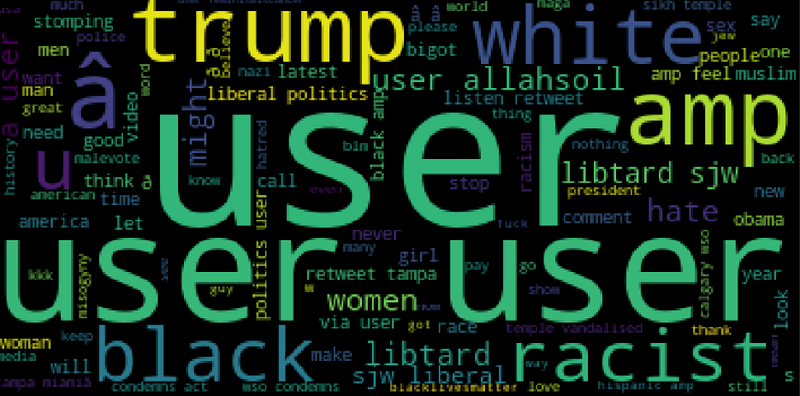
<span class="hljs-number">749.2</span>+ KB</pre></div><h2 id="3753">Word cloud</h2><div id="5e64"><pre>nl = negative<span class="hljs-selector-attr">[<span class="hljs-string">'tweet'</span>]</span><span class="hljs-selector-class">.tolist</span>()
ns = <span class="hljs-string">" "</span><span class="hljs-selector-class">.join</span>(nl)
plt<span class="hljs-selector-class">.figure</span>(figsize=(<span class="hljs-number">20</span>,<span class="hljs-number">20</span>))
plt<span class="hljs-selector-class">.imshow</span>(<span class="hljs-built_in">WordCloud</span>()<span class="hljs-selector-class">.generate</span>(ns))</pre></div><p id="17e9">Output —</p><figure id="a6d2"><img src="https://cdn-images-1.readmedium.com/v2/resize:fit:800/1*YA0ksUtJTMJgeTjPGutQtA.png"><figcaption></figcaption></figure><h2 id="5e61">Remove punctuation</h2><div id="8fd9"><pre><span class="hljs-keyword">tr</span> = []
<span class="hljs-keyword">for</span> char in Test:
<span class="hljs-keyword">if</span> char not in <span class="hljs-built_in">string</span>.punctuation:
<span class="hljs-keyword">tr</span>.<span class="hljs-keyword">append</span>(char)
<span class="hljs-keyword">tj</span> = <span class="hljs-string">' '</span>.<span class="hljs-keyword">join</span>(<span class="hljs-keyword">tr</span>)
<span class="hljs-keyword">tj</span></pre></div><h2 id="d9df">Remove stop words</h2><div id="e9e3"><pre>tjc = [ <span class="hljs-built_in">word</span> <span class="hljs-keyword">for</span> <span class="hljs-built_in">word</span> <span class="hljs-keyword">in</span> tj.<span class="hljs-built_in">split</span>() <span class="hljs-keyword">if</span> <span class="hljs-built_in">word</span>.<span class="hljs-built_in">lower</span>() <span class="hljs-keyword">not</span> <span class="hljs-keyword">in</span> stopwords.<span class="hljs-keyword">words</span>(<span class="hljs-string">'english'</span>)]</pre></div><h2 id="fa01">Tokenization</h2><div id="2af8"><pre><span class="hljs-attribute">vectorizer</span> <span class="hljs-operator">=</span> CountVectorizer()
<span class="hljs-attribute">X</span> <span class="hljs-operator">=</span> vectorizer.fit_transform(sample_data)</pre></div><h2 id="e0b1">Train a Naive Bayes Classifier</h2><div id="6e83"><pre>X_train, X_test, y_train, y_test = train_test_split(X, y, <span class="hljs-attribute">test_size</span>=0.2)
<span class="hljs-keyword">from</span> sklearn.naive_bayes import MultinomialNB</pre></div><div id="2f63"><pre>NB_classifier = <span class="hljs-built_in">MultinomialNB</span>()
NB_classifier<span class="hljs-selector-class">.fit</span>(X_train, y_train)</pre></div><h2 id="47d5">Model performance</h2><div id="8736"><pre>y_predict_test = NB_classifier<span class="hljs-selector-class">.predict</span>(X_test)
<span class="hljs-function"><span class="hljs-title">print</span><span class="hljs-params">(classification_report(y_test, y_predict_test)</span></span>)</pre></div><p id="5b0a">Output —</p><div id="a4d8"><pre><span class="hljs-attribute">precision</span> recall f1-score support
       <span class="hljs-attribute">0</span>       <span class="hljs-number">0</span>.<span class="hljs-number">97</span>      <span class="hljs-number">0</span>.<span class="hljs-number">97</span>      <span class="hljs-number">0</span>.<span class="hljs-number">97</span>      <span class="hljs-number">5957</span>
       <span class="hljs-attribute">1</span>       <span class="hljs-number">0</span>.<span class="hljs-number">56</span>      <span class="hljs-number">0</span>.<span class="hljs-number">53</span>      <span class="hljs-number">0</span>.<span class="hljs-number">54</span>       <span class="hljs-number">436</span>

<span class="hljs-attribute">accuracy</span>                           <span class="hljs-number">0</span>.<span class="hljs-number">94</span>      <span class="hljs-number">6393</span>
<span class="hljs-attribute">macro</span> avg <span class="hljs-number">0</span>.<span class="hljs-number">76</span> <span class="hljs-number">0</span>.<span class="hljs-number">75</span> <span class="hljs-number">0</span>.<span class="hljs-number">76</span> <span class="hljs-number">6393</span>
<span class="hljs-attribute">weighted</span> avg <span class="hljs-number">0</span>.<span class="hljs-number">94</span> <span class="hljs-number">0</span>.<span class="hljs-number">94</span> <span class="hljs-number">0</span>.<span class="hljs-number">94</span> <span class="hljs-number">6393</span></pre></div><p id="3d48"><b><i>Learnings —</i></b></p><p id="477f">How to perform tokenization, create a pipeline to remove stop-words, punctuation, and train a Naive Bayes Classifier and do performance analysis.</p><p id="d38a"><b><i>Day 56: Coming soon!</i></b></p><p id="a039">Follow and Stay tuned. Keep coding :)</p><h1 id="a69d">For other projects, tune to —</h1><p id="b31f"><b>Build Machine Learning Pipelines( With Code)</b></p><div id="5b37" class="link-block">
<a href="https://medium.datadriveninvestor.com/build-machine-learning-pipelines-with-code-part-1-bd3ed7152124">
<div>
<div>
<h2>Build Machine Learning Pipelines( With Code) — Part 1</h2>
<div><h3>Complete implementation…</h3></div>
<div><p>medium.datadriveninvestor.com</p></div>
</div>
<div>
<div style="background-image: url(https://miro.readmedium.com/v2/resize:fit:320/0*KdToBD8RDMBH4jXM.png)"></div>
</div>
</div>
</a>
</div><p id="946c"><b>Recurrent Neural Network with Keras</b></p><div id="607d" class="link-block">
<a href="https://medium.datadriveninvestor.com/recurrent-neural-network-with-keras-b5b5f6fe5187">
<div>
<div>
<h2>Recurrent Neural Network with Keras</h2>
<div><h3>Project Implementation and cheatsheet…</h3></div>
<div><p>medium.datadriveninvestor.com</p></div>
</div>
<div>
<div style="background-image: url(https://miro.readmedium.com/v2/resize:fit:320/0*xs3Dya3qQBx6IU7C.png)"></div>
</div>
</div>
</a>
</div><p id="56e1"><b>Clustering Geolocation Data in Python using DBSCAN and K-Means</b></p><div id="2b3e" class="link-block">
<a href="https://medium.datadriveninvestor.com/clustering-geolocation-data-in-python-using-dbscan-and-k-means-3705d9f44522">
<div>
<div>
<h2>Clustering Geolocation Data in Python using DBSCAN and K-Means</h2>
<div><h3>Project Implementation…</h3></div>
<div><p>medium.datadriveninvestor.com</p></div>
</div>
<div>
<div style="background-image: url(https://miro.readmedium.com/v2/resize:fit:320/0*0uPCZnohdaPCO4NN.png)"></div>
</div>
</div>
</a>
</div><p id="a29c"><b>Facial Expression Recognition using Keras</b></p><div id="ccaa" class="link-block">
<a href="https://medium.datadriveninvestor.com/facial-expression-recognition-using-keras-cbdd661a0a54">
<div>
<div>
<h2>Facial Expression Recognition using Keras</h2>
<div><h3>Project Implementation…</h3></div>
<div><p>medium.datadriveninvestor.com</p></div>
</div>
<div>
<div style="background-image: url(https://miro.readmedium.com/v2/resize:fit:320/0*CGch7hzdjg1fpgKy.jpg)"></div>
</div>
</div>
</a>
</div><p id="0db7"><b>Hyperparameter Tuning with Keras Tuner</b></p><div id="6dff" class="link-block">
<a href="https://medium.datadriveninvestor.com/hyperparameter-tuning-with-keras-tuner-3a609d3fd85b">
<div>
<div>
<h2>Hyperparameter Tuning with Keras Tuner</h2>
<div><h3>Project Implementation….</h3></div>
<div><p>medium.datadriveninvestor.com</p></div>
</div>
<div>
<div style="background-image: url(https://miro.readmedium.com/v2/resize:fit:320/0*jlaEz8AZaptNWHEr.png)"></div>
</div>
</div>
</a>
</div><p id="fed8"><b>Custom Layers in Keras</b></p><div id="e4fd" class="link-block">
<a href="https://medium.datadriveninvestor.com/custom-layers-in-keras-de5f793217aa">
<div>
<div>
<h2>Custom Layers in Keras</h2>
<div><h3>Code implementation …</h3></div>
<div><p>medium.datadriveninvestor.com</p></div>
</div>
<div>
<div style="background-image: url(https://miro.readmedium.com/v2/resize:fit:320/0*1IH67KJadqeqeO01.png)"></div>
</div>
</div>
</a>
</div><p id="2ea9"><b><i>That’s it fellas. Peace out and keep coding :)</i></b></p><p id="ec55">Stay Tuned and of-course let me end this post with a quote by Steve Jobs ;)</p><p id="5004" type="7">“You have to be burning with an idea, or a problem, or a wrong that you want to right. If you’re not passionate enough from the start, you’ll never stick it out.”</p></article></body>