
Day 54: 60 days of Data Science and Machine Learning Series
Pytorch and ResNet with a project…
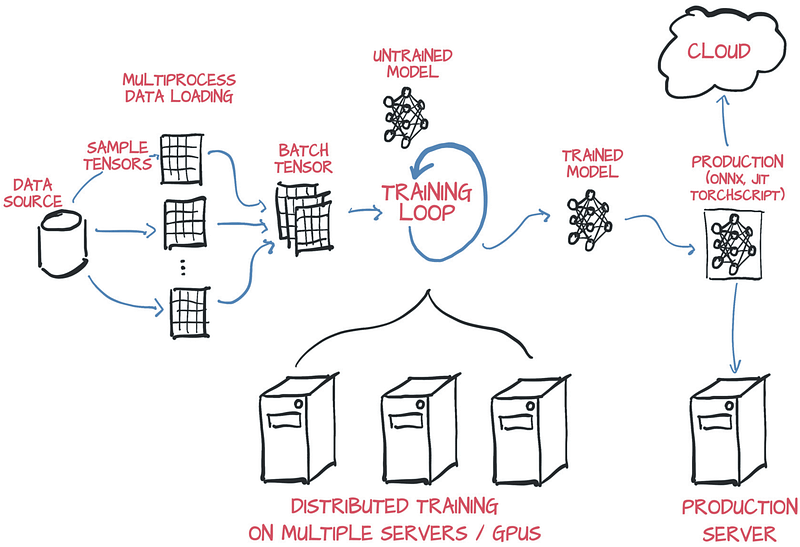
Welcome back peeps! Hope you have been learning a lot from this 60 days of Data Science and Machine Learning Series. In this post we will learn about the basics of PyTorch ( one of my favorite library) and ResNet.
Some of the other best Series —
100 days : Your Data Science and Machine Learning Degree Series with projects
Complete Data Visualization and Pre-processing Series with projects
Projects Videos —
All the projects, data structures, SQL, algorithms, system design, Data Science and ML , Data Analytics, Data Engineering, , Implemented Data Science and ML projects, Implemented Data Engineering Projects, Implemented Deep Learning Projects, Implemented Machine Learning Ops Projects, Implemented Time Series Analysis and Forecasting Projects, Implemented Applied Machine Learning Projects, Implemented Tensorflow and Keras Projects, Implemented PyTorch Projects, Implemented Scikit Learn Projects, Implemented Big Data Projects, Implemented Cloud Machine Learning Projects, Implemented Neural Networks Projects, Implemented OpenCV Projects,Complete ML Research Papers Summarized, Implemented Data Analytics projects, Implemented Data Visualization Projects, Implemented Data Mining Projects, Implemented Natural Leaning Processing Projects, MLOps and Deep Learning, Applied Machine Learning with Projects Series, PyTorch with Projects Series, Tensorflow and Keras with Projects Series, Scikit Learn Series with Projects, Time Series Analysis and Forecasting with Projects Series, ML System Design Case Studies Series videos will be published on our youtube channel ( just launched).
Subscribe today!
Tech Newsletter —
If you are interested, you can join my newsletter through which I send tech interview tips, techniques, patterns, hacks — Software Development, ML, Data Science, Startups and Technology projects to more than 30K readers. You can subscribe to Tech Brew :
PyTorch, developed by Facebook AI and built based on Python is an open source machine learning — optimized tensor library used for Deep Learning applications and allows computations of the tensors on Graphical Processing Units ( GPU’s). In simple words, it’s used to process tensors which are nothing but the fundamental unit of data which can be a number, vector or matrix/n-dimensional array.
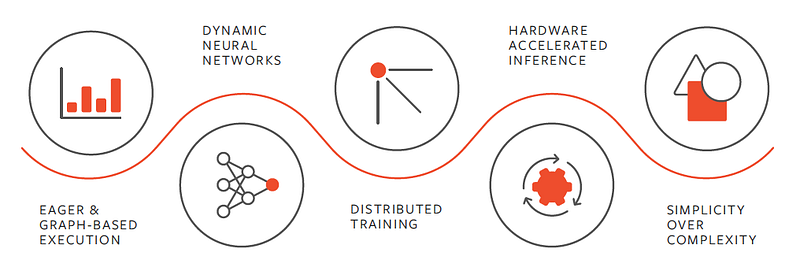
A good reference to understand the vastness of PyTorch —
You can install PyTorch using —
pip3 install torch torchvisionThe residual neural network (ResNet) is basically artificial neural network (ANN) which builds on pyramidal cells by utilizing skip connections to jump over the different layers. It’s frequently used in computer vision tasks, easier to optimize and solves the vanishing gradient problem.
A good reference to understand Resnet-18 ( at the link below):
Let’s dive in!
Importing Libraries
%matplotlib inlineimport os
import shutil
import random
import torch
import torchvision
import numpy as npfrom PIL import Image
from matplotlib import pyplot as plttorch.manual_seed(0)Creating Custom Dataset
class_names = ['normal', 'viral', 'covid']
root_dir = 'COVID-19 Radiography Database'
source_dirs = ['NORMAL', 'Viral Pneumonia', 'COVID-19']
if os.path.isdir(os.path.join(root_dir, source_dirs[1])):
os.mkdir(os.path.join(root_dir, 'test'))for i, d in enumerate(source_dirs):
os.rename(os.path.join(root_dir, d), os.path.join(root_dir, class_names[i]))for c in class_names:
os.mkdir(os.path.join(root_dir, 'test', c))for c in class_names:
images = [x for x in os.listdir(os.path.join(root_dir, c)) if x.lower().endswith('png')]
selected_images = random.sample(images, 30)
for image in selected_images:
source_path = os.path.join(root_dir, c, image)
target_path = os.path.join(root_dir, 'test', c, image)
shutil.move(source_path, target_path)
class cds(torch.utils.data.Dataset):
def __init__(self,image_dirs,transform):
def gi(class_name):
images = [x for x in os.listdir(image_dirs[class_name]) if x.lower()]
return images
self.images ={}
self.class_names = ['normal','viral','covid']
for c in self.class_names:
self.images[c] = gi(c)
self.image_dirs = image_dirs
self.transform = transform
def __len__(self):
return sum([len(self.images[c]) for c in self.class_names])
def __getitem__(self,index):
class_name = random.choice(self.class_names)
index = index % len( self.images[class_name])
image_name = self.images[class_name][index]
image_path = os.path.join(self.image_dirs[class_name], image_name)
image = Image.open(image_path).convert('RGB')
return self.transform(image),self.class_names.index(class_name)Transform Images
train_transform = torchvision.transforms.Compose([
    torchvision.transforms.Resize(size=(224,224)),
    torchvision.transforms.RandomHorizontalFlip(),
    torchvision.transforms.ToTensor(),
    torchvision.transforms.Normalize(mean=[0.485,0.456,0.406],
                                    std= [0.229,0.224,0.225])

])
test_transform = torchvision.transforms.Compose([
    torchvision.transforms.Resize(size=(224,224)),
    torchvision.transforms.ToTensor(),
    torchvision.transforms.Normalize(mean=[0.485,0.456,0.406],
                                    std= [0.229,0.224,0.225])

])
DataLoader
train_dirs = {
    'normal': 'COVID-19 Radiography Database/normal',
    'viral': 'COVID-19 Radiography Database/viral',
    'covid': 'COVID-19 Radiography Database/covid'
}
train_dataset = cds(train_dirs,train_transform)
test_dirs = {
    'normal': 'COVID-19 Radiography Database/test/normal',
    'viral': 'COVID-19 Radiography Database/test/viral',
    'covid': 'COVID-19 Radiography Database/test/covid'
}
test_dataset = cds(test_dirs,test_transform)
batch_size = 6dl_train = torch.utils.data.DataLoader(train_dataset,batch_size=batch_size,shuffle=True)
dl_test = torch.utils.data.DataLoader(test_dataset,batch_size=batch_size,shuffle=True)Data Visualization
class_names = train_dataset.class_namesdef show_images(images, labels, preds):
plt.figure(figsize=(8, 4))
for i, image in enumerate(images):
plt.subplot(1, 6, i + 1, xticks=[], yticks=[])
image = image.numpy().transpose((1, 2, 0))
mean = np.array([0.485, 0.456, 0.406])
std = np.array([0.229, 0.224, 0.225])
image = image * std + mean
image = np.clip(image, 0., 1.)
plt.imshow(image)
col = 'green'
if preds[i] != labels[i]:
col = 'red'
plt.xlabel(f'{class_names[int(labels[i].numpy())]}')
plt.ylabel(f'{class_names[int(preds[i].numpy())]}', color=col)
images, labels = next(iter(dl_train))
show_images(images, labels, labels)
images, labels = next(iter(dl_test))
show_images(images, labels, labels)Create the Model
resnet18 = torchvision.models.resnet18(pretrained=True)resnet18.fc = torch.nn.Linear(in_features=512, out_features=3)
loss_fn = torch.nn.CrossEntropyLoss()
optimizer = torch.optim.Adam(resnet18.parameters(), lr=3e-5)Train the Model
def train(epochs):
    print('Starting training..')
    for e in range(0, epochs):
        print('='*20)
        print(f'Starting epoch {e + 1}/{epochs}')
        print('='*20)
train_loss = 0.
val_loss = 0.resnet18.train() # set model to training phasefor train_step, (images, labels) in enumerate(dl_train):
optimizer.zero_grad()
outputs = resnet18(images)
loss = loss_fn(outputs, labels)
loss.backward()
optimizer.step()
train_loss += loss.item()
if train_step % 20 == 0:
print('Evaluating at step', train_step) accuracy = 0 resnet18.eval() # set model to eval phase for val_step, (images, labels) in enumerate(dl_test):
outputs = resnet18(images)
loss = loss_fn(outputs, labels)
val_loss += loss.item() _, preds = torch.max(outputs, 1)
accuracy += sum((preds == labels).numpy()) val_loss /= (val_step + 1)
accuracy = accuracy/len(test_dataset)
print(f'Validation Loss: {val_loss:.4f}, Accuracy: {accuracy:.4f}')resnet18.train()Learnings —
How to create dataloader , custom data and train ResNet-18 model in PyTorch.
Day 55: Coming soon!
Follow and Stay tuned. Keep coding :)
For other projects, tune to —
Build Machine Learning Pipelines( With Code)
Recurrent Neural Network with Keras
Clustering Geolocation Data in Python using DBSCAN and K-Means
Facial Expression Recognition using Keras
Hyperparameter Tuning with Keras Tuner
Custom Layers in Keras
That’s it fellas. Peace out and keep coding :)
Stay Tuned and of-course let me end this post with a quote by Steve Jobs ;)
“You have to be burning with an idea, or a problem, or a wrong that you want to right. If you’re not passionate enough from the start, you’ll never stick it out.”


