Free AI web copilot to create summaries, insights and extended knowledge, download it at here
9552
Abstract
cts</a>, <a href="https://readmedium.com/implemented-big-data-projects-9973d14131ca?sk=f41dfc9c96be347127ab78ac998e06ee">Implemented Big Data Projects</a>, <a href="https://readmedium.com/implemented-cloud-machine-learning-projects-b5a34d1d7f8?sk=6fa9d02dde908aa397dcaeb02cf754b4">Implemented Cloud Machine Learning Projects</a>, <a href="https://readmedium.com/implemented-neural-networks-projects-d25a6476d72b?sk=022a810763e8e8366974c066fa9c1c85">Implemented Neural Networks Projects</a>, <a href="https://readmedium.com/implemented-opencv-projects-7406d9b89032?sk=eea2d41edcb2da4a87830dfb7d702524">Implemented OpenCV Projects</a>,<a href="https://readmedium.com/complete-ml-research-papers-summarized-a69afd5bb9bf?sk=54dcfdc31cf7c959192ebf666ca24cdd">Complete ML Research Papers Summarized</a>, <a href="https://readmedium.com/data-analytics-projects-series-b6abc25e4815?sk=571e1a7e344560ab7aa01d7af7004824&utm_campaign=Become%20a%20Tech%20Samurai&utm_medium=email&utm_source=Revue%20newsletter">Implemented Data Analytics projects</a></i></b>,<b><i> <a href="https://readmedium.com/implemented-data-visualization-projects-9576431db13d?sk=280a40c65eced3fd9febd11a40d68bf0">Implemented Data Visualization Projects</a>, <a href="https://readmedium.com/implemented-data-mining-projects-b448780b5869?sk=a41f09a7fe9c71566977dfd47ed76e9f">Implemented Data Mining Projects</a>, <a href="https://readmedium.com/implemented-natural-leaning-processing-projects-f5efa8c4cb31?sk=597f814c51b392abd8b2a9e28c1eebb5">Implemented Natural Leaning Processing Projects</a>, <a href="https://readmedium.com/day-1-of-30-days-of-machine-learning-ops-7c299e4b09be?sk=4ab48350a5c359fc157109e48b1d738f">MLOps </a>and <a href="https://readmedium.com/day-1-of-60-days-of-deep-learning-with-projects-series-4a5caa305cf6?sk=89f3d43dd450035546bf3a8cf85bb125">Deep Learning</a>, <a href="https://readmedium.com/60-days-of-applied-machine-learning-with-projects-series-cd975641da0a?sk=09cf1f30e912774cba6501c8bac5edde">Applied Machine Learning with Projects Series</a>, <a href="https://readmedium.com/30-days-of-pytorch-with-projects-series-737941e5aa4f?sk=d0ead140034be9f1fff27d059b525221">PyTorch with Projects Series</a>, <a href="https://readmedium.com/30-days-of-tensorflow-and-keras-with-projects-series-f52e0815d696?sk=945bb73c32bc967b7e056f894fab7626">Tensorflow and Keras with Projects Series</a>, <a href="https://readmedium.com/day-1-of-30-days-of-scikit-learn-series-with-projects-76341935e5fd?sk=44a6845c53109c2482c368bdb7924e46">Scikit Learn Series with Projects</a>, <a href="https://readmedium.com/day-1-of-15-days-of-time-series-analysis-and-forecasting-with-projects-series-5ba3b6cf7528?sk=7a5826927d95b8fd22deae9ee53bc54d">Time Series Analysis and Forecasting with Projects Series</a>, <a href="https://readmedium.com/day-1-of-ml-system-design-case-studies-series-ml-system-design-basics-dbf7765b3c0c?sk=9ce5aee0a8b5208be05ac5284872e91b">ML System Design Case Studies Series</a> videos will be published on our youtube channel ( just launched).</i></b></p><p id="4b19"><b><i>Subscribe today!</i></b></p><div id="1520" class="link-block">
<a href="https://www.youtube.com/@ignito5917/about">
<div>
<div>
<h2>Ignito</h2>
<div><h3>Excited to share that we have launched our Youtube channel — Ignito to cover all the projects and coding exercise for …</h3></div>
<div><p>www.youtube.com</p></div>
</div>
<div>
<div style="background-image: url(https://miro.readmedium.com/v2/resize:fit:320/0*N9OmxhpEw0AuQEey)"></div>
</div>
</div>
</a>
</div><h2 id="9083">Tech Newsletter —</h2><blockquote id="8abe"><p>If you are interested, you can join my newsletter through which I send tech interview tips, techniques, patterns, hacks — Software Development, ML, Data Science, Startups and Technology projects to more than 30K readers. You can subscribe to <b>Tech Brew :</b></p></blockquote><div id="8d5c" class="link-block">
<a href="https://naina0405.substack.com/">
<div>
<div>
<h2>Ignito</h2>
<div><h3>Data Science, ML, AI and more… Click to read Ignito, by Naina Chaturvedi, a Substack publication. Launched 7 months…</h3></div>
<div><p>naina0405.substack.com</p></div>
</div>
<div>
<div style="background-image: url(https://miro.readmedium.com/v2/resize:fit:320/0*_ER1J-h50iqAjH70)"></div>
</div>
</div>
</a>
</div><p id="6719">Let’s dive in!</p><h2 id="3984">Import necessary Libraries</h2><div id="aff6"><pre><span class="hljs-keyword">import</span> matplotlib.pyplot <span class="hljs-keyword">as</span> plt
%matplotlib inline
<span class="hljs-keyword">import</span> pandas <span class="hljs-keyword">as</span> pd
<span class="hljs-keyword">import</span> warnings
<span class="hljs-title">warnings</span>.simplefilter('ignore')
<span class="hljs-keyword">import</span> numpy <span class="hljs-keyword">as</span> np
<span class="hljs-keyword">import</span> yellowbrick <span class="hljs-keyword">as</span> yb
<span class="hljs-title">from</span> yellowbrick.contrib.scatter <span class="hljs-keyword">import</span> ScatterVisualizer
<span class="hljs-title">from</span> yellowbrick.features.radviz <span class="hljs-keyword">import</span> RadViz
<span class="hljs-title">from</span> yellowbrick.features.pcoords <span class="hljs-keyword">import</span> ParallelCoordinates
<span class="hljs-title">from</span> yellowbrick.features.rankd <span class="hljs-keyword">import</span> Rank2D</pre></div><h2 id="edb1">Anscombe’s Quartet</h2><div id="077f"><pre><span class="hljs-meta">#data</span></pre></div><div id="c7ec"><pre><span class="hljs-attribute">x</span> = np.array([<span class="hljs-number">10</span>, <span class="hljs-number">8</span>, <span class="hljs-number">13</span>, <span class="hljs-number">9</span>, <span class="hljs-number">11</span>, <span class="hljs-number">14</span>, <span class="hljs-number">6</span>, <span class="hljs-number">4</span>, <span class="hljs-number">12</span>, <span class="hljs-number">7</span>, <span class="hljs-number">5</span>])
<span class="hljs-attribute">y1</span> = np.array([<span class="hljs-number">8</span>.<span class="hljs-number">04</span>, <span class="hljs-number">6</span>.<span class="hljs-number">95</span>, <span class="hljs-number">7</span>.<span class="hljs-number">58</span>, <span class="hljs-number">8</span>.<span class="hljs-number">81</span>, <span class="hljs-number">8</span>.<span class="hljs-number">33</span>, <span class="hljs-number">9</span>.<span class="hljs-number">96</span>, <span class="hljs-number">7</span>.<span class="hljs-number">24</span>, <span class="hljs-number">4</span>.<span class="hljs-number">26</span>, <span class="hljs-number">10</span>.<span class="hljs-number">84</span>, <span class="hljs-number">4</span>.<span class="hljs-number">82</span>, <span class="hljs-number">5</span>.<span class="hljs-number">68</span>])
<span class="hljs-attribute">y2</span> = np.array([<span class="hljs-number">9</span>.<span class="hljs-number">14</span>, <span class="hljs-number">8</span>.<span class="hljs-number">14</span>, <span class="hljs-number">8</span>.<span class="hljs-number">74</span>, <span class="hljs-number">8</span>.<span class="hljs-number">77</span>, <span class="hljs-number">9</span>.<span class="hljs-number">26</span>, <span class="hljs-number">8</span>.<span class="hljs-number">10</span>, <span class="hljs-number">6</span>.<span class="hljs-number">13</span>, <span class="hljs-number">3</span>.<span class="hljs-number">10</span>, <span class="hljs-number">9</span>.<span class="hljs-number">13</span>, <span class="hljs-number">7</span>.<span class="hljs-number">26</span>, <span class="hljs-number">4</span>.<span class="hljs-number">74</span>])
<span class="hljs-attribute">y3</span> = np.array([<span class="hljs-number">7</span>.<span class="hljs-number">46</span>, <span class="hljs-number">6</span>.<span class="hljs-number">77</span>, <span class="hljs-number">12</span>.<span class="hljs-number">74</span>, <span class="hljs-number">7</span>.<span class="hljs-number">11</span>, <span class="hljs-number">7</span>.<span class="hljs-number">81</span>, <span class="hljs-number">8</span>.<span class="hljs-number">84</span>, <span class="hljs-number">6</span>.<span class="hljs-number">08</span>, <span class="hljs-number">5</span>.<span class="hljs-number">39</span>, <span class="hljs-number">8</span>.<span class="hljs-number">15</span>, <span class="hljs-number">6</span>.<span class="hljs-number">42</span>, <span class="hljs-number">5</span>.<span class="hljs-number">73</span>])
<span class="hljs-attribute">x4</span> = np.array([<span class="hljs-number">8</span>, <span class="hljs-number">8</span>, <span class="hljs-number">8</span>, <span class="hljs-number">8</span>, <span class="hljs-number">8</span>, <span class="hljs-number">8</span>, <span class="hljs-number">8</span>, <span class="hljs-number">19</span>, <span class="hljs-number">8</span>, <span class="hljs-number">8</span>, <span class="hljs-number">8</span>])
<span class="hljs-attribute">y4</span> = np.array([<span class="hljs-number">6</span>.<span class="hljs-number">58</span>, <span class="hljs-number">5</span>.<span class="hljs-number">76</span>, <span class="hljs-number">7</span>.<span class="hljs-number"
Options
71</span>, <span class="hljs-number">8</span>.<span class="hljs-number">84</span>, <span class="hljs-number">8</span>.<span class="hljs-number">47</span>, <span class="hljs-number">7</span>.<span class="hljs-number">04</span>, <span class="hljs-number">5</span>.<span class="hljs-number">25</span>, <span class="hljs-number">12</span>.<span class="hljs-number">50</span>, <span class="hljs-number">5</span>.<span class="hljs-number">56</span>, <span class="hljs-number">7</span>.<span class="hljs-number">91</span>, <span class="hljs-number">6</span>.<span class="hljs-number">89</span>])</pre></div><h2 id="666c">Load Data</h2><div id="99d9"><pre><span class="hljs-meta"># Load the classification data set</span>
<span class="hljs-class"><span class="hljs-keyword">data</span> = pd.read_csv('<span class="hljs-type">Path</span> <span class="hljs-title">to</span> <span class="hljs-title">the</span> <span class="hljs-title">file</span> /<span class="hljs-title">data</span>.<span class="hljs-title">csv'</span>)</span></pre></div><div id="e35a"><pre><span class="hljs-comment"># features of interest</span>
<span class="hljs-attr">f</span> = [<span class="hljs-string">'temperature'</span>,<span class="hljs-string">'relative humidity'</span>, <span class="hljs-string">'light'</span>, <span class="hljs-string">'C02'</span>, <span class="hljs-string">'humidity'</span>]
<span class="hljs-attr">classes</span> = [<span class="hljs-string">'unoccupied'</span>,<span class="hljs-string">'occupied'</span>]</pre></div><div id="bf76"><pre><span class="hljs-meta"># instances and target</span>
<span class="hljs-type">X</span> = <span class="hljs-class"><span class="hljs-keyword">data</span>[f]</span>
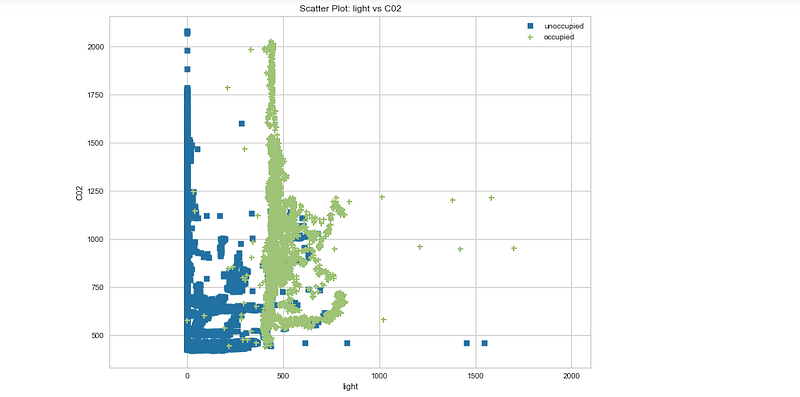
<span class="hljs-title">y</span>=<span class="hljs-class"><span class="hljs-keyword">data</span>.occupancy</span></pre></div><h2 id="6a33">Scatter Plot</h2><div id="e775"><pre><span class="hljs-attr">v</span> = ScatterVisualizer(x=<span class="hljs-string">'light'</span>,y=<span class="hljs-string">'C02'</span>,classes=classes,size=(<span class="hljs-number">800</span>,<span class="hljs-number">600</span>))</pre></div><div id="9a6a"><pre>v<span class="hljs-selector-class">.fit</span>(X,y)
v<span class="hljs-selector-class">.transform</span>(X)
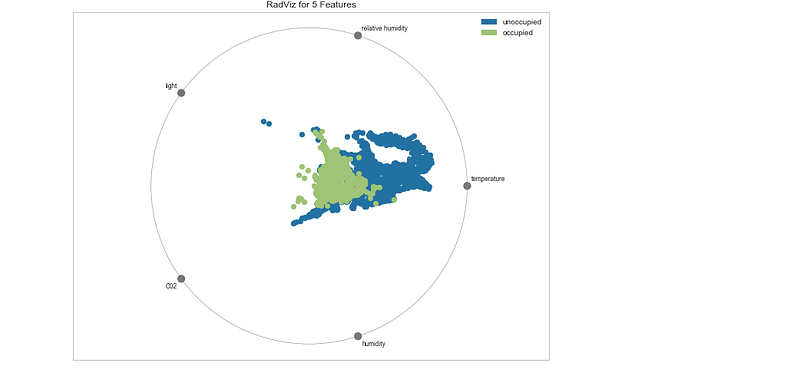
v<span class="hljs-selector-class">.poof</span>()</pre></div><p id="8b10">Output —</p><figure id="a18c"><img src="https://cdn-images-1.readmedium.com/v2/resize:fit:800/1*f7c2K4PKONA8qaj3Bo2V8g.png"><figcaption></figcaption></figure><h2 id="9d77">RadViz</h2><div id="fdd5"><pre>v = <span class="hljs-built_in">RadViz</span>(classes=classes,features=f,size=(<span class="hljs-number">800</span>,<span class="hljs-number">600</span>))
v<span class="hljs-selector-class">.fit</span>(X,y)
v<span class="hljs-selector-class">.transform</span>(X)
v<span class="hljs-selector-class">.poof</span>()</pre></div><p id="3536">Output —</p><figure id="e64a"><img src="https://cdn-images-1.readmedium.com/v2/resize:fit:800/1*hlk2oIAOkXkJ25UjTHQliw.png"><figcaption></figcaption></figure><h2 id="4bc9">Parallel Coordinates Plot</h2><div id="eb3b"><pre><span class="hljs-comment"># Instantiate </span>
<span class="hljs-attr">v</span> = ParallelCoordinates(
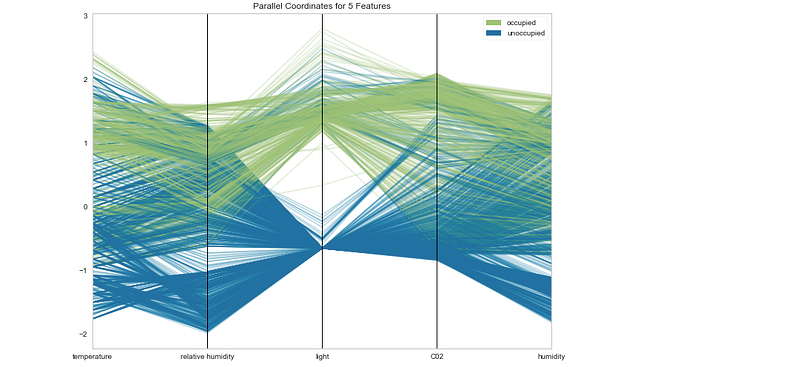
<span class="hljs-attr">classes</span>=classes, features=f,normalize=<span class="hljs-string">'standard'</span>,sample=<span class="hljs-number">0.1</span>,size=(<span class="hljs-number">800</span>,<span class="hljs-number">600</span>)</pre></div><div id="ff55"><pre>)
v<span class="hljs-selector-class">.fit</span>(X,y)
v<span class="hljs-selector-class">.transform</span>(X)
v<span class="hljs-selector-class">.poof</span>()</pre></div><p id="a704">Output —</p><figure id="9dc2"><img src="https://cdn-images-1.readmedium.com/v2/resize:fit:800/1*tDhpDDrz9tGicSxdJRLRDw.png"><figcaption></figcaption></figure><h2 id="a7ae">Rank Features</h2><div id="9ad9"><pre>v = <span class="hljs-built_in">Rank2D</span>(features=f,algorithm=<span class="hljs-string">'covariance'</span>)
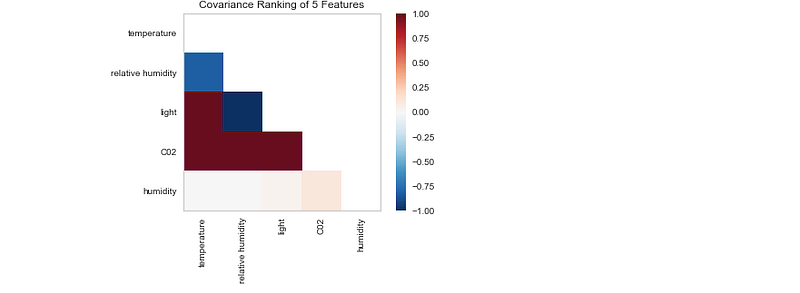
v<span class="hljs-selector-class">.fit</span>(X,y)
v<span class="hljs-selector-class">.transform</span>(X)
v<span class="hljs-selector-class">.poof</span>()</pre></div><p id="ec82">Output —</p><figure id="da02"><img src="https://cdn-images-1.readmedium.com/v2/resize:fit:800/1*OKK3F4vi2RpOuaOXTxVt0g.png"><figcaption></figcaption></figure><div id="f9c1"><pre>v = <span class="hljs-built_in">Rank2D</span>(features=f,algorithm=<span class="hljs-string">'pearson'</span>)
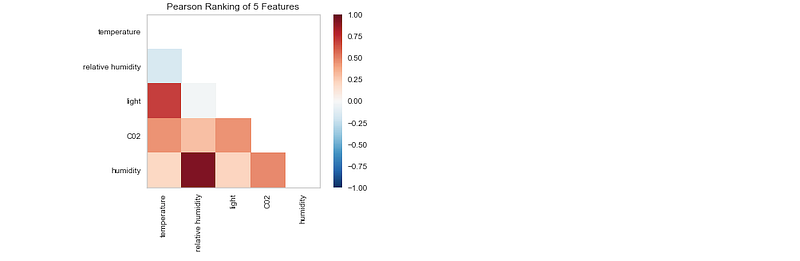
v<span class="hljs-selector-class">.fit</span>(X,y)
v<span class="hljs-selector-class">.transform</span>(X)
v<span class="hljs-selector-class">.poof</span>()</pre></div><p id="8c38">Output —</p><figure id="0fae"><img src="https://cdn-images-1.readmedium.com/v2/resize:fit:800/1*xfPSXLy6Qxj6dYwbn3eXvA.png"><figcaption></figcaption></figure><p id="2bf3"><b><i>Learnings —</i></b></p><p id="477f">How to perform feature analysis techniques using visual tools from Yellowbrick.</p><p id="d38a"><b><i>Day 52: Coming soon!</i></b></p><p id="a039">Follow and Stay tuned. Keep coding :)</p><h1 id="a69d">For other projects, tune to —</h1><p id="b31f"><b>Build Machine Learning Pipelines( With Code)</b></p><div id="5b37" class="link-block">
<a href="https://medium.datadriveninvestor.com/build-machine-learning-pipelines-with-code-part-1-bd3ed7152124">
<div>
<div>
<h2>Build Machine Learning Pipelines( With Code) — Part 1</h2>
<div><h3>Complete implementation…</h3></div>
<div><p>medium.datadriveninvestor.com</p></div>
</div>
<div>
<div style="background-image: url(https://miro.readmedium.com/v2/resize:fit:320/0*KdToBD8RDMBH4jXM.png)"></div>
</div>
</div>
</a>
</div><p id="946c"><b>Recurrent Neural Network with Keras</b></p><div id="607d" class="link-block">
<a href="https://medium.datadriveninvestor.com/recurrent-neural-network-with-keras-b5b5f6fe5187">
<div>
<div>
<h2>Recurrent Neural Network with Keras</h2>
<div><h3>Project Implementation and cheatsheet…</h3></div>
<div><p>medium.datadriveninvestor.com</p></div>
</div>
<div>
<div style="background-image: url(https://miro.readmedium.com/v2/resize:fit:320/0*xs3Dya3qQBx6IU7C.png)"></div>
</div>
</div>
</a>
</div><p id="56e1"><b>Clustering Geolocation Data in Python using DBSCAN and K-Means</b></p><div id="2b3e" class="link-block">
<a href="https://medium.datadriveninvestor.com/clustering-geolocation-data-in-python-using-dbscan-and-k-means-3705d9f44522">
<div>
<div>
<h2>Clustering Geolocation Data in Python using DBSCAN and K-Means</h2>
<div><h3>Project Implementation…</h3></div>
<div><p>medium.datadriveninvestor.com</p></div>
</div>
<div>
<div style="background-image: url(https://miro.readmedium.com/v2/resize:fit:320/0*0uPCZnohdaPCO4NN.png)"></div>
</div>
</div>
</a>
</div><p id="a29c"><b>Facial Expression Recognition using Keras</b></p><div id="ccaa" class="link-block">
<a href="https://medium.datadriveninvestor.com/facial-expression-recognition-using-keras-cbdd661a0a54">
<div>
<div>
<h2>Facial Expression Recognition using Keras</h2>
<div><h3>Project Implementation…</h3></div>
<div><p>medium.datadriveninvestor.com</p></div>
</div>
<div>
<div style="background-image: url(https://miro.readmedium.com/v2/resize:fit:320/0*CGch7hzdjg1fpgKy.jpg)"></div>
</div>
</div>
</a>
</div><p id="0db7"><b>Hyperparameter Tuning with Keras Tuner</b></p><div id="6dff" class="link-block">
<a href="https://medium.datadriveninvestor.com/hyperparameter-tuning-with-keras-tuner-3a609d3fd85b">
<div>
<div>
<h2>Hyperparameter Tuning with Keras Tuner</h2>
<div><h3>Project Implementation….</h3></div>
<div><p>medium.datadriveninvestor.com</p></div>
</div>
<div>
<div style="background-image: url(https://miro.readmedium.com/v2/resize:fit:320/0*jlaEz8AZaptNWHEr.png)"></div>
</div>
</div>
</a>
</div><p id="fed8"><b>Custom Layers in Keras</b></p><div id="e4fd" class="link-block">
<a href="https://medium.datadriveninvestor.com/custom-layers-in-keras-de5f793217aa">
<div>
<div>
<h2>Custom Layers in Keras</h2>
<div><h3>Code implementation …</h3></div>
<div><p>medium.datadriveninvestor.com</p></div>
</div>
<div>
<div style="background-image: url(https://miro.readmedium.com/v2/resize:fit:320/0*1IH67KJadqeqeO01.png)"></div>
</div>
</div>
</a>
</div><p id="2ea9"><b><i>That’s it fellas. Peace out and keep coding :)</i></b></p><p id="ec55">Stay Tuned and of-course let me end this post with a quote by Steve Jobs ;)</p><p id="5004" type="7">“You have to be burning with an idea, or a problem, or a wrong that you want to right. If you’re not passionate enough from the start, you’ll never stick it out.”</p></article></body>