
Day 50: 60 days of Data Science and Machine Learning Series
Bidirectional Encoder Representations from Transformers ( BERT)…
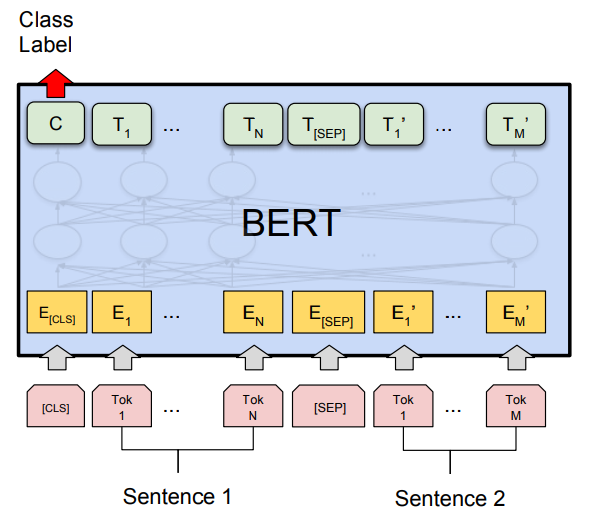
Tensorflow is an open source platform for machine learning and deep learning developed by Google Brain Team and written in C++, Python, and CUDA created for large numerical computations and deep learning. It ingests the data in the form of tensors which are nothing but multi-dimensional arrays of higher dimensions to handle large amounts of data. It works on the data flow graphs that have nodes and edges and supports both CPUs and GPUs. It works by preprocessing the data, building the model, training and estimating the model.
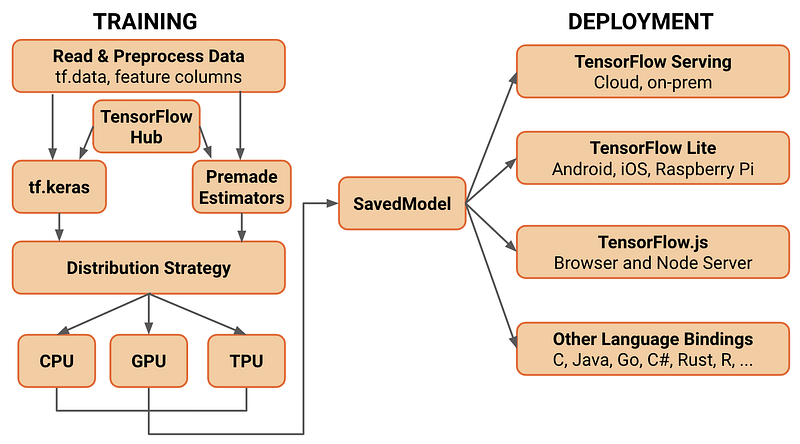
A good reference to Tensorflow ( used in this project as well ) —
Some of the other best Series —
100 days : Your Data Science and Machine Learning Degree Series with projects
Complete Data Visualization and Pre-processing Series with projects
Projects Videos —
All the projects, data structures, SQL, algorithms, system design, Data Science and ML , Data Analytics, Data Engineering, , Implemented Data Science and ML projects, Implemented Data Engineering Projects, Implemented Deep Learning Projects, Implemented Machine Learning Ops Projects, Implemented Time Series Analysis and Forecasting Projects, Implemented Applied Machine Learning Projects, Implemented Tensorflow and Keras Projects, Implemented PyTorch Projects, Implemented Scikit Learn Projects, Implemented Big Data Projects, Implemented Cloud Machine Learning Projects, Implemented Neural Networks Projects, Implemented OpenCV Projects,Complete ML Research Papers Summarized, Implemented Data Analytics projects, Implemented Data Visualization Projects, Implemented Data Mining Projects, Implemented Natural Leaning Processing Projects, MLOps and Deep Learning, Applied Machine Learning with Projects Series, PyTorch with Projects Series, Tensorflow and Keras with Projects Series, Scikit Learn Series with Projects, Time Series Analysis and Forecasting with Projects Series, ML System Design Case Studies Series videos will be published on our youtube channel ( just launched).
Subscribe today!
Tech Newsletter —
If you are interested, you can join my newsletter through which I send tech interview tips, techniques, patterns, hacks — Software Development, ML, Data Science, Startups and Technology projects to more than 30K readers. You can subscribe to Tech Brew :
Bidirectional Encoder Representations from Transformers ( BERT) , developed by Google is a deeply bidirectional transformer-based machine learning technique for NLP. It primarily trains the language models based on the complete set of words in a query or sentence during text processing.
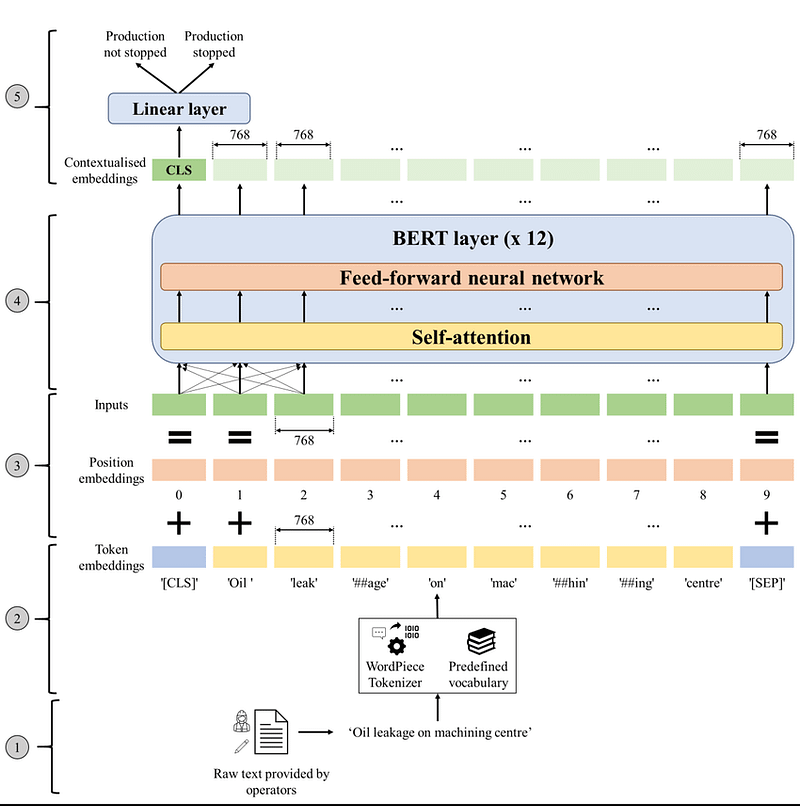
A good reference to understand the vastness of BERT —
In this post we will learn how to fine tune BERT for text classification.
Let’s dive in!
Import necessary Libraries
import numpy as np
import tensorflow as tf
import tensorflow_hub as hub
import sys
sys.path.append('models')
from official.nlp.data import classifier_data_lib
from official.nlp.bert import tokenization
from official.nlp import optimization
import numpy as np
import pandas as pd
from sklearn.model_selection import train_test_split
from tensorflow.python.data.ops.dataset_ops import AUTOTUNEprint("TF Version: ", tf.__version__)
print("Eager mode: ", tf.executing_eagerly())
print("Hub version: ", hub.__version__)
print("GPU is", "available" if tf.config.experimental.list_physical_devices("GPU") else "NOT AVAILABLE")Output —
TF Version:  2.7.0
Eager mode:  True
Hub version:  0.12.0
GPU is available
Load Dataset
df = pd.read_csv('Path to data', compression='zip',low_memory=False)
Create tf.data.Datasets for Training and Evaluation
train_df, r = train_test_split(df,random_state=42,train_size=0.0075,stratify = df.target.values)
valid_df, _ = train_test_split(r,random_state=42,train_size=0.0075,stratify=r.target.values)
with tf.device('/cpu:0'):
train_data = tf.data.Dataset.from_tensor_slices((train_df['question_text'].values,train_df['target'].values))
valid_data = tf.data.Dataset.from_tensor_slices((valid_df.question_text.values,valid_df.target.values))Pre-trained BERT Model
label_list = [0,1]
msl = 128
tbs=32

bert_layer = hub.KerasLayer('https://tfhub.dev/tensorflow/bert_en_uncased_L-12_H-768_A-12/2', trainable= True)
vocab_file= bert_layer.resolved_object.vocab_file.asset_path.numpy()
do_lower_case = bert_layer.resolved_object.do_lower_case.numpy()
tokenizer = tokenization.FullTokenizer(vocab_file,do_lower_case)
tokenizer.wordpiece_tokenizer.tokenize('hi! beautiful world')
Output —
['hi', '##!', 'beautiful', 'world']Tokenize and Preprocess Text
def to_feature(text, label, label_list=label_list, max_seq_length=msl, tokenizer=tokenizer):
  ex = classifier_data_lib.InputExample(guid= None, text_a = text.numpy(),text_b = None, label = label.numpy())
  f = classifier_data_lib.convert_single_example(0,ex,label_list,msl,tokenizer)
  return (f.input_ids,f.input_mask,f.segment_ids,f.label_id)
Eager Execution
def to_feature_map(text, label):
input_ids, input_mask, segment_ids, label_id = tf.py_function(to_feature,inp=[text,label], Tout = [tf.int32,tf.int32,tf.int32,tf.int32])input_ids.set_shape([msl])
input_mask.set_shape([msl])
segment_ids.set_shape([msl])
label_id.set_shape([])x = {
'input_word_ids':input_ids, 'input_mask':input_mask, 'input_type_ids' : segment_ids}
return ( x, label_id)Input Pipeline with tf.data
with tf.device('/cpu:0'):
  # train
  train_data = (train_data.map(to_feature_map,num_parallel_calls=tf.data.experimental.AUTOTUNE)

   .shuffle(1000)
   .batch(32,drop_remainder=True)
   .prefetch(tf.data.experimental.AUTOTUNE))
# valid
valid_data = ( valid_data.map(to_feature_map,num_parallel_calls=tf.data.experimental.AUTOTUNE)
.batch(32,drop_remainder=True)
.prefetch(tf.data.experimental.AUTOTUNE))Build Model
def create_model():
  input_word_ids = tf.keras.layers.Input(shape=(msl),dtype=tf.int32,num='input_word_ids')
  input_mask = tf.keras.layers.Input(shape=(msl),dtype=tf.int32,num='input_mask')
  segment_ids = tf.keras.layers.Input(shape=(msl),dtype=tf.int32,num='segment_ids')
pooled_output, sequnece_output = bert_layer([input_word_ids,input_mask,sement_ids])
drop = tf.keras.layers.Droupout(0.4)(pooled_out)
output = tf.keras.layers.Dense(1,activation='segment_idsmodel = tf.keras.Model(
input = {
'input_word_ids':input_ids,
'input_mask':input_mask,
'input_type_ids':input_type_ids},
output = output)
return modelFine-Tune BERT
model = create_model()
model.compile(optimizer=tf.keras.optimizers.Adam(learning_rate=2e-5),

              loss= tf.keras.losses.binary_CrossEntropy(),
              metrics = [tf.keras.metrics.BinaryAccuracy()]

              )
epochs = 4
history = model.fit(train_data,
                    validation_data = valid_data, epochs=epochs, verbose=1)
Learnings —
How to tokenize and preprocess Text for BERT Build tensorFlow input pipelines for text data with the tf.data API.
Day 51: Coming soon!
Follow and Stay tuned. Keep coding :)
For other projects, tune to —
Build Machine Learning Pipelines( With Code)
Recurrent Neural Network with Keras
Clustering Geolocation Data in Python using DBSCAN and K-Means
Facial Expression Recognition using Keras
Hyperparameter Tuning with Keras Tuner
Custom Layers in Keras
That’s it fellas. Peace out and keep coding :)
Stay Tuned and of-course let me end this post with a quote by Steve Jobs ;)
“You have to be burning with an idea, or a problem, or a wrong that you want to right. If you’re not passionate enough from the start, you’ll never stick it out.”


