Free AI web copilot to create summaries, insights and extended knowledge, download it at here
9589
Abstract
4a5caa305cf6?sk=89f3d43dd450035546bf3a8cf85bb125">Deep Learning</a>, <a href="https://readmedium.com/60-days-of-applied-machine-learning-with-projects-series-cd975641da0a?sk=09cf1f30e912774cba6501c8bac5edde">Applied Machine Learning with Projects Series</a>, <a href="https://readmedium.com/30-days-of-pytorch-with-projects-series-737941e5aa4f?sk=d0ead140034be9f1fff27d059b525221">PyTorch with Projects Series</a>, <a href="https://readmedium.com/30-days-of-tensorflow-and-keras-with-projects-series-f52e0815d696?sk=945bb73c32bc967b7e056f894fab7626">Tensorflow and Keras with Projects Series</a>, <a href="https://readmedium.com/day-1-of-30-days-of-scikit-learn-series-with-projects-76341935e5fd?sk=44a6845c53109c2482c368bdb7924e46">Scikit Learn Series with Projects</a>, <a href="https://readmedium.com/day-1-of-15-days-of-time-series-analysis-and-forecasting-with-projects-series-5ba3b6cf7528?sk=7a5826927d95b8fd22deae9ee53bc54d">Time Series Analysis and Forecasting with Projects Series</a>, <a href="https://readmedium.com/day-1-of-ml-system-design-case-studies-series-ml-system-design-basics-dbf7765b3c0c?sk=9ce5aee0a8b5208be05ac5284872e91b">ML System Design Case Studies Series</a> videos will be published on our youtube channel ( just launched).</i></b></p><p id="4b19"><b><i>Subscribe today!</i></b></p><div id="1520" class="link-block">
<a href="https://www.youtube.com/@ignito5917/about">
<div>
<div>
<h2>Ignito</h2>
<div><h3>Excited to share that we have launched our Youtube channel — Ignito to cover all the projects and coding exercise for …</h3></div>
<div><p>www.youtube.com</p></div>
</div>
<div>
<div style="background-image: url(https://miro.readmedium.com/v2/resize:fit:320/0*N9OmxhpEw0AuQEey)"></div>
</div>
</div>
</a>
</div><h2 id="9083">Tech Newsletter —</h2><blockquote id="8abe"><p>If you are interested, you can join my newsletter through which I send tech interview tips, techniques, patterns, hacks — Software Development, ML, Data Science, Startups and Technology projects to more than 30K readers. You can subscribe to <b>Tech Brew :</b></p></blockquote><div id="8d5c" class="link-block">
<a href="https://naina0405.substack.com/">
<div>
<div>
<h2>Ignito</h2>
<div><h3>Data Science, ML, AI and more… Click to read Ignito, by Naina Chaturvedi, a Substack publication. Launched 7 months…</h3></div>
<div><p>naina0405.substack.com</p></div>
</div>
<div>
<div style="background-image: url(https://miro.readmedium.com/v2/resize:fit:320/0*_ER1J-h50iqAjH70)"></div>
</div>
</div>
</a>
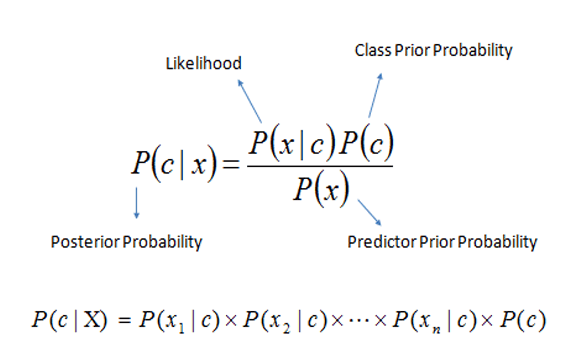
</div><h2 id="c2f6">Bayes Theorem —</h2><p id="b932">It’s a method which is used to determine conditional probabilities which means the probability of one event occurring given that another event has already occurred.</p><p id="6d61">The conditional probability can be calculated as follows —</p><p id="09d1"><b>P(A | B) = P(A, B) / P(B)</b></p><p id="2a29">Bayes theorem is extensively used in the medical sciences ( to calculate the likelihood ratio if some one has a disease or not). Nevertheless, it’s also used in the other applications — filtering spam.</p><p id="8cb6">NB classifiers are a set of classification algorithms based on Bayes’ Theorem.</p><p id="9080">A good reference to understand the vastness of Naive Bayes —</p><div id="ad59" class="link-block">
<a href="https://scikit-learn.org/stable/modules/naive_bayes.html">
<div>
<div>
<h2>1.9. Naive Bayes</h2>
<div><h3>Naive Bayes methods are a set of supervised learning algorithms based on applying Bayes' theorem with the "naive"…</h3></div>
<div><p>scikit-learn.org</p></div>
</div>
<div>
<div style="background-image: url(https://miro.readmedium.com/v2/resize:fit:320/0*2_TJGntwn_ufvKjZ)"></div>
</div>
</div>
</a>
</div><p id="e063">MultinomialNB is used for text classification which implements naive Bayes algorithm for multinomially distributed data . In this post we are going to implement language classification with Naive Bayes through project.</p><p id="333e">Let’s dive in!</p><h2 id="7b4d">Import Necessary Libraries</h2><div id="dfde"><pre><span class="hljs-keyword">import</span> matplotlib
<span class="hljs-meta">%matplotlib</span> inline
<span class="hljs-meta">%config</span> InlineBackend.figure_format = <span class="hljs-string">'svg'</span>
<span class="hljs-keyword">import</span> matplotlib.pyplot <span class="hljs-keyword">as</span> plt
plt.style.use(<span class="hljs-string">'ggplot'</span>)</pre></div><div id="e98a"><pre><span class="hljs-keyword">import</span> numpy <span class="hljs-keyword">as</span> np
<span class="hljs-keyword">import</span> string</pre></div><div id="49ee"><pre><span class="hljs-keyword">from</span> collections <span class="hljs-keyword">import</span> defaultdict</pre></div><div id="e1f1"><pre><span class="hljs-keyword">from</span> sklearn.metrics <span class="hljs-keyword">import</span> f1_score
<span class="hljs-keyword">from</span> sklearn.naive_bayes <span class="hljs-keyword">import</span> MultinomialNB
<span class="hljs-keyword">from</span> sklearn.feature_extraction.text <span class="hljs-keyword">import</span> CountVectorizer</pre></div><div id="9df3"><pre><span class="hljs-keyword">import</span> joblib
</pre></div><h2 id="3b04">Load the data</h2><div id="65ac"><pre>model = joblib.<span class="hljs-keyword">load</span>(<span class="hljs-string">'Path to Data/Models/final_model.joblib'</span>)
vectorizer = joblib.<span class="hljs-keyword">load</span>(<span class="hljs-string">'Path to Data/Vectorizers/final_model.joblib'</span>)
<span class="hljs-type">text</span> = <span class="hljs-string">'Its a beautiful day'</span>
<span class="hljs-type">text</span> = preprocess_function(<span class="hljs-type">text</span>)
<span class="hljs-type">text</span> = [split_into_subwords_function(<span class="hljs-type">text</span>)]
tv =vectorizer.<span class="hljs-keyword">transform</span>(<span class="hljs-type">text</span>)
model.predict(tv)</pre></div><p id="64bc">Output —</p><div id="7c6b"><pre><span class="hljs-function"><span class="hljs-title">array</span><span class="hljs-params">([<span class="hljs-string">'en'</span>], dtype=<span class="hljs-string">'<U2'</span>)</span></span></pre></div><h2 id="9754">Exploratory data analysis</h2><div id="bbfe"><pre>def open_file(filename):
with <span class="hljs-keyword">open</span>(filename, <span class="hljs-string">'r'</span>) <span class="hljs-keyword">as</span> <span class="hljs-keyword">f</span>:
data = <span class="hljs-keyword">f</span>.readlines()
<span class="hljs-keyword">return</span> data
<span class="hljs-keyword">dr</span>= dict()
<span class="hljs-keyword">dr</span>[<span class="hljs-string">'sk'</span>] = open_file(<span class="hljs-string">'Data/Sentences/train_sentences.sk'</span>)
<span class="hljs-keyword">dr</span>[<span class="hljs-string">'cs'</span>] = open_file(<span class="hljs-string">'Data/Sentences/train_sentences.cs'</span>)
<span class="hljs-keyword">dr</span>[<span class="hljs-string">'en'</span>] = open_file(<span class="hljs-string">'Data/Sentences/train_sentences.en'</span>)
def show_statistics(data):
<span class="hljs-keyword">for</span> <span class="hljs-keyword">language</span>, sentences in data.<span class="hljs-built_in">items</span>():
    number_of_sentences = <span class="hljs-number">0</span>
    number_of_words = <span class="hljs-number">0</span>
    number_of_unique_words = <span class="hljs-number">0</span>
    sample_extract = <span class="hljs-string">''</span>


    word_list = <span class="hljs-string">' '</span>.<span class="hljs-keyword">join</span>(sentences).<span class="hljs-keyword">split</span>()
    ns = <span class="hljs-built_in">len</span>(sentences)
    nw=<span class="hljs-built_in">len</span>(word_list)
    <span class="hljs-keyword">nu</span> = <span class="hljs-built_in">len</span>(<span class="hljs-keyword">set</span>(word_list))
    <span class="hljs-keyword">se</span> = <span class="hljs-string">' '</span>.<span class="hljs-keyword">join</span>(sentences[<span class="hljs-number">0</span>].<span class="hljs-keyword">split</span>()[<span class="hljs-number">0</span>:<span class="hljs-number">7</span>])
show_statistics(<span class="hljs-keyword">dr</span>)</pre></div><p id="193d">Output —</p><div id="0b3b"><pre><span class="hljs-section">Language: sk
-----------------------</span>
Number of sentences : 100
Number of words : 2016
Number of unique words : 1322
Sample extract : Pán de Grandes Pascual jasne vysvetlil, aká...
<span class="hljs-section">Language: cs
-----------------------</span>
Number of sentences : 10
Number of words : 158
Number of unique words : 141
Sample extract : Upozorňujeme, že jejím cílem je šetřit penězi...
<span class="hljs-section">Language: en
-----------------------</span>
Number of sentences : 100
Number of words : 2381
Number of unique words : 1037
Sample extract : I can understand your approach a little...</pre></div><h2 id="1945">Data preprocessing</h2><div id="62a4"><pre>def <span class="h
Options
ljs-built_in">preprocess</span>(text):
preprocessed_text = text
preprocessed_text = text.<span class="hljs-built_in">lower</span>().<span class="hljs-built_in">replace</span>(<span class="hljs-string">'-'</span>,<span class="hljs-string">' '</span>)
translation_table = str.<span class="hljs-built_in">maketrans</span>(<span class="hljs-string">'\n'</span>,<span class="hljs-string">' '</span>,string.punctuation + string.digits)
preprocessed_text= preprocessed_text.<span class="hljs-built_in">translate</span>(translation_table)

return preprocessed_text
data_preprocessed = {k: [<span class="hljs-built_in">preprocess</span>(sentence) for sentence in v] for k,v in dr.<span class="hljs-built_in">items</span>()}
<span class="hljs-built_in">show_statistics</span>(data_preprocessed)</pre></div><p id="0d77">Output —</p><div id="c93c"><pre><span class="hljs-section">Language: sk
-----------------------</span>
Number of sentences : 100
Number of words : 1996
Number of unique words : 1207
Sample extract : pán de grandes pascual jasne vysvetlil aká...
<span class="hljs-section">Language: cs
-----------------------</span>
Number of sentences : 10
Number of words : 155
Number of unique words : 133
Sample extract : upozorňujeme že jejím cílem je šetřit penězi...
<span class="hljs-section">Language: en
-----------------------</span>
Number of sentences : 100
Number of words : 2366
Number of unique words : 904
Sample extract : i can understand your approach a little...</pre></div><h2 id="30d9">Vectorize</h2><div id="14cd"><pre>strain,y_train =<span class="hljs-comment">[]</span>,<span class="hljs-comment">[]</span></pre></div><div id="e979"><pre>for k,v in data_preprocessed<span class="hljs-selector-class">.items</span>():
for sentence in v:
strain.<span class="hljs-built_in">append</span>(sentence)
y_train.<span class="hljs-built_in">append</span>(k)
vectorizer = <span class="hljs-built_in">CountVectorizer</span>()
X_train = vectorizer.<span class="hljs-built_in">fit_transform</span>(strain)</pre></div><h2 id="ebe8">Build Model and Training</h2><div id="4339"><pre>nc = <span class="hljs-built_in">MultinomialNB</span>()
nc<span class="hljs-selector-class">.fit</span>(X_train,y_train)
</pre></div><h2 id="cba0">Evaluate the model</h2><div id="54d7"><pre><span class="hljs-variable">dv</span>= <span class="hljs-function"><span class="hljs-title">dict</span>()</span>
<span class="hljs-variable">dv</span>[<span class="hljs-string">'sk'</span>] = <span class="hljs-function"><span class="hljs-title">open_file</span>(<span class="hljs-string">'Data/Sentences/val_sentences.sk'</span>)</span>
<span class="hljs-variable">dv</span>[<span class="hljs-string">'cs'</span>] = <span class="hljs-function"><span class="hljs-title">open_file</span>(<span class="hljs-string">'Data/Sentences/val_sentences.cs'</span>)</span>
<span class="hljs-variable">dv</span>[<span class="hljs-string">'en'</span>] = <span class="hljs-function"><span class="hljs-title">open_file</span>(<span class="hljs-string">'Data/Sentences/val_sentences.en'</span>)</span></pre></div><div id="a862"><pre><span class="hljs-attr">data_val_preprocessed</span> = {k: [preprocess(sentence) for sentence in v] for k,v in dv.items()}</pre></div><div id="0e5a"><pre>sval,y_val =<span class="hljs-comment">[]</span>,<span class="hljs-comment">[]</span></pre></div><div id="1243"><pre><span class="hljs-keyword">for</span> k,v <span class="hljs-keyword">in</span> data_val_preprocessed.<span class="hljs-keyword">items</span>():
<span class="hljs-keyword">for</span> <span class="hljs-keyword">sentence</span> <span class="hljs-keyword">in</span> v:
sval.append(<span class="hljs-keyword">sentence</span>)
y_val.append(k)</pre></div><div id="9984"><pre><span class="hljs-attr">X_val</span> = vectorizer.transform(sval)
<span class="hljs-attr">pred</span> = nc.predict(X_val)</pre></div><div id="32af"><pre><span class="hljs-attribute">nc</span> = MultinomialNB(alpha=<span class="hljs-number">0</span>.<span class="hljs-number">0001</span>,fit_prior=False)
<span class="hljs-attribute">nc</span>.fit(X_train,y_train)</pre></div><div id="f6f7"><pre>pred = nc<span class="hljs-selector-class">.predict</span>(X_val)
<span class="hljs-function"><span class="hljs-title">f1_score</span><span class="hljs-params">(y_val,pred,average=<span class="hljs-string">'weighted'</span>)</span></span></pre></div><p id="1627">Output —</p><div id="3c13"><pre><span class="hljs-attribute">0</span>.<span class="hljs-number">8368507601649364</span></pre></div><p id="84af"><b><i>Learnings —</i></b></p><p id="a76c">How to clean and preprocess data for language classification as well as build, train and evaluate a multinomial Naive Bayes model.</p><p id="2b93"><b><i>Day 47: Coming soon!</i></b></p><p id="a039">Follow and Stay tuned. Keep coding :)</p><h1 id="a69d">For other projects, tune to —</h1><p id="b31f"><b>Build Machine Learning Pipelines( With Code)</b></p><div id="5b37" class="link-block">
<a href="https://medium.datadriveninvestor.com/build-machine-learning-pipelines-with-code-part-1-bd3ed7152124">
<div>
<div>
<h2>Build Machine Learning Pipelines( With Code) — Part 1</h2>
<div><h3>Complete implementation…</h3></div>
<div><p>medium.datadriveninvestor.com</p></div>
</div>
<div>
<div style="background-image: url(https://miro.readmedium.com/v2/resize:fit:320/0*KdToBD8RDMBH4jXM.png)"></div>
</div>
</div>
</a>
</div><p id="946c"><b>Recurrent Neural Network with Keras</b></p><div id="607d" class="link-block">
<a href="https://medium.datadriveninvestor.com/recurrent-neural-network-with-keras-b5b5f6fe5187">
<div>
<div>
<h2>Recurrent Neural Network with Keras</h2>
<div><h3>Project Implementation and cheatsheet…</h3></div>
<div><p>medium.datadriveninvestor.com</p></div>
</div>
<div>
<div style="background-image: url(https://miro.readmedium.com/v2/resize:fit:320/0*xs3Dya3qQBx6IU7C.png)"></div>
</div>
</div>
</a>
</div><p id="56e1"><b>Clustering Geolocation Data in Python using DBSCAN and K-Means</b></p><div id="2b3e" class="link-block">
<a href="https://medium.datadriveninvestor.com/clustering-geolocation-data-in-python-using-dbscan-and-k-means-3705d9f44522">
<div>
<div>
<h2>Clustering Geolocation Data in Python using DBSCAN and K-Means</h2>
<div><h3>Project Implementation…</h3></div>
<div><p>medium.datadriveninvestor.com</p></div>
</div>
<div>
<div style="background-image: url(https://miro.readmedium.com/v2/resize:fit:320/0*0uPCZnohdaPCO4NN.png)"></div>
</div>
</div>
</a>
</div><p id="a29c"><b>Facial Expression Recognition using Keras</b></p><div id="ccaa" class="link-block">
<a href="https://medium.datadriveninvestor.com/facial-expression-recognition-using-keras-cbdd661a0a54">
<div>
<div>
<h2>Facial Expression Recognition using Keras</h2>
<div><h3>Project Implementation…</h3></div>
<div><p>medium.datadriveninvestor.com</p></div>
</div>
<div>
<div style="background-image: url(https://miro.readmedium.com/v2/resize:fit:320/0*CGch7hzdjg1fpgKy.jpg)"></div>
</div>
</div>
</a>
</div><p id="0db7"><b>Hyperparameter Tuning with Keras Tuner</b></p><div id="6dff" class="link-block">
<a href="https://medium.datadriveninvestor.com/hyperparameter-tuning-with-keras-tuner-3a609d3fd85b">
<div>
<div>
<h2>Hyperparameter Tuning with Keras Tuner</h2>
<div><h3>Project Implementation….</h3></div>
<div><p>medium.datadriveninvestor.com</p></div>
</div>
<div>
<div style="background-image: url(https://miro.readmedium.com/v2/resize:fit:320/0*jlaEz8AZaptNWHEr.png)"></div>
</div>
</div>
</a>
</div><p id="fed8"><b>Custom Layers in Keras</b></p><div id="e4fd" class="link-block">
<a href="https://medium.datadriveninvestor.com/custom-layers-in-keras-de5f793217aa">
<div>
<div>
<h2>Custom Layers in Keras</h2>
<div><h3>Code implementation …</h3></div>
<div><p>medium.datadriveninvestor.com</p></div>
</div>
<div>
<div style="background-image: url(https://miro.readmedium.com/v2/resize:fit:320/0*1IH67KJadqeqeO01.png)"></div>
</div>
</div>
</a>
</div><p id="2ea9"><b><i>That’s it fellas. Peace out and keep coding :)</i></b></p><p id="ec55">Stay Tuned and of-course let me end this post with a quote by Steve Jobs ;)</p><p id="5004" type="7">“Your work is going to fill a large part of your life, and the only way to be truly satisfied is to do what you believe is great work. And the only way to do great work is to love what you do. If you haven’t found it yet, keep looking. Don’t settle. As with all matters of the heart, you’ll know when you find it.”</p></article></body>