avatarJason Knight

Free AI web copilot to create summaries, insights and extended knowledge, download it at here

16877

Abstract

media images into that subdirectory becuase they obey the META and LINK, favicons be they png, svg, or .ico are just more reliable (and result in less 404 in your logs) if you put them in the project root alongside the HTML.</p><h1 id="8de7">Optimizing For Single JS File Output</h1><p id="d0a1">One of the biggest problems with “modules” is that client-side you end up using a metric shit tonne of file requests. It is thus I prefer to use {} as scoping blocks on all my files so I can just copy (dos/win) or cat (nix) the files together in their relevant order. I used to use IIFE for the same purpose, but these days with let/const being locally scoped to the nearest block there’s no need.</p><p id="639c">Even better though is that Google’s “Closure Compiler” can be told to merge files together. I plan on having four JS files</p><div id="7e78"><pre>/scripts/sources/dom.lib.js ; DOM and Modal Helper Library /scripts/sources/calc.app.js ; The calculator application /scripts/sources/help.modals.js ; Modal dialogs <span class="hljs-keyword">for</span> the <span class="hljs-built_in">help</span> system /scripts/comment.js ; A comment minification should ignore</pre></div><p id="8f76">And a batch file to call closure to compile them down.</p><div id="b5fb"><pre><span class="hljs-variable">@echo</span> off echo Combining <span class="hljs-keyword">and</span> minifying JS files into temp.js <span class="hljs-variable">@java</span>^ -jar^ \closureCompiler\closure-compiler-v20230103.jar^ --js^ sources/dom.lib.js^ sources/calc.app.js^ sources/help.modals.js^ --js_output_file^ temp.js echo Combining comment.js + temp.js as calc.min.js copy /B comment.js + temp.js calc.min.js echo Removing temp.js del temp.js echo Attempt Complete pause</pre></div><p id="3fa5">I could add some %errorLevel% branching in there, but honestly if I don’t notice the closure compiler spewing errors, that’s on me not my automation.</p><p id="c673">I had to include the comment as a separate file and copy because for some reason I can’t get the command line version of closure to obey the “extra asterisk” method of saying “don’t delete this comment”. Almost seems like they got rid of it in the most recent (October 2022) release.</p><h1 id="974e">Optimizing For Push</h1><p id="6fbd">I previously wrote about how in a lot of cases <a href="https://levelup.gitconnected.com/http-2-push-fact-fiction-placebo-746cee7e3bdf">HTTP push can be a placebo</a> on larger projects. In testing I’ve found that where it makes the biggest difference is in smaller applications where you can keep the code filecount below six files, and you can push two extra files if it helps reduce FOUC. <i>Flash Of Unstyled Content</i></p><p id="aa74">We could do the push via “preload” link in the markup, but that can introduce a slight delay… though in practice nothing you push or preload starts until the markup does. If we pull up a waterfall of the completed demo without push:</p><figure id="21b9"><img src="https://cdn-images-1.readmedium.com/v2/resize:fit:800/1*Or3ZrrxK2d8mRCq4D2WABA.png"><figcaption>Networking waterfall without push</figcaption></figure><p id="3706">And compare to with push enabled:</p><figure id="b2e1"><img src="https://cdn-images-1.readmedium.com/v2/resize:fit:800/1*grWmxl4adRBZaQqMCu8gQw.png"><figcaption>🎵 <i>Push push lady lightning! Push! Puuuush…</i>🎵</figcaption></figure><p id="5bb0">Now those two charts are not set to the same time scale, so let’s do that for a proper comparison.</p><figure id="674a"><img src="https://cdn-images-1.readmedium.com/v2/resize:fit:800/1*0jJAqwS8P37VrSE6aGI2xQ.png"><figcaption>All things being equal…</figcaption></figure><p id="20de">Oh… ok then, Push is not a placebo in this case. We have in fact cut “time to interactable” and “first meaningful paint” in half. Even though the parallelism did in fact make some files take longer to transfer, that they occur side-by-side results in a lower load time overall. <b>That’s what push and/or preload is SUPPOSED to do!</b></p><p id="b975">Choosing the files to push was simple, and thus I have this in my .htaccess for the project:</p><div id="f58d"><pre><Files calc.app.html> Header <span class="hljs-keyword">add</span> Link <span class="hljs-string">"</for_others/medium_articles/htmlCSSCalcScripted/template/images/canvas_1.webp>; rel=preload; as=image;"</span> Header <span class="hljs-keyword">add</span> Link <span class="hljs-string">"</for_others/medium_articles/htmlCSSCalcScripted/template/calc.screen.css>; rel=preload; as=style;"</span> Header <span class="hljs-keyword">add</span> Link <span class="hljs-string">"</for_others/medium_articles/htmlCSSCalcScripted/scripts/calc.min.js>; rel=preload; as=script;"</span> Header <span class="hljs-keyword">add</span> Link <span class="hljs-string">"</for_others/medium_articles/htmlCSSCalcScripted/template/fonts/OPTIEdgarExtended-Regular.woff2>; rel=preload; as=font; crossorigin"</span> Header <span class="hljs-keyword">add</span> Link <span class="hljs-string">"</for_others/medium_articles/htmlCSSCalcScripted/template/fonts/interface-Regular.woff2>; rel=preload; as=font; crossorigin"</span> </Files></pre></div><p id="e592">Might seem weird to try and start the canvas background first, but it’s actually the largest file.</p><p id="b3e2">I also set my cache-control headers ahead of time for static files as per Google’s recommendation. This part IS mostly BS, but it shuts up their analysis tools.</p><div id="b410"><pre><IfModule mod_headers.c> <FilesMatch <span class="hljs-string">".(ico|jpg|jpeg|png|webp|gif|swf|avi|wmv|mp4|ogg|js|css|woff|woff2|ttf|eot|otf|svg)"</span>&gt; Header <span class="hljs-built_in">set</span> Cache-Control <span class="hljs-string">"max-age=2592000, public"</span> &lt;/FilesMatch&gt; &lt;FilesMatch <span class="hljs-string">"\.(woff|woff2?)"</span>> Header <span class="hljs-built_in">set</span> Access-Control-Allow-Origin <span class="hljs-string">""</span> </FilesMatch> </IfModule></pre></div><p id="8b69">A big detail there is setting the Access-Control-Allow-Origin on the font files. If you don’t do this Firefox tends to try to load the same font files twice… three times if you disable caching. You set this and it will actually bother using the preload/push instead of reloading it when it parses the CSS. This is the same as setting “crossorigin” on a link in your HTML.</p><p id="17a9">One big thing I want to call your attention to in those waterfalls though is how NOTHING else starts downloading — not even push, not rel=”preload” links, <b>NOTHING</b> — until after the markup is done. People wonder why I obsess on keeping the HTML as small as I can get away with… well <b>THERE IT FLIPPING IS! </b>Pissing all over the HTML with presentational classes and DIV soup just delays everything else loading. If you use sematnic markup, and keep your presentation in the external stylesheet on top of multi-skinning and media targets, your first-load is more efficient as whilst grabbing the page cache-empty you can leverage parallelism. And that’s again before we even talk about caching where CSS is typically cached when HTML isn’t.</p><p id="ee80">You want that 100% in lighthouse, you’re not going to get it with the mental huffing midgetry of <code><div class="text-center text-xl color-red-400 col-4-s col-6-m"></code> resulting in 150k of HTML doing 10k’s job! <i>Thus why the peddlers of scam artist bullshit like Failwind and Bootcrap aren’t even qualified to flap their damned yap on the topic.</i></p><p id="2279"><a href="https://twitter.com/adamwathan/status/1613720517865013248">And Adam, get back to me</a>.<i> </i><i>I done told you once you son of a bitch, I’m the best that’s ever been. </i></p><p id="452b"><i>Well Wathan went to Cupertino, he was looking for some nubes to peel…</i></p><h1 id="5887">Turning The Template Into DOM Instructions</h1><p id="cdd2">Because we should be generating our application from the scripting instead of crapping on the markup with stuff not all users will even be able to use, we need some DOM making tools.</p><p id="ab8d">Sure we could do the backtick string markup and innerHTML it in, but that opens the door to security woes, performance woes, much less the sheer volume of getElement(s)by<i>XXX </i>or querySelector(all) that we’d have to do after. Even if we batched all the markup for a single push — which could render faster — that gets thrown in the trash once we start trying to hook our elements.</p><p id="4567">Or worse we end up polluting the global namespace with on<i>event</i> attributes like “onclick” forcing the functions they call to be global.</p><p id="e69c">Thus for this task I use what I was taught are called “make” routines… which are very similar to what React tries to do with their own createElement.</p><p id="2d70">To that end I have dom.lib.js which contains some make routines, and a couple of startup fixes and aids. I start this file with a descriptive comment.</p><div id="9169"><pre>/* dom.<span class="hljs-keyword">lib</span>.js Jason M. Knight January <span class="hljs-number">2023</span>

REQUIRES <span class="hljs-literal">nothing</span> POLLUTES document, Element.prototype, <span class="hljs-type">Object</span>.prototype EVENTS window load, keypress

My baseline helper functions. This <span class="hljs-built_in">is</span> about <span class="hljs-keyword">as</span> close <span class="hljs-keyword">to</span> a <span class="hljs-string">"framework"</span> <span class="hljs-keyword">as</span> I typically would <span class="hljs-keyword">get</span>.

YES, I extend system objects. Bite <span class="hljs-keyword">me</span>. */</pre></div><p id="8881">The “requires/pollutes/events” section is a habit I picked up ages ago when programming assembly. This is something that I think a lot of programmers would struggle less with gibberish like “side effects” if they’d just bother doing. If the file has dependencies needed before it and you’re not using modules, list them. If you change anything in the global scope or modify system objects, say so. If you hook events, list them.</p><p id="e7d7">Next I have a scope isolating block. This replaces IIFE since if you just {} all the let/const you use inside it don’t bleed into the global scope. It also is somewhat superior to modules for client-side deployment since — as in the above batch file — to combine/pack all your different files, you can literally just copy them together.</p><p id="3f1a">Anyhow, inside the scope isolating block the first thing I have is a routine I used two or three times. {} might not make functions local in scope like a IIFE, but if you define them as constants they are!</p><div id="17a4"><pre> <span class="hljs-keyword">const</span>

<span class="hljs-title function_">isNodeOrNonObject</span> = (<span class="hljs-params">obj</span>) => ( (<span class="hljs-string">"object"</span> !== <span class="hljs-keyword">typeof</span> obj) || (obj <span class="hljs-keyword">instanceof</span> <span class="hljs-title class_">Node</span>) ); <span class="hljs-comment">// isNodeOrNonObject</span></pre></div><p id="c0a0">This simple check returns true if the variable passed to it isn’t an object, or if it is an object is it an instance of node. Why do I need this? For my make routines.</p><p id="0b2d">I append the first make to document as .__make. Appending to system objects is frowned on in some circles, and really there are only two reasons to worry about it.</p><ol><li>namespace collisions with other libraries. Borrowing from lodash for the double underscore helps. Using Object.definePropert(y/ies) helps even more since trying to define more than once will throw an error. Thus you can fix those conflicts <b>before</b> you do something stupid like deploy.</li><li>IE couldn’t do it to Element.prototype prior to IE 10. This is 2023, who gives a flying purple fish about Interdebt Exploder?</li></ol><p id="756d">Likewise if people used Object.defineProperty on objects they’d have less headaches since they aren’t iterable unless you tell them to be so. That’s a big spot people doing things like “Object.prototype.myfunction=() => something;” cock up a lot. In fact it’s the root of the <b>MYTHS </b>of the “evils” of “for..in”</p><p id="34b9">Thus, I’m doing it. It’s an easy way to extend what JS can do.</p><div id="bcce"><pre> <span class="hljs-title class_">Object</span>.<span class="hljs-title function_">defineProperties</span>(<span class="hljs-variable language_">document</span>, {

__make : { value : <span class="hljs-function">(<span class="hljs-params">tagName, ...rest</span>) =&gt;</span> {
  <span class="hljs-keyword">let</span> e = <span class="hljs-variable language_">document</span>.<span class="hljs-title function_">createElement</span>(tagName);
  <span class="hljs-keyword">if</span> (rest.<span class="hljs-property">length</span>) e.<span class="hljs-title function_">__attach</span>(...rest);
  <span class="hljs-keyword">return</span> e;
} }, <span class="hljs-comment">// document.__make</span></pre></div><p id="8f7f">The way this works is that the first argument is always the tag name used to make our DOM element. Any other arguments are passed to Element.__attach which I’ll get to in a moment. We then return the element.</p><p id="302d">Let’s skip ahead in the code to that attach:</p><div id="3f97"><pre> <span class="hljs-title class_">Object</span>.<span class="hljs-title function_">defineProperties</span>(<span class="hljs-title class_">Element</span>.<span class="hljs-property"><span class="hljs-keyword">prototype</span></span>, {

__attach : { value : <span class="hljs-keyword">function</span>(<span class="hljs-params">...rest</span>) {
  <span class="hljs-keyword">for</span> (<span class="hljs-keyword">let</span> arg <span class="hljs-keyword">of</span> rest) {
    <span class="hljs-keyword">if</span> (arg !== <span class="hljs-literal">undefined</span>) {
      <span class="hljs-keyword">if</span> (arg <span class="hljs-keyword">instanceof</span> <span class="hljs-title class_">Array</span>) <span class="hljs-variable language_">this</span>.<span class="hljs-title function_">__make</span>(...arg);
      <span class="hljs-keyword">else</span> <span class="hljs-keyword">if</span> (<span class="hljs-title function_">isNodeOrNonObject</span>(arg)) <span class="hljs-variable language_">this</span>.<span class="hljs-title function_">append</span>(arg);
      <span class="hljs-keyword">else</span> {
        <span class="hljs-keyword">if</span> (arg.<span class="hljs-property">placement</span>) {
          <span class="hljs-variable language_">this</span>.<span class="hljs-property">dataset</span>.<span class="hljs-property">__domMakePlacement</span> = <span class="hljs-title class_">String</span>(arg.<span class="hljs-property">placement</span>).<span class="hljs-title function_">toLowerCase</span>();
          <span class="hljs-keyword">delete</span> arg.<span class="hljs-property">placement</span>;
        }
        <span class="hljs-keyword">if</span> (arg.<span class="hljs-property">style</span>) {
          <span class="hljs-title class_">Object</span>.<span class="hljs-title function_">assign</span>(<span class="hljs-variable language_">this</span>.<span class="hljs-property">style</span>, arg.<span class="hljs-property">style</span>);
          <span class="hljs-keyword">delete</span> arg.<span class="hljs-property">style</span>;
        }
        <span class="hljs-title class_">Object</span>.<span class="hljs-title function_">assign</span>(<span class="hljs-variable language_">this</span>, arg);
      }
    }
  }
  <span class="hljs-keyword">return</span> <span class="hljs-variable language_">this</span>;
} }, <span class="hljs-comment">// Element.prototype.__attach</span></pre></div><p id="6dec"><i>Note that because we want to use “this” we can’t use arrow functions.</i></p><p id="c2e0">We loop through its arguments. Beware that some arguments may return undefined for christmas only knows what reason, so filter out that “noise”. If it’s an array, we treat it as parameters to pass to a new make. See how it’s “this.__make”? That version appends the result to the Element whereas document.__make leaves it unattached.</p><p id="f5a7">If it’s a node or non-object we use the conventional append of that child.</p><p id="1a55">Otherwise it must be a non-node object. If a child parameter of __make or __attach is such an object, it is assumed to hold parameters to be assigned to the element. The “Element.__make” will use the placement “attribute” to determine wh

Options

ere to insertAdjacentHTML, so we need to trap and remove that since Element.placement isn’t an actual value we want to object.assign. I communicate it as data-__domMakePlacement to make namespace collisions highly unlikely. Style is similarly trapped and applied directly since Object.assign chokes on nested objects, and then in the case of both we delete them before doing the assign.</p><p id="1687"><i>Also I force it to string just becuase loose typecasting could bite you, and to lowercase because I have the nasty habit ot typing “beforeEnd” and so forth instead of “beforeend”. Did I ever mention how as an old-school Pascal / Modula / Ada / assembly language guy I positively <b>HATE</b> case sensitive programming languages and filesystems?</i></p><p id="1cee">Then we have Element.__make</p><div id="0ad7"><pre> __make : { value : <span class="hljs-keyword">function</span>(<span class="hljs-params">tagName, ...rest</span>) { <span class="hljs-keyword">let</span> e = <span class="hljs-variable language_">document</span>.<span class="hljs-title function_">__make</span>(tagName, ...rest); <span class="hljs-variable language_">this</span>.<span class="hljs-title function_">insertAdjacentElement</span>(e.<span class="hljs-property">dataset</span>.<span class="hljs-property">__domMakePlacement</span> || <span class="hljs-string">"beforeend"</span>, e); <span class="hljs-keyword">delete</span> e.<span class="hljs-property">dataset</span>.<span class="hljs-property">__domMakePlacement</span>; <span class="hljs-keyword">return</span> e; } } <span class="hljs-comment">// Element.prototype.__make</span></pre></div><p id="897f">It differs from document.__make in that the result is attached via insertAdjacentElement, using that dataset.__domMakePlacement if it is present, “beforeend” if it is not. If the first argument is one of those non-node objects, we see if there’s a “placement” key. If so we use that as our placement instead of “beforeend”. This allows you to add DOM elements with make easily in relation to the element you call make on. We then delete that key/value since that’s not a real HTML parameter and we don’t want it trickling down into Object.assign on the resultant new Element.</p><p id="c018">That all sounds complex. It isn’t. Basically:</p><div id="c63d"><pre>document.__make(“<span class="hljs-selector-tag">a</span>”, { href : “#test” }, “This is <span class="hljs-selector-tag">a</span> test”);</pre></div><p id="d46d">creates the same thing as <code><a href=”#test”>This is a test</a></code> as an unattached DOM element. Whereas if we were to:</p><div id="83a0"><pre>document<span class="hljs-selector-class">.body</span>.__make("<span class="hljs-selector-tag">a</span>", { href : <span class="hljs-string">"#top"</span> }, "Back <span class="hljs-selector-tag">to</span> <span class="hljs-attribute">top</span>");</pre></div><p id="1850">It would create a “back to top” link right before </p><div id="1a9c"><pre>document<span class="hljs-selector-class">.body</span>.__make("<span class="hljs-selector-tag">a</span>", { href : <span class="hljs-string">"#top"</span>, placement : <span class="hljs-string">"afterbegin"</span> }, "Back <span class="hljs-selector-tag">to</span> <span class="hljs-attribute">top</span>");</pre></div><p id="3a68">would place it right after you open . More complex structures can be built:</p><div id="9201"><pre>// assumes mainMenu is <span class="hljs-selector-tag">a</span> <span class="hljs-selector-tag">UL</span> mainMenu.__make( "<span class="hljs-selector-tag">li</span>", { className : <span class="hljs-string">"modalOpen"</span> }, <span class="hljs-selector-attr">[ <span class="hljs-string">"a"</span>, { href : <span class="hljs-string">"#about"</span> }, <span class="hljs-string">"about"</span> ]</span> );</pre></div><p id="10e0">See how that array as a new set of arguments to pass to this.__make works? That would basically add:</p><div id="f870"><pre><span class="hljs-tag"><<span class="hljs-name">li</span> <span class="hljs-attr">class</span>=<span class="hljs-string">"modalOpen"</span>></span><span class="hljs-tag"><<span class="hljs-name">a</span> <span class="hljs-attr">href</span>=<span class="hljs-string">"#about"</span>></span>about<span class="hljs-tag"></<span class="hljs-name">a</span>></span><span class="hljs-tag"></<span class="hljs-name">li</span>></span></pre></div><p id="34e2">To that UL.</p><p id="5667">Thus I have my modal making template as a property of document. I’m including modal dialog code as that’s how I’d like to implement the help system. Sure it’s only gonna have three pages, “about”, “keys”, and “indicators”, but it’s a slick and professional way to implement it.</p><div id="2ae7"><pre> __makeModal : { value : <span class="hljs-function">(<span class="hljs-params">tagName, id, title, ...children</span>) =></span> { <span class="hljs-keyword">const</span> div = <span class="hljs-variable language_">document</span>.<span class="hljs-title function_">__make</span>( <span class="hljs-string">"div"</span>, [ <span class="hljs-string">"h2"</span>, [ <span class="hljs-string">"a"</span>, { hidden : <span class="hljs-literal">true</span>, href : <span class="hljs-string">"#"</span> }, [ <span class="hljs-string">"span"</span>, <span class="hljs-string">"Close Modal"</span> ] ], title ], ...children ); <span class="hljs-variable language_">document</span>.<span class="hljs-property">body</span>.<span class="hljs-title function_">__make</span>( tagName, { id, className : <span class="hljs-string">"modal"</span> }, [ <span class="hljs-string">"a"</span>, { hidden : <span class="hljs-literal">true</span>, href : <span class="hljs-string">"#"</span>, tabindex : <span class="hljs-string">"-1"</span> }, [ <span class="hljs-string">"span"</span>, <span class="hljs-string">"Close Modal"</span> ] ], div ); <span class="hljs-keyword">return</span> div; } } <span class="hljs-comment">// document.__makeModal</span></pre></div><p id="985e">I make the DIV first as the outer container for the modal is none of the code calling it’s business. The DIV is what you would append any extra information inside. It gets a H2 as a heading since these types of modals are major page subsections, the hidden anchor in the H2 is the close hook. Then we append any extra passed children. Then the modal itself is made with the div attached to it. A second outer closing anchor is used to let clicking outside the inner DIV act as a close, and then we return the DIV.</p><p id="ca93">Basically if we passed this:</p><div id="beb5"><pre><span class="hljs-keyword">const</span> aboutModal = <span class="hljs-variable language_">document</span>.<span class="hljs-title function_">__makeModal</span>( <span class="hljs-string">"section"</span>, <span class="hljs-string">"about"</span>, <span class="hljs-string">"About This Calculator"</span>, [ <span class="hljs-string">"p"</span>, <span class="hljs-string">"Place your description here"</span> ] );</pre></div><p id="393f">It generates roughly the equivalent of this:</p><div id="f1b6"><pre>document.body.append( <span class="hljs-tag">&lt;<span class="hljs-name">section</span> <span class="hljs-attr">class</span>=<span class="hljs-string">"modal"</span> <span class="hljs-attr">id</span>=<span class="hljs-string">"about"</span>&gt;</span> <span class="hljs-tag">&lt;<span class="hljs-name">a</span> <span class="hljs-attr">href</span>=<span class="hljs-string">"#"</span> <span class="hljs-attr">hidden</span>&gt;</span><span class="hljs-tag">&lt;<span class="hljs-name">span</span>&gt;</span>Close Modal<span class="hljs-tag">&lt;/<span class="hljs-name">span</span>&gt;</span><span class="hljs-tag">&lt;/<span class="hljs-name">a</span>&gt;</span> <span class="hljs-tag">&lt;<span class="hljs-name">div</span>&gt;</span> <span class="hljs-tag">&lt;<span class="hljs-name">h2</span>&gt;</span> <span class="hljs-tag">&lt;<span class="hljs-name">a</span> <span class="hljs-attr">href</span>=<span class="hljs-string">"#"</span> <span class="hljs-attr">hidden</span>&gt;</span><span class="hljs-tag">&lt;<span class="hljs-name">span</span>&gt;</span>Close Modal<span class="hljs-tag">&lt;/<span class="hljs-name">span</span>&gt;</span><span class="hljs-tag">&lt;/<span class="hljs-name">a</span>&gt;</span> About This Calculator <span class="hljs-tag">&lt;/<span class="hljs-name">h2</span>&gt;</span> <span class="hljs-tag">&lt;<span class="hljs-name">p</span>&gt;</span> Place your description here <span class="hljs-tag">&lt;/<span class="hljs-name">p</span>&gt;</span> <span class="hljs-tag">&lt;/<span class="hljs-name">div</span>&gt;</span> <span class="hljs-tag">&lt;/<span class="hljs-name">section</span>&gt;</span>);

const aboutModal = document.getElementById("about");</pre></div><p id="ab75">Just without the possibility of security exploits if we plug user data into our modal, without getting the parser involved, and without the expensive “getElementBy” operation that triggers the parser before scripting is complete.</p><p id="3341">You can see how handy that will be, particularly since I’ll be doing that at least 4 times. It’s as clean and easy as HTML, just using JSON-style formatting. In fact because it’s basically JSON you can even pull it AJAX-style. <i>Which there’s no reason to try doing here… for now.</i></p><p id="0f98">Those of you who use React might recognize this is similar to how their flavor of “createElement” works, just it makes assigning attributes and text cleaner/easier and is slightly less WET. If I were to actually embrace React, for client-side code I’d be one of those using createElement instead of JSX.</p><p id="8afa">Oh and a lot of you have in the past asked about when I do things like this:</p><div id="b5a5"><pre>{ <span class="hljs-built_in">id</span>, className : <span class="hljs-string">"modal"</span> },</pre></div><p id="20d7">If in a declarative object you just use a variable name, the variable name is used as the key and the value as the … well… value. Thus that is identical to:</p><div id="cc32"><pre>{ <span class="hljs-built_in">id</span> : <span class="hljs-built_in">id</span>, className : <span class="hljs-string">"modal"</span> },</pre></div><p id="6406">I know some people say “<i>don’t do that because beginners might not understand it</i>” whereas I say “<i>do it <b>because </b>beginners might not understand it! Thus forcing them to ask and learn!</i>” I positively despise when people say “<i>that’s too advanced for other programmers</i>”. If I can put up with JavaScript’s cryptic C syntax BS, nubes can learn something that simple and handy!</p><p id="62c6" type="7">Do you want them to stay beginners forever? Because that’s how they stay beginners forever!</p><p id="b9fd">Honestly there’s too much “<i>I’m too stupid to understand it so nobody else should be allowed to use it</i>” out there.</p><p id="f89c">The next function extends Object.prototype:</p><div id="a898"><pre> <span class="hljs-title class_">Object</span>.<span class="hljs-title function_">defineProperty</span>(<span class="hljs-title class_">Object</span>.<span class="hljs-property"><span class="hljs-keyword">prototype</span></span>, <span class="hljs-string">"__getPrevNext"</span>, { value : <span class="hljs-keyword">function</span>(<span class="hljs-params">name</span>) { <span class="hljs-keyword">const</span> keys = <span class="hljs-title class_">Object</span>.<span class="hljs-title function_">keys</span>(<span class="hljs-variable language_">this</span>), nameIndex = keys.<span class="hljs-title function_">indexOf</span>(name); <span class="hljs-keyword">return</span> nameIndex >= <span class="hljs-number">0</span> ? { prev : keys[nameIndex - <span class="hljs-number">1</span>], next : keys[nameIndex + <span class="hljs-number">1</span>] } : { prev : <span class="hljs-literal">undefined</span>, next : <span class="hljs-literal">undefined</span> }; } } ); <span class="hljs-comment">// Object.prototype.__getPrevNext</span></pre></div><p id="4661">This helper I needed for the pagination of the help system. When you have the key of an iterable object, it often helps to be able to find out what the previous and next keys are. So grab the keys, see if the name is in it. If so return an object of the previous and next keys, otherwise return the same formatted object with the properties undefined. I use undefined becuase that’s what array index out of range returns.</p><p id="8fae">After that I add a keyboard event listener sniffing for the escape key and if we’re hash-linked to a modal.</p><div id="dfd4"><pre> <span class="hljs-title function_">addEventListener</span>(<span class="hljs-string">"keypress"</span>, <span class="hljs-function">(<span class="hljs-params">e</span>) =></span> { <span class="hljs-keyword">if</span> ((location.<span class="hljs-property">hash</span>.<span class="hljs-property">length</span> < <span class="hljs-number">2</span>) || (e.<span class="hljs-property">key</span> !== <span class="hljs-string">"Escape"</span>)) <span class="hljs-keyword">return</span>; <span class="hljs-keyword">const</span> target = <span class="hljs-variable language_">document</span>.<span class="hljs-title function_">getElementById</span>(location.<span class="hljs-property">hash</span>.<span class="hljs-title function_">substr</span>(<span class="hljs-number">1</span>)); <span class="hljs-keyword">if</span> (target && target.<span class="hljs-property">classList</span>.<span class="hljs-title function_">contains</span>(<span class="hljs-string">"modal"</span>)) location.<span class="hljs-property">hash</span> = <span class="hljs-string">"#"</span>; } );</pre></div><p id="91aa">If the hash is empty, contains just “#”, or it’s not the escape key, we prematurely exist. Otherwise we grab the element the hash is (or should be) pointing at, seeing if it exists and if it is a modal. If so we set the hash to “#” closing it. <i>Since I’m using scriptless :target driven modals.</i></p><p id="053b">The final bit is that webkit and blink (<i>aka Safari and chrome-likes</i>) unlike chakra or quantum will not actually trigger :target on a hash linked element if it is added to the DOM after page-load. Thus if a hash link is set, we need to unset it then reset it at onload.</p><div id="ccb3"><pre> <span class="hljs-comment">/* bizarre chrome fix */</span> <span class="hljs-keyword">if</span> (location.<span class="hljs-property">hash</span>.<span class="hljs-property">length</span> > <span class="hljs-number">1</span>) { <span class="hljs-keyword">const</span> hash = location.<span class="hljs-property">hash</span>; location.<span class="hljs-property">hash</span> = <span class="hljs-string">""</span>; <span class="hljs-title function_">addEventListener</span>(<span class="hljs-string">"load"</span>, <span class="hljs-function">() =></span> { location.<span class="hljs-property">hash</span> = hash; }); }</pre></div><p id="9f63">It’s stupid to have to do it, but if we want links like: <a href="https://cutcodedown.com/for_others/medium_articles/htmlCSSCalcScripted/calc.app.html#inputAndControls">https://cutcodedown.com/for_others/medium_articles/htmlCSSCalcScripted/calc.app.html#inputAndControls</a></p><p id="e8ac">… to actually work by opening the modal in Chrome and Safari when we’re generating those modals in the scripting? Well, that’s how we have to do it.</p><p id="49c1">Alright, that’s our planning and library in place. In the next article I’ll go over implementing the calendar itself, and then in the final article I hope to get to the code for the modal driven documentation.</p><h1 id="f242">Article Index</h1><p id="6c2c"><a href="https://readmedium.com/how-css-is-reducing-the-need-for-images-lets-style-a-calculator-ccf9332e56e">Part 1, Markup and Layout</a> <a href="https://readmedium.com/how-css-is-reducing-the-need-for-images-part-2-eye-candy-bd5ee628e849">Part 2, Eye Candy</a> <a href="https://readmedium.com/css-reduces-the-need-for-images-part-3-lets-script-it-5a466ae5930a">Part 3, Make it work with JS</a> <a href="https://readmedium.com/css-reduces-the-need-for-images-part-4-the-actual-application-script-127f3eeb492a">Part 4, Explaining the calculator JS</a> <a href="https://deathshadow.medium.com/css-reduces-the-need-for-images-part-5-modal-driven-help-1ed7b41b580e">Part 5, Explaining the Help Modals</a></p></article></body>

CSS Reduces The Need For Images — Part 3, Let’s Script It
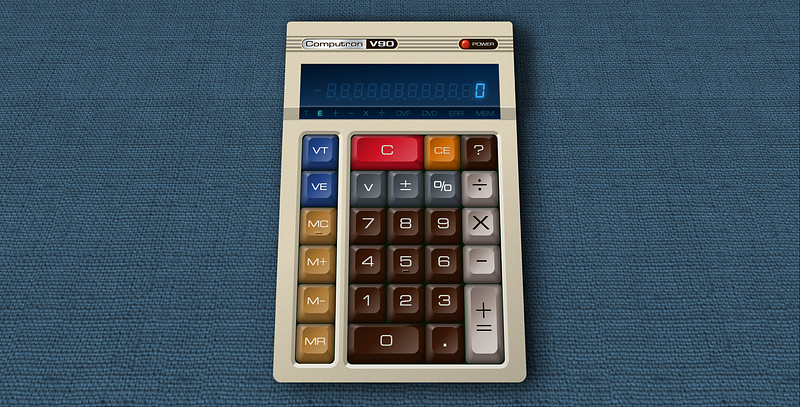
You ever start playing with something and get carried away on adding stuff? Yeah, this was fun. In the process of implementing this I’ve added more buttons and flags mimicking an old HeathKit calculator I built in the ‘80’s. This includes buttons to switch views between the saved total and the entry, some direct operators, and moved the memory and view controls into their own column. On a real-world device such divisions help “feel’ where the keys are.

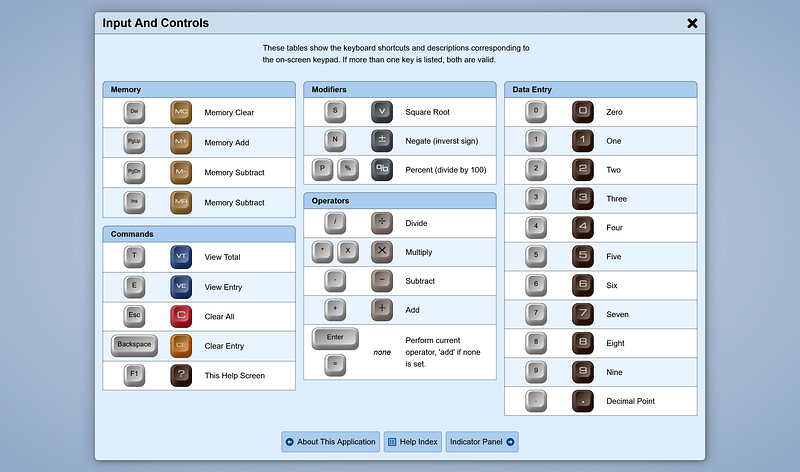
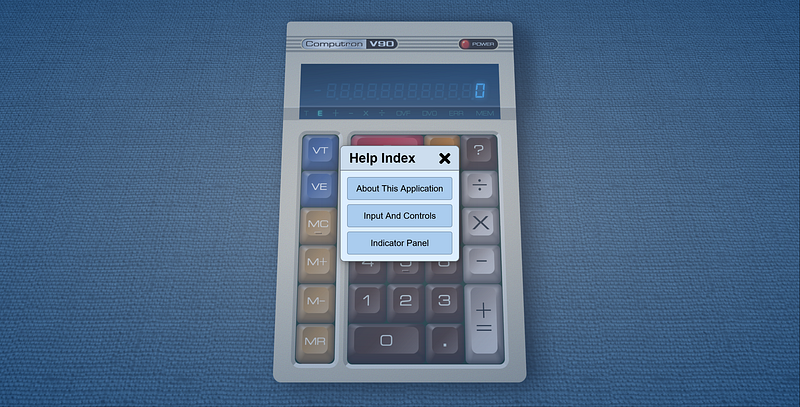
In addition I’ve added a help system using non-scripted modal dialogs.
So Let’s See It.

Before I start explaining the CSS, let’s just let you folks try it out. Testing is 99% complete on all platforms except crApple. MAYBE I’ll bother with that at some point even though I really think the tools and fools suckered into lighting money on fire on Apple products deserve to have things not work right.

As with everything I do, the directory is wide open for easy access to the gooey bits and pieces, and there’s a .rar of all of it. https://cutcodedown.com/for_others/medium_articles/htmlCSSCalcScripted/

And a fun detail of said app?

Integrating It To My App Baseline

In a previous article I wrote about how it’s important to set up graceful degradation when using scripting only solutions. If the browser is too old, tell them. If it’s blocked being a scripting only app, tell them.

To that end we need some detection scripts in the HTML file, IE detection, etc, etm. Thus I started this step wtih this markup:

<!DOCTYPE html><html lang=en prefix="og: https://ogp.me/ns#"><head>

  <meta charset=utf-8>
  <meta name=viewport content="width=device-width,initial-scale=1">
  <meta http-equiv=X-UA-Compatible content="IE=9">
  <!--
    Yes, content="IE=9" throws a validation warning.
    The W3C and WhatWG can go plow themselves on that!
  -->

  <meta property=og:image content=images/social480.jpg>
  <meta property=og:image:width content=480>
  <meta property=og:image:height content=252>

  <meta property=og:image content=images/socialFull.jpg>
  <meta property=og:image:width content=1200>
  <meta property=og:image:height content=630>

  <meta
    name=description
    content="A demo of how far you can push creating graphical elements built with nothing more than HTML and CSS. The only images are for textures, not shape or design."
  >

  <link rel="shortcut icon" href="favicon.ico">
  
  <!--[if !IE]>-->

    <link
      rel=stylesheet
      href=template/calc.screen.css
      media=screen
    >
    <link rel=icon href=vanilla.svg type=image/svg+xml>
    <link rel=apple-touch-icon href=apple-touch-icon.png>
    <link rel=mask-icon href=vanilla.mask.svg color=#EC8>

  <!--<![endif]-->

  <title>Vanilla HTML/CSS/JavaScript Calculator Demo</title>

</head><body>

  <div id=fauxBody>

    <h1>Calculator Application</h1>

    <div id=loadErrors>
      <noscript>
        <p>
          This page requires JavaScript to function. Please revisit this site with scripting enabled or in a JavaScript compatible browser.
        </p>
      </noscript>
      <!--[if IE]>
        <p>
          This page is not compatible with Internet Explorer. Please get a browser made in this century!
        </p>
      <![endif]-->
      <p>
        This page requires JavaScript to function. Please revisit this site with scripting enabled or in a JavaScript compatible browser.
      </p>
    <!-- #loadErrors --></div>

  <!-- #fauxBody --></div>

  <!--[if !IE]>--><script>

    // coded to 1999 specs as this is backwards compat testing

    (function(d) {

      var loadErrors = d.getElementById("loadErrors");

      if ("function" != typeof BigInt) loadErrors.appendChild(
        d.createElement("p")
      ).textContent = "\
        This page requires at least ECMAScript 2020 to function.\
        Please return in a compatible browser.\
      ";
      
      else if (matchMedia && matchMedia("screen").matches) {
        loadErrors.remove();
        d.body.appendChild(d.createElement("script")).src = "scripts/calc.min.js";
      }

    } )(document);

  </script><!--<![endif]-->

</body></html>

The only major changes from my normal app baseline is that it only loads a single combined minified JavaScript, and it deletes the entire loadErrors element once we’re sure there’s no errors / incompatibilities. Well that and the addition of a div#fauxBody so as to avoid the “double scrollbar” problem that can happen with modal dialogs on smaller displays.

Notice how I only use double quotes on attribute values when they contain spaces or equals? That’s valid HTML now. No joke, this validates. I’m going to write an article about that and where I weigh in on it.

The single file keeps the counts low. There is also the strange problem that adding multiple separate scripts via the DOM executes them in the order they were loaded, not the order they are in the markup… given there’s a “library” script I want loaded first, the normal way of iterating an array is off the table.

That single file also contributes to that 100% rating in lighthouse.

Now, you’ll notice that none of the markup of the calculator is present. This is because of a simple rule I have. It’s something that systems I usually attack like react and vue encourage that in the case of an actual scripted application makes sense.

That rule?

Any DOM elements that the user can only use when scripting is enabled and fully working properly have zero business in the markup!

Why? Because users with scripting disabled don’t need to see any of that. A giant page of non-functional elements they can navigate and interact with, but don’t do anything is bad UX. It’s better to show them that “loadErrors” DIV with the appropriate information, than it is to give them a whole bunch of broken crap they can’t use!

The reason I dislike SPA isn’t a problem with SPA, it’s that people throw them at things that have no reason to be anything more than a normal website that works scripting off. THIS is an actual application, thus the rules are different. STOP treating websites as apps and apps as websites. They are two different things that operate under two entirely different sets of rules.

Because there is a lot of scripting, specifically:

/scripts/sources/dom.lib.js        3.1k
/scripts/sources/calc.app.js      13.1k
/scripts/sources/help.modals.js    9.7k

I’m going to break this up into two further articles, so that will be a five part trilogy. In other words, going pure Piers Anthony on it. If I documented all 25.9k you’d likely get sick of scrolling up and down so blasted much.

I also want to take the time to explain the DOM methods I’m using, particularly since I’m playing with a new approach.

Planning Is Everything!

Before I even start coding I try to figure out what I’m going to need to track for data, what I’m going to need for library helpers. This planning stage requires a degree of experience, and is sadly neglected in too many projects. I want to go over this planning since it happened BEFORE I wrote any of the actual scripting source files, and that includes my server optimization and delivery.

What to track is actually pretty simple:

  1. DOM elements for all buttons and their keyboard event equivalents
  2. Total value, entry value, current operator, and if we should clear entry on next “input” key (0–9 and period)
  3. Flag indicators to show calculator and display state

Library helpers I’ll want a DOM maker (a more robust equivalent of react’s “createElement”), modal assistance for help dialogs, and some keyboard enhancement.

The next thing to plan is the directory structure. I like to set things so that all commands and paths point “down tree” so I never have to “../”. Good directory planning can save you a lot of headaches. To that end:

/                ; root, contains HTML and icons
/images          ; content and social media images
/scripts         ; minified unified script file
                 ; non-minify comment
                 ; batch file to combine and minify
/scripts/sources ; unminified master scripts
/template        ; template CSS
/template/fonts  ; template font files
/template/images ; template images

I maintain that if you have to use “../” anywhere in your code, you didn’t plan things out very well.

Some will go “why don’t you put the icons in /images?” and that’s easy. Things like the apple-touch-icon and favicon.ico many UA’s will look for in root before they even bother parsing the markup. Or even IF they bother. Whilst I moved the social media images into that subdirectory becuase they obey the META and LINK, favicons be they png, svg, or .ico are just more reliable (and result in less 404 in your logs) if you put them in the project root alongside the HTML.

Optimizing For Single JS File Output

One of the biggest problems with “modules” is that client-side you end up using a metric shit tonne of file requests. It is thus I prefer to use {} as scoping blocks on all my files so I can just copy (dos/win) or cat (*nix) the files together in their relevant order. I used to use IIFE for the same purpose, but these days with let/const being locally scoped to the nearest block there’s no need.

Even better though is that Google’s “Closure Compiler” can be told to merge files together. I plan on having four JS files

/scripts/sources/dom.lib.js     ; DOM and Modal Helper Library
/scripts/sources/calc.app.js    ; The calculator application
/scripts/sources/help.modals.js ; Modal dialogs for the help system
/scripts/comment.js             ; A comment minification should ignore

And a batch file to call closure to compile them down.

@echo off
echo Combining and minifying JS files into temp.js
@java^
 -jar^
   \closureCompiler\closure-compiler-v20230103.jar^
  --js^
    sources/dom.lib.js^
    sources/calc.app.js^
    sources/help.modals.js^
  --js_output_file^
    temp.js
echo Combining comment.js + temp.js as calc.min.js
copy /B comment.js + temp.js calc.min.js
echo Removing temp.js
del temp.js
echo Attempt Complete
pause

I could add some %errorLevel% branching in there, but honestly if I don’t notice the closure compiler spewing errors, that’s on me not my automation.

I had to include the comment as a separate file and copy because for some reason I can’t get the command line version of closure to obey the “extra asterisk” method of saying “don’t delete this comment”. Almost seems like they got rid of it in the most recent (October 2022) release.

Optimizing For Push

I previously wrote about how in a lot of cases HTTP push can be a placebo on larger projects. In testing I’ve found that where it makes the biggest difference is in smaller applications where you can keep the code filecount below six files, and you can push two extra files if it helps reduce FOUC. Flash Of Unstyled Content

We could do the push via “preload” link in the markup, but that can introduce a slight delay… though in practice nothing you push or preload starts until the markup does. If we pull up a waterfall of the completed demo without push:

Networking waterfall without push

And compare to with push enabled:

🎵 Push push lady lightning! Push! Puuuush…🎵

Now those two charts are not set to the same time scale, so let’s do that for a proper comparison.
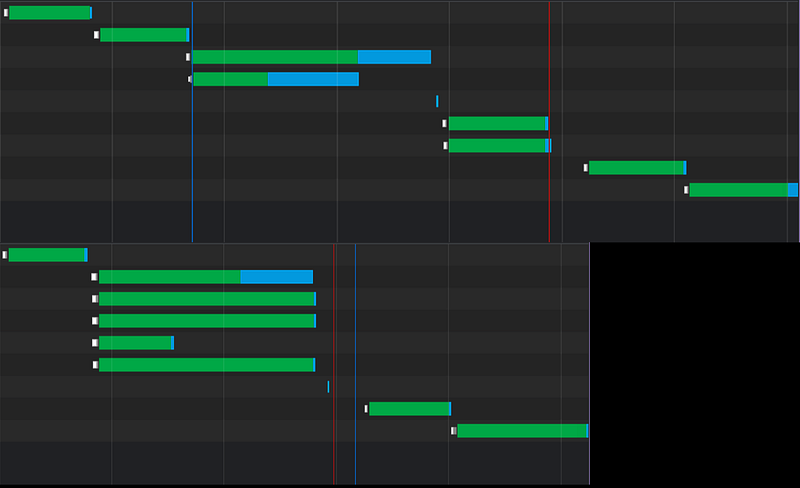
All things being equal…

Oh… ok then, Push is not a placebo in this case. We have in fact cut “time to interactable” and “first meaningful paint” in half. Even though the parallelism did in fact make some files take longer to transfer, that they occur side-by-side results in a lower load time overall. That’s what push and/or preload is SUPPOSED to do!

Choosing the files to push was simple, and thus I have this in my .htaccess for the project:

<Files calc.app.html>
  Header add Link "</for_others/medium_articles/htmlCSSCalcScripted/template/images/canvas_1.webp>; rel=preload; as=image;"
  Header add Link "</for_others/medium_articles/htmlCSSCalcScripted/template/calc.screen.css>; rel=preload; as=style;"
  Header add Link "</for_others/medium_articles/htmlCSSCalcScripted/scripts/calc.min.js>; rel=preload; as=script;"
  Header add Link "</for_others/medium_articles/htmlCSSCalcScripted/template/fonts/OPTIEdgarExtended-Regular.woff2>; rel=preload; as=font; crossorigin"
  Header add Link "</for_others/medium_articles/htmlCSSCalcScripted/template/fonts/interface-Regular.woff2>; rel=preload; as=font; crossorigin"
</Files>

Might seem weird to try and start the canvas background first, but it’s actually the largest file.

I also set my cache-control headers ahead of time for static files as per Google’s recommendation. This part IS mostly BS, but it shuts up their analysis tools.

<IfModule mod_headers.c>
  <FilesMatch "\.(ico|jpg|jpeg|png|webp|gif|swf|avi|wmv|mp4|ogg|js|css|woff|woff2|ttf|eot|otf|svg)$">
    Header set Cache-Control "max-age=2592000, public"
  </FilesMatch>
 <FilesMatch "\.(woff|woff2?)$">
    Header set Access-Control-Allow-Origin "*"
  </FilesMatch>
</IfModule>

A big detail there is setting the Access-Control-Allow-Origin on the font files. If you don’t do this Firefox tends to try to load the same font files twice… three times if you disable caching. You set this and it will actually bother using the preload/push instead of reloading it when it parses the CSS. This is the same as setting “crossorigin” on a link in your HTML.

One big thing I want to call your attention to in those waterfalls though is how NOTHING else starts downloading — not even push, not rel=”preload” links, NOTHING — until after the markup is done. People wonder why I obsess on keeping the HTML as small as I can get away with… well THERE IT FLIPPING IS! Pissing all over the HTML with presentational classes and DIV soup just delays everything else loading. If you use sematnic markup, and keep your presentation in the external stylesheet on top of multi-skinning and media targets, your first-load is more efficient as whilst grabbing the page cache-empty you can leverage parallelism. And that’s again before we even talk about caching where CSS is typically cached when HTML isn’t.

You want that 100% in lighthouse, you’re not going to get it with the mental huffing midgetry of <div class="text-center text-xl color-red-400 col-4-s col-6-m"> resulting in 150k of HTML doing 10k’s job! Thus why the peddlers of scam artist bullshit like Failwind and Bootcrap aren’t even qualified to flap their damned yap on the topic.

And Adam, get back to me. I done told you once you son of a bitch, I’m the best that’s ever been.

Well Wathan went to Cupertino, he was looking for some nubes to peel…

Turning The Template Into DOM Instructions

Because we should be generating our application from the scripting instead of crapping on the markup with stuff not all users will even be able to use, we need some DOM making tools.

Sure we could do the backtick string markup and innerHTML it in, but that opens the door to security woes, performance woes, much less the sheer volume of getElement(s)byXXX or querySelector(all) that we’d have to do after. Even if we batched all the markup for a single push — which could render faster — that gets thrown in the trash once we start trying to hook our elements.

Or worse we end up polluting the global namespace with onevent attributes like “onclick” forcing the functions they call to be global.

Thus for this task I use what I was taught are called “make” routines… which are very similar to what React tries to do with their own createElement.

To that end I have dom.lib.js which contains some make routines, and a couple of startup fixes and aids. I start this file with a descriptive comment.

/*
  dom.lib.js
  Jason M. Knight
  January 2023
 
  REQUIRES
    nothing
  POLLUTES
    document, Element.prototype, Object.prototype
  EVENTS
    window load, keypress
 
  My baseline helper functions. This is about as
  close to a "framework" as I typically would get. 
 
  YES, I extend system objects. Bite me.
*/

The “requires/pollutes/events” section is a habit I picked up ages ago when programming assembly. This is something that I think a lot of programmers would struggle less with gibberish like “side effects” if they’d just bother doing. If the file has dependencies needed before it and you’re not using modules, list them. If you change anything in the global scope or modify system objects, say so. If you hook events, list them.

Next I have a scope isolating block. This replaces IIFE since if you just {} all the let/const you use inside it don’t bleed into the global scope. It also is somewhat superior to modules for client-side deployment since — as in the above batch file — to combine/pack all your different files, you can literally just copy them together.

Anyhow, inside the scope isolating block the first thing I have is a routine I used two or three times. {} might not make functions local in scope like a IIFE, but if you define them as constants they are!

 const
 
   isNodeOrNonObject = (obj) => (
     ("object" !== typeof obj) ||
     (obj instanceof Node)
   ); // isNodeOrNonObject

This simple check returns true if the variable passed to it isn’t an object, or if it is an object is it an instance of node. Why do I need this? For my make routines.

I append the first make to document as .__make. Appending to system objects is frowned on in some circles, and really there are only two reasons to worry about it.

  1. namespace collisions with other libraries. Borrowing from lodash for the double underscore helps. Using Object.definePropert(y/ies) helps even more since trying to define more than once will throw an error. Thus you can fix those conflicts before you do something stupid like deploy.
  2. IE couldn’t do it to Element.prototype prior to IE 10. This is 2023, who gives a flying purple fish about Interdebt Exploder?

Likewise if people used Object.defineProperty on objects they’d have less headaches since they aren’t iterable unless you tell them to be so. That’s a big spot people doing things like “Object.prototype.myfunction=() => something;” cock up a lot. In fact it’s the root of the MYTHS of the “evils” of “for..in”

Thus, I’m doing it. It’s an easy way to extend what JS can do.

 Object.defineProperties(document, {
 
    __make : { value : (tagName, ...rest) => {
      let e = document.createElement(tagName);
      if (rest.length) e.__attach(...rest);
      return e;
    } }, // document.__make

The way this works is that the first argument is always the tag name used to make our DOM element. Any other arguments are passed to Element.__attach which I’ll get to in a moment. We then return the element.

Let’s skip ahead in the code to that attach:

 Object.defineProperties(Element.prototype, {
 
    __attach : { value : function(...rest) {
      for (let arg of rest) {
        if (arg !== undefined) {
          if (arg instanceof Array) this.__make(...arg);
          else if (isNodeOrNonObject(arg)) this.append(arg);
          else {
            if (arg.placement) {
              this.dataset.__domMakePlacement = String(arg.placement).toLowerCase();
              delete arg.placement;
            }
            if (arg.style) {
              Object.assign(this.style, arg.style);
              delete arg.style;
            }
            Object.assign(this, arg);
          }
        }
      }
      return this;
    } }, // Element.prototype.__attach

Note that because we want to use “this” we can’t use arrow functions.

We loop through its arguments. Beware that some arguments may return undefined for christmas only knows what reason, so filter out that “noise”. If it’s an array, we treat it as parameters to pass to a new make. See how it’s “this.__make”? That version appends the result to the Element whereas document.__make leaves it unattached.

If it’s a node or non-object we use the conventional append of that child.

Otherwise it must be a non-node object. If a child parameter of __make or __attach is such an object, it is assumed to hold parameters to be assigned to the element. The “Element.__make” will use the placement “attribute” to determine where to insertAdjacentHTML, so we need to trap and remove that since Element.placement isn’t an actual value we want to object.assign. I communicate it as data-__domMakePlacement to make namespace collisions highly unlikely. Style is similarly trapped and applied directly since Object.assign chokes on nested objects, and then in the case of both we delete them before doing the assign.

Also I force it to string just becuase loose typecasting could bite you, and to lowercase because I have the nasty habit ot typing “beforeEnd” and so forth instead of “beforeend”. Did I ever mention how as an old-school Pascal / Modula / Ada / assembly language guy I positively HATE case sensitive programming languages and filesystems?

Then we have Element.__make

    __make : { value : function(tagName, ...rest) {
      let e = document.__make(tagName, ...rest);
      this.insertAdjacentElement(e.dataset.__domMakePlacement || "beforeend", e);
      delete e.dataset.__domMakePlacement;
      return e;
    } } // Element.prototype.__make

It differs from document.__make in that the result is attached via insertAdjacentElement, using that dataset.__domMakePlacement if it is present, “beforeend” if it is not. If the first argument is one of those non-node objects, we see if there’s a “placement” key. If so we use that as our placement instead of “beforeend”. This allows you to add DOM elements with make easily in relation to the element you call make on. We then delete that key/value since that’s not a real HTML parameter and we don’t want it trickling down into Object.assign on the resultant new Element.

That all sounds complex. It isn’t. Basically:

document.__make(“a”, { href : “#test” }, “This is a test”);

creates the same thing as <a href=”#test”>This is a test</a> as an unattached DOM element. Whereas if we were to:

document.body.__make("a", { href : "#top" }, "Back to top");

It would create a “back to top” link right before

document.body.__make("a", { href : "#top", placement : "afterbegin" }, "Back to top");

would place it right after you open . More complex structures can be built:

// assumes mainMenu is a UL
mainMenu.__make(
  "li",
  { className : "modalOpen" },
  [ "a", { href : "#about" }, "about" ]
);

See how that array as a new set of arguments to pass to this.__make works? That would basically add:

<li class="modalOpen"><a href="#about">about</a></li>

To that UL.

Thus I have my modal making template as a property of document. I’m including modal dialog code as that’s how I’d like to implement the help system. Sure it’s only gonna have three pages, “about”, “keys”, and “indicators”, but it’s a slick and professional way to implement it.

      __makeModal : { value : (tagName, id, title, ...children) => {
      const div = document.__make(
        "div", 
        [
          "h2", 
          [ "a",
            { hidden : true, href : "#" },
            [ "span", "Close Modal" ]
          ],
          title
        ],
        ...children
      );
      document.body.__make(
        tagName,
        { id, className : "modal" },
        [ 
          "a",
          { hidden : true, href : "#", tabindex : "-1" },
          [ "span", "Close Modal" ]
        ],
        div
      );
      return div;
    } } // document.__makeModal

I make the DIV first as the outer container for the modal is none of the code calling it’s business. The DIV is what you would append any extra information inside. It gets a H2 as a heading since these types of modals are major page subsections, the hidden anchor in the H2 is the close hook. Then we append any extra passed children. Then the modal itself is made with the div attached to it. A second outer closing anchor is used to let clicking outside the inner DIV act as a close, and then we return the DIV.

Basically if we passed this:

const aboutModal = document.__makeModal(
  "section",
  "about",
  "About This Calculator",
  [ "p", "Place your description here" ]
);

It generates roughly the equivalent of this:

document.body.append(`
  <section class="modal" id="about">
    <a href="#" hidden><span>Close Modal</span></a>
    <div>
      <h2>
        <a href="#" hidden><span>Close Modal</span></a>
        About This Calculator
      </h2>
      <p>
        Place your description here
      </p>
    </div>
  </section>
`);

const aboutModal = document.getElementById("about");

Just without the possibility of security exploits if we plug user data into our modal, without getting the parser involved, and without the expensive “getElementBy” operation that triggers the parser before scripting is complete.

You can see how handy that will be, particularly since I’ll be doing that at least 4 times. It’s as clean and easy as HTML, just using JSON-style formatting. In fact because it’s basically JSON you can even pull it AJAX-style. Which there’s no reason to try doing here… for now.

Those of you who use React might recognize this is similar to how their flavor of “createElement” works, just it makes assigning attributes and text cleaner/easier and is slightly less WET. If I were to actually embrace React, for client-side code I’d be one of those using createElement instead of JSX.

Oh and a lot of you have in the past asked about when I do things like this:

{ id, className : "modal" },

If in a declarative object you just use a variable name, the variable name is used as the key and the value as the … well… value. Thus that is identical to:

{ id : id, className : "modal" },

I know some people say “don’t do that because beginners might not understand it” whereas I say “do it because beginners might not understand it! Thus forcing them to ask and learn!” I positively despise when people say “that’s too advanced for other programmers”. If I can put up with JavaScript’s cryptic C syntax BS, nubes can learn something that simple and handy!

Do you want them to stay beginners forever? Because that’s how they stay beginners forever!

Honestly there’s too much “I’m too stupid to understand it so nobody else should be allowed to use it” out there.

The next function extends Object.prototype:

  Object.defineProperty(Object.prototype, "__getPrevNext", {
    value : function(name) {
      const
        keys = Object.keys(this),
        nameIndex = keys.indexOf(name);
      return nameIndex >= 0 ? {
        prev : keys[nameIndex - 1],
        next : keys[nameIndex + 1]
      } : {
        prev : undefined,
        next : undefined
      };
    }
  } ); // Object.prototype.__getPrevNext

This helper I needed for the pagination of the help system. When you have the key of an iterable object, it often helps to be able to find out what the previous and next keys are. So grab the keys, see if the name is in it. If so return an object of the previous and next keys, otherwise return the same formatted object with the properties undefined. I use undefined becuase that’s what array index out of range returns.

After that I add a keyboard event listener sniffing for the escape key and if we’re hash-linked to a modal.

  addEventListener("keypress", (e) => {
    if ((location.hash.length < 2) || (e.key !== "Escape")) return;
    const target = document.getElementById(location.hash.substr(1));
    if (target && target.classList.contains("modal")) location.hash = "#";
  } );

If the hash is empty, contains just “#”, or it’s not the escape key, we prematurely exist. Otherwise we grab the element the hash is (or should be) pointing at, seeing if it exists and if it is a modal. If so we set the hash to “#” closing it. Since I’m using scriptless :target driven modals.

The final bit is that webkit and blink (aka Safari and chrome-likes) unlike chakra or quantum will not actually trigger :target on a hash linked element if it is added to the DOM after page-load. Thus if a hash link is set, we need to unset it then reset it at onload.

  /* bizarre chrome fix */
  if (location.hash.length > 1) {
    const hash = location.hash;
    location.hash = "";
    addEventListener("load", () => { location.hash = hash; });
  }

It’s stupid to have to do it, but if we want links like: https://cutcodedown.com/for_others/medium_articles/htmlCSSCalcScripted/calc.app.html#inputAndControls

… to actually work by opening the modal in Chrome and Safari when we’re generating those modals in the scripting? Well, that’s how we have to do it.

Alright, that’s our planning and library in place. In the next article I’ll go over implementing the calendar itself, and then in the final article I hope to get to the code for the modal driven documentation.

Article Index

Part 1, Markup and Layout Part 2, Eye Candy Part 3, Make it work with JS Part 4, Explaining the calculator JS Part 5, Explaining the Help Modals

JavaScript
HTML
CSS
Web Development
Web App Development
Recommended from ReadMedium