
Creating Automation Credentials Without Exposing Them To Users
ACM.35: Creating Secrets in AWS Secrets Manager with CloudFormation
~~~~~~~~~~~~~~~~~~~~~~~~~~~~~~~~~~~~~~~~~~~~~~~~~~~~~~~~~
⚙️ Check out my series on Automating Cybersecurity Metrics. The Code.
🔒 Related Stories: AWS Security | Security Architecture | IAM
💻 Free Content on Jobs in Cybersecurity | ✉️ Sign up for the Email List
~~~~~~~~~~~~~~~~~~~~~~~~~~~~~~~~~~~~~~~~~~~~~~~~~~~~~~~~~
~~~~
Update: Looks like AWS is now offering this approach for RDS passwords. :)
~~~
In the last post, we looked at how to prevent the confused deputy attack by leveraging resource policies.
Now we’re going to look at how we can create some credentials for automation without exposing them to users.
Let’s review the dependencies for this post we created in prior posts.
We created a role for automated credential deployments to be used by a batch job.
We created an AWS IAM user that is allowed to assume the batch job role:
We passed the batch job role into our KMS key policy:
We added a policy to our batch job role:
We refactored the role to work with an IAM Administrator User.
We fixed a problem that could lead to a confused deputy security weakness:
Now we can finally deploy our credentials using our new deployment role. We’re going to start by getting the role working and fix the permissions a bit more in subsequent posts.
CloudFormation Template to Create Credentials
The first thing we need is a CloudFormation template that will create credentials for our batch job admin. Recall that we created this user in a previous post and assign virtual MFA to the user, and both the user policy and the batch job assume role policy require MFA. The user doesn’t have permission to do anything without MFA so the credentials alone shouldn’t do anyone any good.
Even so we want to limit credential exposure so we’ll create them in an automated way and store them in AWS Secrets Manager without letting anyone see them.
Let’s take a look at the CloudFormation documentation for an access key.
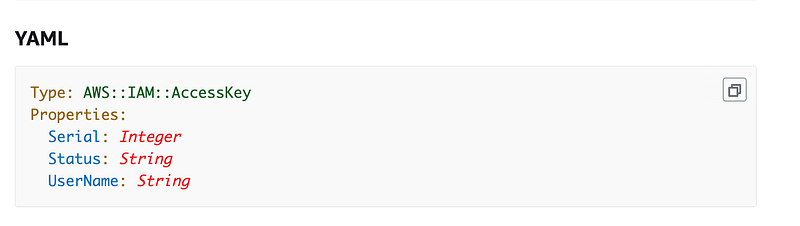
Serial is not required and used for rotation. We may revisit that later.
Status: is not required. The allowed values are Active and Inactive. Since the documentation doesn’t specify a default we’ll pass in Active.
UserName is required. We will pass in our batch admin username which is the output of our Batch Job Admin stack:
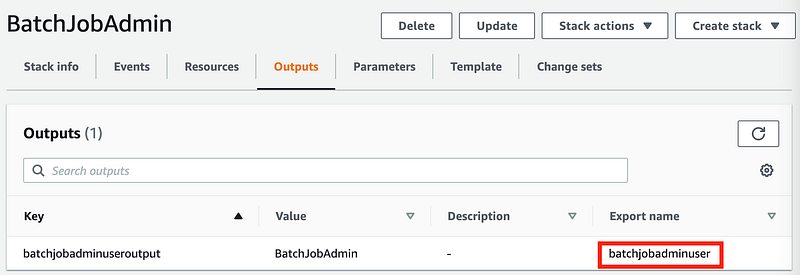
Create the template in the cfn directory for the batch job. I named the file:
credentials_batch_job_admin.yaml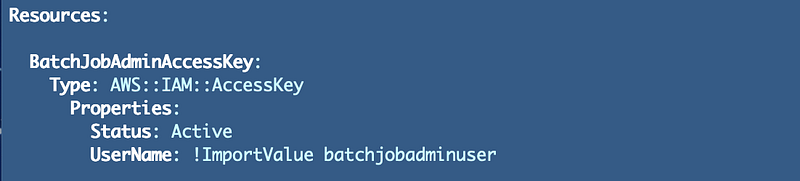
Now how can be get access to the credentials? If you created these credentials in the console you would be able to access them at the point of creation, but after you leave that screen there’s no way to get them again. Head over to the documentation and look for Ref and GetAtt.
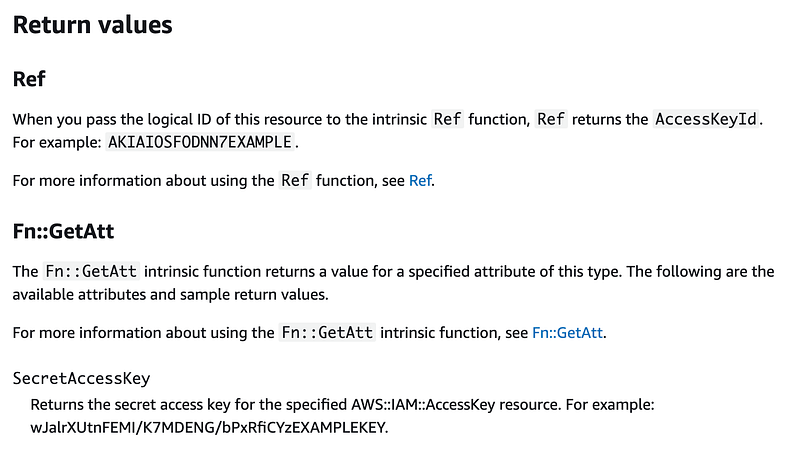
We can get our access key id and secret access key using those constructs. In this case we definitely do NOT want to use a CloudFormation output. That would expose our credentials in the AWS Console to anyone who has access to CloudFormation.
In order to avoid that we’ll have to immediately create our Secrets Manager Secret here and add our secrets directly from Ref and GetAtt into our new secret.
CloudFormation for a Secret Manager Secret
Review the CloudFormation documentation for a Secret.
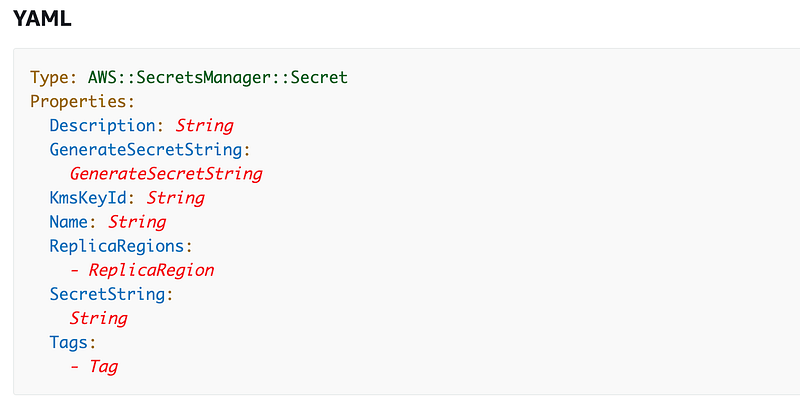
No fields are required but the documentation says:
Either
GenerateSecretStringorSecretStringmust have a value, but not both.
We will use these fields: Description, Name, KmsKeyId and SecretString.
We can pass in key-value pairs for our secret as shown in this example and we’ll use that format to pass in our two secret values.
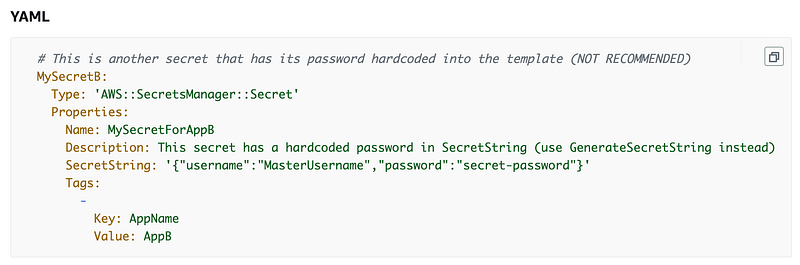
We will pull the KMSKeyId from the outputs of our key stack as we did when we tested the DescribeKey command above. So here’s what our CloudFormation looks like for our secret:
Now run the command with the correct profile. Instead of letting the script use the default profile we’ll pass in our new batch job profile:
./deploy.sh batchTurns out I got the following error:

For more about what causes this error check out this blog post.
I feel like this is a bug but for now we have to add both encrypt and decrypt permissions in the key policy for our IAM user.
Other changes to the KMS key policy
Note that I had to make some other changes to the key policy while figuring this all out I had some other errors.
After removing the current user and root user as administrators, I couldn’t view the key or the key policy in the console with my current user.
Since I was logged in as an administrator, I added the root user to the DescribeKey statement.
After doing that, I also need the GetKeyPolicy action:

To disallow non-admins from viewing the policy I created a separate statement in the policy for administrators to view the key policy.
Now our policy allows admin users to view but not modify keys via the KMS Key resource policy.
Prior post on IAM, Resource, and Trust policies if you are not familiar:
Our policy:
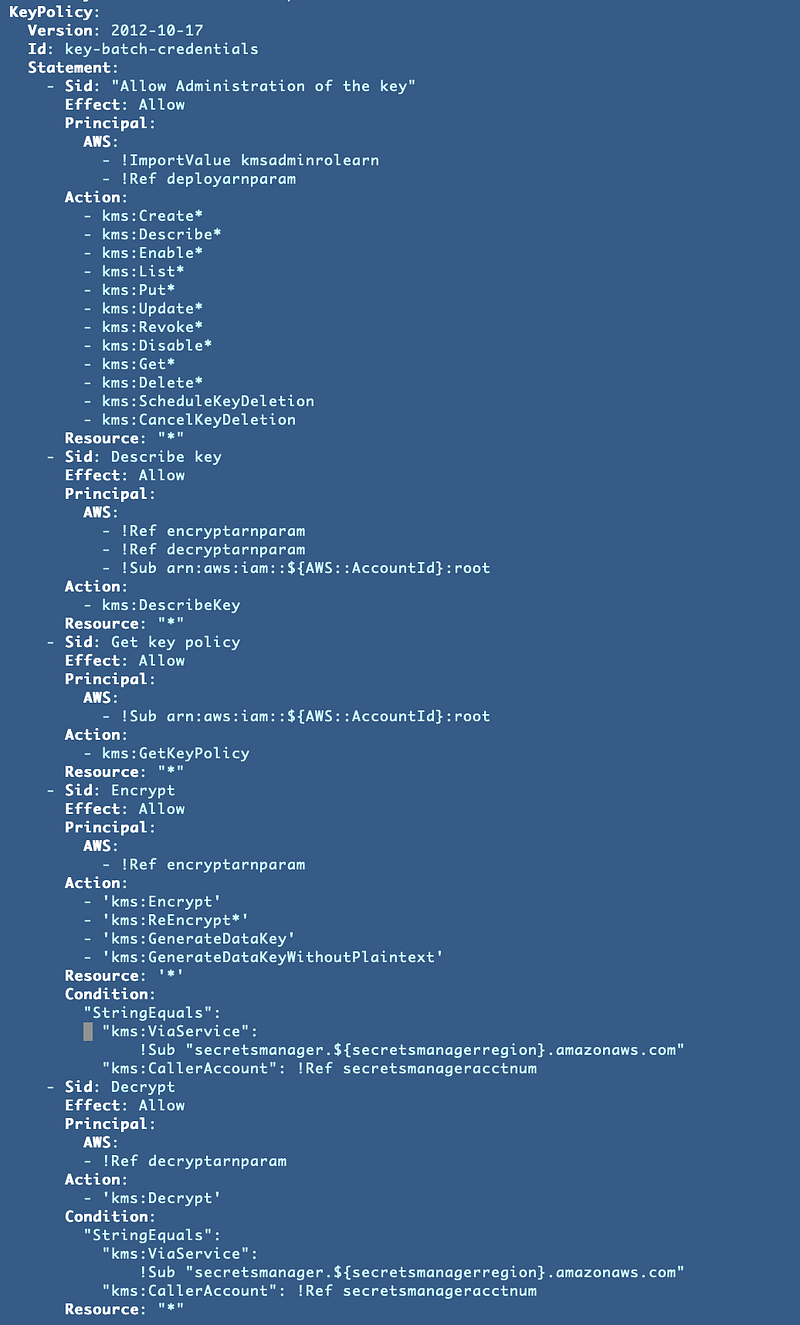
Note that with these changes, the KMS user needs to create, update and schedule keys for deletion. No one else will be able to do that. I added a script to schedule key deletion into the kms folder which can be called using the kms AWS CLI profile we created in a prior post:
Access to KMS is not allowed
I had one other case of the KMS is not allowed error I had to resolve.
When I look at the key policy I see the following condition:
"Condition": {
                "StringEquals": {
                    "kms:ViaService": "secretsmanager.${AWS::Region}.amazonaws.com",
                    "kms:CallerAccount": "${AWS::AccountId}"
                }
            }
I added that condition in this prior post:
Oops. Our pseudo parameters did not resolve correctly. I was trying to use them to set defaults for parameters but apparently that doesn’t work.
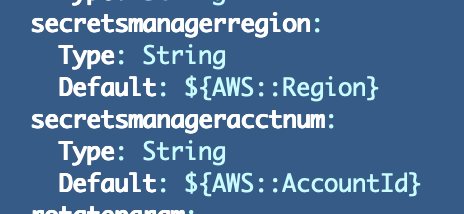
I decided to remove the Account ID because we’ll be using keys in a cross-account scenario. If I want to pass in an account ID later I’ll add it back in.
I also moved the current region pseudo parameter instead of passing in the region and we’ll assume for now that everyone in our accounts will use the current region where the key is deployed. In an environment that requires failover to a different region or a cross-account scenario you’ll need to test this to make sure it works.

After fixing that problem, the CloudFormation deploys successfully. The outputs show the resources that have been deployed.
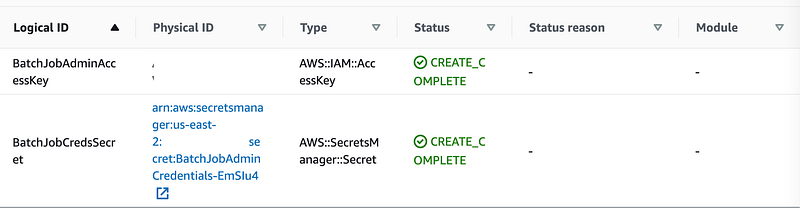
Attempting to view the secret as an admin fails, as expected, because only the role that triggers batch jobs can retrieve and view the secret.

We can try to turn this into a batch job later, but it looks like we’re going to have to use our KMS batch job role and user to deploy the KMS key and we’ll leave that until we finalize moving management of KMS keys to a separate account.
Now we need to revise our role to give it only the permissions it requires — or in other words, a zero trust IAM policy. We’ll work on that next.
Follow for updates.
Teri Radichel | © 2nd Sight Lab 2022
About Teri Radichel:
~~~~~~~~~~~~~~~~~~~~
⭐️ Author: Cybersecurity Books
⭐️ Presentations: Presentations by Teri Radichel
⭐️ Recognition: SANS Award, AWS Security Hero, IANS Faculty
⭐️ Certifications: SANS ~ GSE 240
⭐️ Education: BA Business, Master of Software Engineering, Master of Infosec
⭐️ Company: Penetration Tests, Assessments, Phone Consulting ~ 2nd Sight Lab
Need Help With Cybersecurity, Cloud, or Application Security?
~~~~~~~~~~~~~~~~~~~~~~~~~~~~~~~~~~~~~~~~~~~~~~~~~~~~~~~~~~~~~
🔒 Request a penetration test or security assessment
🔒 Schedule a consulting call
🔒 Cybersecurity Speaker for PresentationFollow for more stories like this:
~~~~~~~~~~~~~~~~~~~~~~~~~~~~~~~~~~~~~~~~~~~~~~~~~~~~~~~~~~~~~
❤️ Sign Up my Medium Email List
❤️ Twitter: @teriradichel
❤️ LinkedIn: https://www.linkedin.com/in/teriradichel
❤️ Mastodon: @teriradichel@infosec.exchange
❤️ Facebook: 2nd Sight Lab
❤️ YouTube: @2ndsightlab


