
A Role for Automated Credential Deployments
ACM.20 Implementation of an AWS IAM role to deploy batch job credentials
Part of my series on Automating Cybersecurity Metrics. IAM. Passwords. The Code.
Free Content on Jobs in Cybersecurity | Sign up for the Email List
In the last post we considered the requirements we need to define for to securely use KMS keys. Just implementing and using a key doesn’t solve all our security problems. We need to think about how it might be accessed, abused, or misconfigured, and how it works with other AWS services.
Caveat. The code in these posts changes as I proceed through this series. Follow through to the end if you want the end result. The GitHub repo may not match the screen shots as a result.
In this post I’m going to create a role that can encrypt our batch job credentials using our KMS key and store the the credentials in AWS Secrets Manager as I wrote about in the prior post.
We need a role that can encrypt, and a role that can decrypt. We’re also going to look at restricting these roles to decrypting the secret when using AWS Secrets Manager. We’ll start with the encryption role.
A batch job role for automated deployments
We need a role that can encrypt secrets and store them in secrets manager. As discussed this role could be used by our deployment system. There are many ways to create a deployment system. We could even create a batch job to carry out this deployment.
Let’s say that in the future we’re going to use a batch job for deployments, so we’ll add a directory for our batch job in our jobs directory and add the deployment of the role in that directory. We’ll have to test out this theory of using AWS Batch for deployments, of course, but for now we’ll add a directory for our batch job in the jobs directory:
jobs/DeployBatchJobCredentialsCreate a cfn folder inside of that for our batch job role policy CloudFormation template as I’ve been doing throughout this series:
jobs/DeployBatchJobCredentials/cfnCreate a deploy.sh file insider of our batch job folder to deploy the resources associated with our batch job and make sure you have execute permissions on the file.
jobs/DeployBatchJobCredentials/deploy.shYou’ll have to put something in the deploy file so put a shebang inside of it just so we can save it for the moment.
#!/bin/shNow we need to add a Policy for our role in the cfn folder. We want a consistent naming convention for batch job roles so we can use the same code to deploy the role for each batch job. So let’s name our CloudFormation policy for our new template as follows:
jobs/DeployBatchJobCredentials/cfn/policy_batch_job.yamlWe’re going to need to add a policy document in this file that will apply to our batch job. We’ll use the generic role deployment script we created in an earlier post to deploy this role.
Associating a role with our batch job policy
Note that we have multiple ways of attaching a role to our batch job policy.
- Create the role and pass the policy in as a parameter. Then create the role and reference the output of our policy template.
- Alternatively, as shown in the documentation below for an IAM policy you can reference the role at the time you create the policy.
Which method is best? That depends on who you want to allow to make what changes in part. If you want to only allow one team to create the roles, you could have that team execute the role template and output the role in the role CloudFormation script. Then the team creating the policy would reference that role but not be able to add new roles or change existing roles, including the associated AssumeRoleDocument. That way you could ensure only the appropriate people (or automation) can assume those roles by creating the AssumeRolePolicyDocument in the Role template, but you could allow developers to change the policies associated with batch jobs.
You still have the issue of someone leveraging a batch job to do something they are not otherwise allowed to do if they can create a batch job policy and execute it. However, you can use permission boundaries and other organizational restrictions to limit what people can put into their batch job policies and who can execute them.
We’ll go with the approach of creating the role first. Then the policy will reference the output of the role template to assign a policy to the role. For my purposes I don’t need all the restrictions I just wrote about in terms of who can create roles and policies, so I’m going to run the CloudFormation scripts to create the role and the policy in my deploy script associated with the batch job. I have the option to change it later if my company turns into a multi-national security company that needs such stringent restrictions. :)
CloudFormation template role references — Name or ARN
Some CloudFormation resources will require you to pass in a full ARN to a template, whereas others will require only the name of a resource. Consult the documentation to determine which you need.
In order to create the policy we need the role output, so we will need to add that to the role CloudFormation template we created earlier. First we need to understand if we need to obtain the full ARN of the role or only the role name for our policy template. It appears that we only need the role name according to the documentation for IAM policy:
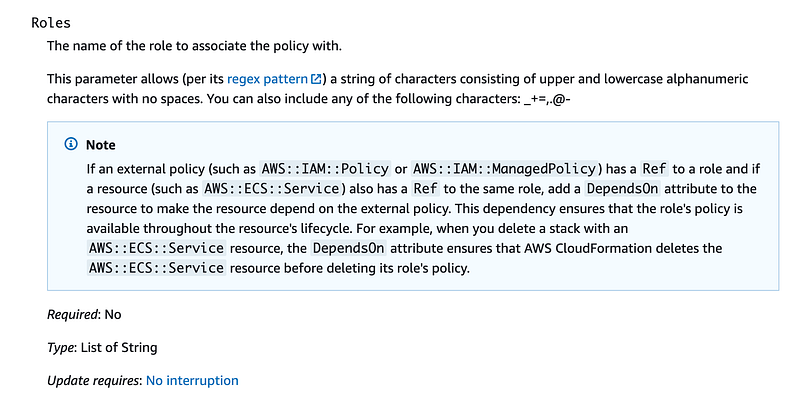
Although the document indicates it needs a role name here, I’m a bit skeptical that we wouldn’t find out we need to pass in an ARN on further testing, but that’s what it says. The examples at the bottom of the page use a !Ref to an imaginary role which is not created anywhere in the example. That’s not real helpful.
Let’s take a look at a KMS key policy. Look at the KMS Key documentation.
Scroll down to the section on the key policy. That section isn’t exactly clear but if you scroll down and look at the samples at the bottom of the page, the example shows that a KMS key policy uses a full user ARN so that is what we’ll need to supply to our KMS policy template, rather than a name.
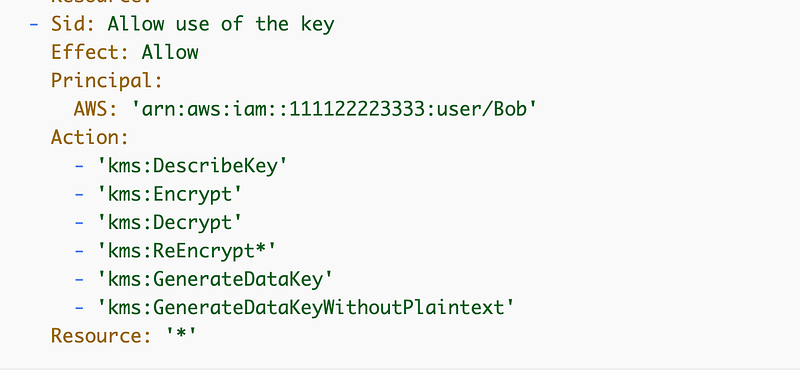
You’ll also find an example using a role on this page:
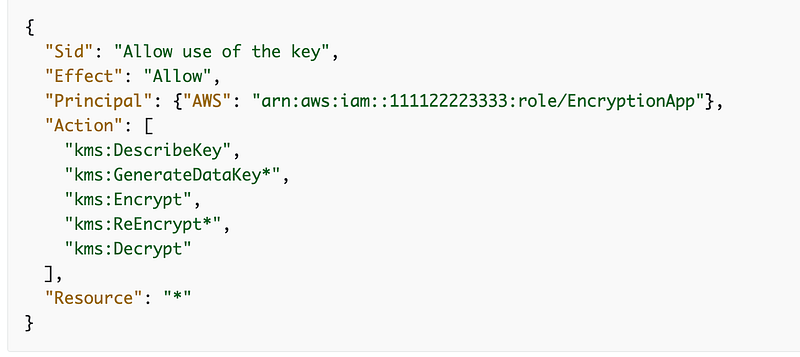
We’re going to need to get a handle to the ARN for our role somehow.
Role Names, ARNs and Outputs using GetAtt or Ref
If you recall an earlier template we created, batchjobadmins.yaml, our PolicyDocument required a full ARN, which we constructed using the name of a role and other information available to us in the CloudFormation template and with the Sub function.
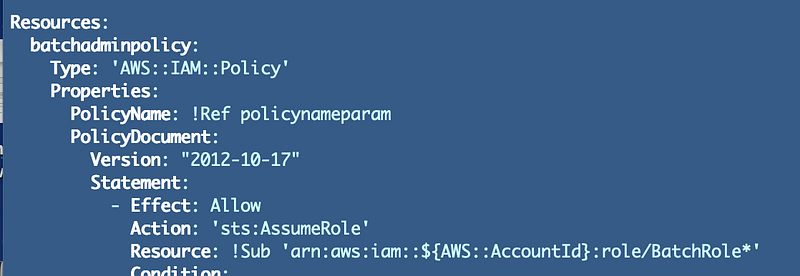
We could have alternatively added the full ARN of the Batch Job role in the outputs instead of only the name. Then we would not have needed to piece together that role we could have just referenced the output of the other template. However, by piecing together the role as shown above I’m ensuring that only a role in the current AWS account is added to the policy.
What if we wanted to pass the full ARN in the output of a CloudFormation template? We can use the GetAtt function to get information about a resource deployed by CloudFormation.
How do we know what values we can retrieve using the GetAtt function for a particular resource? The above documentation sends us here:
If you click on IAM and then Role you end up back at the CloudFormation documentation for an IAM Role:
Scroll down and it tells you want Ref returns and what values you can obtain using GetAttr. The Ref (reference) pointer for an IAM role returns the name. Using GetAttr we can get the whole Arn or the role ID.
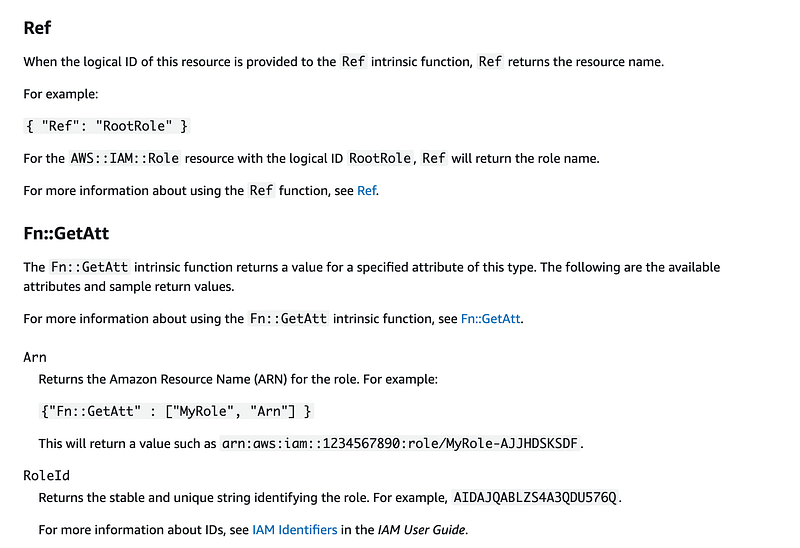
Since we know we need an ARN and we might need a Name we’ll output both in our role templates.
Add outputs to our batch job role creation template
Edit the batch job role we created earlier and use Ref to output the name of the role it creates. Add the ARN as an output as well. In addition, since we are using these outputs for multiple stacks created from the same template, we’ll need to make each output unique by including the job name in the output name.
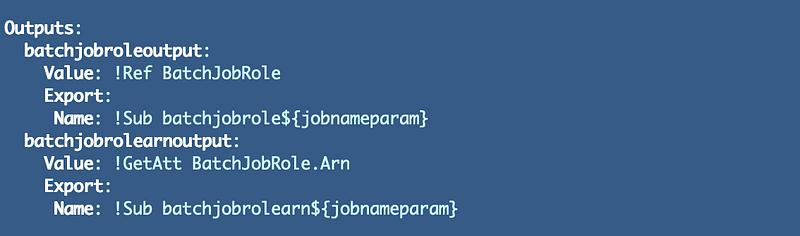
Note that “Arn” is case sensitive. Also, make sure you do not give different outputs the same name or reference or the second output might overwrite the first output. Not that I’ve ever done that and spent far too long trying to figure out what my outputs were not working!
Deploy Our Role
Here’s where we run into a bit of a catch 22.
- We can’t create our KMS policy with zero-trust permissions until we have our roles that we want to give encrypt and decrypt permissions.
- We can’t assign specific keys to the role’s IAM policy as explained in this documentation until we create the key.
To overcome this dilemma, we can deploy our resources in this order:
- Create the role.
- Create the KMS policy.
- Add the KMS permissions to the IAM role.
In order to create the KMS policy, we’ll also need to create the role that is allowed to decrypt the credentials and use them. So for now, in this blog post, we’re simply going to deploy the role and we’ll add the policy that allows the role to decrypt using KMS in a future post.
We already have a deploy script that deploys the role in the batch_job_role folder:
batch_job_role/deploy.shAs you recall we wrote that script in such a way that it takes a batch job name as a parameter. That comes in handy right about now. I can re-use that code to deploy the role for this batch job.
Try adding this command to your batch job script:
../../batch_job_role/deploy.sh 'DeployBatchJobCredentials'The problem we have now is that the deployment script we’re referencing is looking for our CloudFormation template relative to the directory were we are executing this current script. Bummer.
There are multiple ways we can solve this. We could use an environment variable to define the path but I don’t really like that idea because those variables are too easily manipulated. Personal preference. I also don’t want to break what I wrote in prior blog posts. Instead of referencing the path to the script this way we’ll navigate to that directory, execute the script and navigate back. In the long term this code may all look different but that works easily for now. Let’s try this:
jobname='DeployBatchJobCredentials'cd ../../batch_job_role/
./deploy.sh $jobname
cd ../jobs/$jobnameNote: This gets revised in an upcoming blog post.
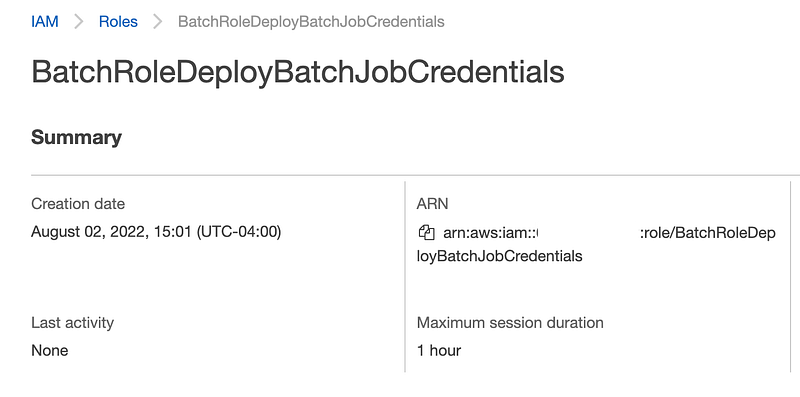
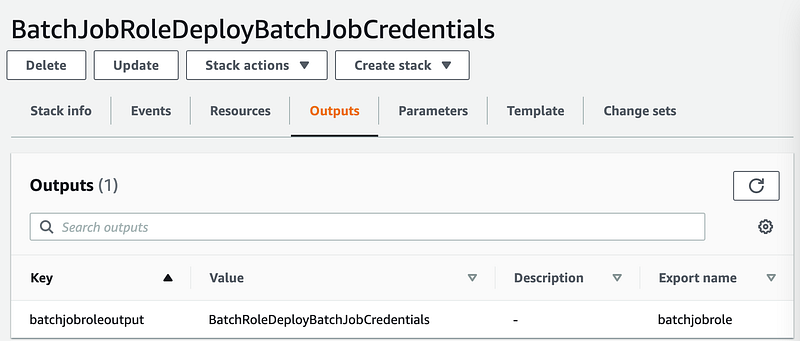
Ah, yes, that works better. Execute the script and check to make sure the role is created properly and contains the required output.
Here’s our role:
Here’s our role name in the output of our CloudFormation Template:
Beautiful. We deployed that with a minimal amount of code and we can reuse this for every batch job we create that needs a new role.
You can find the code in the GitHub repo and specifically in the directory linked below, with some revisions explained in upcoming blog posts.
https://github.com/tradichel/SecurityMetricsAutomation/tree/main/jobs/DeployBatchJobCredentialsNote that I do revise the concept slightly in future posts to account for different scenarios where different users need to assume a role.
Follow for updates.
Teri Radichel | © 2nd Sight Lab 2022
About Teri Radichel:
~~~~~~~~~~~~~~~~~~~~
⭐️ Author: Cybersecurity Books
⭐️ Presentations: Presentations by Teri Radichel
⭐️ Recognition: SANS Award, AWS Security Hero, IANS Faculty
⭐️ Certifications: SANS ~ GSE 240
⭐️ Education: BA Business, Master of Software Engineering, Master of Infosec
⭐️ Company: Penetration Tests, Assessments, Phone Consulting ~ 2nd Sight Lab
Need Help With Cybersecurity, Cloud, or Application Security?
~~~~~~~~~~~~~~~~~~~~~~~~~~~~~~~~~~~~~~~~~~~~~~~~~~~~~~~~~~~~~
🔒 Request a penetration test or security assessment
🔒 Schedule a consulting call
🔒 Cybersecurity Speaker for PresentationFollow for more stories like this:
~~~~~~~~~~~~~~~~~~~~~~~~~~~~~~~~~~~~~~~~~~~~~~~~~~~~~~~~~~~~~
❤️ Sign Up my Medium Email List
❤️ Twitter: @teriradichel
❤️ LinkedIn: https://www.linkedin.com/in/teriradichel
❤️ Mastodon: @teriradichel@infosec.exchange
❤️ Facebook: 2nd Sight Lab
❤️ YouTube: @2ndsightlab