
Building a Data Lakehouse in Azure with Databricks
How to build up a modern Data Platform with Databricks and Azure Cloud

If you want to build a modern data platform for your company, the Data Lakehouse is one of the most promising architectures for it. In the Microsoft Azure Cloud, there are even several approaches and solutions, one of which is the use of Databricks.
Recap: Data Lakehouse
It is not just about integrating a Data Lake with a Data Warehouse, but rather integrating a Data Lake, a Data Warehouse, and purpose-built storage to enable unified governance and ease of data movement [1]. From my own experience, it has often shown that a Data Lakes can be realized much faster. Once all data is available, Data Warehouses can still be built on top of it as a hybrid solution.
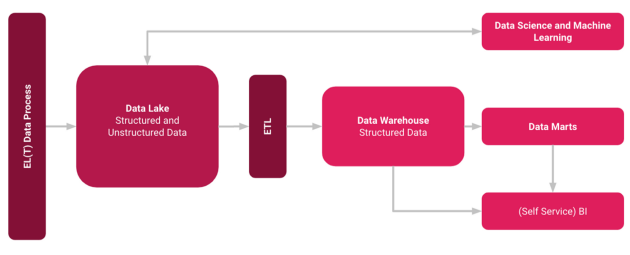
Benefits of a (Databricks) Data Lakehouse
A Databricks Lakehouse within the Azure Cloud combines ACID transactions and Data Governance of Data Warehouses with the flexibility and cost efficiency of Data Lakes to enable you and your company with (Self-Service) Business Intelligence and Machine Learning or Deep Learning. Databricks Lakehouse stores your data in your comprehensively scalable cloud object store, built on open source data standards, so you can use your data anywhere and any way you want [2]. Other providers such as Google and AWS, but also platform-independent providers such as Snowflake, naturally offer similarly good solutions here. Read more about Data Lakehouses here:
Building up a Databricks Solution in Azure
An architecture might look like the one shown below, where you use a Data Lake storage from Azure as the basic storage. Of course, you could also consider using only relational database storage if you don’t actually have any semi-structured or unstructured data in the company, but who knows what else is coming, you are flexible here.
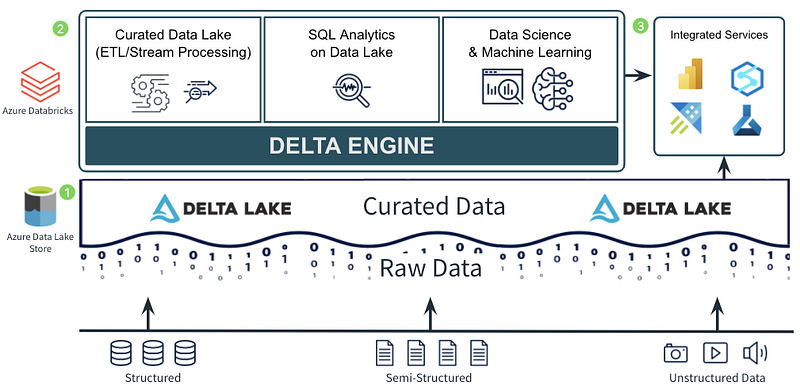
In addition, it also works well with other solutions, interesting is also that Microsoft with Azure Synapse actually offers its own similar product.
By storing data with Delta Lake, you enable Data Scientists and Engineers to use the same production data that your core ETL workloads are based on when that data is processed [3].
Using the built-in Unity Catalog you can handle data governance and discovery on Azure Databricks very easily. Available in Notebooks, Jobs, and Databricks SQL, Unity Catalog provides features and user interfaces that make workloads and users available designed for both Data Lakes and Data Warehouses [3]. This is also necessary so that the correct data arrives at the right time at the right people or can be found by them and shared under policies and to enable later approaches such as a Data Mesh. In the subsequent process, the data can then be used for processes such as Business Intelligence through e.g. Power BI and co. for reporting and dashboarding.
Summary
As a modern architecture, the Data Lakehouse will probably continue to prevail in companies. One solution is to use Azure Data Lake together with Databricks as a Data Warehouse component. As mentioned, Azure also offers other solutions such as Azure Synapse. In the end, you have to decide which is the better choice for you by knowing your exact requirements, and it is also worthwhile to look at the costs of the individual services. If you work a lot with Azure, Databricks and Power BI, you might also be interested in the following articles:
How Databricks want to enforce the Citizen Data Scientist
Data Science via Drag and Drop?
medium.com
Sources and Further Readings
[1] AWS, What is a Lake House approach? (2021)
[2] Microsoft, What is the Databricks Lakehouse? (2022)
[3] Analytics on Azure Blog, Simplify Your Lakehouse Architecture with Azure Databricks, Delta Lake, and Azure Data Lake Storage (2022)


