avatarChristianlauer

Free AI web copilot to create summaries, insights and extended knowledge, download it at here

2065

Abstract

network data gateway. You can utilize this option instead of the on-premises data gateway to avoid creating a DSN, and creating a connection string, installing a driver, setting up data source specific configurations or downloading anything. But also the on-premise gateway has been updated so that it’s ensured that the reports that you publish to the Power BI Service and refresh via the gateway will go through the same query execution logic/run-time as in the August version of Power BI Desktop [2].</p><p id="a34e">So if you’re tapping data directly from Power BI and accessing databases through it, you and Data Engineers should be pleased with these new features. Another, more stable way, however, can be to first make the data obsolete via a <a href="https://readmedium.com/data-lake-vs-data-warehouse-4584b5fd83d0">Data Lake or Data Warehouse</a>, such as Azure Snypase, and then make it available in Power BI from there.</p><h2 id="a40f">Third Update: More Options using Data Loss Prevention</h2><p id="dc34">The Data loss prevention or short DLP policies will help you to protect sensitive data in your Power BI tenant and comply with your data governance or industry regulations, like the GDPR.</p><p id="548b">Since more and more companies in Europe want to use the large cloud providers from the USA such as Microsoft, Google and co. and their services, but have to comply with the regulations, Microsoft conveniently offers this function and is now expanding it with two new options:</p><ul><li>CPU metering for DLP policy evaluation</li><li>Overriding policy tips and reporting false positives</li></ul><p id="fefa">This should provide further support for companies in the area of data governance, because here there is often still a problem between the <a href="https://readmedium.com/cloud-act-vs-gdpr-e65a396d0bed#:~:text=The%20CLOUD%20Act%20from%20the,simply%20because%20of%20the%20GDPR.">Cloud Act and GDPR</a>.</p><div id="5f21" class="link-block"> <a href="https://readmedium.com/cloud-act-vs-gdpr-e65a396d0bed"> <div>

Options

          <div>
            <h2>Cloud Act vs. GDPR</h2>
            <div><h3>What you have to know for your Cloud and Data Projects</h3></div>
            <div><p>medium.com</p></div>
          </div>
          <div>
            <div style="background-image: url(https://miro.readmedium.com/v2/resize:fit:320/1*uEK8___hPz8pst0oe0f77w.jpeg)"></div>
          </div>
        </div>
      </a>
    </div><h2 id="91ed">Fourth Update: Better Integration within Azure Cloud</h2><p id="d42c">Microsoft Power BI now can be used with <i>Dataset Write</i> permissions connected to Azure services. That means that you can use explicit Write permission to assign granular dataset rights comparable to the permission levels of an Azure Analysis Services database. This will make it easier to move Azure Analysis Services databases to Power BI as you can grant non-server admins the right to modify a dataset without having to elevate their status to a server admin equivalent [3].</p><h2 id="051a">Summary</h2><p id="7c6d">This is a brief summary of the latest updates to Microsoft Power BI and what they do. I think this August has provided some great enhancements and will help companies to implement their Data Governance and Self Service BI initiatives in Power BI in a better way.</p><h2 id="0af9">Sources and furhter Readings</h2><p id="b7b8">[1] Microsoft Power BI Blog, <a href="https://powerbi.microsoft.com/de-de/blog/announcing-improvements-to-datamart-query-editor/">Announcing improvements to Datamart Query editor</a> (2022)</p><p id="b6ad">[2] Microsoft Power BI Blog, <a href="https://powerbi.microsoft.com/en-us/blog/on-premises-data-gateway-august-2022-update-is-now-available/">On-premises data gateway August 2022 update is now available</a> (2022)</p><p id="8442">[3] Microsoft Power BI Blog, <a href="https://powerbi.microsoft.com/en-us/blog/power-bi-paves-the-way-for-smooth-azure-analysis-services-migrations/">Power BI paves the way for smooth Azure Analysis Services migrations</a> (2022)</p></article></body>

4 interesting Updates for Microsoft Power BI

Microsoft implemented some nice Updates for its Business Intelligence Tool in August

Photo by Matthew Manuel on Unsplash

Most recently, Microsoft had brought joy to me and many others by integrating Power BI into the Teams mobile app. Now, they are three more important updates.

Let’s look into the updates and how you can benefit from them.

First Update: Improved Datamart Query Editor

Microsoft Power BI Datamarts is a fully managed SQL database that allows users to easily perform relational database analytics using no-code or low-code [1]. No there are some new functions that make that service more powerful — you can now use functions like autosave, rename, multiple query tabs, etc.
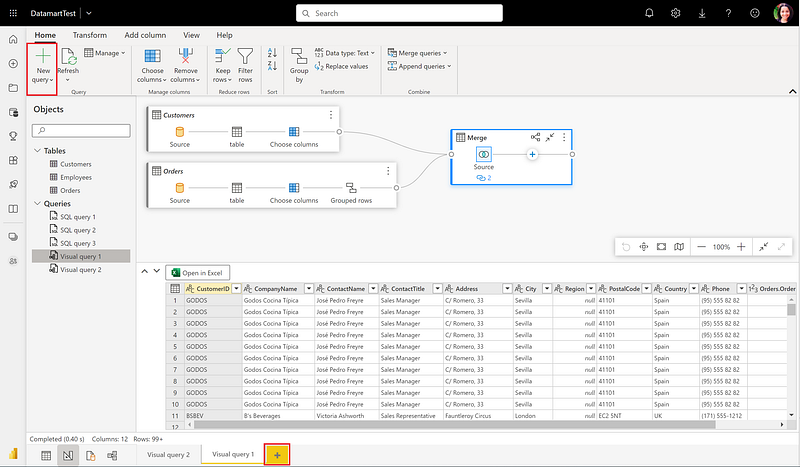
Multiple Query Tabs — Image Source: Microsoft[1]

For me, a good decision to further develop this tool, it should facilitate especially users from the business sector who are able to work with it in their data marts and should drive self-service BI initiatives at companies working with Power BI.

Second Update: More Data Gateway Capabilities

Here, you can now use the PostgreSQL connector for the virtual network data gateway. You can utilize this option instead of the on-premises data gateway to avoid creating a DSN, and creating a connection string, installing a driver, setting up data source specific configurations or downloading anything. But also the on-premise gateway has been updated so that it’s ensured that the reports that you publish to the Power BI Service and refresh via the gateway will go through the same query execution logic/run-time as in the August version of Power BI Desktop [2].

So if you’re tapping data directly from Power BI and accessing databases through it, you and Data Engineers should be pleased with these new features. Another, more stable way, however, can be to first make the data obsolete via a Data Lake or Data Warehouse, such as Azure Snypase, and then make it available in Power BI from there.

Third Update: More Options using Data Loss Prevention

The Data loss prevention or short DLP policies will help you to protect sensitive data in your Power BI tenant and comply with your data governance or industry regulations, like the GDPR.

Since more and more companies in Europe want to use the large cloud providers from the USA such as Microsoft, Google and co. and their services, but have to comply with the regulations, Microsoft conveniently offers this function and is now expanding it with two new options:

  • CPU metering for DLP policy evaluation
  • Overriding policy tips and reporting false positives

This should provide further support for companies in the area of data governance, because here there is often still a problem between the Cloud Act and GDPR.

Fourth Update: Better Integration within Azure Cloud

Microsoft Power BI now can be used with Dataset Write permissions connected to Azure services. That means that you can use explicit Write permission to assign granular dataset rights comparable to the permission levels of an Azure Analysis Services database. This will make it easier to move Azure Analysis Services databases to Power BI as you can grant non-server admins the right to modify a dataset without having to elevate their status to a server admin equivalent [3].

Summary

This is a brief summary of the latest updates to Microsoft Power BI and what they do. I think this August has provided some great enhancements and will help companies to implement their Data Governance and Self Service BI initiatives in Power BI in a better way.

Sources and furhter Readings

[1] Microsoft Power BI Blog, Announcing improvements to Datamart Query editor (2022)

[2] Microsoft Power BI Blog, On-premises data gateway August 2022 update is now available (2022)

[3] Microsoft Power BI Blog, Power BI paves the way for smooth Azure Analysis Services migrations (2022)

Microsoft
Power Bi
Technology
Data Science
Azure
Recommended from ReadMedium