avatarClark

Free AI web copilot to create summaries, insights and extended knowledge, download it at here

4084

Abstract

at everyone should use it, the reality is a little bit more different from that. The Bartender is a great utility app that many designers, developers, scientists and medical professionals could benefit from. It is a way to optimize your workflow by reducing the visual clutter.</p><p id="e3a4">Having said that, I’m not entirely convinced that the novice Mac user could receive many benefits from it. I think there are many people who are still new to utility apps like Bartender, and they might be confused on setting up the app and finding its real functionalities.</p><p id="e149">The problem for people who are new to Macs comes from the difficulty the operating system presents to them. Difficulties such as finding the options to allow Bartender to run properly, to knowing what kind of changes in the Apple’s preferences window you should commit to achieve a bug-free experience. There are also some issues with the app itself which I’ll explain later in this review.</p><p id="444e">In conclusion, if you are a novice Mac user who can’t easily find their way around Mac, you might need some help setting up the app. However, if you know your way around the Mac, then you should be fine using Bartender 4.</p><h2 id="6131">What Is Success For Bartender 4?</h2><p id="6983">I like to think the success for this app is the number of people using it, however, I don’t believe that should be the case. I imagine a future where most apps work with Bartender 4 to offer better services for their users.</p><p id="dc72">If Bartender 4 gives API access for third-party developers and also finds a way to publish its app on the App Store then I believe it will reach more people.</p><h1 id="8291">The Good And The Not So Good Features</h1><p id="4838">I love having a clutter-free Mac. In fact, I have written several articles for digital minimalism on <a href="https://readmedium.com/here-is-what-you-should-do-for-digital-minimalism-on-mac-720c80651949">Macs</a> and <a href="https://readmedium.com/digital-minimalism-on-iphone-in-depth-guide-56f3aaa571fe">iPhones</a>.</p><p id="3271">The Good Features:</p><ul><li>Hover your cursor on the menu bar to quickly reveal a mini window to show the Bartender bar with all the hidden apps</li><li>Ability to customize the bartender icon</li><li>Ability to change the margin of which apps start to show once the Bartender activate on the menu bar</li><li>Custom triggers to specify when an item shows</li><li>M1 Support</li><li>Multiple screen support</li></ul><p id="6cdb">Not So Great Features:</p><ul><li>Poor UX Writing in many sections of the Bartender’s preference menu</li><li>The App looks decent but could be more user-friendly</li><li>Some functionalities of the app like changing the menu bar layout had a steep learning curve for me</li><li>The information presented in the preference panel might be a little complicated for novice users</li></ul><h2 id="9296">The Solutions</h2><ul><li>I would revamp the information architecture of the app and separate many sections of the app.</li><li>I would also create a dedicated home screen where accessing to the most important functionalities is more user-friendly.</li><li>Adding a theme and style option to customize the Bartender bar would be a cool addition to making the user interface feel more welcome to the users.</li><li>Shortening the descriptive text with better writing for the preference panel.</li></ul><p id="1dd7">I think Bartender 4 does a tremendous job at making sure you have a clutter-free environment on your Mac. Considering the vast amount of changes since the last version (Bartender 3) the app has been great, and I do hope to see more greatness.</p><p id="34e1">The Bartender 4 is available to purchase directly from their website for $15 for a single user on one Mac or more.</p><div id="913b" class="link-block"> <a href="https://www.macbartender.com"> <div> <div> <h2>Bartender 4 - Take control of your Menu bar</h2> <div><h3>Bartender 4 is only compatible with macOS Big Sur. Because o

Options

f the massive changes in macOS Big Sur Bartender 4 could…</h3></div> <div><p>www.macbartender.com</p></div> </div> <div> <div style="background-image: url(https://miro.readmedium.com/v2/resize:fit:320/0*A7ewLJ3HUAHpYgk4)"></div> </div> </div> </a> </div><p id="8fa3">I want to thank you for reading this review. If you have any feedback, comments about this review, let me know in the response section.</p><p id="8c34">You can also read my other App reviews below.</p><div id="6de7" class="link-block"> <a href="https://readmedium.com/textsniper-for-mac-is-it-worth-6-99-8de368069f8e"> <div> <div> <h2>TextSniper for Mac. Is it worth $6.99?</h2> <div><h3>TextSniper allows you to capture the text from your screen and copy it into your clipboard.</h3></div> <div><p>medium.com</p></div> </div> <div> <div style="background-image: url(https://miro.readmedium.com/v2/resize:fit:320/1*YXKOFPYsfgOIqS3YVCKkLQ.jpeg)"></div> </div> </div> </a> </div><div id="ef77" class="link-block"> <a href="https://readmedium.com/craft-review-is-it-a-minimalist-dream-come-true-98451a08491d"> <div> <div> <h2>Craft review, is it a minimalist dream come true?</h2> <div><h3>Craft, an application developed by Luki Labs. It is a fantastic approach for those who want to organize and enhance…</h3></div> <div><p>medium.com</p></div> </div> <div> <div style="background-image: url(https://miro.readmedium.com/v2/resize:fit:320/1*nGm-7EzPz_4HLI03hcBRfA.jpeg)"></div> </div> </div> </a> </div><div id="7867" class="link-block"> <a href="https://readmedium.com/tempo-mail-review-is-it-a-minimalist-dream-come-true-9e9d16c9cca2"> <div> <div> <h2>Tempo mail review, is it a minimalist dream come true?</h2> <div><h3>Focus, there are moments in life when you are in the zone; all that is visible in your sight is the objective, and that…</h3></div> <div><p>medium.com</p></div> </div> <div> <div style="background-image: url(https://miro.readmedium.com/v2/resize:fit:320/1*yu3hGFdis3WJj3BJ9FPrPQ.png)"></div> </div> </div> </a> </div><div id="0b02" class="link-block"> <a href="https://uxplanet.org/dayone-ios-will-this-journaling-app-change-your-life-ui-ux-review-f81e2da6f125"> <div> <div> <h2>DayOne iOS: Will this journaling app change your life? (UI/UX Review)</h2> <div><h3>You just opened the door of a cafe, the smell of fresh coffee beans hit you on the entrance, and it seems like you have…</h3></div> <div><p>uxplanet.org</p></div> </div> <div> <div style="background-image: url(https://miro.readmedium.com/v2/resize:fit:320/1*xbzLWYkTJno26jw5wy9DqQ.png)"></div> </div> </div> </a> </div><div id="b0a6" class="link-block"> <a href="https://readmedium.com/bear-app-on-ios-is-it-a-minimalists-dream-come-true-49eaf27a09df"> <div> <div> <h2>Bear App on iOS, Is it a minimalist’s dream come true?</h2> <div><h3>First and foremost, I don’t consider myself a minimalist. I simply love the idea of getting rid of clutter specially…</h3></div> <div><p>medium.com</p></div> </div> <div> <div style="background-image: url(https://miro.readmedium.com/v2/resize:fit:320/1*yVwAe9NjVZ9c5CnAblm59Q.png)"></div> </div> </div> </a> </div></article></body>

Bartender 4 Will Make Your Mac More Minimal! — A Review
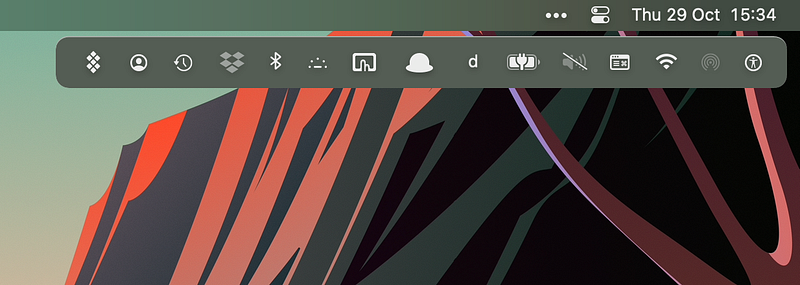
Image of App’s Bar from the MediaKit available from Bartender’s website

The number of useful apps on the Mac has grown a lot since the past few years and developers are doing a great job building apps for each user with their specific needs. Many of those apps have created solutions to stay hidden yet accessible from your eyes to reduce the amount of visual clutter from the operating system. One of the most used methods is to live on the menu bar with a simple icon allowing you to change some functions and view the state of what is happening.

One of the most minimalistic ways to use your Mac is to remove the apps that clutter your view on the menu bar, however, most often the them are of immense help to your work, productivity, and creativity. Let me give you an example.

My Use Case

I am a researcher and someone who writes about technology on his Medium blog. I have a Mac with productivity apps which reduce milliseconds of my time by reducing the extra steps required to achieve a certain task.

A Small Utility App

An example would be an application called Amphetamine which helps me stop the Mac from sleeping when I’m working on a task that requires using more than one device.

To use Amphetamine, I don’t have to open it, I simply use the menu bar icon with a right click which activates the mode I ask. Going to the menu bar and clicking the icon shouldn’t be a problem, however, I have assigned a shortcut to activate the app without having to open it. I save time by a second. Now I’m left with an icon on the menu bar that is visually of no use to me. That is where the clutter builds up.

Solutions

There are a couple of solutions to my problem:

  • Finding a way to hide the app icon without completely quitting from it
  • Completely exit the app and find other ways to achieve my task
  • Use the Dock icon instead of the menu bar icon to reduce clutter

None of those solutions really help me have all the benefits of using the app without cluttering my view.

That is where Bartender comes to the rescue.

Image of App’s functionality from the MediaKit available from Bartender’s website

Bartender 4 is a helpful utility app where you’ll be able to temporarily hide the menu bar apps and still have quick access to them in a visually appealing way.

Bartender 4 doesn’t use lots of resources to run on your Mac. In fact, in terms of performance I’ve had no issues with it. The app works really well and is optimized with newer Macs running M1 chip.

Installing and setting up the Bartender 4 is not too difficult. All you’ll need to do is drag and drop the app in your applications directory and open it from the App Launcher. On the first run you’ll be asked to allow certain permissions then re-open the app.

Using the app is not difficult either. Upon launch, you will be given a panel to manage your preferences. If you can’t find the panel, simply right-click on the menu bar icon and choose preferences.
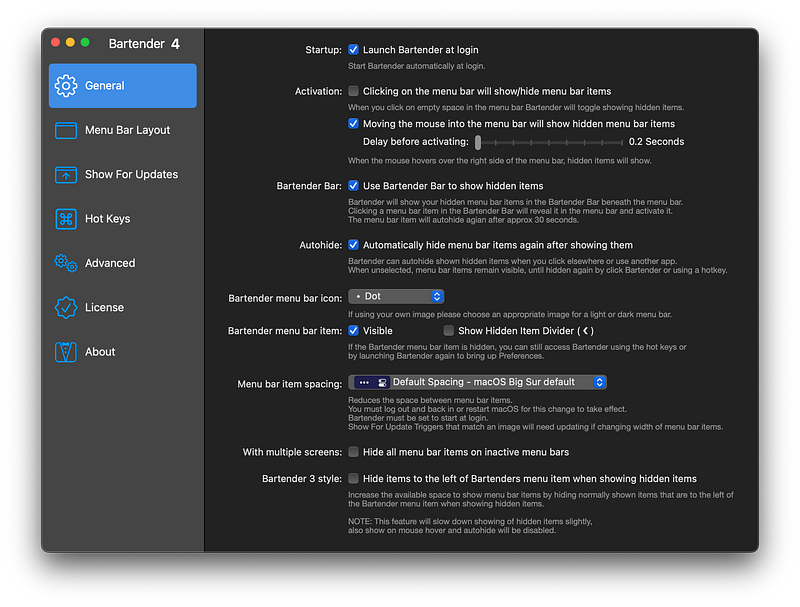
My preference panel of the Bartender app running on Mac OS Big Sur

Bartender 4 has so many great options to customize it to your likings. You can customize its look and behavior with simple steps. You can change its layout and assign hot keys.

Who Should Use The Bartender App?

As much as I love to say that everyone should use it, the reality is a little bit more different from that. The Bartender is a great utility app that many designers, developers, scientists and medical professionals could benefit from. It is a way to optimize your workflow by reducing the visual clutter.

Having said that, I’m not entirely convinced that the novice Mac user could receive many benefits from it. I think there are many people who are still new to utility apps like Bartender, and they might be confused on setting up the app and finding its real functionalities.

The problem for people who are new to Macs comes from the difficulty the operating system presents to them. Difficulties such as finding the options to allow Bartender to run properly, to knowing what kind of changes in the Apple’s preferences window you should commit to achieve a bug-free experience. There are also some issues with the app itself which I’ll explain later in this review.

In conclusion, if you are a novice Mac user who can’t easily find their way around Mac, you might need some help setting up the app. However, if you know your way around the Mac, then you should be fine using Bartender 4.

What Is Success For Bartender 4?

I like to think the success for this app is the number of people using it, however, I don’t believe that should be the case. I imagine a future where most apps work with Bartender 4 to offer better services for their users.

If Bartender 4 gives API access for third-party developers and also finds a way to publish its app on the App Store then I believe it will reach more people.

The Good And The Not So Good Features

I love having a clutter-free Mac. In fact, I have written several articles for digital minimalism on Macs and iPhones.

The Good Features:

  • Hover your cursor on the menu bar to quickly reveal a mini window to show the Bartender bar with all the hidden apps
  • Ability to customize the bartender icon
  • Ability to change the margin of which apps start to show once the Bartender activate on the menu bar
  • Custom triggers to specify when an item shows
  • M1 Support
  • Multiple screen support

Not So Great Features:

  • Poor UX Writing in many sections of the Bartender’s preference menu
  • The App looks decent but could be more user-friendly
  • Some functionalities of the app like changing the menu bar layout had a steep learning curve for me
  • The information presented in the preference panel might be a little complicated for novice users

The Solutions

  • I would revamp the information architecture of the app and separate many sections of the app.
  • I would also create a dedicated home screen where accessing to the most important functionalities is more user-friendly.
  • Adding a theme and style option to customize the Bartender bar would be a cool addition to making the user interface feel more welcome to the users.
  • Shortening the descriptive text with better writing for the preference panel.

I think Bartender 4 does a tremendous job at making sure you have a clutter-free environment on your Mac. Considering the vast amount of changes since the last version (Bartender 3) the app has been great, and I do hope to see more greatness.

The Bartender 4 is available to purchase directly from their website for $15 for a single user on one Mac or more.

I want to thank you for reading this review. If you have any feedback, comments about this review, let me know in the response section.

You can also read my other App reviews below.

Apple
Apps
Mac
Technology
Tech
Recommended from ReadMedium