
APM & Logging Services Part.3 — The cache of Cloudflare

As I have ever introduced it in the previous article, Cloudflare is one kind of the reverse proxy of CDN (Content Delivery Network).
The physical data server location relates to the network latency. With the AnyCast and distributed data center around the world, the requests will pass to the data server which is close to the client.
There are several hops from the client and the data server. However, we don’t have to go back to the server after caching the static resources on the CDN.
We will talk about the network latency and cache in this topic.
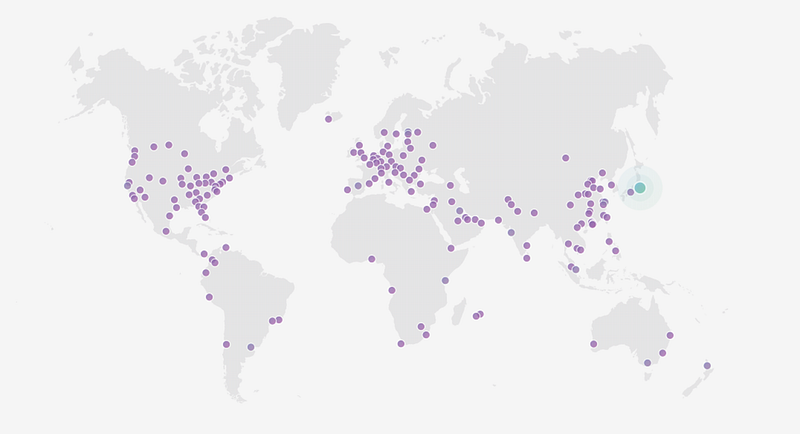
Cache from Cloudflare
Caching is the process of storing resources from one request and reusing those resources for subsequent requests. The original servers don’t have to handle the requests.
1.Make sure that Cloudflare has already cached the static resources
The first thing to do is getting the header of the response. You can retrieve the response headers by using curl on UNIX-like platform.
curl -svo /dev/null explore.garmin.cn/css/main.cssWe can get useful information there.
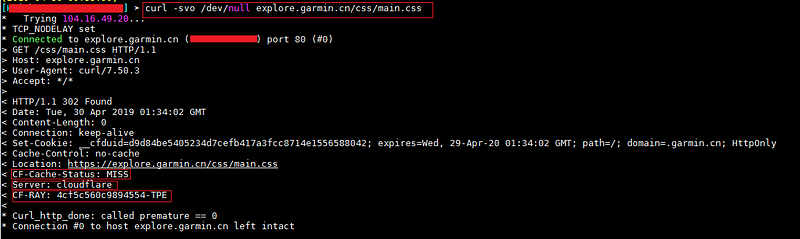
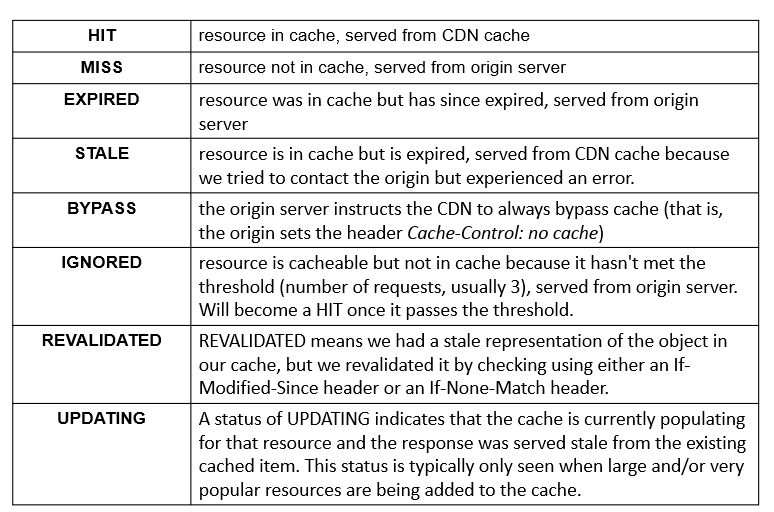
CF-Cache-Status We can look for the CF-Cache-Status to realizing the cache status. You can refer to the following table to look at the data types that Cloudflare will cache by the default setting.
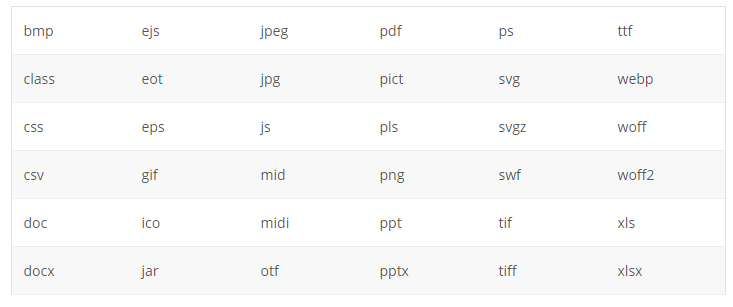
Server Cloudflare won’t cache some resource types by default. In this case, it will not show CF-Cache-Status in the header. You can refer to the following list.
Notice that Cloudflare won’t cache the dynamic content and the HTML files by the default setting.
2. Where does the latency occur?
As we mentioned before, the physical data server location relates to the network latency.
To answer this question, we can review the client side process by checking the timeline from Pingdom.
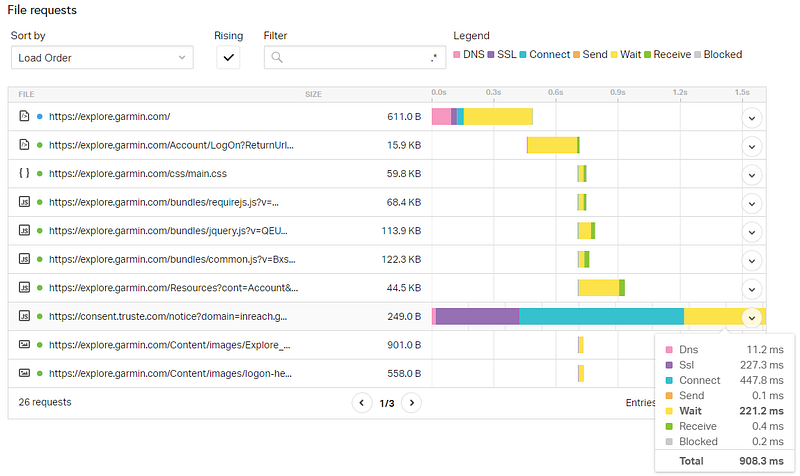
- DNS In this phase, the user’s browser must perform domain lookup when the web page references content from another domain. It will increase more delays if the website uses domain sharding.
- SSL In this phase, the client waits for the SSL handshake with the server.
- Connect
- Send In this phase, the client sends requests to the server.
- Wait (TTFB) In this phase, the client waits for the first byte (Time To the First Byte) from the server. It includes operation such as the database operation and insufficient server resources.
- Receive In this phase, the client waits for all data from the server.
The latency for send, wait, and receive will increase with the distance between the server and the client.
3.How to evaluate the latency improvement from Cloudflare?
Use Pingdom to test the same site twice. It will cache the static resources on the second time.
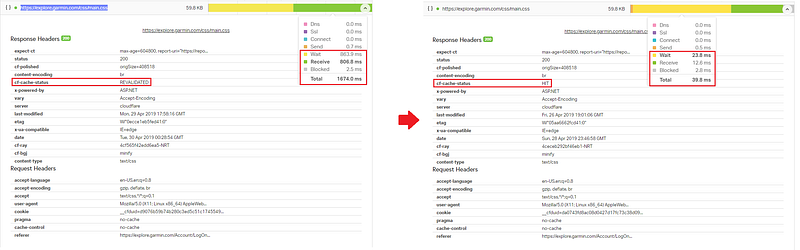
The left part doesn’t cached contents yet (Revalidated). The right part cached (Hit).
The cache can improve the network latency for send, wait, and receive phases because because the requests don’t need to go back to the server after the caching.
3. Will Cloudflare cause any Side effects or disadvantages?
As we know, Cloudflare is one kind of reverse proxy which acts as an intermediary server between the client and the server.
It still have some disadvantages:
- First, you have to change the name server to point directly to Cloudfare.
- Second, Reverse proxy will increase the latency of send, wait, and receive with distance increasing if Cloudflare doesn’t cache yet.
Summary
Thanks for your patient. I am Sean. I work as a software engineer.
This article is my note. Please feel free to give me advice if any mistakes. I am looking forward to your feedback.
Please feel free to clap if this article can help you. Thank you.
You can also subscribe my page on Facebook.
Related topics
APM & Logging Services:
APM & Logging Services Part.2- New Relic Query Language
New Relic
Query Language New Relicmedium.com
IT & Network:
Database:
Software testing:
Debugging:
DevOps:
References
- What do the various Cloudflare cache responses (HIT, Expired, etc.) mean?
- Which file extensions does Cloudflare cache for static content?
- Kinsta CDN vs Cloudflare CDN — Which One Should You Use?
- 某交易網站經常出現 Error 520 ? Cloudflare和Ray ID是甚麼 ?
- Error 520: Web server is returning an unknown error
- What is Domain Sharding?
- How to Analyze and Improve Page Load Performance
- Maximum concurrent connections to the same domain for browsers
- How to Properly Run a Website Speed Test (You’re Doing it Wrong)
- Network Latency — Comparing the Impact on Your WordPress Site
- WordPress CDN — Why You Should Be Using One in 2019
- How can I tell if Cloudflare is caching my site or a specific file?


