avatarTeri Radichel

Free AI web copilot to create summaries, insights and extended knowledge, download it at here

10192

Abstract

//cdn-images-1.readmedium.com/v2/resize:fit:800/1*LkLjt4oorVyIG4l3Z5HSLQ.png"><figcaption></figcaption></figure><p id="9b2d">It’s probably not perfect but better than nothing at this point.</p><p id="c90f">Now I can add that check to the run.sh file:</p><figure id="1156"><img src="https://cdn-images-1.readmedium.com/v2/resize:fit:800/1*7VGu81zVqL6CE7Um4XzcRg.png"><figcaption></figcaption></figure><h2 id="4172">A job configuration parameter to deploy the dev OU</h2><p id="941c">Let’s create a parameter for the first resource we need to deploy — the dev OU:</p><figure id="0690"><img src="https://cdn-images-1.readmedium.com/v2/resize:fit:800/1*QtNGv_y9KwtO-dW8peJp6g.png"><figcaption></figcaption></figure><p id="c00c">Here’s the parameter name based on the naming convention above and our hierarchy of AWS resources and categories:</p><div id="254b"><pre><span class="hljs-regexp">/job/</span>awsenvinit<span class="hljs-regexp">/root-admin/</span>organizations-organizationalunit-dev</pre></div><p id="7ed9">The resource hierarchy was explained here:</p><div id="c74d" class="link-block"> <a href="https://readmedium.com/generating-a-directory-structure-for-cloudformation-templates-1954a4b53520"> <div> <div> <h2>Generating A Directory Structure For CloudFormation Templates</h2> <div><h3>ACM.362 Leveraging the AWS documentation to create a directory structure for CloudFormation templates</h3></div> <div><p>medium.com</p></div> </div> <div> <div style="background-image: url(https://miro.readmedium.com/v2/resize:fit:320/1*uQPbA5YX7yMKDYQ-z_o8ug.png)"></div> </div> </div> </a> </div><p id="185e">As described in the prior post on how I formulate the parameters, the value for my parameter would be:</p><div id="cd13"><pre><span class="hljs-attribute">env</span><span class="hljs-operator">=</span>dev <span class="hljs-attribute">region</span><span class="hljs-operator">=</span>us-east-<span class="hljs-number">2</span></pre></div><p id="ba47">Recall that<b><i> role, container image, category type, resource type, and resource name</i></b> get parsed out of the parameter name.</p><p id="9a74">The <b><i>region</i></b> is used by the CLI command and where the CloudFormation stack will end up, if not required for global resources.</p><p id="b0a8">The <i>env </i>value is the environment in which the resource will be deployed and is prepended to the name (or in this case it is the name).</p><p id="025e">I also need to pass in CloudFormation parameters with a defined prefix so we can easily parse out those parameters and pass them to a CloudFormation template.</p><p id="f0e8">I can’t remember if I wrote about this already or not. I’m going to rename all my parameters to start with:</p><div id="af01"><pre>cf_param_</pre></div><p id="487f">So my organizational unit template becomes:</p><figure id="9fa3"><img src="https://cdn-images-1.readmedium.com/v2/resize:fit:800/1*ldI7N2tVgM0IWwjwFyqvyA.png"><figcaption></figcaption></figure><p id="ae2d">OK. Except AWS naming inconsistencies strike again.</p><p id="e123">I can only use alphanumeric so I’m going to have to use this format:</p><figure id="fe68"><img src="https://cdn-images-1.readmedium.com/v2/resize:fit:800/1*Ulb9IapjrkbSxxjfU-UPDQ.png"><figcaption></figcaption></figure><p id="2895">I’m going to pass in those parameters in my configuration like this:</p><div id="a5f8"><pre><span class="hljs-attribute">env</span><span class="hljs-operator">=</span>dev <span class="hljs-attribute">region</span><span class="hljs-operator">=</span>us-east-<span class="hljs-number">2</span> <span class="hljs-attribute">cfparamName</span><span class="hljs-operator">=</span>dev <span class="hljs-attribute">cfparamParentid</span><span class="hljs-operator">=</span>[hold this thought...]</pre></div><p id="87ab">In fact we don’t need the name because it’s in our parameter name so:</p><div id="202e"><pre><span class="hljs-attribute">env</span><span class="hljs-operator">=</span>dev <span class="hljs-attribute">region</span><span class="hljs-operator">=</span>us-east-<span class="hljs-number">2</span> <span class="hljs-attribute">cfparamParentid</span><span class="hljs-operator">=</span>[hold this thought...]</pre></div><p id="b56b">Pretty much every resource is going to have a <b><i>cfparamName</i></b> parameter.</p><h2 id="6683">Eliminating repetitive code</h2><p id="60d5">Now I can parse through all the parameters that start with that prefix and add them to the parameter list I’m creating over and over again in my deploy functions:</p><figure id="72c9"><img src="https://cdn-images-1.readmedium.com/v2/resize:fit:800/1*C2G5F9DoTWz_VIL2sFBHZQ.png"><figcaption></figcaption></figure><p id="a864">While we are at it, we can get rid of some hard coded values that are derived from the job config parameter name and value:</p><figure id="6741"><img src="https://cdn-images-1.readmedium.com/v2/resize:fit:800/1*msOeegF7hiINH5usdOdU8A.png"><figcaption></figcaption></figure><p id="8183">We can probably validate the values of our parameters in our common parameter parsing routine, or worse case it’s validated by CloudFormation:</p><figure id="5e65"><img src="https://cdn-images-1.readmedium.com/v2/resize:fit:800/1*hymaDK0sgiU1IfXbS-RidA.png"><figcaption></figcaption></figure><p id="e0ea">In fact, we can pretty much eliminate this function altogether and use a common function to deploy this resource.</p><figure id="2953"><img src="https://cdn-images-1.readmedium.com/v2/resize:fit:800/1*w_RUdBGuHE-2tw71EcOSWQ.png"><figcaption></figcaption></figure><p id="47c4">Almost. I need to deal with that parent ID value.</p><h2 id="f137">Dynamically retrieve ids based on type and name</h2><p id="4c8c">What about that root ID for the OU parent?</p><p id="c191">In some cases we need to pass in IDs to CloudFormation templates. The IDs might be different in different environments while the names will be the same.</p><p id="e729">For example, if a bunch of people want to use this code in their AWS accounts they might leave the name of the OU the same (<i>dev</i>) but the underlying OU id after they create the OU will be different. Also their root id is not going to match my root id, so if I put my root id hard coded into my repository the code isn’t going to work for them.</p><p id="114b">Also, we might not want to expose the IDs. Although account IDs are not meant to be secrets according to AWS, knowledge of accounts does make certain things easier for attackers. I just saw someone posting some research about that on X. So we may not want to expose IDs in code either.</p><p id="996e">For this resource, we need to pass in a parent ID which is either going to be the organizational root ID or another organizational unit ID. I already have a function to look up an OU ID by name in my <i>organization_functions.sh</i> file:</p><figure id="f556"><img src="https://cdn-images-1.readmedium.com/v2/resize:fit:800/1*u4dqJg6cacGuzbWFllOVrg.png"><figcaption></figcaption></figure><p id="7f7d">What if I include the related functions file in my generic function for any resource I’m deploying. Then I make it such that I can call any function in that file and pass in a value from my job config. That gives us a lot of flexibility to come up with the necessary values to complete the task at hand. So like this:</p><div id="a202"><pre><span class="hljs-comment">#THIS IS BAD CODE. DON'T DO THIS.</span>

<span class="hljs-attr">env</span>=dev <span class="hljs-attr">region</span>=us-east-<span class="hljs-number">2</span> <span class="hljs-attr">cfparamParentid</span>=(get_id_from_name <span class="hljs-string">"root"</span>)</pre></div><p id="e1d7"><b><i>WARNING: The above has some serious security ramifications</i></b>. We’d be <b><i>passing executable code through and any matching function in any included file </i></b>could be called if we add it to the configuration.</p><p id="9892">If I was penetration testing the above code, I’d try to pass in all sorts of bash scripts and try to call other functions to try to make this code do bad things.</p><p id="bcb1">I might create a parameter value like this to see if that would execute and I could get the password file and then crack other passwords on the system, for example:</p><div id="c440"><pre><span class="hljs-comment">#yikes!</span> <span class="hljs-attr">env</span>=dev <span class="hljs-attr">region</span>=us-east-<span class="hljs-number">2</span> <span class="hljs-attr">cfparamParentid</span>=(cat /etc/passwd)</pre></div><p id="ea9f">Or since this is running on AWS I might try to pass in a <b><i>curl command</i></b> to see if I could get credentials from the <b><i>AWS metadata service</i></b>.</p><p id="efd7">Well, that’s not good.</p><p id="93f3">Here’s what I am going to do instead. We are only going to allow one specific function to be called for any resource: <b><i>get_id</i></b>.</p><p id="5625">I have already started renaming any functions that get an id based on a resource name to get_id in all my functions files for consistency. <b><i>Any other function name will be rejected.</i></b></p><p id="abfa">We may be able to take some additional validation steps to ensure the get_id function is<b><i> only called for the specified type</i> </b>by<i> <b>adding the resource category and type.</b></i></p><p id="05b1">So <i>get_id</i> is the only function that can be called here and I change the format so it is not passed in as an executable string but rather a static value parsed to determine the action to take:</p><div id="1971"><pre><span class="hljs-attr">env</span>=dev <span class="hljs-attr">region</span>=us-east-<span class="hljs-number">2</span> <span class="hljs-attr">cfparamParentid</span>=:get_id:organization:organizationalunit:root</pre></div><p id="05b5">With the above directive we know that because it starts with :get_id: we’re going to use the<i> get_id</i> function and we know from which file based on the category and type due to our naming convention, and the last value is the name. We can write a common function to use

Options

that information to include the correct functions file and return the specified value.</p><p id="3f6b">Here’s my function to process the id:</p><figure id="5b7d"><img src="https://cdn-images-1.readmedium.com/v2/resize:fit:800/1*2Et7vmvCILYJP-PIB9_KuQ.png"><figcaption></figcaption></figure><p id="4ea6">I ended up putting that in a new shared file because I ran into conflicts when I sourced the file from the functions file that the file I’m sourcing in turns sources. This creates a kind of circular dependency.</p><div id="e7ba"><pre><span class="hljs-keyword">shared</span>/parse_config.sh</pre></div><p id="82c3">I tested that by setting a CLI profile that had access to AWS organizations and calling the function like this at the bottom of the file:</p><figure id="83db"><img src="https://cdn-images-1.readmedium.com/v2/resize:fit:800/1*O0kB1NWVOfxnVd9Mg_aZhQ.png"><figcaption></figcaption></figure><p id="52dc">I executed the file:</p><div id="1bad"><pre>./<span class="hljs-keyword">shared</span>/parse_config.sh </pre></div><p id="25b0">That successfully gave me the root id of my organization. So now I can call that function and pass in a configuration value to get back an ID. Woot!</p><p id="37a2">I removed the two test lines above.</p><h2 id="a717">Add the configuration to the job config repository</h2><p id="0d11">I added the configuration to my <i>2sl-jobconfig-awsdeploy </i>repository.</p><div id="345f" class="link-block"> <a href="https://github.com/tradichel/2sl-jobconfig-awsdeploy"> <div> <div> <h2>GitHub — tradichel/2sl-jobconfig-awsdeploy</h2> <div><h3>undefined</h3></div> <div><p>undefined</p></div> </div> <div> <div style="background-image: url(https://miro.readmedium.com/v2/resize:fit:320/0*8vNHBZRjxgUc6Og7)"></div> </div> </div> </a> </div><p id="c141">Although this technically is not a configuration for the awsdeploy job I don’t want to create a whole repository for one file.</p><p id="d0bf">I made a note of this in the README of my job repository:</p><div id="f23b" class="link-block"> <a href="https://github.com/tradichel/2sl-job-awsorginit"> <div> <div> <h2>GitHub - tradichel/2sl-job-awsorginit</h2> <div><h3>undefined</h3></div> <div><p>undefined</p></div> </div> <div> <div style="background-image: url(https://miro.readmedium.com/v2/resize:fit:320/0*2Vzsi-qbSuF3tUP2)"></div> </div> </div> </a> </div><p id="9f16">Back in the <a href="https://github.com/tradichel/2sl-jobconfig-awsdeploy"><b>2sl-jobconfig-awsdeploy</b></a> repository…</p><p id="d843">I crafted this file path and navigated into the <i>aws-root</i> folder:</p><div id="db0f"><pre><span class="hljs-regexp">/job/</span>awsenvinit<span class="hljs-regexp">/aws-root/</span></pre></div><p id="ad8e">I edited the job config file:</p><div id="cfa3"><pre><span class="hljs-attribute">vi organizations-organizationalunit-dev</span></pre></div><figure id="eefc"><img src="https://cdn-images-1.readmedium.com/v2/resize:fit:800/1*hy48PotGGDQbcbIC9QtpAg.png"><figcaption></figcaption></figure><p id="bc0a">Save it.</p><h2 id="220c">Deploy the job configuration into an AWS SSM Parameter</h2><p id="8a95">To deploy the job configuration parameter in our init script I made a couple of changes.</p><p id="17e2">I put the function to deploy a job parameter into the job config repository:</p><div id="a6a9" class="link-block"> <a href="https://github.com/tradichel/2sl-jobconfig-awsdeploy"> <div> <div> <h2>GitHub - tradichel/2sl-jobconfig-awsdeploy:</h2> <div><h3>undefined</h3></div> <div><p>undefined</p></div> </div> <div> <div style="background-image: url(https://miro.readmedium.com/v2/resize:fit:320/0*cuU5_P7IQCMeTZiG)"></div> </div> </div> </a> </div><p id="bcec">In a file named:</p><div id="f21f"><pre>job_parameter_functions.<span class="hljs-keyword">sh</span></pre></div><p id="d14c">I made the profile optional since we don’t have a profile in CloudShell.</p><figure id="7305"><img src="https://cdn-images-1.readmedium.com/v2/resize:fit:800/1*RSy1P0TUY82hUNaLiQbuhw.png"><figcaption></figcaption></figure><p id="2462">I clone the repository and deploy the parameter in my<i> init.sh</i> script and create the parameter with the code below:</p><figure id="0afb"><img src="https://cdn-images-1.readmedium.com/v2/resize:fit:800/1*0ZvUqlzNk1ANs-KJpfhTHw.png"><figcaption></figcaption></figure><p id="493a">I verify the parameter is created with the correct name:</p><figure id="4e03"><img src="https://cdn-images-1.readmedium.com/v2/resize:fit:800/1*n-7F0tUHO7g7p861t-Lk9g.png"><figcaption></figcaption></figure><p id="a933">And has the correct value:</p><figure id="5798"><img src="https://cdn-images-1.readmedium.com/v2/resize:fit:800/1*P5Fwla3vkQx1Iz2mMPRy2g.png"><figcaption></figcaption></figure><h2 id="15f3">A generic function to deploy resources based on a job configuration</h2><p id="118d">Now that we have a parameter we need a generic function that can parse the parameter and deploy our resource.</p><p id="f0e3">I’m also going to add this common function to <i>shared/parse_config.sh.</i></p><p id="1176">Here’s what it is going to do:</p><div id="69f7"><pre><span class="hljs-comment">* Receive the parameter name as an argument.</span> <span class="hljs-comment">* Parse out the name, resource, and category from the parameter name.</span> <span class="hljs-comment">* Read the value or the parameter.</span> <span class="hljs-comment">* Parse each line</span> <span class="hljs-comment">* If env then prepend name to env unless env is the name and set env value.</span> <span class="hljs-comment">* If region then set the region var</span> <span class="hljs-comment">* If the line contains a cfparam:</span> <span class="hljs-comment">*** If value starts with :get_id: then resolve id.</span> <span class="hljs-comment">*** Add parameter and value to the parameter list.</span> <span class="hljs-comment">* Call the deploy stack function.</span></pre></div><p id="5a36">Here’s the generic function I ended up with:</p><figure id="8f56"><img src="https://cdn-images-1.readmedium.com/v2/resize:fit:800/1*BfIvY6gOTZs2q7cb53vtjA.png"><figcaption></figcaption></figure><p id="4b47">I did some testing but the deploy_stack function needs a profile which we don’t have in AWS CloudShell so I tested the remainer in the job container that obtains a profile before running the job.</p><h2 id="ba3e">Run the job</h2><p id="373e">Now when the job runs it needs to pick up the parameter value. In future jobs I will pass the parameter in but this job has a specific use case and I’m just performing an initial test. Heads up, this is going to change but I need to make sure this use case works first.</p><p id="05ad">I source my new parse_config.sh file in the execute.sh file.</p><p id="a321">I’m add a call to the deploy function and pass in the parameter name.</p><div id="fcad"><pre><span class="hljs-keyword">deploy</span>_config <span class="hljs-string">"/job/awsenvinit/root-admin/organizations-organizationalunit-dev"</span></pre></div><figure id="10de"><img src="https://cdn-images-1.readmedium.com/v2/resize:fit:800/1*gjDL5vSQkkYkWvwLZVzsnQ.png"><figcaption></figcaption></figure><p id="c9e0">Check the CloudFormation stacks to make sure that worked.</p><figure id="b5eb"><img src="https://cdn-images-1.readmedium.com/v2/resize:fit:800/1*oZR_gRxPdIKRWj8PNBGpqQ.png"><figcaption></figcaption></figure><figure id="edb6"><img src="https://cdn-images-1.readmedium.com/v2/resize:fit:800/1*BAWQiJ452uaDgqW1bs-o-A.png"><figcaption></figcaption></figure><p id="942f">What if I wanted to deploy another resource?</p><p id="909a">Well, I could add another parameter to SSM Parameter Store.</p><p id="ee64">Then I could call the deploy command again.</p><p id="2aad">That works but then I have a whole bunch of parameters. I will explore some other options in the next post that perhaps can limit the number of parameters we need to create.</p><p id="0864">I had to fix a few typos along the way but the latest code with any fixes should be in GitHub. As always if you hit an issue submit it in the GitHub repo. I’ll fix it when I can.</p><p id="356d">Follow for updates.</p><p id="4a3a">Teri Radichel | <i>© <a href="https://2ndsightlab.com/?source=post_page---------------------------">2nd Sight Lab</a> 2024</i></p><div id="8b5f"><pre><span class="hljs-section">About Teri Radichel:

⭐️ Author: Cybersecurity Books
⭐️ Presentations: Presentations by Teri Radichel
⭐️ Recognition: SANS Award, AWS Security Hero, IANS Faculty
⭐️ Certifications: SANS ~ GSE 240
⭐️ Education: BA Business, Master of Software Engineering, Master of Infosec
⭐️ Company: Penetration Tests, Assessments, Phone Consulting ~ 2nd Sight Lab</pre></div><div id="caae"><pre><span class="hljs-section">Need Help With Cybersecurity, Cloud, or Application Security?
~~~~~~~~~~~~~~~~~~~~~~~~~~~~~~~~~~~~~~~~~~~~~~~~~~~~~~~~~~~~~</span>
🔒 Request a penetration test or security assessment
🔒 Schedule a consulting call
🔒 Cybersecurity Speaker for Presentation</pre></div><div id="5a42"><pre>Follow <span class="hljs-keyword">for</span> more stories like <span class="hljs-keyword">this</span>:

❤️ Sign Up my Medium Email List ❤️ Twitter: <span class="hljs-meta">@teriradichel</span> ❤️ LinkedIn: https:<span class="hljs-comment">//www.linkedin.com/in/teriradichel</span> ❤️ Mastodon: <span class="hljs-meta">@teriradichel</span><span class="hljs-meta">@infosec</span>.exchange ❤️ Facebook: 2nd Sight Lab ❤️ YouTube: @2ndsightlab</pre></div><figure id="faf5"><img src="https://cdn-images-1.readmedium.com/v2/resize:fit:800/0*H9Ew1KCl-29nZiPR.jpeg"><figcaption></figcaption></figure></article></body>

Adding a Batch Job Configuration SSM Parameter For The 2SL Job Execution Framework

ACM.439 Deploy a 2SL Job Execution Environment — Step 2— Adding a job configuration parameter to deploy a single resource

~~~~~~~~~~~~~~~~~~~~~~~~~~~~~~~~~~~~~~~~~~~~~~~~~~~~~~~~~~~

⚙️ Part of my series on Automating Cybersecurity Metrics. The Code.

🔒 Related Stories: AWS Security | Application Security | Batch Jobs

💻 Free Content on Jobs in Cybersecurity | ✉️ Sign up for the Email List

~~~~~~~~~~~~~~~~~~~~~~~~~~~~~~~~~~~~~~~~~~~~~~~~~~~~~~~~~~~

In the last post, I created a new batch job type for my job execution framework by adding a new repository, Dockerfile, and execution.sh file.

In this post I want to define an SSM Parameter with configuration for my batch job so I can use the value in that parameter for CloudFormation template parameters and job execution environment arguments.

TLDR; 
Add a job configuration parameter SSM that looks like this:

Name: 
/job/awsenvinit/root-admin/organizations-organizationalunit-dev

Value:
env=dev
region=us-east-2
cfparamParentid=:get_id:organization:organizationalunit:root

Add this command to execute.sh in your job:
deploy /job/awsenvinit/root-admin/organizations-organizationalunit-dev

Future: just pass that above job parameter name into the awsdeploy container

The 2nd Sight Lab Job Execution Framework does the rest.
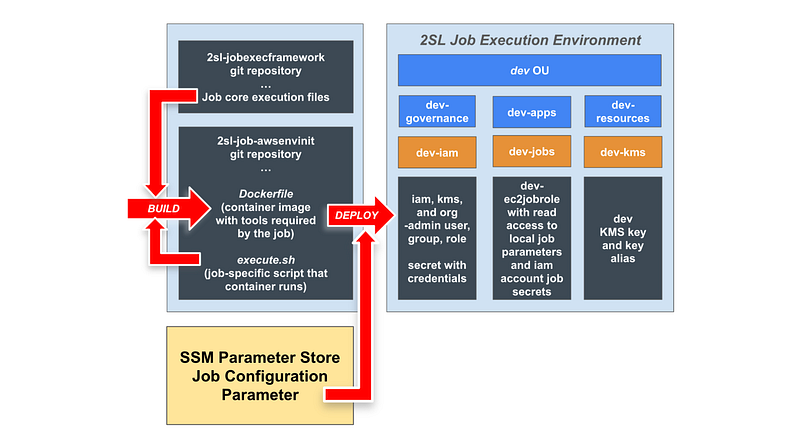
SSM Parameters for Job Configurations Revisited

I already explained how to use SSM parameters for a job configuration here.

There were a few things I didn’t like about that approach. One is that the job configuration was limited to a particular format if I parse it in run.sh.

Each batch job could potentially have a different configuration format in the SSM Parameter if I let the job handle parsing the configuration. one might use XML or JSON or Yaml, or something completely different, like I might do.

Blindly passing the value of whatever is in the parameter to the job might lead to injection attacks. Each job needs to validate the value of the parameter carefully. But I can eliminate the chance of that affecting the job execution framework itself if I avoid pulling in the parameter value into the run.sh file itself. That file is just going to pass along the parameter name to the job.

The job runs in a container. If our container is sufficiently locked down (which it is not yet!) then code hopefully can’t escape to the host running it which has a role that can access all our credential secrets. You could create multiple ec2jobexecution roles if you want to further limit that blast radius.

Although I want to get the code parsing parameters out of run.sh, I want to leverage reusable code for parsing parameters, because that might be used in different jobs. I’m going to add my parameter parsing code to a shared functions file in the job execution framework so I’m not repeating that in every job. I’m once again following the DRY principle and trying to limit code duplication.

SSM job configuration parameter name — recap

One thing I do want to do is limit the format of the job parameter name in the run.sh file.

Recall that I refined the job names here:

I went on to refine the naming conventions for parameters in this post so we can leverage the name in policies and getting a list of jobs a role can execute:

The format:

/job/[container image]/[job execution role]/[job name]

The job name defines the resource deployed in a format that matches the naming convention in the resulting CloudFormation stack:

[resource category]-[resource type]-[resource name]

That way it’s easy to find the parameters passed into a given stack, though you can also find those in CloudFormation. The thing an SSM Parameter might buy you is versioning to see how parameters changed over time.

Of course, it doesn’t help if you give everyone permission to delete versions.

Validating the job config parameter name

I can validate that the parameter name is a valid format and that the parameter exists in run.sh before passing it along.

  • Starts with /job/
  • Only four slashes (/) in the name
  • The values between the slashes should only have alphanumeric or dash characters

Here’s what I came up with and tested with a couple of values:
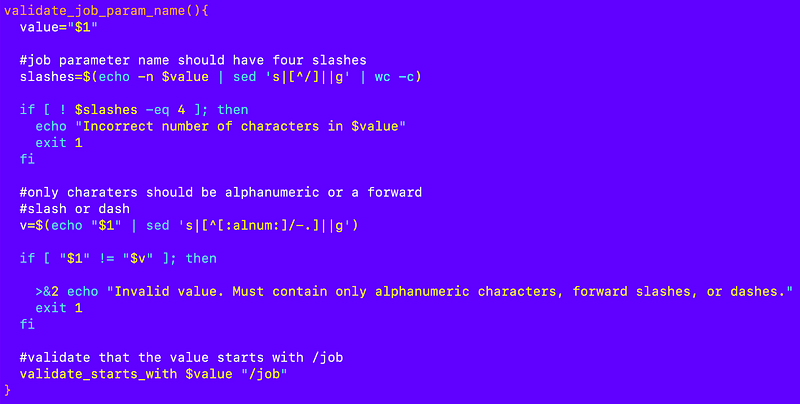
It’s probably not perfect but better than nothing at this point.

Now I can add that check to the run.sh file:
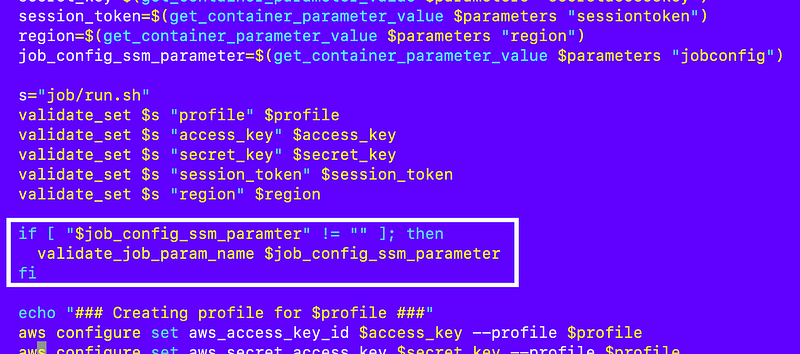
A job configuration parameter to deploy the dev OU

Let’s create a parameter for the first resource we need to deploy — the dev OU:
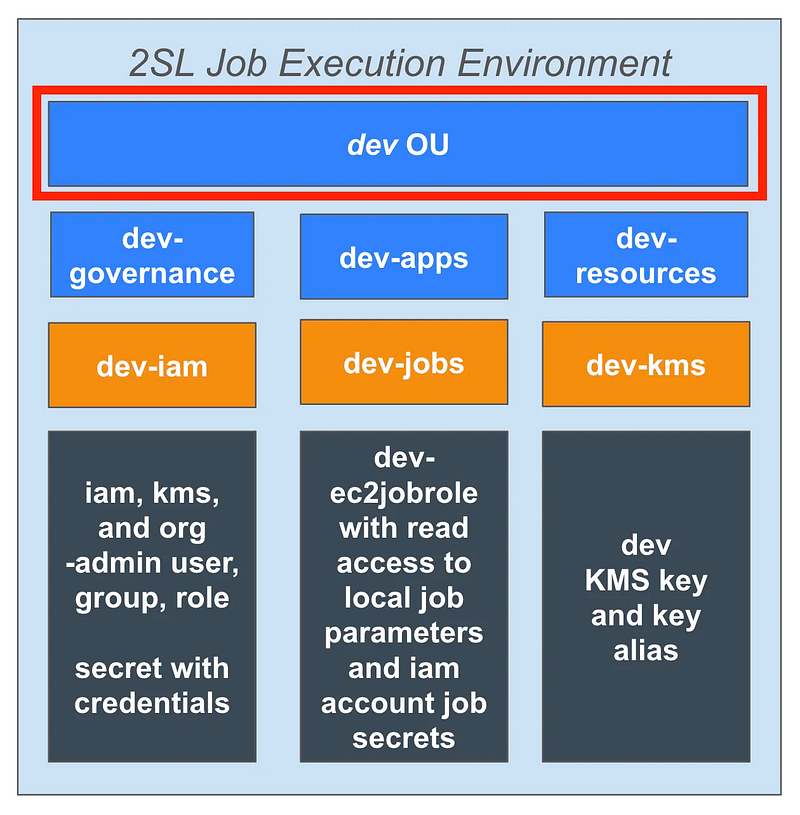
Here’s the parameter name based on the naming convention above and our hierarchy of AWS resources and categories:

/job/awsenvinit/root-admin/organizations-organizationalunit-dev

The resource hierarchy was explained here:

As described in the prior post on how I formulate the parameters, the value for my parameter would be:

env=dev
region=us-east-2

Recall that role, container image, category type, resource type, and resource name get parsed out of the parameter name.

The region is used by the CLI command and where the CloudFormation stack will end up, if not required for global resources.

The env value is the environment in which the resource will be deployed and is prepended to the name (or in this case it is the name).

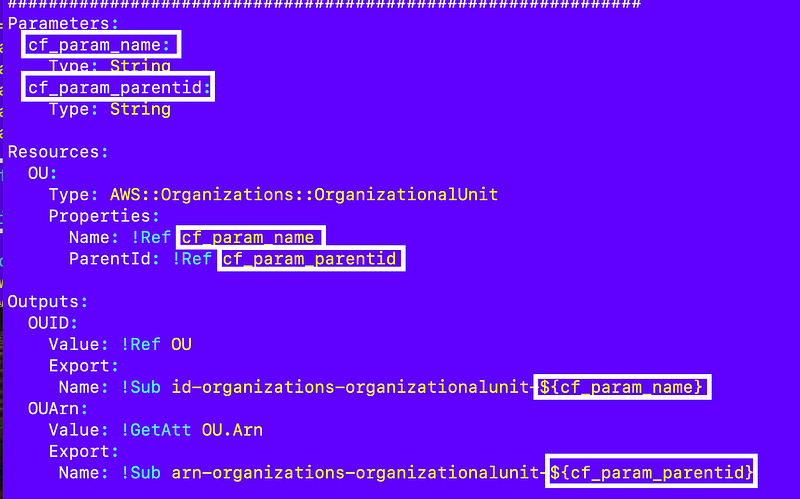
I also need to pass in CloudFormation parameters with a defined prefix so we can easily parse out those parameters and pass them to a CloudFormation template.

I can’t remember if I wrote about this already or not. I’m going to rename all my parameters to start with:

cf_param_

So my organizational unit template becomes:
OK. Except AWS naming inconsistencies strike again.

I can only use alphanumeric so I’m going to have to use this format:
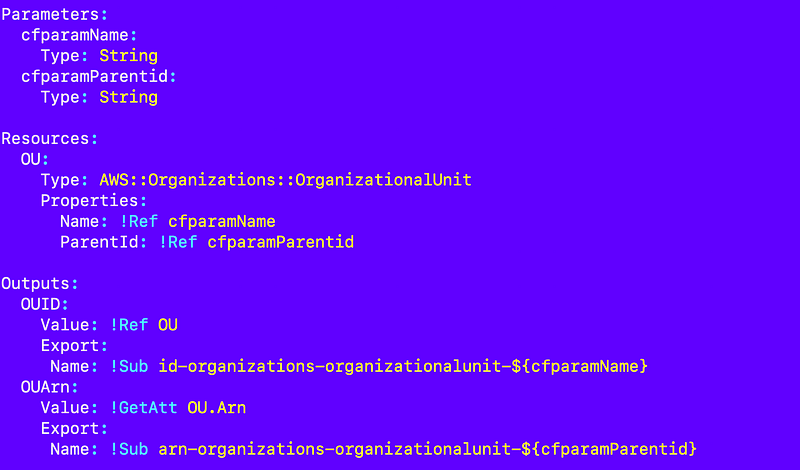
I’m going to pass in those parameters in my configuration like this:

env=dev
region=us-east-2
cfparamName=dev
cfparamParentid=[hold this thought...]

In fact we don’t need the name because it’s in our parameter name so:

env=dev
region=us-east-2
cfparamParentid=[hold this thought...]

Pretty much every resource is going to have a cfparamName parameter.

Eliminating repetitive code

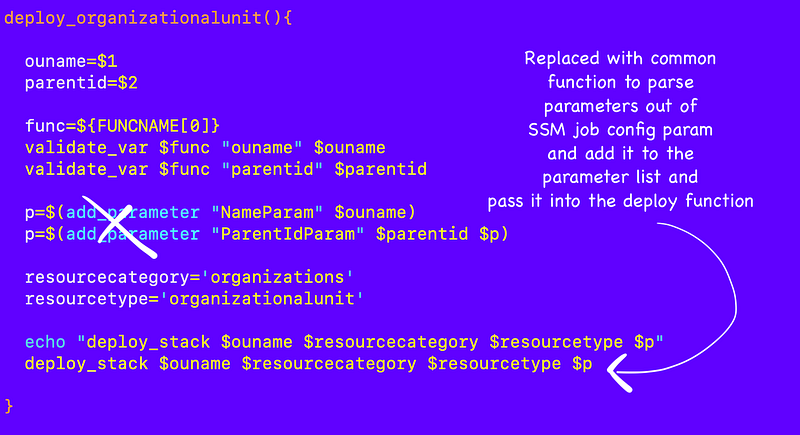
Now I can parse through all the parameters that start with that prefix and add them to the parameter list I’m creating over and over again in my deploy functions:
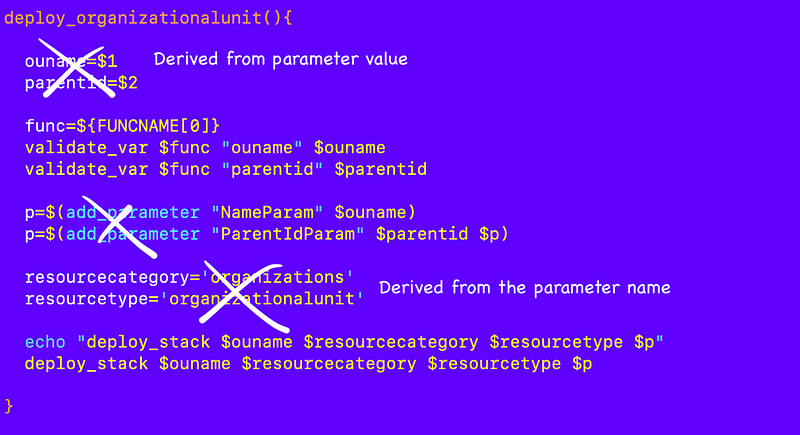
While we are at it, we can get rid of some hard coded values that are derived from the job config parameter name and value:
We can probably validate the values of our parameters in our common parameter parsing routine, or worse case it’s validated by CloudFormation:
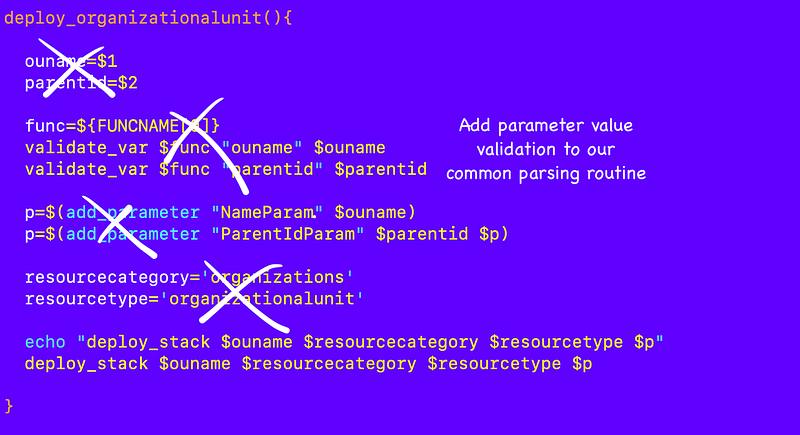
In fact, we can pretty much eliminate this function altogether and use a common function to deploy this resource.
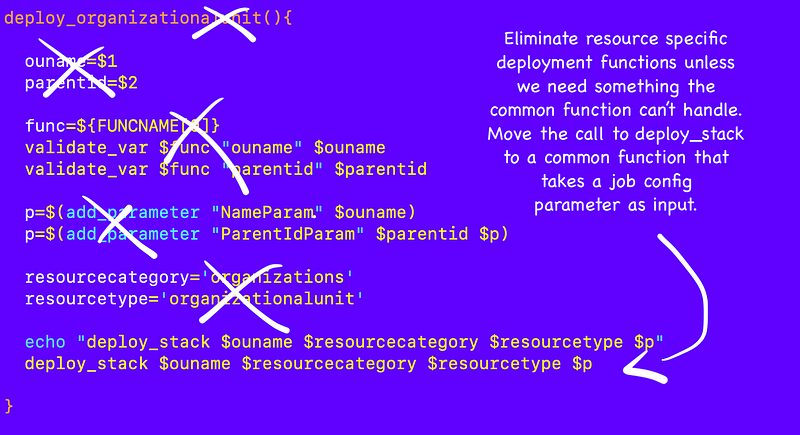
Almost. I need to deal with that parent ID value.

Dynamically retrieve ids based on type and name

What about that root ID for the OU parent?

In some cases we need to pass in IDs to CloudFormation templates. The IDs might be different in different environments while the names will be the same.

For example, if a bunch of people want to use this code in their AWS accounts they might leave the name of the OU the same (dev) but the underlying OU id after they create the OU will be different. Also their root id is not going to match my root id, so if I put my root id hard coded into my repository the code isn’t going to work for them.

Also, we might not want to expose the IDs. Although account IDs are not meant to be secrets according to AWS, knowledge of accounts does make certain things easier for attackers. I just saw someone posting some research about that on X. So we may not want to expose IDs in code either.

For this resource, we need to pass in a parent ID which is either going to be the organizational root ID or another organizational unit ID. I already have a function to look up an OU ID by name in my organization_functions.sh file:
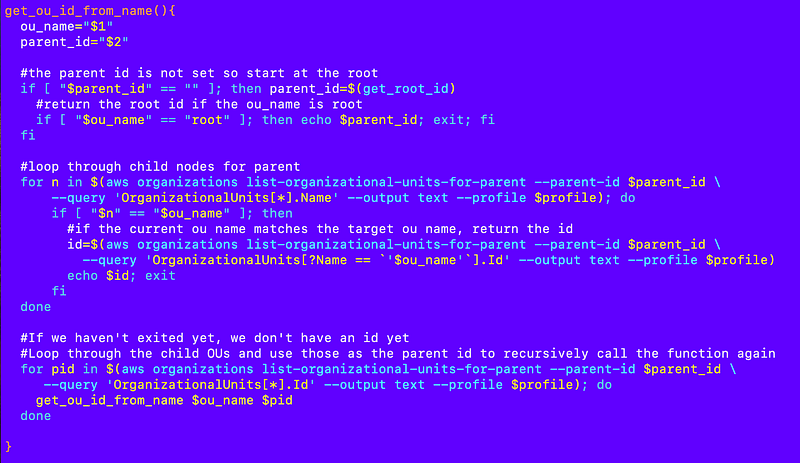
What if I include the related functions file in my generic function for any resource I’m deploying. Then I make it such that I can call any function in that file and pass in a value from my job config. That gives us a lot of flexibility to come up with the necessary values to complete the task at hand. So like this:

#THIS IS BAD CODE. DON'T DO THIS.

env=dev
region=us-east-2
cfparamParentid=$(get_id_from_name "root")

WARNING: The above has some serious security ramifications. We’d be passing executable code through and any matching function in any included file could be called if we add it to the configuration.

If I was penetration testing the above code, I’d try to pass in all sorts of bash scripts and try to call other functions to try to make this code do bad things.

I might create a parameter value like this to see if that would execute and I could get the password file and then crack other passwords on the system, for example:

#yikes!
env=dev
region=us-east-2
cfparamParentid=$(cat /etc/passwd)

Or since this is running on AWS I might try to pass in a curl command to see if I could get credentials from the AWS metadata service.

Well, that’s not good.

Here’s what I am going to do instead. We are only going to allow one specific function to be called for any resource: get_id.

I have already started renaming any functions that get an id based on a resource name to get_id in all my functions files for consistency. Any other function name will be rejected.

We may be able to take some additional validation steps to ensure the get_id function is only called for the specified type by adding the resource category and type.

So get_id is the only function that can be called here and I change the format so it is not passed in as an executable string but rather a static value parsed to determine the action to take:

env=dev
region=us-east-2
cfparamParentid=:get_id:organization:organizationalunit:root

With the above directive we know that because it starts with :get_id: we’re going to use the get_id function and we know from which file based on the category and type due to our naming convention, and the last value is the name. We can write a common function to use that information to include the correct functions file and return the specified value.

Here’s my function to process the id:
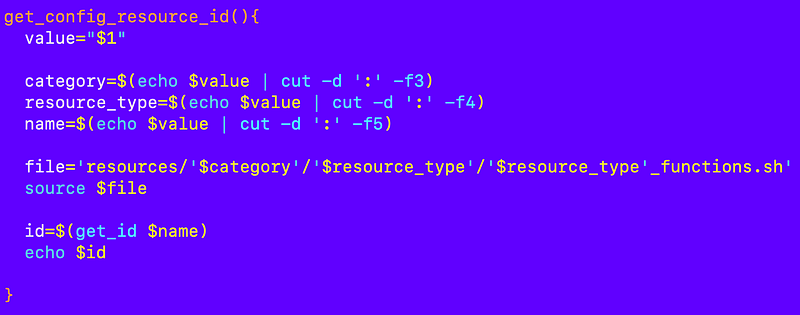
I ended up putting that in a new shared file because I ran into conflicts when I sourced the file from the functions file that the file I’m sourcing in turns sources. This creates a kind of circular dependency.

shared/parse_config.sh

I tested that by setting a CLI profile that had access to AWS organizations and calling the function like this at the bottom of the file:

I executed the file:

./shared/parse_config.sh 

That successfully gave me the root id of my organization. So now I can call that function and pass in a configuration value to get back an ID. Woot!

I removed the two test lines above.

Add the configuration to the job config repository

I added the configuration to my 2sl-jobconfig-awsdeploy repository.

Although this technically is not a configuration for the awsdeploy job I don’t want to create a whole repository for one file.

I made a note of this in the README of my job repository:

Back in the 2sl-jobconfig-awsdeploy repository…

I crafted this file path and navigated into the aws-root folder:

/job/awsenvinit/aws-root/

I edited the job config file:

vi organizations-organizationalunit-dev

Save it.

Deploy the job configuration into an AWS SSM Parameter

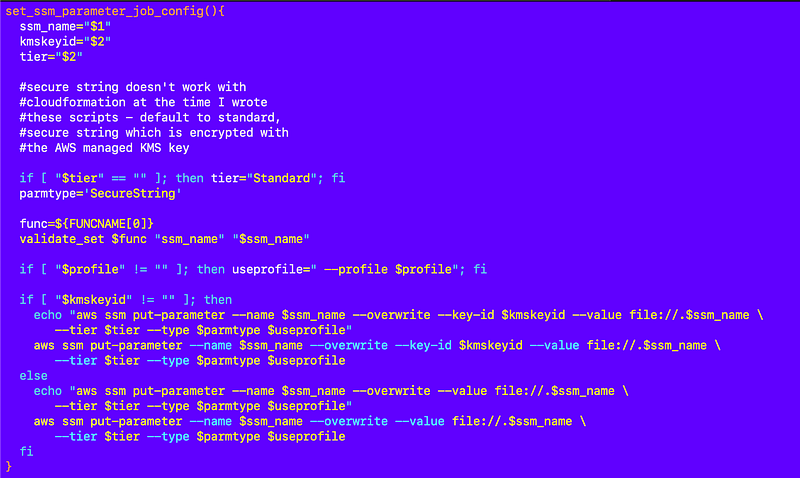
To deploy the job configuration parameter in our init script I made a couple of changes.

I put the function to deploy a job parameter into the job config repository:

In a file named:

job_parameter_functions.sh

I made the profile optional since we don’t have a profile in CloudShell.
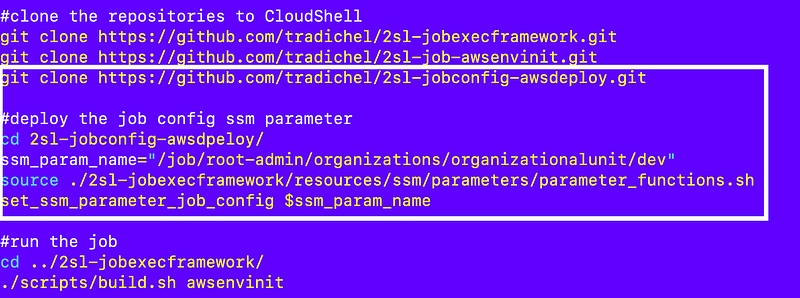
I clone the repository and deploy the parameter in my init.sh script and create the parameter with the code below:
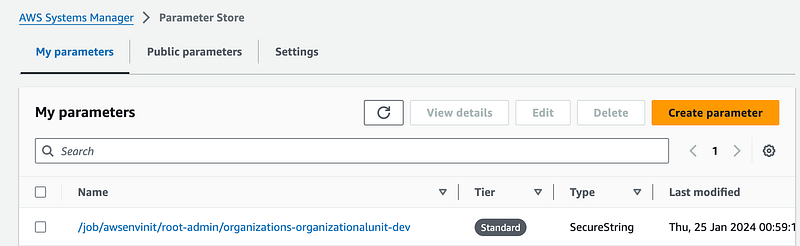
I verify the parameter is created with the correct name:
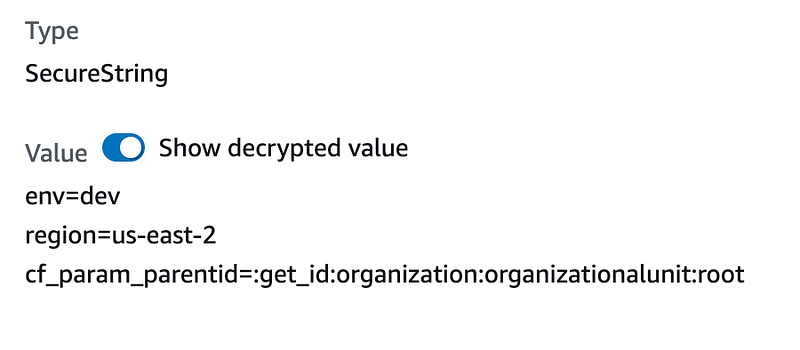
And has the correct value:
A generic function to deploy resources based on a job configuration

Now that we have a parameter we need a generic function that can parse the parameter and deploy our resource.

I’m also going to add this common function to shared/parse_config.sh.

Here’s what it is going to do:

* Receive the parameter name as an argument.
* Parse out the name, resource, and category from the parameter name.
* Read the value or the parameter.
* Parse each line
* If env then prepend name to env unless env is the name and set env value.
* If region then set the region var
* If the line contains a cfparam:
*** If value starts with :get_id: then resolve id.
*** Add parameter and value to the parameter list.
* Call the deploy stack function.

Here’s the generic function I ended up with:
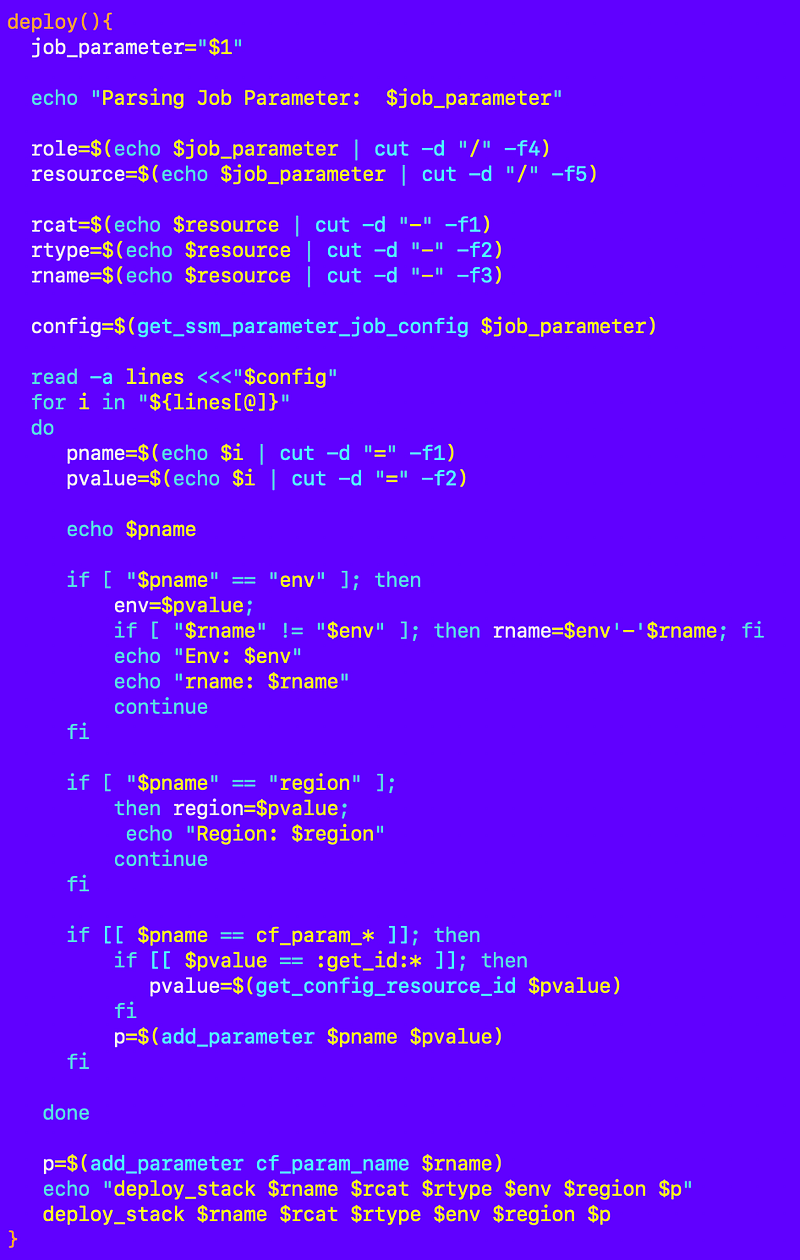
I did some testing but the deploy_stack function needs a profile which we don’t have in AWS CloudShell so I tested the remainer in the job container that obtains a profile before running the job.

Run the job

Now when the job runs it needs to pick up the parameter value. In future jobs I will pass the parameter in but this job has a specific use case and I’m just performing an initial test. Heads up, this is going to change but I need to make sure this use case works first.

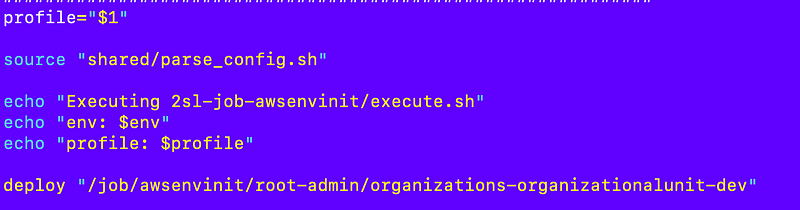
I source my new parse_config.sh file in the execute.sh file.

I’m add a call to the deploy function and pass in the parameter name.

deploy_config "/job/awsenvinit/root-admin/organizations-organizationalunit-dev"
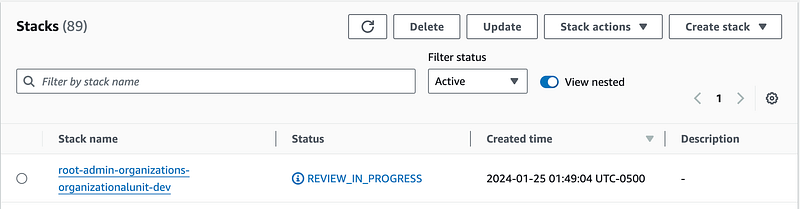
Check the CloudFormation stacks to make sure that worked.
What if I wanted to deploy another resource?

Well, I could add another parameter to SSM Parameter Store.

Then I could call the deploy command again.

That works but then I have a whole bunch of parameters. I will explore some other options in the next post that perhaps can limit the number of parameters we need to create.

I had to fix a few typos along the way but the latest code with any fixes should be in GitHub. As always if you hit an issue submit it in the GitHub repo. I’ll fix it when I can.

Follow for updates.

Teri Radichel | © 2nd Sight Lab 2024

About Teri Radichel:
~~~~~~~~~~~~~~~~~~~~
⭐️ Author: Cybersecurity Books
⭐️ Presentations: Presentations by Teri Radichel
⭐️ Recognition: SANS Award, AWS Security Hero, IANS Faculty
⭐️ Certifications: SANS ~ GSE 240
⭐️ Education: BA Business, Master of Software Engineering, Master of Infosec
⭐️ Company: Penetration Tests, Assessments, Phone Consulting ~ 2nd Sight Lab
Need Help With Cybersecurity, Cloud, or Application Security?
~~~~~~~~~~~~~~~~~~~~~~~~~~~~~~~~~~~~~~~~~~~~~~~~~~~~~~~~~~~~~
🔒 Request a penetration test or security assessment
🔒 Schedule a consulting call
🔒 Cybersecurity Speaker for Presentation
Follow for more stories like this:
~~~~~~~~~~~~~~~~~~~~~~~~~~~~~~~~~~~~~~~~~~~~~~~~~~~~~~~~~~~~~ 
❤️ Sign Up my Medium Email List
❤️ Twitter: @teriradichel
❤️ LinkedIn: https://www.linkedin.com/in/teriradichel
❤️ Mastodon: @teriradichel@infosec.exchange
❤️ Facebook: 2nd Sight Lab
❤️ YouTube: @2ndsightlab

AWS
Cloudformation
Batch Job
Automation
Security
Recommended from ReadMedium
