
Using an SSM Parameter to Pass Parameters To A Container
ACM.429 Abstracting out variations to prevent hardcoded values in the code in a deployment container
~~~~~~~~~~~~~~~~~~~~~~~~~~~~~~~~~~~~~~~~~~~~~~~~~~~~~~~~~~~
⚙️ Part of my series on Automating Cybersecurity Metrics. The Code.
🔒 Related Stories: AWS Security | Application Security | Abstraction
💻 Free Content on Jobs in Cybersecurity | ✉️ Sign up for the Email List
~~~~~~~~~~~~~~~~~~~~~~~~~~~~~~~~~~~~~~~~~~~~~~~~~~~~~~~~~~~
In the last post I migrated code to deploy a delegated administrator over to our new container deployment method.
One of the things I had to modify in the code to look up the account ID of the account we want to use as our delegated administrator account like this:
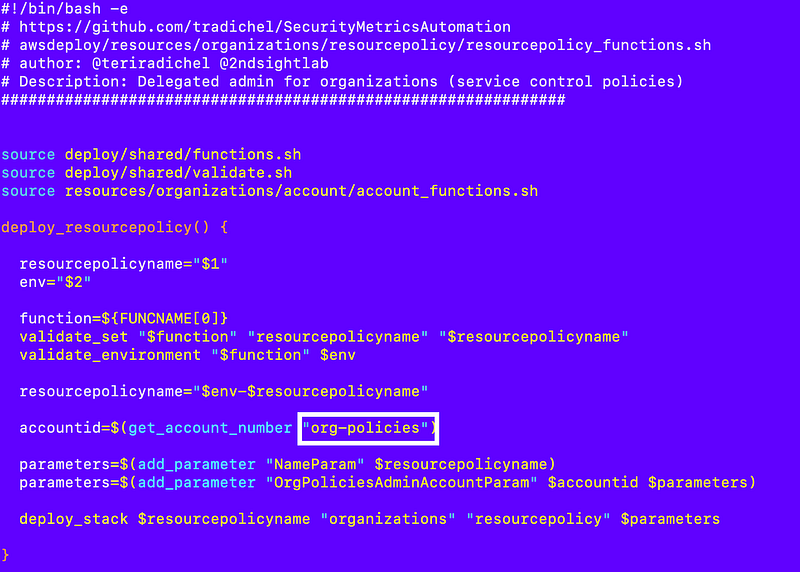
But what if an organization wants to use another account name besides org-policies as the account for their organizations delegated administrator?
This code is not very flexible.
It also doesn’t allow me to fully automate my code created by my code generator. I’ve been thinking about how I want to implement this next piece for a while and it may take some trial and error over the next few blog posts. Let’s see how it goes.
Limiting manual inputs to avoid incidents
I want to avoid passing parameters in on the command line to the container. That’s a source of fat-fingering errors that have proven to create disasters over time like an AWS S3 outage, for example.
So I want to get to the point where I’m manually typing as little as possible once the code is fully deployed.
When I’m testing and developing, I’m typing a lot — and deleting a lot! Less is more when it comes to code.
So how can we solve this problem ?
Existing code and iterations of parameters passed to a container
Here’s what we have now.
I showed how to pass credentials into a container:
I showed how to pass a parameter list into the container:
I added names to the parameter list here:

I have a function that can get a parameter from that list:
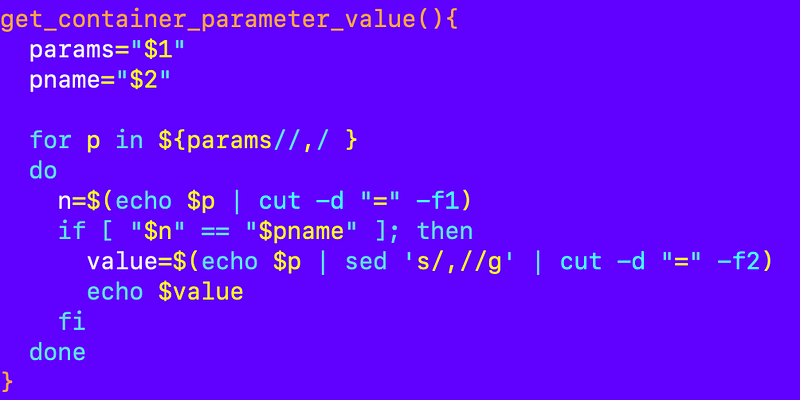
Passing parameters from AWS SSM Parameter Store
I’ve been wanting to test out using AWS SSM Parameter Store instead of passing in parameters on the command line. This is something I’ve done before for deployment scripts so I can configure something in a parameter once and reuse it over and over again while testing a deployment. I want to make my approach a bit more standardized and consistent in this post.
Basically, this is what I want to do:
- If a script requires parameters, create an SSM Parameter that matches the job name (script file less .sh at the end).
- Put that parameter list string above into the parameter instead of passing it to the container on the command line.
- The container run.sh script will check if a parameter exists for the script that is getting executed in the account where the execution starts.
- If the parameter exists, retrieve the string.
- Pass the parameters into the script (rather than from a command line)
I have additional ideas about code generation but I’ll save those for later.
Injection warning
As a side note this is a solution ripe for code injection security problems. If anyone can change the SSM parameter they might be able to insert executable code that gets injected into the deployment script and does something undesirable. In my case it’s just me messing around with my own code. In a larger organization, proper permissions and validation of all changes should be in place to prevent unwanted changes.
If you don’t know what I mean by injection, I explained that here:
In the long run we’ll want a lot of validation to ensure unwanted values cannot be passed into our deployment routines. I have some of that here but needs to be taken a lot further.
/deploy/shared/validate.shFor now I’m performing a simple test but validation of all values passed in code should exist if you use this in any form in a production environment.
Abstraction
Just a note that I’m using the principle of abstraction I wrote about in other posts:
Secrets and Credentials
Not that I am not storing secrets or credentials in parameter store for reasons explained in prior posts.
Parameter Data Structure
Ok let’s start with a simple test. I’m going to manually create an SSM parameter and add some parameters to it. There are a lot of ways to configure parameters like JSON or YAML or something like that. I’m just going to use a simple option for now.
I’m going to initially just keep the parameter list exactly as it is now and put it in the SSM Parameter.
param1=value1,param2=value2That way I can retrieve the value and have very little edits to make to my existing code. The parameter list is the same, it’s just coming from a different source.
Parameter Naming Convention
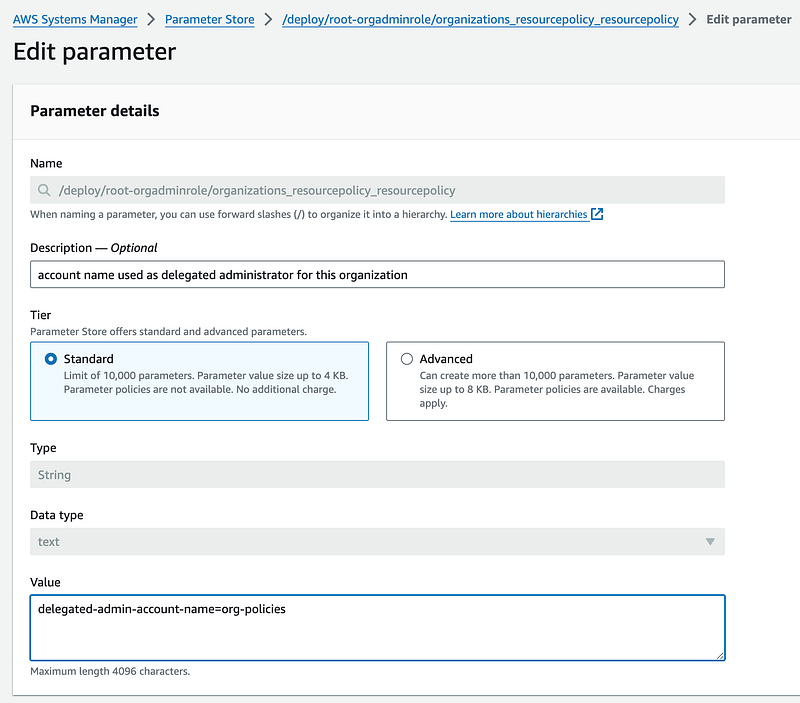
For our initial use case I’m going to manually create a parameter in the management account with the same name as the script we just created in the last post (less the .sh) which was:
/deploy/root-orgadminrole/organizations_resourcepolicy_resourcepolicyInitial Test Value
For our initial test, I’m going to create this value in my test parameter:
delegated-admin-account-name=org-policiesEncryption
I’m thinking about encryption but for this initial test I am not going to implement it. There’s a catch 22 about creating the KMS key for our very first deployment in a new account that I need to think about.
Parameter Name Must Be a Fully Qualified Name
Now here’s the weird thing. I try to save that and I get this error.

Basically if your parameter name has a / in it then it has to start with a /. Why? I think it has something to do with granting permissions based on paths which may come in handy later. After all, our scripts are created in a hierarchy based on who is allowed to run them.
Initial SSM Parameter
Here’s the SSM Parameter for this test:
Retrieving the parameter in our container run script
Recall that our container runs the job/run.sh script when it starts and currently that reads parameters from the command line passed into the container.
The parameters are retrieved from the last argument passed into the run script. The parameters are a list of comma separated values in an array.
The script to run is calculated at the end. We can use that to get our parameter name.
Then the parameters are passed into the script as the last argument.
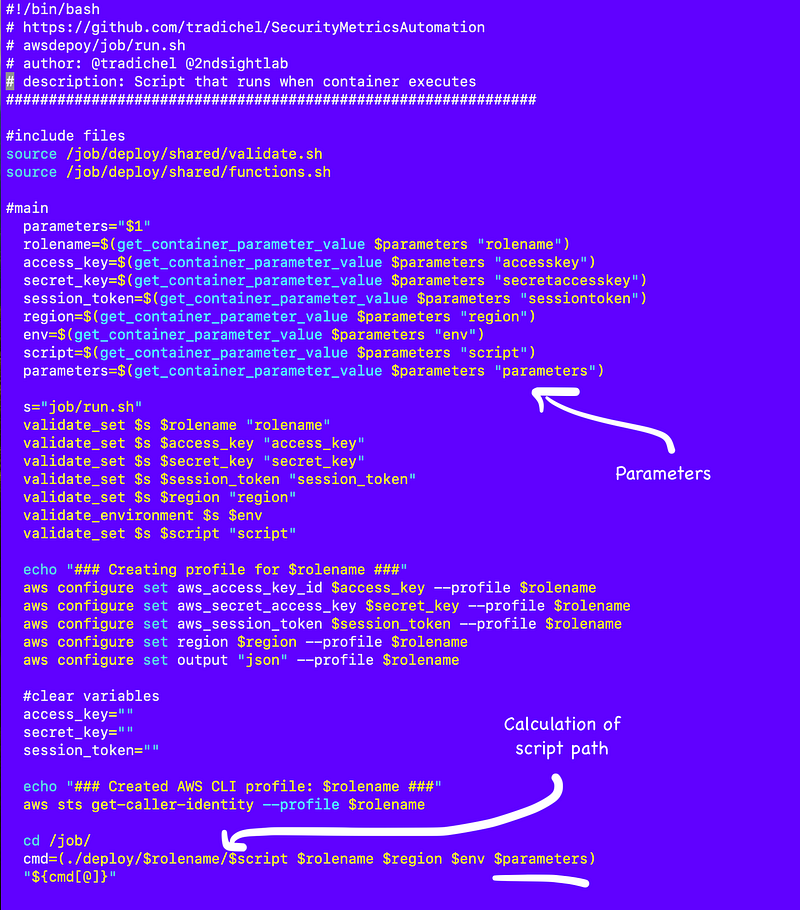
Let’s adjust the code to retrieve the SSM parameter using the role configured in the above code.
I have two functions for retrieving parameters by name in this file which I’ll need to source in my script:
awsdeploy/resources/ssm/parameter/parameter_functions.sh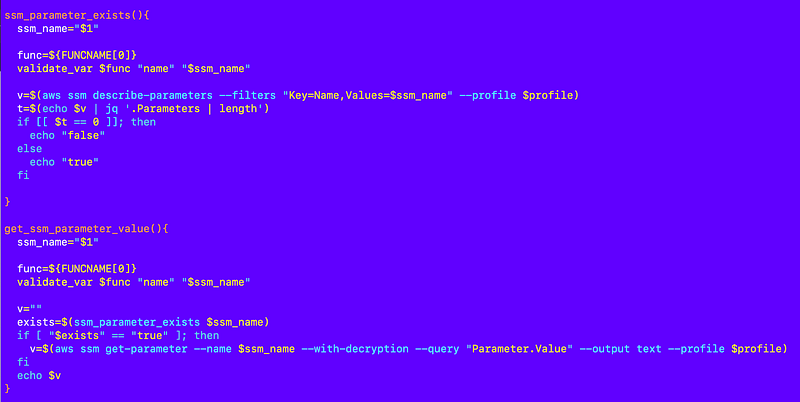
Here are the modifications to retrieve the parameter store and override anything passed in on the command line.
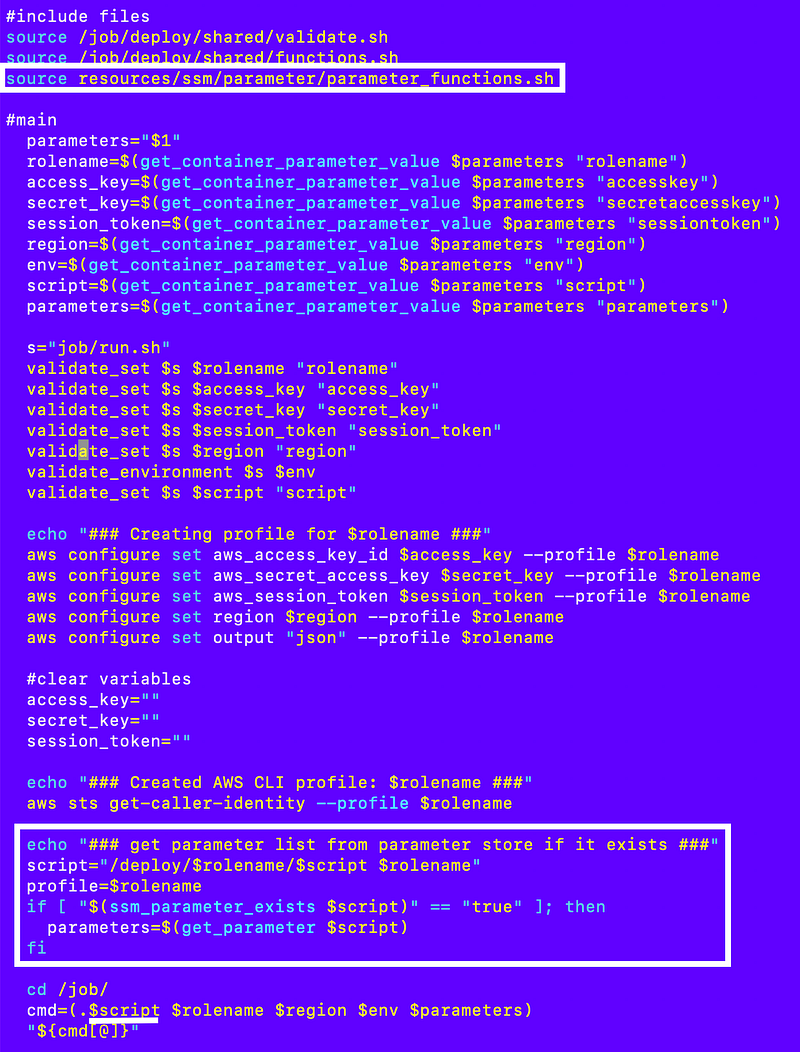
Now I can get the value of the account name to use as the delegated administrator in my deployment script and retrieve the value as per usual with my existing function I showed you above. Then I can pass it into the functions file.
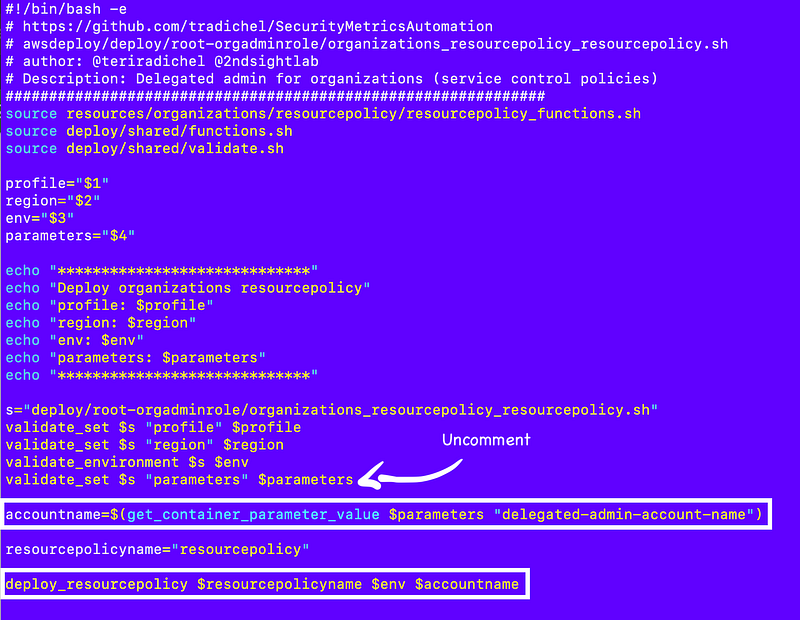
In the functions file I can use that value instead of the hardcoded account name:
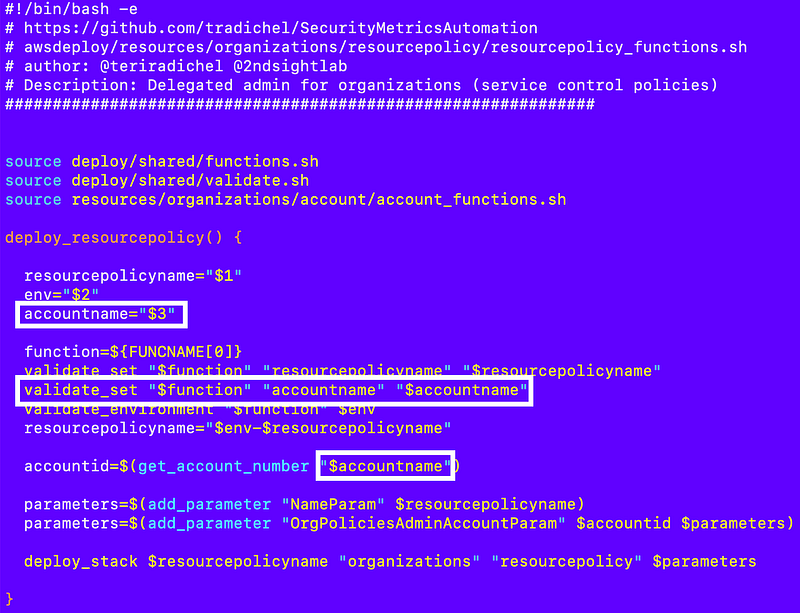
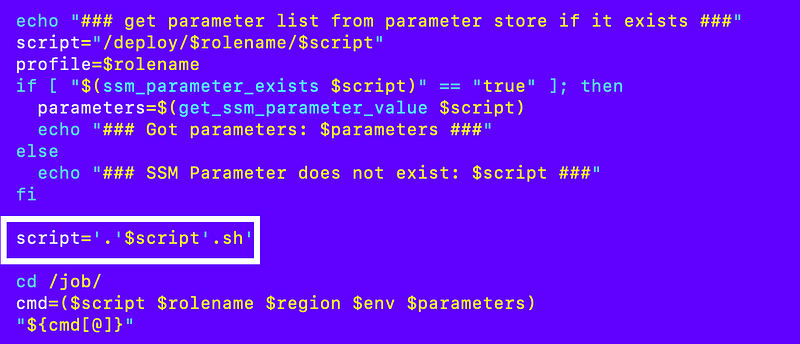
I had to make one other change to remove .sh from the script passed into the job/run.sh file and I add it in the job/run file instead:
Run that to validate the code still works. When I do that I can see that the parameter value is correctly retrieved from parameter store, the parameters are passes and values are retrieved with existing code as per usual, and that there is no change to my stack:
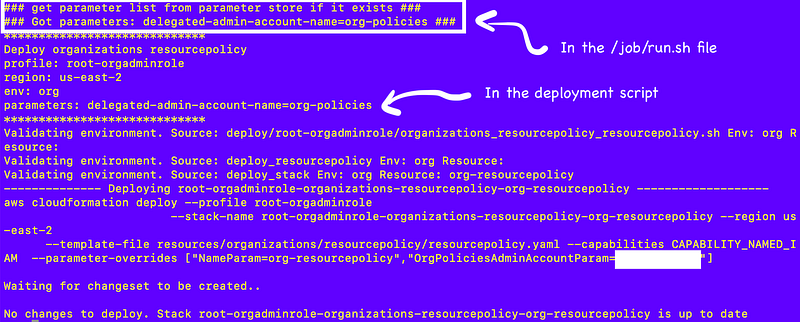
No more hardcoded value — no need to change the code
Now let’s say someone is using my code and they want to name their account something other than org-policies. No problem. Change the account name in the SSM parameter without altering the code.
Next up — I need to think about automatically generating the SSM parameter rather than manually creating it.
Update: I really streamlined this a few posts down the line. It is pretty slick.
Next post:
Follow for updates.
Teri Radichel | © 2nd Sight Lab 2024
About Teri Radichel:
~~~~~~~~~~~~~~~~~~~~
⭐️ Author: Cybersecurity Books
⭐️ Presentations: Presentations by Teri Radichel
⭐️ Recognition: SANS Award, AWS Security Hero, IANS Faculty
⭐️ Certifications: SANS ~ GSE 240
⭐️ Education: BA Business, Master of Software Engineering, Master of Infosec
⭐️ Company: Penetration Tests, Assessments, Phone Consulting ~ 2nd Sight Lab
Need Help With Cybersecurity, Cloud, or Application Security?
~~~~~~~~~~~~~~~~~~~~~~~~~~~~~~~~~~~~~~~~~~~~~~~~~~~~~~~~~~~~~
🔒 Request a penetration test or security assessment
🔒 Schedule a consulting call
🔒 Cybersecurity Speaker for PresentationFollow for more stories like this:
~~~~~~~~~~~~~~~~~~~~~~~~~~~~~~~~~~~~~~~~~~~~~~~~~~~~~~~~~~~~~
❤️ Sign Up my Medium Email List
❤️ Twitter: @teriradichel
❤️ LinkedIn: https://www.linkedin.com/in/teriradichel
❤️ Mastodon: @teriradichel@infosec.exchange
❤️ Facebook: 2nd Sight Lab
❤️ YouTube: @2ndsightlab