
The Importance of Parameter Management in Cybersecurity and Application Security
ACM.430 Architecting a secure parameter management system
~~~~~~~~~~~~~~~~~~~~~~~~~~~~~~~~~~~~~~~~~~~~~~~~~~~~~~~~~~~
⚙️ Part of my series on Automating Cybersecurity Metrics. The Code.
🔒 Related Stories: AWS Security | Application Security | Abstraction
💻 Free Content on Jobs in Cybersecurity | ✉️ Sign up for the Email List
~~~~~~~~~~~~~~~~~~~~~~~~~~~~~~~~~~~~~~~~~~~~~~~~~~~~~~~~~~~
In the last post I altered my code to use parameters from AWS SSM Parameter store if a parameter matching the script name exists:
I manually added the parameter to AWS SSM Parameter in that post. In this post, I want to think through the architecture and requirements for automating parameter deployment.
A value-based approach to security
This post hearkens all the way back to a post I wrote at the very beginning of this series on value-based security.
You can take a predictive approach to security to try to anticipate when you are going to have security problems and the amount of risk that exists in an organization using fancy Monte Carlo simulations and take your chances.
Alternatively, you can track and monitor your configurations for unwanted changes and build a secure deployment model that is both flexible for developers and QA professionals, while at the same time strict in production environments where your most sensitive assets exist.
I’ve seen SalesForce using the concept from one of my prior posts in its ads recently. Maybe they read my blog or my book at the bottom of this post. 😁
Your configurations are what protect your assets. Configure things appropriately and you have effectively limited your risk. Otherwise, you’re really just guessing and betting. If you can’t manage your configurations, then you can only take the latter approach and monitor for unwanted activity after the fact.
In reality, organizations need to do both, because no matter how closely you monitor your deployments, something may sneak in. There is no such thing as perfect security or zero risk. But how easy are you making it for someone to inadvertently or maliciously insert an insecure configuration into your environment?
Creating a new parameter
Adding the parameter to SSM Parameter Store is simple.
I already have a function to create a parameter and set the value:
resources/ssm/parameter/parameter_functions.shRecall why I’m not using CloudFormation:
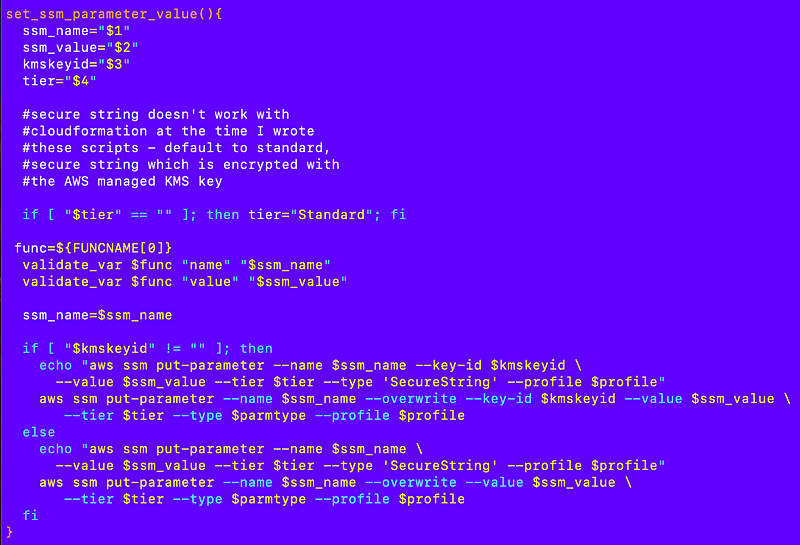
The complexity lies in the overall architecture for parameter management.
Architecting Configuration Parameter Management Across an Organization, Accounts, and Environments
Here’s what I’ve been noodling over for a while.
Consider the script I’ve been deploying. Let’s say someone can live with the default parameters. I can simply hardcode a parameter file inside the script and when the organization gets deployed, it deploys the default parameter in SSM if it doesn’t exist and runs the script.
But potential problems arise from that solution — problems which can lead to security incidents and vulnerabilities in your deployment processes if you don’t think through them carefully.
Likely, someone is going to need to change the value in SSM Parameter Store because your account has a different name, in this case. You also have people who are testing deployment of the same resource in different environments. It’s the same resource but with different values matching the particular environment where someone is deploying it.
If you are not careful about how you handle those variations, you might not actually be testing what you think you are testing and what ends up in production could be highly suspect. Below I think through some of the considerations and requirements for my parameter management solution.
A problem with my existing container
There’s a problem with my existing code. I’m hardcoding deployment specific values into the scripts run by different administrators into a container that is meant to be used generically for deployments. That’s not going to work very well in the long run and I’m trying to sort that out in my mind at the moment.
The container is meant to be somewhat opinionated, meaning there are some rules for what you can and cannot deploy. That’s the whole point of governance. But at the same time, I want to reduce the amount of code that needs to be written and allow people to change the values they need to change for flexible and simple deployments — without changing the code in the container.
The way I’m doing it right now, every time I want to add a new AWS account I have to modify the scripts inside the container. I want to be able to change the account list in an SSM parameter and have that get used by the container to deploy the accounts.
At the same time I need to track the configurations that exist and I’d like to do that in source control. If I track the changes in source control, how will that code get into the container? Or how will the SSM parameters get deployed since their values cannot be hard coded inside the container?
Let’s think through some of the requirements for this solution and why they matter for security.
Cryptographic validation of executable code
The cryptographic signature or integrity check of the code deployed in the container should match in any environment where it is used.
For example, if the container is used to deploy a website in development, the cryptographic signature of that container should match the container used to deploy that website in production.
I haven’t gotten into this yet but if you run this command you can get back digests for a container images:
docker image ls — digestsAs you can see I don’t have a digest for my images yet:

But if I scroll down to the image provided by AWS, it has a digest and I can check to see that digest matches what it is supposed to match to ensure the code hasn’t been altered:

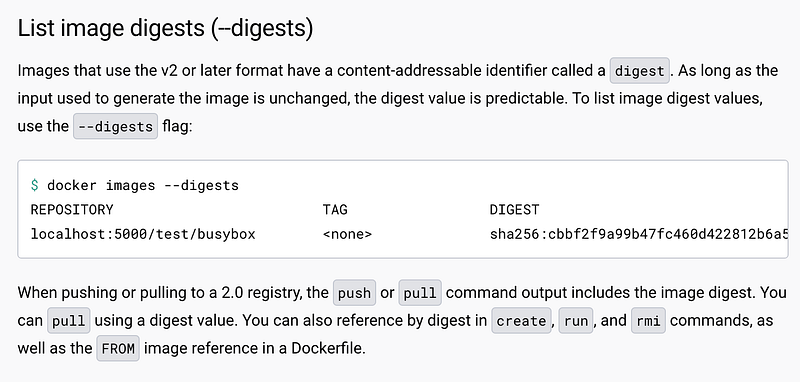
You can also use Docker Trust to sign images:
Only the parameters should change, not any of the executable code in the deployment container, as the deployment of the resource gets repeated in QA, Staging, Production, or different AWS accounts.
The parameters should not alter the execution of the code. They should be static values only.
The code should validate the parameter value types at the time of deployment.
These are important aspects of preventing supply chain attacks.
Requirement: Changing parameters does not require changing the code or how it executes.
Requirement: Parameters are static with proper type checking, not executable code or values that alter how the code executes.
Requirements: Once a container is pushed from a development environment to a test environment, the digest should never change.
Manual edits makes security harder
Let’s say someone wants to change the account used for the AWS organizations delegated administrator. They change the SSM Parameter value and re-run the script. How do you know they made that change? Who is monitoring it? Who has access to do it? Who is testing it? What if they made a mistake and accidentally typed the wrong account name (or intentionally?)
Overriding parameters manually in SSM Parameter Store makes version control, governance, and security monitoring harder. It may be fine in a development environment or QA when people are testing changes to the code and figuring out how to develop, test, break and fix things. But once the code moves to production, the deployment of parameters is hopefully following a proper software development life cycle (SDLC) process.
Sure, parameter store has versioning and hopefully you have record of the change in CloudTrail (verify that) and maybe you wrote some custom code to send an alert if that change was made. But if that change has to go through a standard, well-architected software development life cycle, hopefully inadvertent mistakes get discovered prior to deployment or quickly after deployment. Also, you have a consistent way to track the versions of all the “things” you are trying to secure in the cloud if you keep those configurations in one place — your source control system.
Although I could try to figure out how to deal with all those parameter changes in some other way, I’d rather just have changes to them deployed from source control. Then I can easily run a diff between source control and my parameters to see if anything is misaligned, and from my parameters to CloudFormation potentially and from CloudFormation to what is actually deployed (with some limitations) using CloudFormation drift detection.
Requirement: Store parameters and parameter values in source control.
Requirement: Test parameter changes prior to pushing to a production environment, with very limited exceptions approved by security and monitored closely for changes.
Requirement: Ability to trace the value of a parameter from source control through to the resource where it was deployed to make sure what is deployed matches what is in source control.
Multiple execution of the same code to deploy different resources
My test script was pretty basic. I simply run it once for one account and then done. My method for hardcoding a value into the parameter works fine because there’s only ever one value.
But what if we want to run a script multiple times? Let’s say I have code that deploys a TLS certificate for a web site? I might want to use the same code over and over, but pass in different parameters because each website has a different domain name.
If I take the approach of creating a new script for every new resource, then my code has to change for every new resource and that’s not really what I want, so I have to change something about how my deployments work right now to 1.) Reduce the amount of code I need to write and 2.) Support multiple resources deployed by the same code with different parameters.
This requirement aligns with the principle of abstraction in security (as I define it which is not the same as how some others define it):
Requirement: Abstract the parameters out of the code so we can use the same code to deploy multiple resources where only the parameters vary.
Avoid unnecessary duplication of parameter values
Parameters cannot be shared in a cross account manner, but as I’ve already shown in my scripts I can switch roles to get access to different accounts using my framework. I could store parameters in one account as the “source of truth” and other accounts could access those parameters in a read only manner to use them in scripts.
For example, if I have an organization name and that needs to be used in scripts in different accounts, I don’t want to have to copy that name to every account. So I need some kind of mechanism that allows referencing parameters from other accounts where the parameter lives in a single place for a single value when necessary.
Think of the concept as global variables in an application. You declare some variables one time and then you use them throughout your application. I need to allow for this construct somehow in my parameter architecture.
The other key point here is that if I have to change the name of my organization for some reason, I need to be able to change it in one place and then redeploy all the resources that depend on it. I don’t want to have to redeploy that value everywhere.
So for each parameter there should be one “source of truth” parameter for each individual value.
Requirement: Ability to define a parameter value one time if it is the same value used in many scripts and reference that value in other SSM Parameters.
There are cases where you do not want to eliminate duplication. I used the example of an order on an e-commerce website in a past post. You duplicate the price the person paid on the order because if someone changes the price later, the order will not accurately show the price the person paid. That’s why you need to duplicate some information.
But you would not have the pricing duplicated in your database for the page that shows the product grid and the individual product page. That could lead to errors where someone forgets to update the price in both cases.
This comes down to accurate analysis of the data you need to store and the purpose of that data. In our case, I deploy using CloudFormation and CloudFormation tracks the parameter used at the time of deployment. If you only use CloudFormation and no manual changes are allowed, then you can always look at the CloudFormation parameters to see what was deployed with what parameter values, even if your new deployments are using different parameters stored in your source control system.
Think these things through carefully so you can trace back changes in the event of a security incident, and detect changes quickly if one is in progress or someone has made a mistake.
Parameter Hierarchy
It could be that there’s an application that needs to be deployed in multiple environments and only a few of the values change in each environment. I would like to define all the parameters that never change one time and override only the necessary parameters while testing. For example, there are many values involved in deploying a website but perhaps I only need to change the name of the domain in the configuration in each environment.
Requirement: Ability to implement a hierarchy of parameters where some parameters never change but others might in different environments for a particular resource
This is really supported by the fact that the base parameters are stored in source control and someone can manually override those parameters when testing in a development environment, for example. What you don’t want is to have your developers check in their test changes to your production configuration and have that accidentally make its way to a production deployment.
Requirement: The hierarchy implementation needs to prevent deployments of values for one environment to another that should have different values.
Dynamic Parameters
I might have some parameters that can be derived dynamically. For example, I’ve used AWS Pseudo Parameters in CloudFormation templates that can dynamically pick up the value of the account ID for the current account. I will likely need the same concept when deploying resources to multiple accounts. Perhaps I need to use the account name for the current account to deploy something and I should simply be able to specify a parameter that represents the account name and the code knows how to retrieve that to pass into my script. That way someone doesn’t fat-finger the account number in the configuration.
I also absolutely want to prevent the ability for someone to specify a production account in a non-production environment to get access to resources. However, your encryption, IAM, and networking controls should also be preventing that access. Use the big three to protect against misconfigurations.
Requirement: Support the use of dynamic values for any values related to the environment where the resource is being deployed. Those parameters are read from the environment, not a hardcoded value.
Different people are allowed to change different values
Different people have access to change different parameters. A developer should only be allowed to change the parameters that particular developer is authorized to work on. QA engineers should only be changing the parameters for their particular instance of an application they are testing. The overall organization parameters should only be changed on rare occasions by a select few individuals.
That means we can’t just store all our parameter values in one big list in a single code commit repository. There may be some mechanism for storing parameters for different environments in different repositories, for example.
Requirement: Ability to limit who can change parameters based on job role in source control and AWS SSM Parameter store.
Summarized Requirements List
Here’s a list of the requirements I came up with (so far):
- Changing parameters does not require changing the code or how it executes.
- Parameters are static with proper type checking, not executable code or values that alter how the code executes.
- Once a container is pushed from a development environment to a test environment, the digest should never change.
- Store parameters and parameter values in source control.
- Test parameter changes prior to pushing to a production environment, with very limited exceptions approved by security and monitored closely for changes.
- Ability to trace the value of a parameter from source control through to the resource where it was deployed to make sure what is deployed matches what is in source control.
- Abstract the parameters out of the code so we can use the same code to deploy multiple resources where only the parameters vary.
- Ability to define a parameter value one time if it is the same value used in many scripts and reference that value in other SSM Parameters.
- Ability to implement a hierarchy of parameters where some parameters never change but others might in different environments for a particular resource
- The hierarchy implementation needs to prevent deployments of values for one environment to another that should have different values.
- Support the use of dynamic values for any values related to the environment where the resource is being deployed. Those parameters are read from the environment, not a hardcoded value.
- Ability to limit who can change parameters based on job role in source control and AWS SSM Parameter store.
Challenges:
How does someone maintain a list of the configuration values in source control and deploy those parameters to parameter store without an existing parameter? That whole circular problem appears once again.
Is there some external process that deploys the parameters to parameter store separate from the container?
What is the change process for parameters? If someone tests a parameter change manually in a development environment, decides it works, and then wants to check in that change and test it again, how do they get the change into source control and then into the parameter?
Opportunities:
If I limit my deployments to things configured with a parameter, I can dynamically generate the list of jobs a user can run, instead of hard coding those user jobs files.
I can reduce the number of scripts in my deploy directory for each role. For example, the KMS Admins may have two scripts:
- Deploy a KMS Key
- Deploy a KMS Alias
Then they have a GitHub repository with all the parameters that define all the keys and aliases they can deploy.
Once I get to the above state, any developer could submit a new key configuration and the KMS admins could simply approve it.
When deploying complex environments or applications, it might not be so simple, but that is the goal I had in mind in the long run — something that makes it easier to deploy and approve new complex configurations using approved templates and configurations.
Well, that’s what I’m thinking about and now to figure out how to do it. I started in this next post and refined to a pretty slim amount of code down the road.
Follow for updates.
Teri Radichel | © 2nd Sight Lab 2024
About Teri Radichel:
~~~~~~~~~~~~~~~~~~~~
⭐️ Author: Cybersecurity Books
⭐️ Presentations: Presentations by Teri Radichel
⭐️ Recognition: SANS Award, AWS Security Hero, IANS Faculty
⭐️ Certifications: SANS ~ GSE 240
⭐️ Education: BA Business, Master of Software Engineering, Master of Infosec
⭐️ Company: Penetration Tests, Assessments, Phone Consulting ~ 2nd Sight Lab
Need Help With Cybersecurity, Cloud, or Application Security?
~~~~~~~~~~~~~~~~~~~~~~~~~~~~~~~~~~~~~~~~~~~~~~~~~~~~~~~~~~~~~
🔒 Request a penetration test or security assessment
🔒 Schedule a consulting call
🔒 Cybersecurity Speaker for PresentationFollow for more stories like this:
~~~~~~~~~~~~~~~~~~~~~~~~~~~~~~~~~~~~~~~~~~~~~~~~~~~~~~~~~~~~~
❤️ Sign Up my Medium Email List
❤️ Twitter: @teriradichel
❤️ LinkedIn: https://www.linkedin.com/in/teriradichel
❤️ Mastodon: @teriradichel@infosec.exchange
❤️ Facebook: 2nd Sight Lab
❤️ YouTube: @2ndsightlab