
A Better Process to Move Embedded AMD modules from the HTML/CSHTML files to Webpack Bundles

Introduction
The legacy code may contain AMD modules in HTML/cshtml files. The require function can’t be found when using Webpack instead of Require.js. Regarding the scope of require and define only exists in .js files, we have to split embedded modules to independent .js files.
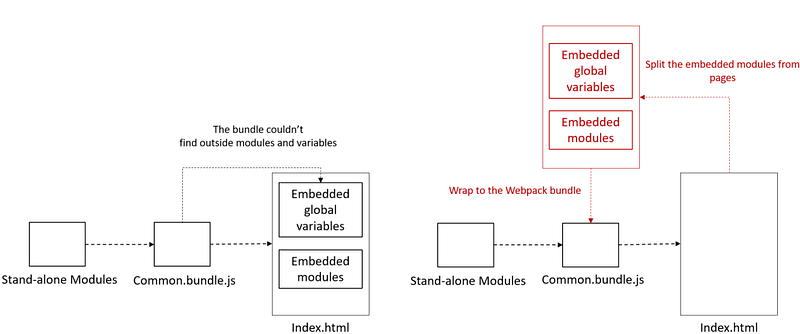
I have noted the process of migration in the following article. However, the steps to move embedded AMD modules to stand-alone JavaScript files are not good enough. In this article, we have a better way rather than putting data in hidden fields.
Example for Refactoring the Embedded module
Here is an example of the embedded module in the cshtml file.
We will follow the following steps to refactor it.
- Move out embedded modules
- Create a new entry bundle
- Set the Webpack config file
- Call exposed functions in HTML/cshtml
Details
1. Move out embedded modules
Create a base module. In order to store data to the memory, use deep copy and return itself.
- For ES5: copy each keys and values from the object
- For ES6: use object.assign
Refactor the module. Bind the exposed functions from the base module.
2. Create a new entry bundle
- Create an entry bundle and require the new module. Expose a new function with the new module
3. Set the Webpack config file
- Set the library target as var
- Use html-webpack-plugin to generate HTML files
- Create the js template file
- Compile Webpack bundles
gulp -b "D:\work\project" --color --gulpfile "D:\work\project\Gulpfile.js" webpack4. Call exposed functions in HTML/cshtml
That’s it!
References
Summary
Thanks for your patient. I am Sean. I work as a software engineer.
This article is my note. Please feel free to give me advice if any mistakes. I am looking forward to your feedback.
- The Facebook page for articles
- The latest side project: Daily Learning
Related topics
How to use the two-way binding in Knout.js and ReactJS?
Learn how to use SignalR to build a chatroom application
My reflection of
IT & Network:
Database:
Software testing:
Debugging:
DevOps:


