avatarClark

Free AI web copilot to create summaries, insights and extended knowledge, download it at here

6275

Abstract

a difficult or complex task. Many people use iPads that support Apple Pencil. Why not use the Pencil to draw your first ideas and try to capture the first unique picture in your head?</p><p id="99e4">The Paper is an astonishing iPad app that runs super smooth, and quickly help you to bring your ideas to life. Having said that, it is not solely for drawing ideas. We can use it to paint pictures, or write our papers.</p><p id="5cb9">The possibilities are endless and here are some interesting features about this app:</p><ul><li>Intuitive interactive menu</li><li>Paper organization with journals</li><li>Amazing user interface design for iPads’ large screens</li><li>Guides and To-Dos to help you along the way</li></ul><p id="5ed6">🔐 Privacy: Collects personal data</p><p id="fc85">💳 Price: Subscription with different plans</p><p id="deac">☑️ Compatibility: 📱iPhone, 📱iPad</p><p id="e148">🧩 Design: Aesthetically pleasing</p><p id="5605">🔗 Download: <a href="https://apps.apple.com/app/apple-store/id506003812?pt=658364">AppStore</a></p><p id="c077">🌐 Research: <a href="https://paper.bywetransfer.com">Website</a></p><h1 id="3b8e">#5. Unsplash</h1><figure id="98aa"><img src="https://cdn-images-1.readmedium.com/v2/resize:fit:800/1*wh_z4o1Eq-FT0EcBByVCwA.png"><figcaption></figcaption></figure><p id="97d1">Finding a wallpaper should not be a challenge. Well… It sort of was a challenge because of copy-write issues. However, things changed since the introduction of Unsplash.</p><p id="83da">Unsplash gives you plenty of images in multiple categories in super high-resolution and different orientations without asking for anything. That being said, I think it will be wonderful to credit the author of the image and support them.</p><p id="7a60">The iPad version of Unsplash is a joy to use, specially since you will be working with lots of photos in high resolution. Here are some great features of this app:</p><ul><li>Support for iPad’s Drag-and-Drop</li><li>Collection creation</li><li>Ability to download every photo</li><li>Powerful search</li><li>Great categorization of images</li><li>Ability to contribute your own photos</li></ul><p id="b4fc">🔐 Privacy: Collects personal data</p><p id="6c21">💳 Price: Free!</p><p id="aa5b">☑️ Compatibility: 📱iPhone, 📱iPad</p><p id="59f7">🧩 Design: Aesthetically pleasing</p><p id="49dd">🔗 Download: <a href="https://apps.apple.com/us/app/unsplash/id1290631746?ls=1">AppStore</a></p><p id="bd60">🌐 Research: <a href="https://unsplash.com">Website</a></p><h1 id="4a57">#6. Nebo</h1><figure id="a376"><img src="https://cdn-images-1.readmedium.com/v2/resize:fit:800/1*MIgxF3M2UMCIm0SHE7O5ww.png"><figcaption></figcaption></figure><p id="b3ce">Writing an essay can be a joy for many people who own an Apple Pencil with their iPad. The feasibility of swinging the pen to write anything on the iPad is phenomenal. One of the best apps that makes use of the tight integration between iPadOS and Apple Pencil is Nebo. It is also relatively new, and many people use it to write their homework and plenty of other things with.</p><p id="240f">Nebo can be specially useful for digital classes where you’ll need to use multiple apps side by side. I used Nebo alongside the Voice Memo to record the session as well as to take notes.</p><p id="4cdb">Some features are:</p><ul><li>Convert handwritings to text</li><li>Convert math writings to text</li><li>Support for emojis and symbols with Apple Pencil</li><li>Support for photos, sketches, and diagrams</li><li>Ability to solve some mathematical calculations</li></ul><p id="4551">🔐 Privacy: Collects personal data</p><p id="4769">💳 Price: Multiple In-App Purchases</p><p id="678e">☑️ Compatibility: 📱iPad</p><p id="5360">🧩 Design: Aesthetically pleasing</p><p id="7923">🔗 Download: <a href="https://apps.apple.com/us/app/myscript-nebo-best-way-to/id1119601770">AppStore</a></p><p id="7e96">🌐 Research: <a href="https://www.nebo.app">Website</a></p><h1 id="25d2">#7. iA Writer</h1><figure id="a0f3"><img src="https://cdn-images-1.readmedium.com/v2/resize:fit:800/1*1PPEj8CT2DUSvqLWewvEJw.png"><figcaption></figcaption></figure><p id="067f">Writing a journal, a book, or even a note might be difficult for many who can’t concentrate. A reason why we can’t concentrate our attention is the lack of a clean writing experience where you’ll only focus on writing and nothing else. That is what iA Writer provides.</p><p id="6ea1">Connect a keyboard to your iPad and just start writing. It’s that simple!</p><p id="4a5e">The minimalist design of iA Writer doesn’t hide anything important from your workflow, albeit there is a small learning curve to master most tools.</p><p id="9c64">The features of iA Writer are:</p><ul><li>Focus mode to highlight current line or paragraph</li><li>Ability to connect to many cloud services</li><li>HTML preview</li><li>Great user interface with dark mode support</li><li>Quick search</li><li>Grammar correction</li></ul><p id="c437">🔐 Privacy: No personal data collection</p><p id="8a59">💳 Price: $29.99</p><p id="04c5">☑️ Compatibility: 📱iPhone, 📱iPad, 💻 Mac</p><p id="b534">🧩 Design: Aesthetically pleasing</p><p id="9d2b">🔗 Download: <a href="https://apps.apple.com/us/app/ia-writer/id775737172">AppStore</a></p><p id="accd">🌐 Research: <a href="https://ia.net/writer">Website</a></p><h1 id="9d44">#8. Shapr3D</h1><figure id="42d1"><img src="https://cdn-images-1.readmedium.com/v2/resize:fit:800/1*M8gzUCEDTa4Qts240QPlsw.png"><figcaption></figcaption></figure><p id="1317">I’m not an industrial designer, nor am I an architect. Having said that, I am a digital product designer and a researcher, and I love it when apps fade the border of traditional usability issues with creative intuitive solutions to help more people use the device as it should be used.</p><p id="01e6">One of those apps is Shapr3D. It is wonderful. With amazing performance, clever introduction and a great learning curve. Moreover, the app is minimal, modern, and good-looking.</p><p id="065f">As an Architect or an Industrial engineer/designer, you won’t find any better app than Shapr3D. Get yourself an Apple Pencil and use this app to create wonders and change the world for the better.</p><p id="e71b">The features of Shapr3D are:</p><ul><li>CAD

Options

file compatibility</li><li>Outstanding Apple Pencil support</li><li>Watch your models in AR</li><li>USDZ Export</li></ul><p id="3fda">🔐 Privacy: Collects personal data</p><p id="dd51">💳 Price: Subscription 29.99 per month</p><p id="41ea">☑️ Compatibility: 📱iPad, 💻 Mac</p><p id="634e">🧩 Design: Aesthetically pleasing</p><p id="a34e">🔗 Download: <a href="https://apps.apple.com/US/app/id1091675654#?platform=ipad">AppStore</a></p><p id="88cc">🌐 Research: <a href="https://www.shapr3d.com">Website</a></p><h1 id="4f13">#9. Things 3 for iPad</h1><figure id="6127"><img src="https://cdn-images-1.readmedium.com/v2/resize:fit:800/1*a6uRoxOSBaz34GjuZNtPAA.png"><figcaption></figcaption></figure><p id="4862">Attention to detail is what Things 3 is all about. An app that is as functional as many competitors out there. An app that is almost as minimal (maybe more) than many competitors out there. Things 3 is a task management app for people who want to get things done.</p><p id="7f78">If you already use it on your Mac /or iPhone then you will be surprised by the clever implementation of Things 3 for the iPad. Some unique features of this app are:</p><ul><li>Use Apple Pencil to write down your task anywhere on the task screen</li><li>Smart user interface design to utilize the iPad’s large screen size</li><li>Categorize tasks with tags</li><li>Assign date and time to repeat or remind a task</li><li>iPadOS home screen widgets</li></ul><p id="5b31">🔐 Privacy: Collects personal data</p><p id="7f51">💳 Price: 19.99</p><p id="4021">☑️ Compatibility: 📱iPad</p><p id="a722">🧩 Design: Aesthetically pleasing</p><p id="e1dd">🔗 Download: <a href="https://apps.apple.com/us/app/things-3-for-ipad/id904244226">AppStore</a></p><p id="250d">🌐 Research: <a href="https://culturedcode.com/things/">Website</a></p><h1 id="4739">#10. Day One</h1><figure id="bd7b"><img src="https://cdn-images-1.readmedium.com/v2/resize:fit:800/1*jm6W-ljUpeVErCfAzaxEkw.png"><figcaption></figcaption></figure><p id="0a2f">Writing a journal a day keeps cloudy thought away. At least for the next day. Day One can help you write down anything that is in your head and create a safe box where you will find your most memorable days to bring back memories. I use the app like that, you don’t have to, but it is highly recommended.</p><p id="9e5b">One of the best self-improving practices is logging your state of mind on a daily basis. Writing about your feelings, accomplishments, what you are thankful for and many more is essential to grow your mindset of who you are.</p><p id="4a41">Day One is extremely functional, customizable and comes with many great features; some noteworthy ones are:</p><ul><li>Templates… Many templates to ease your job of writing journals</li><li>Ability to create custom templates</li><li>Exclusive notification implementation to remind you to record your day</li><li>Voice and Video support</li><li>Great synchronization engine</li><li>HealthKit connection</li><li>Support for photos and drawings</li><li>Biometric security</li><li>End-to-end encryption</li></ul><p id="f700">🔐 Privacy: Collects personal data</p><p id="68ba">💳 Price: Subscription $34.99 per year</p><p id="3bc2">☑️ Compatibility: ⌚️Apple Watch, 📱iPhone,📱iPad, 💻 Mac</p><p id="df25">🧩 Design: Decent looking</p><p id="180b">🔗 Download: <a href="https://apps.apple.com/us/app/day-one-2-journal-notes/id1044867788">AppStore</a></p><p id="9001">🌐 Research: <a href="https://dayoneapp.com">Website</a></p><p id="f001">Thank you for reading this first edition of monthly introduction to useful apps for the iPad. I hope you enjoyed this story. If you have any recommendations, I’ll be glad to hear it.</p><p id="c710">Here are some more stories I’ve written about the iPad.</p><div id="9d3d" class="link-block"> <a href="https://readmedium.com/15-wishes-for-ipados-15-cc47bc14ebb2"> <div> <div> <h2>15 Wishes for iPadOS 15!</h2> <div><h3>Why can’t we run more professional apps to take advantage of the iPad’s amazing hardware?</h3></div> <div><p>medium.com</p></div> </div> <div> <div style="background-image: url(https://miro.readmedium.com/v2/resize:fit:320/1*St1BGbTkTmJboNyzR9Kwow.jpeg)"></div> </div> </div> </a> </div><div id="bf56" class="link-block"> <a href="https://readmedium.com/10-reasons-why-ipad-cameras-are-more-useful-than-you-think-b1d30e5c5d2e"> <div> <div> <h2>10 Reasons Why iPad Cameras Are More Useful Than You Think</h2> <div><h3>Have you ever used yours?</h3></div> <div><p>medium.com</p></div> </div> <div> <div style="background-image: url(https://miro.readmedium.com/v2/resize:fit:320/1*6klipR9NdXdv9Q8xT4Jdpg.jpeg)"></div> </div> </div> </a> </div><div id="4e80" class="link-block"> <a href="https://readmedium.com/an-advance-piece-of-machinery-ipad-pro-12-9-review-526fce36e4d5"> <div> <div> <h2>An advance piece of machinery. iPad Pro 12.9" review</h2> <div><h3>A designer’s perspective</h3></div> <div><p>medium.com</p></div> </div> <div> <div style="background-image: url(https://miro.readmedium.com/v2/resize:fit:320/1*_zXYHpqoCTKB9LDjnh6hMQ.jpeg)"></div> </div> </div> </a> </div><div id="0090" class="link-block"> <a href="https://readmedium.com/5-minimal-ipad-apps-55eceb0b544e"> <div> <div> <h2>5 Minimal iPad Apps</h2> <div><h3>There is nothing better than a universal app explicitly written for the Apple platform. We will read about five minimal…</h3></div> <div><p>medium.com</p></div> </div> <div> <div style="background-image: url(https://miro.readmedium.com/v2/resize:fit:320/1*wz_-mlmk4sSUyF3srCG6Bw.jpeg)"></div> </div> </div> </a> </div></article></body>

10 iPad Apps For The Month Of June
The iPad is a phenomenal machine. Just to be correct: Not a computer, but a machine… a capable one. Apple is investing so many resources into its development and developers love building apps for it.

I believe that in the next 30 to 50 years, our main computers will be iPad-like, and we will interact with a fully glass device that has more capabilities than most super computers these days. The future is so bright, and I am so ready for it.

In this story I will introduce 10 iPad apps that make use of its powerful hardware and are built on top of the wonderful features of iPadOS.

#1. Halide Mark II
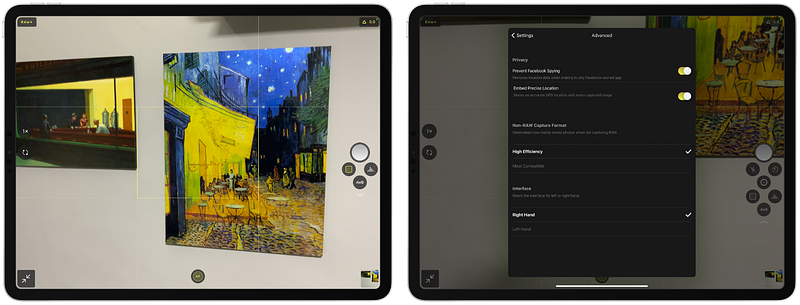
Many people don’t believe in the iPad’s capabilities for taking photos, or recording videos. I don’t think they are wrong. I believe the iPad’s form factor and its large design makes it weird for outdoor use as a camera, however, because something feels weird, it shouldn’t make us stop exploring its possibilities.

Furthermore, I believe that is what the team at Halide did for the iPad. The advancements of iPad hardware has made it a great device for professionals. Specially content creators such as me.

I would be lying if I say I haven’t used the iPad to take some remarkable photos. The camera system is so good that many people prefer using it for their work.

I found so many opportunities with its advance camera system that I dedicate an entire article about it.

Halide is a wonderful app. I’ve been using it since the early versions on my iPhone, and now I’m thrilled of its availability on iPads.

The benefits of taking photos with Halide are:

  • Taking full RAW photos
  • Ability to take portrait photos on the pro models
  • Manual control for shutter speed, ISO, and white balance
  • Siri shortcuts support

🔐 Privacy: No data collection

💳 Price: Subscription $1.99 per month

☑️ Compatibility: ⌚️Apple Watch, 📱iPhone, 📱iPad

🧩 Design: Aesthetically pleasing

🔗 Download: AppStore

🌐 Research: Website

#2. Pixelmator Photo
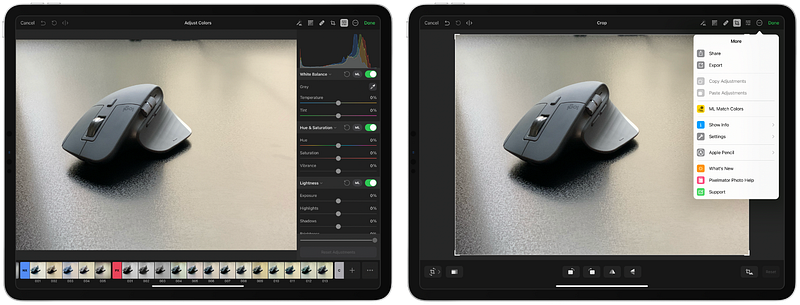
The joy of editing a photo on the large display of the iPad is uncanny. The experience of using the latest and the best photo editing features on a wonderful operating system is a unique experience.

Using your fingers to slide over the values for brightness, contrast, and white balance makes many people love editing photos on the iPad. That is what Pixelmator Photo provides. Along with many wonderful features that makes use of artificial intelligence and machine learning to enhance your photos.

Some note-worthy features are:

  • Full RAW Support
  • Color adjustment
  • Repair tool
  • Machine Learning for improving colors, resolution, crop state and so much more
  • Nondestructive photo edit

🔐 Privacy: No data collection

💳 Price: $7.99

☑️ Compatibility: 📱iPad

🧩 Design: Aesthetically pleasing

🔗 Download: AppStore

🌐 Research: Website

#3. Vectornator
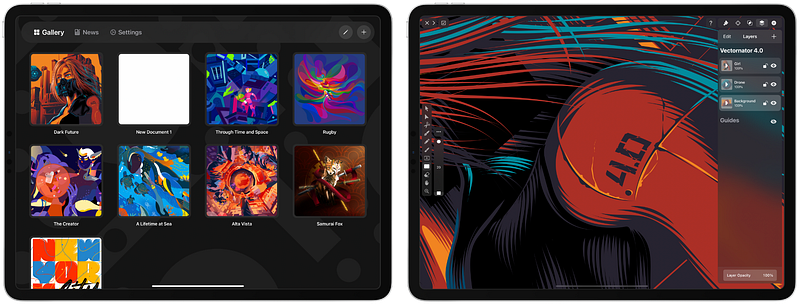
I have always wanted to bring my own voice and language into my publication and future projects. Many people also want to achieve such objective. That is why many pay for illustrators to design their professional logos and trademark.

What if you are at the very first step of your business and don’t have enough budget to dedicate for a logo?

The Vectornator is a great asset If you want your own unique insight into the design of a logo or a vector file.

Vectornator can help you achieve many of your design needs and some of its unique features are:

  • Advance typography tools
  • Object modification and shape tools
  • Auto trace to turn bitmaps into vector
  • Advance color picker
  • Large icon library
  • Compatibility with Adobe Illustrator

🔐 Privacy: Collects personal data

💳 Price: Free!

☑️ Compatibility: 📱iPhone, 📱iPad, 💻 Mac

🧩 Design: Aesthetically pleasing

🔗 Download: AppStore

🌐 Research: Website

#4. Paper by WeTransfer
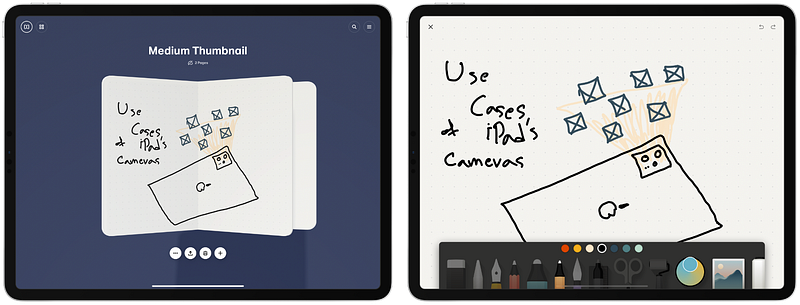
Prototyping an idea should not be a difficult or complex task. Many people use iPads that support Apple Pencil. Why not use the Pencil to draw your first ideas and try to capture the first unique picture in your head?

The Paper is an astonishing iPad app that runs super smooth, and quickly help you to bring your ideas to life. Having said that, it is not solely for drawing ideas. We can use it to paint pictures, or write our papers.

The possibilities are endless and here are some interesting features about this app:

  • Intuitive interactive menu
  • Paper organization with journals
  • Amazing user interface design for iPads’ large screens
  • Guides and To-Dos to help you along the way

🔐 Privacy: Collects personal data

💳 Price: Subscription with different plans

☑️ Compatibility: 📱iPhone, 📱iPad

🧩 Design: Aesthetically pleasing

🔗 Download: AppStore

🌐 Research: Website

#5. Unsplash
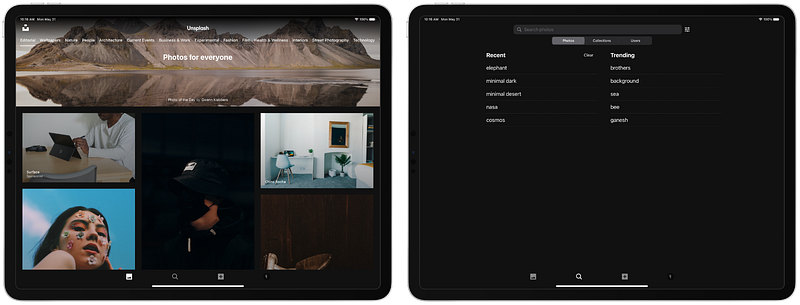
Finding a wallpaper should not be a challenge. Well… It sort of was a challenge because of copy-write issues. However, things changed since the introduction of Unsplash.

Unsplash gives you plenty of images in multiple categories in super high-resolution and different orientations without asking for anything. That being said, I think it will be wonderful to credit the author of the image and support them.

The iPad version of Unsplash is a joy to use, specially since you will be working with lots of photos in high resolution. Here are some great features of this app:

  • Support for iPad’s Drag-and-Drop
  • Collection creation
  • Ability to download every photo
  • Powerful search
  • Great categorization of images
  • Ability to contribute your own photos

🔐 Privacy: Collects personal data

💳 Price: Free!

☑️ Compatibility: 📱iPhone, 📱iPad

🧩 Design: Aesthetically pleasing

🔗 Download: AppStore

🌐 Research: Website

#6. Nebo
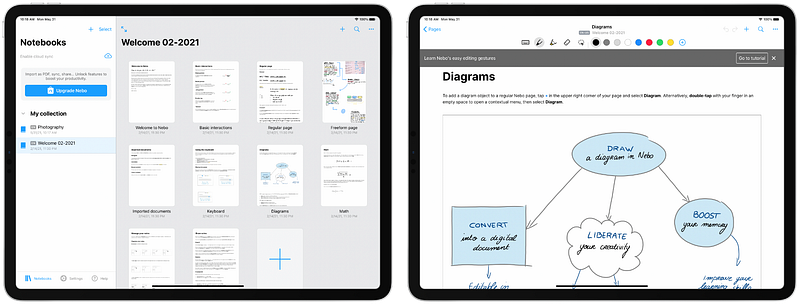
Writing an essay can be a joy for many people who own an Apple Pencil with their iPad. The feasibility of swinging the pen to write anything on the iPad is phenomenal. One of the best apps that makes use of the tight integration between iPadOS and Apple Pencil is Nebo. It is also relatively new, and many people use it to write their homework and plenty of other things with.

Nebo can be specially useful for digital classes where you’ll need to use multiple apps side by side. I used Nebo alongside the Voice Memo to record the session as well as to take notes.

Some features are:

  • Convert handwritings to text
  • Convert math writings to text
  • Support for emojis and symbols with Apple Pencil
  • Support for photos, sketches, and diagrams
  • Ability to solve some mathematical calculations

🔐 Privacy: Collects personal data

💳 Price: Multiple In-App Purchases

☑️ Compatibility: 📱iPad

🧩 Design: Aesthetically pleasing

🔗 Download: AppStore

🌐 Research: Website

#7. iA Writer
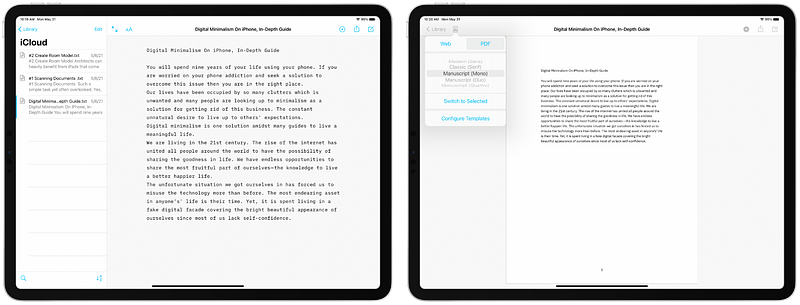
Writing a journal, a book, or even a note might be difficult for many who can’t concentrate. A reason why we can’t concentrate our attention is the lack of a clean writing experience where you’ll only focus on writing and nothing else. That is what iA Writer provides.

Connect a keyboard to your iPad and just start writing. It’s that simple!

The minimalist design of iA Writer doesn’t hide anything important from your workflow, albeit there is a small learning curve to master most tools.

The features of iA Writer are:

  • Focus mode to highlight current line or paragraph
  • Ability to connect to many cloud services
  • HTML preview
  • Great user interface with dark mode support
  • Quick search
  • Grammar correction

🔐 Privacy: No personal data collection

💳 Price: $29.99

☑️ Compatibility: 📱iPhone, 📱iPad, 💻 Mac

🧩 Design: Aesthetically pleasing

🔗 Download: AppStore

🌐 Research: Website

#8. Shapr3D
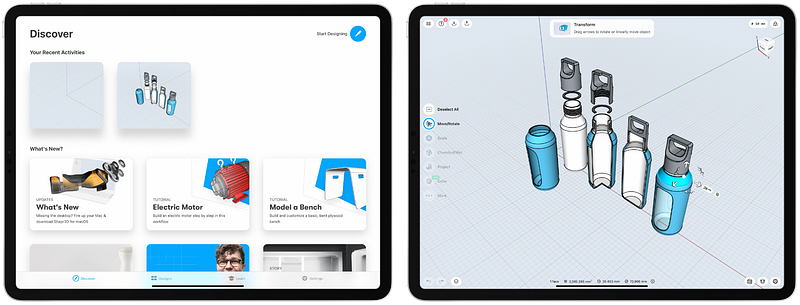
I’m not an industrial designer, nor am I an architect. Having said that, I am a digital product designer and a researcher, and I love it when apps fade the border of traditional usability issues with creative intuitive solutions to help more people use the device as it should be used.

One of those apps is Shapr3D. It is wonderful. With amazing performance, clever introduction and a great learning curve. Moreover, the app is minimal, modern, and good-looking.

As an Architect or an Industrial engineer/designer, you won’t find any better app than Shapr3D. Get yourself an Apple Pencil and use this app to create wonders and change the world for the better.

The features of Shapr3D are:

  • CAD file compatibility
  • Outstanding Apple Pencil support
  • Watch your models in AR
  • USDZ Export

🔐 Privacy: Collects personal data

💳 Price: Subscription $29.99 per month

☑️ Compatibility: 📱iPad, 💻 Mac

🧩 Design: Aesthetically pleasing

🔗 Download: AppStore

🌐 Research: Website

#9. Things 3 for iPad
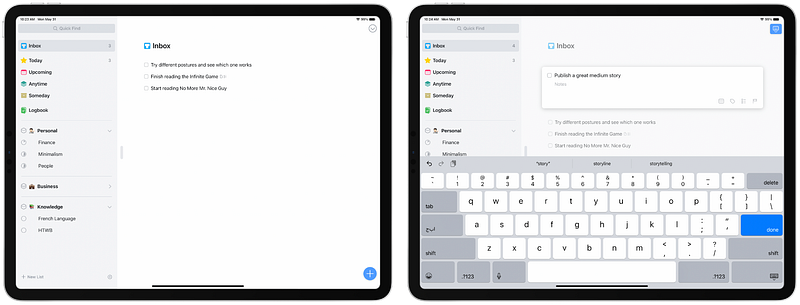
Attention to detail is what Things 3 is all about. An app that is as functional as many competitors out there. An app that is almost as minimal (maybe more) than many competitors out there. Things 3 is a task management app for people who want to get things done.

If you already use it on your Mac /or iPhone then you will be surprised by the clever implementation of Things 3 for the iPad. Some unique features of this app are:

  • Use Apple Pencil to write down your task anywhere on the task screen
  • Smart user interface design to utilize the iPad’s large screen size
  • Categorize tasks with tags
  • Assign date and time to repeat or remind a task
  • iPadOS home screen widgets

🔐 Privacy: Collects personal data

💳 Price: $19.99

☑️ Compatibility: 📱iPad

🧩 Design: Aesthetically pleasing

🔗 Download: AppStore

🌐 Research: Website

#10. Day One
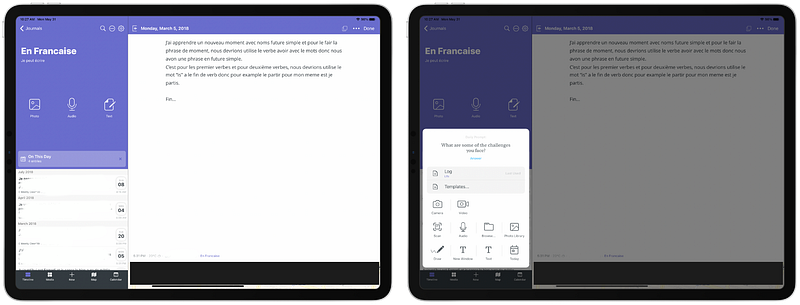
Writing a journal a day keeps cloudy thought away. At least for the next day. Day One can help you write down anything that is in your head and create a safe box where you will find your most memorable days to bring back memories. I use the app like that, you don’t have to, but it is highly recommended.

One of the best self-improving practices is logging your state of mind on a daily basis. Writing about your feelings, accomplishments, what you are thankful for and many more is essential to grow your mindset of who you are.

Day One is extremely functional, customizable and comes with many great features; some noteworthy ones are:

  • Templates… Many templates to ease your job of writing journals
  • Ability to create custom templates
  • Exclusive notification implementation to remind you to record your day
  • Voice and Video support
  • Great synchronization engine
  • HealthKit connection
  • Support for photos and drawings
  • Biometric security
  • End-to-end encryption

🔐 Privacy: Collects personal data

💳 Price: Subscription $34.99 per year

☑️ Compatibility: ⌚️Apple Watch, 📱iPhone,📱iPad, 💻 Mac

🧩 Design: Decent looking

🔗 Download: AppStore

🌐 Research: Website

Thank you for reading this first edition of monthly introduction to useful apps for the iPad. I hope you enjoyed this story. If you have any recommendations, I’ll be glad to hear it.

Here are some more stories I’ve written about the iPad.

iPad
Technology
Apps
Apple
Productivity
Recommended from ReadMedium