avatarClark

Free AI web copilot to create summaries, insights and extended knowledge, download it at here

12595

Abstract

of a large object without having you to physically move.</p><p id="267b">Since the lens has larger depth of field, it will keep most of the scene in focus.</p><h2 id="3da4">Use Cases:</h2><ul><li>As an architect, I can fit more of the foreground while taking a photo a building.</li><li>As a researcher when I query my research documents, I see more viewable are of my users’ background which consequently provides a better context.</li><li>As an artist, I can show the behind-the-scene photos of my workplace with better perspective on the tools and the area I work at.</li><li>As an activist, I can capture photos that will be immensely resourceful for my independent journalism.</li><li>As an astronomer, teaching a class, the ultra-wide lens provides better perspective for my astrophotography which will be useful to share to my students.</li></ul><p id="4144">The other useful features of this lens comes when using specific apps for your research. Occasionally, we come across printed old photos from our client which can be useful. The <b>PhotoScan by Google Photos</b> does an impressive job at capturing a photo without the glare from the flashlight. It is free, however, there is no iPad-specific app, and I’m recommending it because it currently is the one that works the best.</p><figure id="e7df"><img src="https://cdn-images-1.readmedium.com/v2/resize:fit:800/1*GKSSQE8F3BxmVZu7VBYIKg.png"><figcaption></figcaption></figure><p id="5bff"><b>GoodNotes 5</b> also makes use of the camera feature so if you plan and write your notes within this app, don’t forget to use the camera feature to include a photo in your document.</p><h2 id="5042">Referenced Apps:</h2><div id="764e" class="link-block"> <a href="https://apps.apple.com/us/app/photoscan-by-google-photos/id1165525994"> <div> <div> <h2>‎PhotoScan by Google Photos</h2> <div><h3>‎Photos from the past, meet scanner from the future. PhotoScan is a new app from Google Photos that lets you scan and…</h3></div> <div><p>apps.apple.com</p></div> </div> <div> <div style="background-image: url(https://miro.readmedium.com/v2/resize:fit:320/)"></div> </div> </div> </a> </div><div id="0d7d" class="link-block"> <a href="https://apps.apple.com/us/app/goodnotes-5/id1444383602"> <div> <div> <h2>‎GoodNotes 5</h2> <div><h3>‎Transform your Mac into smart digital paper and a powerful document management system. Use the same features from…</h3></div> <div><p>apps.apple.com</p></div> </div> <div> <div style="background-image: url(https://miro.readmedium.com/v2/resize:fit:320/0*RtO6EPKuEeQqniXG)"></div> </div> </div> </a> </div><h1 id="92bc">#5 Try Before You Buy</h1><p id="c863">I believe augmented reality is just the revealing the tip of the iceberg and as it becomes more advanced, better solutions show in our lives. One category which keeps improving by each generation of software updates is shopping apps.</p><figure id="d7c1"><img src="https://cdn-images-1.readmedium.com/v2/resize:fit:800/1*I1TY17DZB3xsW-DFRt1tnA.png"><figcaption></figcaption></figure><p id="94ad"><b>Apple Store</b> app might not be a fully desirable experience for shopping Apple products because the user interface is a little bit old, however, it uses ARKit and most of its products utilize that feature. You can view a product on your desk before making a purchase.</p><p id="25af">I can’t wait until Apple brings the AR models of the new iMacs and see how different colors look on my desk.</p><p id="32f6">One of the pioneers of shopping apps using augmented reality is <b>IKEA Place</b>. It features a dead-simple user interface and a vast category of their products which you can choose and place on your room with AR. The performance of this app is phenomenal and the user interface is lovely. The only issue with it is the lack of offline support as I would like to download some products’ 3D models and place them anywhere I go.</p><h2 id="5ce7">Use Cases:</h2><ul><li>Architects showcasing their models to their customers.</li><li>Consumers trying shoes on their feet with AR before buying them to get a feeling of how they will look.</li><li>Engineers observing an engine part in AR to make sure the part is what they are exactly looking for.</li><li>Astronomers seeing a life-like model of a telescope before planning to purchase one.</li></ul><h2 id="c6bd">Referenced Apps:</h2><div id="4385" class="link-block"> <a href="https://apps.apple.com/us/app/apple-store/id375380948"> <div> <div> <h2>‎Apple Store</h2> <div><h3>‎The Apple Store app provides a more personal way to shop for the latest Apple products and accessories. Get…</h3></div> <div><p>apps.apple.com</p></div> </div> <div> <div style="background-image: url(https://miro.readmedium.com/v2/resize:fit:320/0*qgSxPiTqOft7USxN)"></div> </div> </div> </a> </div><div id="32b3" class="link-block"> <a href="https://apps.apple.com/us/app/ikea-place/id1279244498"> <div> <div> <h2>‎IKEA Place</h2> <div><h3>‎Spark ideas to create a better life at home. IKEA Place lets you virtually place true-to-scale 3D models in your very…</h3></div> <div><p>apps.apple.com</p></div> </div> <div> <div style="background-image: url(https://miro.readmedium.com/v2/resize:fit:320/0*_khHzWZ-NlxUhj48)"></div> </div> </div> </a> </div><div id="a747" class="link-block"> <a href="https://apps.apple.com/us/app/goat-sneakers-apparel/id966758561"> <div> <div> <h2>‎GOAT - Sneakers & Apparel</h2> <div><h3>‎GOAT is the global platform for the greatest products from the past, present and future. Shop sneakers, apparel and…</h3></div> <div><p>apps.apple.com</p></div> </div> <div> <div style="background-image: url(https://miro.readmedium.com/v2/resize:fit:320/0*ucBC_JKgf7jkGH3P)"></div> </div> </div> </a> </div><h1 id="642f">#6 Display Your AR Work</h1><p id="123a">One of the simplest and earliest kinds of augmented reality projects I came across with was apps allowing you to put paintings of renowned painters on your wall. The technology was almost primitive. I remember how ARKit had some difficulties detecting walls and confusing them from floors. However, times have changed and with the newest iPadOS, we see apps getting better and better at handling 3D and 2D AR Models.</p><figure id="0d01"><img src="https://cdn-images-1.readmedium.com/v2/resize:fit:800/1*ikxo0Xlnwp092UmYJpqcjg.png"><figcaption></figcaption></figure><p id="cf76">An interesting AR app to watch famous paintings with is <b>Boulevard</b>. It allows you to get the museum-like experience of seeing a painting on your floor and hear the narrator explain it. It is very life-like and a great experience. The app has not been update for over 3 years. However, I haven’t encountered any bugs.</p><p id="66bc">If you are a 3D designer, an artist who uses apps like Maya and Photoshop to create beautiful models then you are in luck. You can export your design file into <b>Adobe Aero</b> and let it showcase your work in AR. This app is specially useful for your customers. You can easily showcase your design files with its help.</p><h2 id="243a">Use Cases:</h2><ul><li>Creators connecting with a community of people who are like-minded.</li><li>Architects showcasing a model to their clients before making drastic changes</li><li>Product designers sending their work to the client for approval and continuing their work</li><li>The Artists who despise solitude and like to receive feedback from different people</li><li>Mechanical technicians explaining their job in a modern way, so their company is more aware of the project’s status</li><li>Product-Design Students sending their final’s project in an immersive intuitive way</li><li>Activists teaching people about the significance of climate change in an interest visual experience</li><li>Astronomers teaching the public about celestial objects in a mesmerizing experience</li></ul><h2 id="80e1">Referenced Apps:</h2><div id="9480" class="link-block"> <a href="https://apps.apple.com/us/app/adobe-aero/id1401748913"> <div> <div> <h2>‎Adobe Aero</h2> <div><h3>‎Design interactive immersive experiences by bringing your design skills into the world of Augmented Reality. No coding…</h3></div> <div><p>apps.apple.com</p></div> </div> <div> <div style="background-image: url(https://miro.readmedium.com/v2/resize:fit:320/0*lIKpYMmNAzocdoJn)"></div> </div> </div> </a> </div><div id="6bab" class="link-block"> <a href="https://apps.apple.com/us/app/boulevard-ar/id1341182104"> <div> <div> <h2>‎Boulevard AR</h2> <div><h3>‎Exploring works of art has never been this up close and personal. Boulevard AR brings art to you, wherever you are…</h3></div> <div><p>apps.apple.com</p></div> </div> <div> <div style="background-image: url(https://miro.readmedium.com/v2/resize:fit:320/0*zFYsXaVe4AleenUP)"></div> </div> </div> </a> </div><h1 id="9506">#7 Learn With AR</h1><p id="ff76">The educational category has vastly benefited from the integration of scientific resources with augmented reality. I believe we are in the brink of an educational revolution.</p><p id="8c50">The mindset of learning and being proficient in scientific matters has vastly changed and the rise of AR apps is a clue to that transformation.</p><p id="592d">I have always been in love with aerospace industries. Whether it be the jet engine, flying with industrial airplanes, or the physics and electronics of a plane; everything in that category has been important for me.</p><figure id="b20c"><img src="https://cdn-images-1.readmedium.com/v2/resize:fit:800/1*GsIrElNXESw-bsOM9jROdA.png"><figcaption>Screenshot of the JigSpace app for the iPad</figcaption></figure><p id="58f2">With the help of apps like <b>JigSpace</b> I can learn so much about the parts of an airplane. Specifically, the jet engine. Interestingly, It amazes anybody that interacts with a live 3D model of a jet engine. Being able to zoom in and inspect each part and understand how the air flows through the blades is an experience I call one of a kind.</p><figure id="1288"><img src="https://cdn-images-1.readmedium.com/v2/resize:fit:800/1*0eb7rxD-stQjHG_pexerew.png"><figcaption>Engine Visualization AR app for the iPad</figcaption></figure><p id="5713">There are many people who greatly benefit from the interactive 3D model of complicated industrial objects. The portray of information in the simplest form.</p><p id="4472">One of the apps that has not been updated for a significant time but still provides its value is <b>Engine Visualization AR</b> and with it, you can understand how an engine works.</p><p id="8714">The combination of using the <b>Engine Visualization AR</b> and the <b>JigSpace</b> will immensely benefit mechanical engineering students. As you start to understand how an engine works, you switch to JigSpace and learn how the manual transmission system operates.</p><h2 id="cd79">Use Cases:</h2><ul><li>As an architect, I can visualize the 3D model of a building and learn about the structure.</li><li>When I design products, I need to iterate and test my prototypes. The earlier I fail, the better I learn.</li><li>As a mechanical engineer, the process of learning about innovations in the industry is much easier while being enjoyable.</li><li>As a student, I save more time by learning faster and have a visual signifier for the topics I learned about.</li></ul><h2 id="ced0">Referenced Apps:</h2><div id="f313" class="link-block"> <a href="https://apps.apple.com/us/app/jigspace/id1111

Options

193492"> <div> <div> <h2>‎JigSpace</h2> <div><h3>‎** World's highest rated AR app ** ** Featured in Apple's iPhone 12 launch keynote ** ** Featured by Apple on the App…</h3></div> <div><p>apps.apple.com</p></div> </div> <div> <div style="background-image: url(https://miro.readmedium.com/v2/resize:fit:320/0*cNshAhvefq-7Smdk)"></div> </div> </div> </a> </div><div id="8e87" class="link-block"> <a href="https://apps.apple.com/us/app/engine-visualization-3d-ar/id1477436315"> <div> <div> <h2>‎Engine Visualization 3D & AR</h2> <div><h3>‎Note: This application is to test the features and capabilities of ARKit. In the era of a computer replacing books…</h3></div> <div><p>apps.apple.com</p></div> </div> <div> <div style="background-image: url(https://miro.readmedium.com/v2/resize:fit:320/0*AU48evPvK6eqLkre)"></div> </div> </div> </a> </div><h1 id="1ec5">#8 Explore The Universe</h1><p id="a207">According to an article talking about Dr. Neil deGrasse Tyson, <a href="https://www.mentalfloss.com/article/93783/10-things-we-learned-neil-degrasse-tysons-inexplicable-universe-course">we can comprehend only 4% of what the universe is</a>. That is a small number and in that 4% many people are not aware of many scientific matters about the universe.</p><p id="a78a">Fortunately, we are in luck. With the spread of fast internet connections and the newer technologies, we can learn much faster. We are luckier because the AR can help us understand about the universe in an immersive and intuitive way.</p><figure id="076c"><img src="https://cdn-images-1.readmedium.com/v2/resize:fit:800/1*yZtymineUNjzjItPr_opEQ.png"><figcaption>Screenshot of the SolAR app</figcaption></figure><p id="0e97">There are games, simulators, and lots of resources with colorful interactive designs to make the experience of reading and learning about universe much better. What made the experience even better was how apps like <b>Big Bang AR</b> used the ARKit to help us learn in the most futurist way possible.</p><h2 id="2419">Use Cases:</h2><ul><li>As an astronomer, not only I can learn about the universe, but also teach others using the cameras on their iPads.</li><li>As a student, I can summarize most of the points for my essays using apps like <b>Hologo</b>.</li></ul><h2 id="9f71">Referenced Apps:</h2><div id="c39c" class="link-block"> <a href="https://apps.apple.com/us/app/big-bang-ar/id1453396628"> <div> <div> <h2>‎Big Bang AR</h2> <div><h3>‎Join Tilda Swinton and CERN scientists on an epic interactive journey through the birth and evolution of the universe…</h3></div> <div><p>apps.apple.com</p></div> </div> <div> <div style="background-image: url(https://miro.readmedium.com/v2/resize:fit:320/0*2uD-QD9dOTi2z5Fi)"></div> </div> </div> </a> </div><div id="9d08" class="link-block"> <a href="https://apps.apple.com/us/app/solar-solar-system-in-ar/id1286558019"> <div> <div> <h2>‎solAR - Solar System in AR</h2> <div><h3>‎Explore our Solar System like never before in Augmented Reality. Place the entire Solar System or a specific planet in…</h3></div> <div><p>apps.apple.com</p></div> </div> <div> <div style="background-image: url(https://miro.readmedium.com/v2/resize:fit:320/0*UFlgigVLKox8qWxl)"></div> </div> </div> </a> </div><div id="0a38" class="link-block"> <a href="https://apps.apple.com/us/app/hologo/id1293300157"> <div> <div> <h2>‎Hologo</h2> <div><h3>Thank you for the update, which allows people to sample some of the material. Before I couldn't sample anything to know…</h3></div> <div><p>apps.apple.com</p></div> </div> <div> <div style="background-image: url(https://miro.readmedium.com/v2/resize:fit:320/0*tNdFAL521nbFWCHp)"></div> </div> </div> </a> </div><h1 id="2725">#9 Care About Our Planet</h1><p id="788d">The global warming is a mistake our parents made, and apparently we are not doing enough to prevent the disaster. One of the reasons why many people don’t talk about something as important as this is because they honestly don’t know about it. It is remarkable seeing the reaction of many people who barely know about global warming and notice when they realize how serious of an issue it really is.</p><p id="57f7">For this cause, we need to spread the easiest most fruitful explanations to those who are not aware of such matter. One of the tools that could be of a great help is the iPad. An app like <b>WWF Forests</b> helps us realize how humans have destroyed the jungles. Learn about endangered animals with <b>WWF Together</b>. Use <b>WWF Free Rivers</b> to learn how important the rivers are to sustain normal wildlife and provide benefits to the ecosystem.</p><figure id="f9e4"><img src="https://cdn-images-1.readmedium.com/v2/resize:fit:800/1*tXy8r70o-xwdkJGGhEeu3Q.png"><figcaption></figcaption></figure><figure id="523b"><img src="https://cdn-images-1.readmedium.com/v2/resize:fit:800/1*JOHBElN8xRGDoaq3suPh3Q.png"><figcaption></figcaption></figure><h2 id="54c8">Use Cases:</h2><ul><li>As an activist who has a mission to help our planet, I can suggest and share these AR apps to help spread the knowledge and make people more aware of what is happening in our planet.</li><li>As a student who is writing a scientific paper about implementing a new mechanism to filter water, I could observe the many effects of certain mechanisms which prevent the globe from warming up and produce less waste.</li><li>As an architect, I learn about minimalism which is a way to design structures while reducing waste and providing meaning to my work.</li><li>As a product designer, I start with thinking about how my product affects the environment and how much waste I could get rid of to design an environmentally friendly product.</li></ul><h2 id="236c">Referenced Apps:</h2><div id="c9fa" class="link-block"> <a href="https://apps.apple.com/us/app/wwf-forests/id1518039408"> <div> <div> <h2>‎WWF Forests</h2> <div><h3>‎WWF Forests takes you on an immersive tour of temperate forests through an augmented reality experience. Learn about…</h3></div> <div><p>apps.apple.com</p></div> </div> <div> <div style="background-image: url(https://miro.readmedium.com/v2/resize:fit:320/0*B-DV305jHXqjIZUF)"></div> </div> </div> </a> </div><div id="66c5" class="link-block"> <a href="https://apps.apple.com/us/app/wwf-together/id581920331"> <div> <div> <h2>‎WWF Together</h2> <div><h3>‎WWF Together brings you closer to amazing and endangered species than you ever could have imagined, letting you…</h3></div> <div><p>apps.apple.com</p></div> </div> <div> <div style="background-image: url(https://miro.readmedium.com/v2/resize:fit:320/0*fUtJrK8UkGdBiRic)"></div> </div> </div> </a> </div><div id="1284" class="link-block"> <a href="https://apps.apple.com/us/app/wwf-free-rivers/id1349935575"> <div> <div> <h2>‎WWF Free Rivers</h2> <div><h3>‎WWF Free Rivers puts an entire landscape in your hands. Through this immersive, augmented reality experience, you'll…</h3></div> <div><p>apps.apple.com</p></div> </div> <div> <div style="background-image: url(https://miro.readmedium.com/v2/resize:fit:320/0*4USY7Nstz0e94wY9)"></div> </div> </div> </a> </div><h1 id="23cc">#10 Observe Celestials Wonders</h1><figure id="f8b1"><img src="https://cdn-images-1.readmedium.com/v2/resize:fit:800/1*AhDfeTcBkmcmqJKMwz10fg.png"><figcaption>Screenshot of the Night Sky app</figcaption></figure><p id="ad50">A fun way to spend your time is by playing video games. Every so often the bright colorful design we see in the games can be used to enhance our experience of using an app and I think that is what <b>Night Sky</b> has done. The app allows you to observe stars, planets, constellations, and satellites using the combination of technologies on your iPad.</p><p id="bdd2">Night Sky uses the gyroscope, GPS sensor and many other features on your device to provide a natural experience of observing the sky with fun.</p><p id="6a96">It also works on iPhones, Macs, Apple TVs, and Apple Watches.</p><h2 id="03c4">Use Cases:</h2><ul><li>As an artist, I can use such apps to get inspired and paint the universe.</li><li>As an engineer, I can get inspired from celestial objects to design a vehicle.</li><li>As a product designer, I can get inspired from the color and the shape of galaxies and apply them the visual side of my products.</li></ul><h2 id="1961">Referenced Apps:</h2><div id="cf62" class="link-block"> <a href="https://apps.apple.com/us/app/night-sky/id475772902"> <div> <div> <h2>‎Night Sky</h2> <div><h3>‎NIGHT SKY 8 Designed for macOS Big Sur & Apple Silicon Night Sky is a powerful personal planetarium. Quickly identify…</h3></div> <div><p>apps.apple.com</p></div> </div> <div> <div style="background-image: url(https://miro.readmedium.com/v2/resize:fit:320/0*bEXiFujWRM2u_-bF)"></div> </div> </div> </a> </div><p id="c60a">Thank you for reading this article. I believe the iPad is a mysterious device. It can transform our lives for the better while providing the comfort of using technology in the most humane way possible.</p><p id="dbc2">If you like these kinds of articles, then let me know in the response section below.</p><p id="d482">I have also written other iPad related articles which are linked below:</p><div id="0766" class="link-block"> <a href="https://readmedium.com/an-advance-piece-of-machinery-ipad-pro-12-9-review-526fce36e4d5"> <div> <div> <h2>An advance piece of machinery. iPad Pro 12.9" review</h2> <div><h3>A designer’s perspective</h3></div> <div><p>medium.com</p></div> </div> <div> <div style="background-image: url(https://miro.readmedium.com/v2/resize:fit:320/1*_zXYHpqoCTKB9LDjnh6hMQ.jpeg)"></div> </div> </div> </a> </div><div id="3472" class="link-block"> <a href="https://readmedium.com/5-minimal-ipad-apps-55eceb0b544e"> <div> <div> <h2>5 Minimal iPad Apps</h2> <div><h3>There is nothing better than a universal app explicitly written for the Apple platform. We will read about five minimal…</h3></div> <div><p>medium.com</p></div> </div> <div> <div style="background-image: url(https://miro.readmedium.com/v2/resize:fit:320/1*wz_-mlmk4sSUyF3srCG6Bw.jpeg)"></div> </div> </div> </a> </div><div id="03e5" class="link-block"> <a href="https://readmedium.com/10-ipad-apps-you-dont-need-42d66458890f"> <div> <div> <h2>10 iPad Apps you don’t need!</h2> <div><h3>Apps are amazing. They extend our devices’ usability; however, with the advancement of web technologies, the websites…</h3></div> <div><p>medium.com</p></div> </div> <div> <div style="background-image: url(https://miro.readmedium.com/v2/resize:fit:320/0*hJVTPHymvUYyDuv_)"></div> </div> </div> </a> </div></article></body>

10 Reasons Why iPad Cameras Are More Useful Than You Think
Once upon a time, the majority of tech enthusiasts believed that the person who uses the iPad’s camera is not cool. Of course, the majority of them don’t know much about marketing and product design.

Big tech companies like Apple make products based on hundreds of hours of research. If you listen to a senior product designer who has worked on major projects in their career, you understand they don’t immediately jump to conclusions. A lot of great product designers take their time to understand the why behind a product — I believe that is extremely respectful and wise.

The iPad is one of the devices that evolved from a tablet without a camera, to something that is now the main computer of many people who accomplish their tasks with joy.

In this article I will explain 10 reasons why the iPad’s camera system is phenomenal. Many people depend on the fantastic cameras on the iPads. Their needs are often for their businesses, professional work, and creative jobs.

The individuals who benefit a lot from iPad’s camera are Activists, Architects, Artists, Astronomers, Consumers, Creators, Mechanical Technicians, Product Designers, Researchers, and Students.

#1 Scanning Documents

Such a simple task yet often overlooked. Yes, scanning documents could be simple, but, the use cases for this specific task might surprise; most of the wonders come from the apps who carefully observed users’ interactions with the device and come up with wonderful solutions.

Text recognition to convert the handwritten or printed text in digital format is incredibly helpful for many industries.

Use Cases:

  • A student who takes a picture from the whiteboard and immediately gets the whole text copied in the clipboard to use in their note-taking app.
  • Researchers can take an image on textual documents such as hand-written notes and upload the text on the cloud.
  • Architects who create personas before designing a model for their clients and scan notes and convert them to a digital text, useful for profiling their clients’ needs and wants.
  • YouTube creators sometimes use notes, and hand-written scripts for planning their videos benefit from scanning their documents.

Here are a couple of useful apps for scanning documents and notes:

Files App

The stock Files app has a built-in scan feature which is available to everyone running iPadOS 13 and higher. It does a decent job, but the edge detection is not as great as the third-party apps. Hopefully, Apple will improve it in the upcoming releases of iPadOS.

Post-it
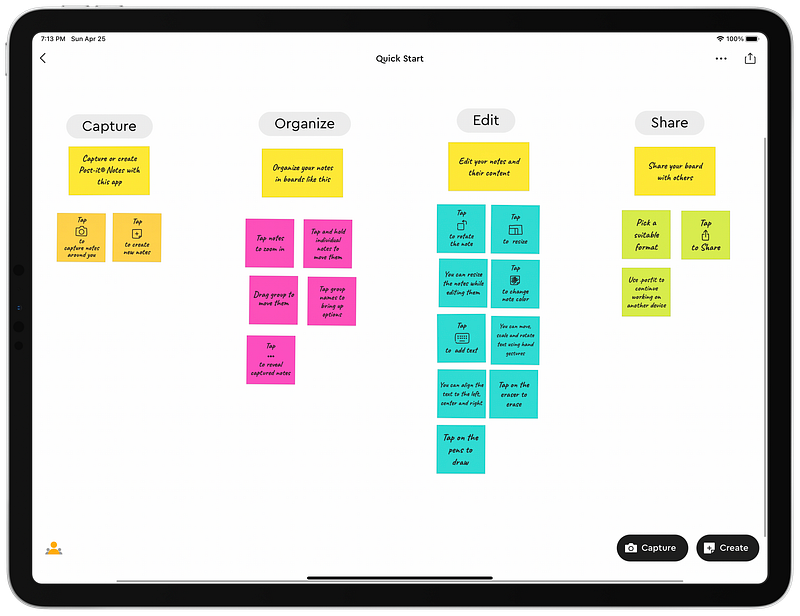
Screenshot of the Post-it app on the iPad Pro

The Post-it app is wonderful for those who write on sticky notes and stick them on their iMac or a white board. You open the Post-it app and tap on scan. It will detect all the notes and capture them into individual sticky notes.

The app is free and runs fluidly on the iPads. It is designed well and also comes with an iPhone and a dedicated Mac app.

Evernote Scannable

Evernote has been in the note-taking app for the long run. With their document scanning app, you are one step closer to quickly scan your documents into the Evernote app. You can also save the scanned document as a photo in your photo gallery.

The app is free and runs well, however, it doesn’t support the landscape mode on the iPad which could be annoying for some people. Another issue is lack of app update for over six months. Having said all that, If you are looking for an app that does the job well, Evernote Scannable is one of the good choices out there.

Referenced Apps:

#2 Create Room Model

Architects can heavily benefit from iPads that come with multiple cameras and a LiDAR sensor. The fantastic collection of apps which are heavily focused on the needs and uses of an architect. Apps such as PLNAR and magicplan are two of the famous ones out there. I have personally used magicplan to map out my house, and I was surprised on the result. The drawings were accurate and the measurements were very close to the real ones. They were just a few centimeters off, but I suspect the result could be close to real-life dimensions once the house is empty and decently lit up with sunlight.

The AR helps many people with redecorating their houses, many which I’ll mention within this article. Speaking of using augmented technology to enhance our experiences, let us not forget the Primer which helps you virtually paint your walls. For a redecoration project, what better way to get a glimpse of the desired design by using the latest the technology offers.

The iPad Pro can be of immense help once you decide to redecorate your and by using the latest features of iPadOS 14 and with the combination of LiDAR alongside its great cameras.

Use Cases:

  • Designers and Researchers conducting extensive researches for certain projects which require contextual inquiry.
  • A Computer Science student working on a project that extends the range of wireless connection to more areas of a house using these apps to get a 2D map which will help get a clear perspective on the result.

Referenced Apps:

#3 Border of Virtual & Digital

One of the most amazing implementations of augmented reality was when people started to combine the power of machine learning and artificial intelligence with it. One of the best projects I have seen out there is an App called Scan Thing.

Thanks to such apps, we can take a photo of an object and have it digitally cut the clutter around it and save the photo with transparent background.

I have shown this app to a couple of people and all of them were surprised by the accuracy and performance it offers.

The great thing about Scan Thing is the privacy. It collects no data from your device and purchasing the premium option is very affordable. Everything happens offline, so there is no need for an internet connection.

In the image below you can see how well the app separated the object in focus (Apple Pencil and AirPods Case) from the background.
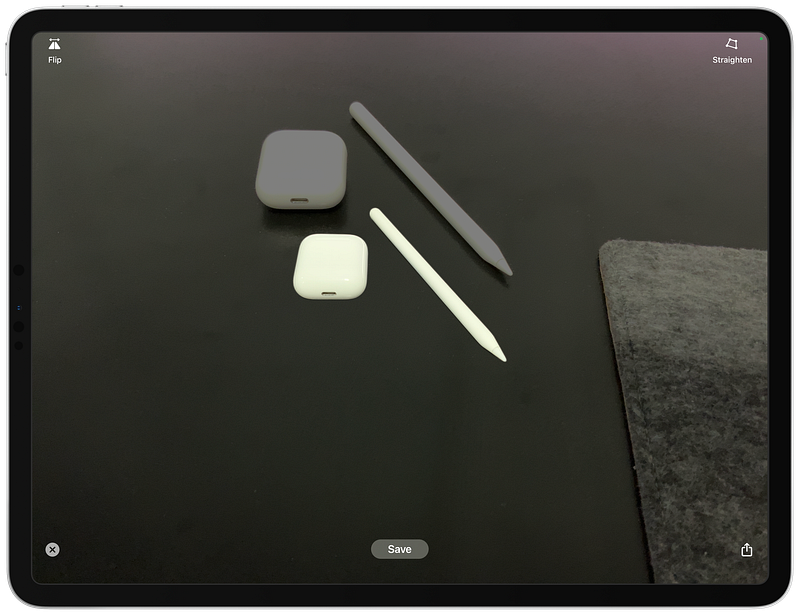
Screenshot of Scan Things app for the iPad

Use Cases:

  • As a designer I see a plant beside my desk, I take a picture of it and let the app get rid of the clutter around the image then AirDrop it to my Mac where I put it on the design.
  • As a researcher when I’m conducting contextual inquiry, I take a photo of an object that my user specifically uses and store that as an image to use for my project.
  • As an artist who is painting a portrait with Apple Pencil, I take a photo of an object which would inspire me and have it vectorized and turned into a graphical design. So, I could increase my creativity while I draw.
  • As an engineer who is fixing a clients’ vehicle, I take the photo of a specific part of an engine which caused the issue for them and attach the photo of that part as documentation.
  • As an information technology student, I take a photo of the server’s part I’m building so that I could have a reference to it throughout my project’s journey.
  • As an astronomer, I can easily take celestial photos and separate the planet or the star I’m looking for and put the photo on the presentation file I am supposed to make for a research work.

Referenced Apps:

#4 Capture Wide Photos

This feature is explicitly available for the iPad Pros which came out after 2020 equipped with Ultra-Wide camera.

When I saw the capabilities of the Ultra-Wide Angle lens on the iPhone, my mind immediately started to think about how useful that feature would be on an iPad. Why? The Ultra-Wide Angle is not only useful for taking group photos or a bright colorful scenery, it can be used to take a picture of a large object without having you to physically move.

Since the lens has larger depth of field, it will keep most of the scene in focus.

Use Cases:

  • As an architect, I can fit more of the foreground while taking a photo a building.
  • As a researcher when I query my research documents, I see more viewable are of my users’ background which consequently provides a better context.
  • As an artist, I can show the behind-the-scene photos of my workplace with better perspective on the tools and the area I work at.
  • As an activist, I can capture photos that will be immensely resourceful for my independent journalism.
  • As an astronomer, teaching a class, the ultra-wide lens provides better perspective for my astrophotography which will be useful to share to my students.

The other useful features of this lens comes when using specific apps for your research. Occasionally, we come across printed old photos from our client which can be useful. The PhotoScan by Google Photos does an impressive job at capturing a photo without the glare from the flashlight. It is free, however, there is no iPad-specific app, and I’m recommending it because it currently is the one that works the best.
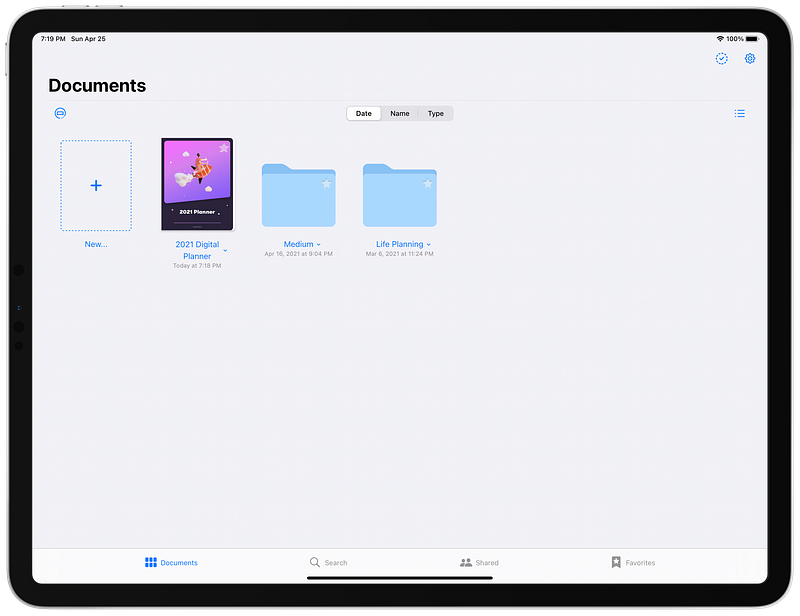
GoodNotes 5 also makes use of the camera feature so if you plan and write your notes within this app, don’t forget to use the camera feature to include a photo in your document.

Referenced Apps:

#5 Try Before You Buy

I believe augmented reality is just the revealing the tip of the iceberg and as it becomes more advanced, better solutions show in our lives. One category which keeps improving by each generation of software updates is shopping apps.
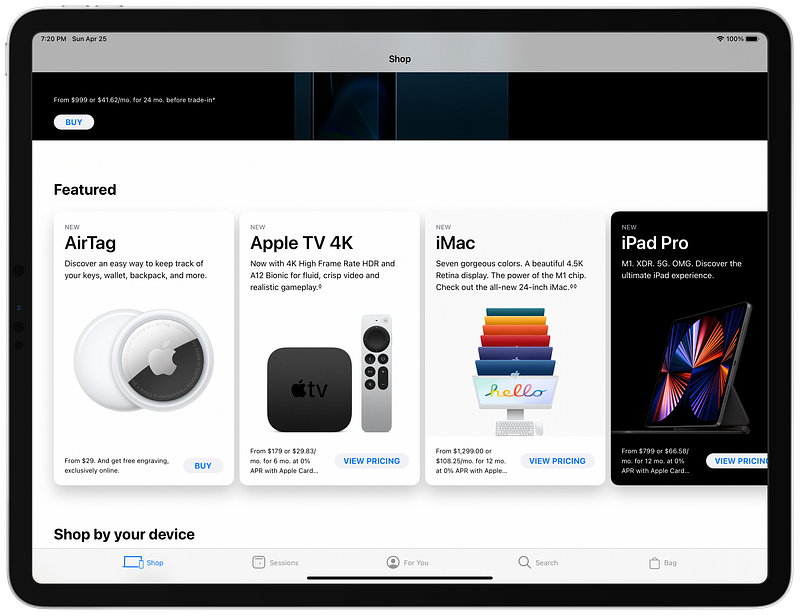
Apple Store app might not be a fully desirable experience for shopping Apple products because the user interface is a little bit old, however, it uses ARKit and most of its products utilize that feature. You can view a product on your desk before making a purchase.

I can’t wait until Apple brings the AR models of the new iMacs and see how different colors look on my desk.

One of the pioneers of shopping apps using augmented reality is IKEA Place. It features a dead-simple user interface and a vast category of their products which you can choose and place on your room with AR. The performance of this app is phenomenal and the user interface is lovely. The only issue with it is the lack of offline support as I would like to download some products’ 3D models and place them anywhere I go.

Use Cases:

  • Architects showcasing their models to their customers.
  • Consumers trying shoes on their feet with AR before buying them to get a feeling of how they will look.
  • Engineers observing an engine part in AR to make sure the part is what they are exactly looking for.
  • Astronomers seeing a life-like model of a telescope before planning to purchase one.

Referenced Apps:

#6 Display Your AR Work

One of the simplest and earliest kinds of augmented reality projects I came across with was apps allowing you to put paintings of renowned painters on your wall. The technology was almost primitive. I remember how ARKit had some difficulties detecting walls and confusing them from floors. However, times have changed and with the newest iPadOS, we see apps getting better and better at handling 3D and 2D AR Models.
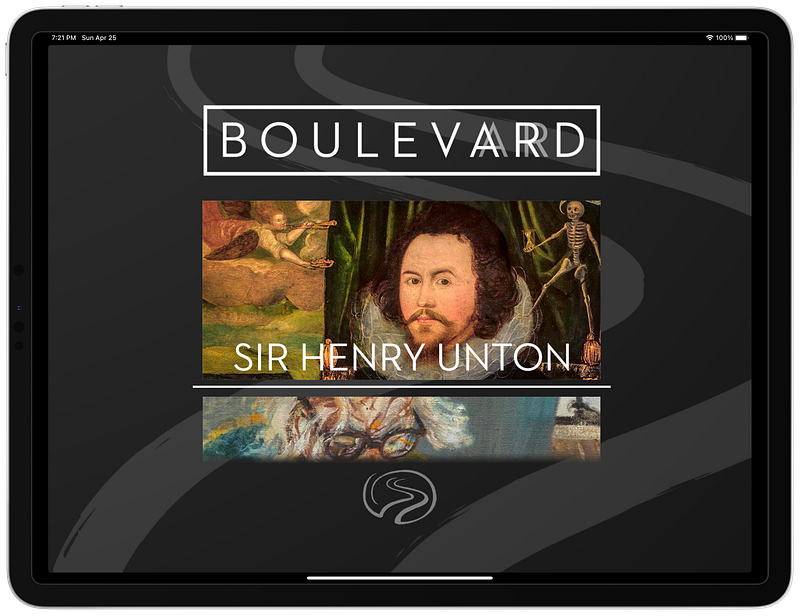
An interesting AR app to watch famous paintings with is Boulevard. It allows you to get the museum-like experience of seeing a painting on your floor and hear the narrator explain it. It is very life-like and a great experience. The app has not been update for over 3 years. However, I haven’t encountered any bugs.

If you are a 3D designer, an artist who uses apps like Maya and Photoshop to create beautiful models then you are in luck. You can export your design file into Adobe Aero and let it showcase your work in AR. This app is specially useful for your customers. You can easily showcase your design files with its help.

Use Cases:

  • Creators connecting with a community of people who are like-minded.
  • Architects showcasing a model to their clients before making drastic changes
  • Product designers sending their work to the client for approval and continuing their work
  • The Artists who despise solitude and like to receive feedback from different people
  • Mechanical technicians explaining their job in a modern way, so their company is more aware of the project’s status
  • Product-Design Students sending their final’s project in an immersive intuitive way
  • Activists teaching people about the significance of climate change in an interest visual experience
  • Astronomers teaching the public about celestial objects in a mesmerizing experience

Referenced Apps:

#7 Learn With AR

The educational category has vastly benefited from the integration of scientific resources with augmented reality. I believe we are in the brink of an educational revolution.

The mindset of learning and being proficient in scientific matters has vastly changed and the rise of AR apps is a clue to that transformation.

I have always been in love with aerospace industries. Whether it be the jet engine, flying with industrial airplanes, or the physics and electronics of a plane; everything in that category has been important for me.
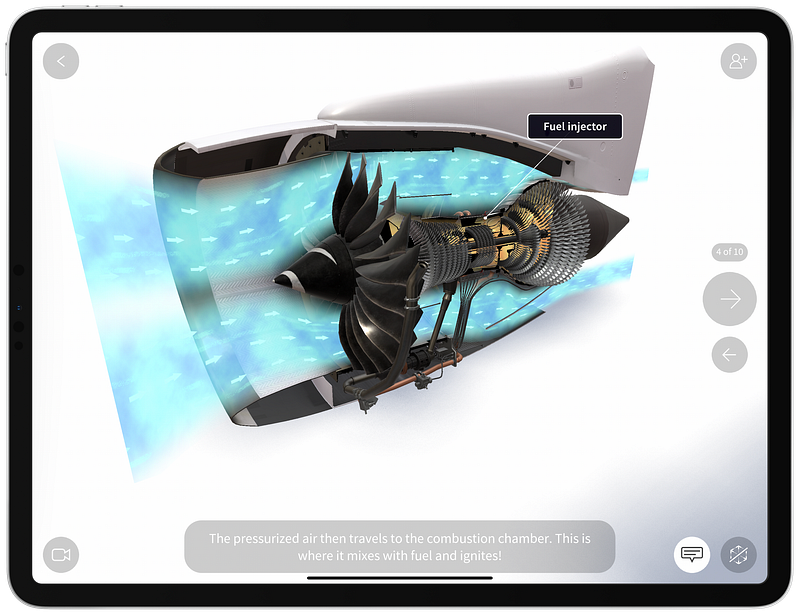
Screenshot of the JigSpace app for the iPad

With the help of apps like JigSpace I can learn so much about the parts of an airplane. Specifically, the jet engine. Interestingly, It amazes anybody that interacts with a live 3D model of a jet engine. Being able to zoom in and inspect each part and understand how the air flows through the blades is an experience I call one of a kind.
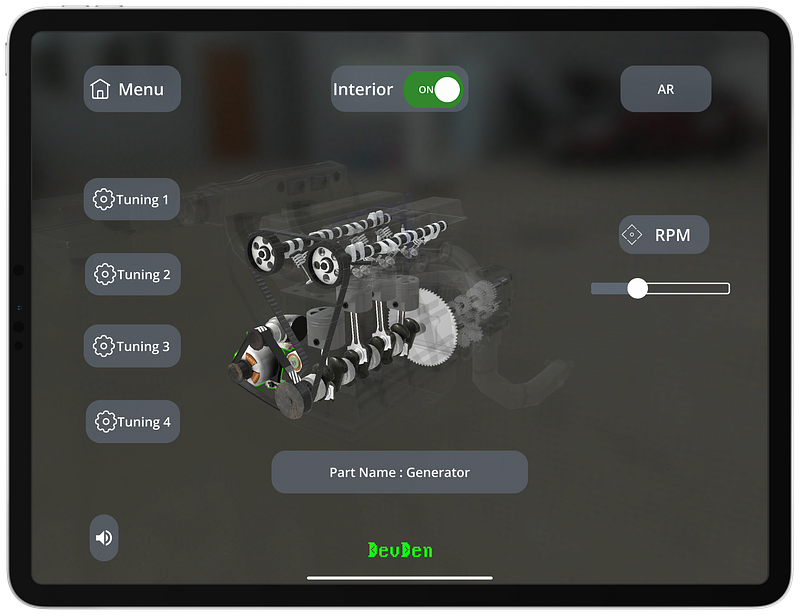
Engine Visualization AR app for the iPad

There are many people who greatly benefit from the interactive 3D model of complicated industrial objects. The portray of information in the simplest form.

One of the apps that has not been updated for a significant time but still provides its value is Engine Visualization AR and with it, you can understand how an engine works.

The combination of using the Engine Visualization AR and the JigSpace will immensely benefit mechanical engineering students. As you start to understand how an engine works, you switch to JigSpace and learn how the manual transmission system operates.

Use Cases:

  • As an architect, I can visualize the 3D model of a building and learn about the structure.
  • When I design products, I need to iterate and test my prototypes. The earlier I fail, the better I learn.
  • As a mechanical engineer, the process of learning about innovations in the industry is much easier while being enjoyable.
  • As a student, I save more time by learning faster and have a visual signifier for the topics I learned about.

Referenced Apps:

#8 Explore The Universe

According to an article talking about Dr. Neil deGrasse Tyson, we can comprehend only 4% of what the universe is. That is a small number and in that 4% many people are not aware of many scientific matters about the universe.

Fortunately, we are in luck. With the spread of fast internet connections and the newer technologies, we can learn much faster. We are luckier because the AR can help us understand about the universe in an immersive and intuitive way.
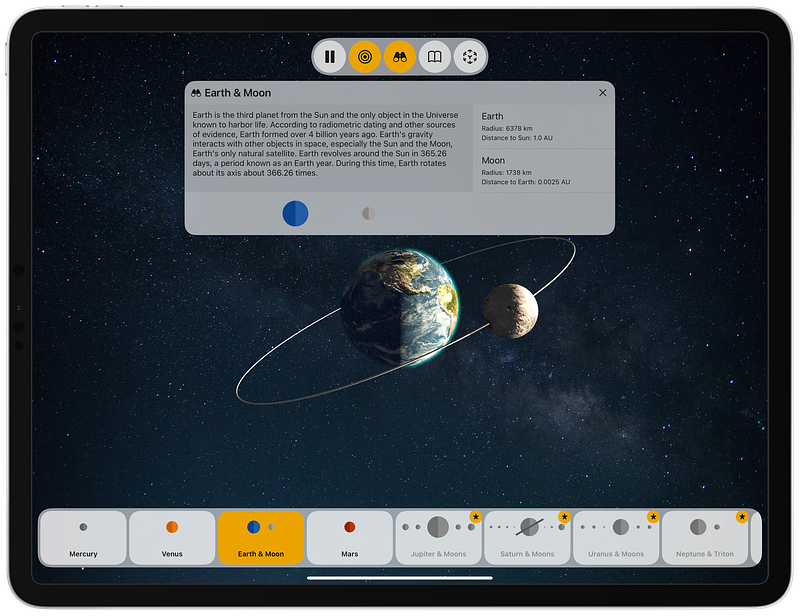
Screenshot of the SolAR app

There are games, simulators, and lots of resources with colorful interactive designs to make the experience of reading and learning about universe much better. What made the experience even better was how apps like Big Bang AR used the ARKit to help us learn in the most futurist way possible.

Use Cases:

  • As an astronomer, not only I can learn about the universe, but also teach others using the cameras on their iPads.
  • As a student, I can summarize most of the points for my essays using apps like Hologo.

Referenced Apps:

#9 Care About Our Planet

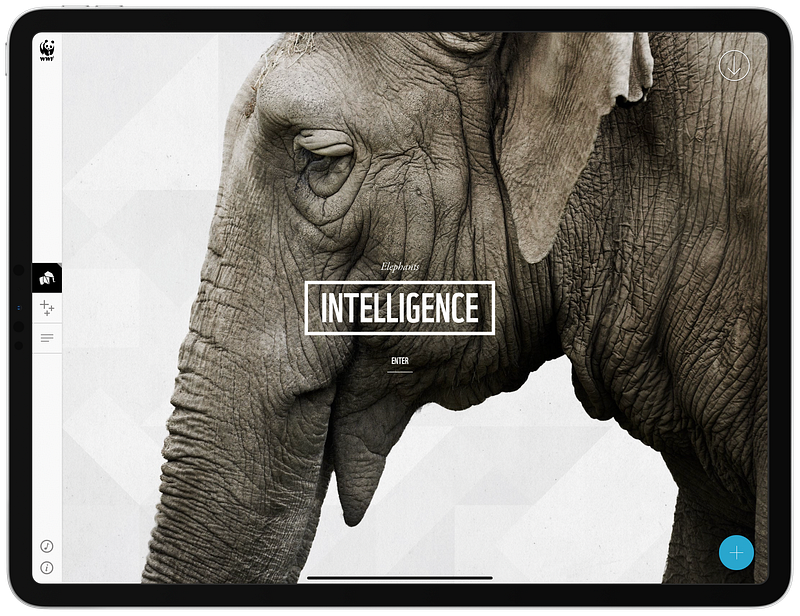
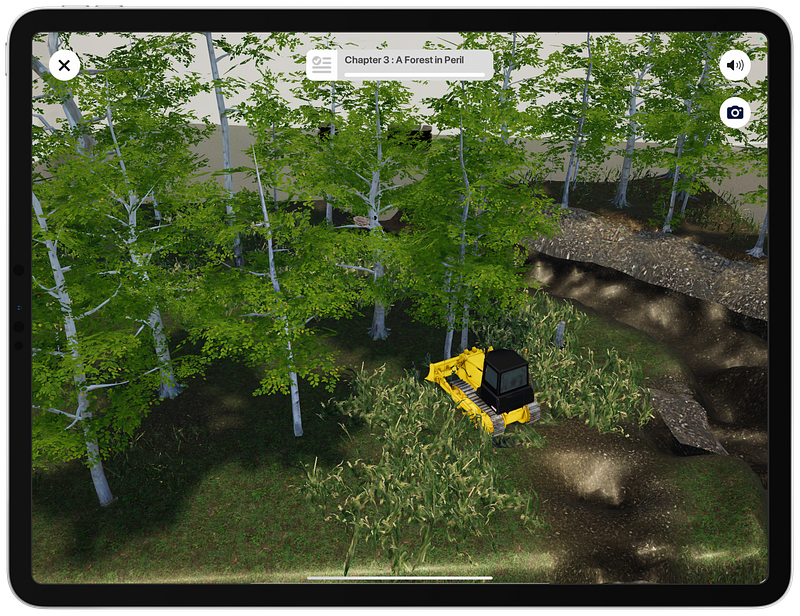
The global warming is a mistake our parents made, and apparently we are not doing enough to prevent the disaster. One of the reasons why many people don’t talk about something as important as this is because they honestly don’t know about it. It is remarkable seeing the reaction of many people who barely know about global warming and notice when they realize how serious of an issue it really is.

For this cause, we need to spread the easiest most fruitful explanations to those who are not aware of such matter. One of the tools that could be of a great help is the iPad. An app like WWF Forests helps us realize how humans have destroyed the jungles. Learn about endangered animals with WWF Together. Use WWF Free Rivers to learn how important the rivers are to sustain normal wildlife and provide benefits to the ecosystem.
Use Cases:

  • As an activist who has a mission to help our planet, I can suggest and share these AR apps to help spread the knowledge and make people more aware of what is happening in our planet.
  • As a student who is writing a scientific paper about implementing a new mechanism to filter water, I could observe the many effects of certain mechanisms which prevent the globe from warming up and produce less waste.
  • As an architect, I learn about minimalism which is a way to design structures while reducing waste and providing meaning to my work.
  • As a product designer, I start with thinking about how my product affects the environment and how much waste I could get rid of to design an environmentally friendly product.

Referenced Apps:

#10 Observe Celestials Wonders
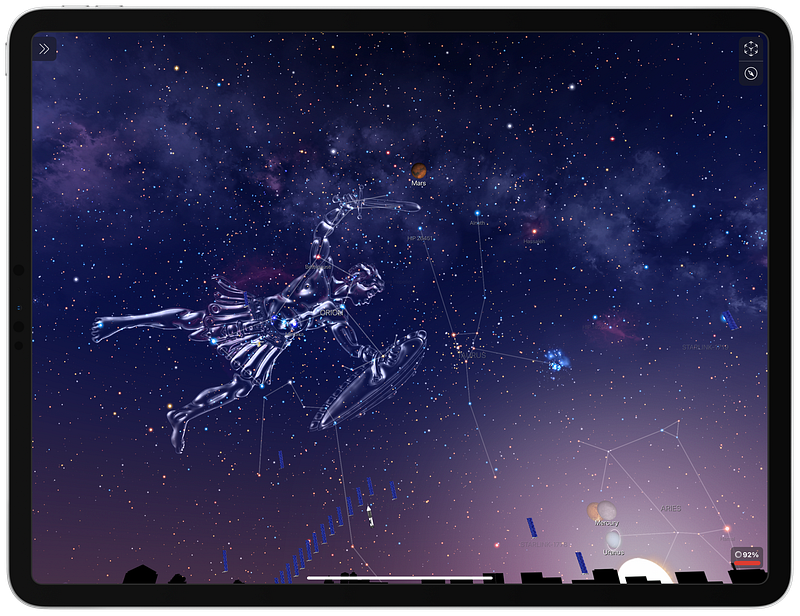
Screenshot of the Night Sky app

A fun way to spend your time is by playing video games. Every so often the bright colorful design we see in the games can be used to enhance our experience of using an app and I think that is what Night Sky has done. The app allows you to observe stars, planets, constellations, and satellites using the combination of technologies on your iPad.

Night Sky uses the gyroscope, GPS sensor and many other features on your device to provide a natural experience of observing the sky with fun.

It also works on iPhones, Macs, Apple TVs, and Apple Watches.

Use Cases:

  • As an artist, I can use such apps to get inspired and paint the universe.
  • As an engineer, I can get inspired from celestial objects to design a vehicle.
  • As a product designer, I can get inspired from the color and the shape of galaxies and apply them the visual side of my products.

Referenced Apps:

Thank you for reading this article. I believe the iPad is a mysterious device. It can transform our lives for the better while providing the comfort of using technology in the most humane way possible.

If you like these kinds of articles, then let me know in the response section below.

I have also written other iPad related articles which are linked below:

iPad
AR
Apple
Apps
Technology
Recommended from ReadMedium