Data Format, Spark, Python
Wide to Long Format in Spark
A quick introduction to changing the data from wide to long format and vice versa

Hi everyone,
Apache Spark is one of the most important frameworks in the Data Engineering and Science fields. Due to its simplicity, its power. Apache Spark is something to know. For a high-level panorama on Spark, you can refer to [1], [2], and [4]. On the other hand, in this post, I will present some spark methods to transform a dataset from the wide to the long format and vice-versa.
An introduction to the problem
In data analytics, the same dataset can be created in two formats: long and wide. Each format has advantages and disadvantages. The choice depends on the need. For each row, some columns identify the entity uniquely (e.g.product ID). The difference between these two formats is the following:
- In the wide format, there is a single row for each identification key;
- In the long format, the identification key is repeated in more rows.
Assume you have a dataset with the following columns:
- ID: the identification key
- Type: the type of the information (type1, type2, type3)
- Value: the value for the type
In the wide format, the table is:
| ID  | Value_type_1 | Value_type_2 | Value_type_3 |
|:---:|:------------:|:------------:|:------------:|
|  1  |      2       |      5       |      5       |
|  2  |      3       |      5       |      5       |
|  3  |      4       |      5       |      5       |
In the long format, the table is in this form:
| ID  | Type   | Value |
|:---:|:------:|:-----:|
|  1  | type_1 | 2     |
|  1  | type_2 | 5     |
|  1  | type_3 | 5     |
|  2  | type_1 | 3     |
|  2  | type_2 | 5     |
|  2  | type_3 | 5     |
|  3  | type_1 | 4     |
|  3  | type_2 | 5     |
|  3  | type_3 | 5     |
In the wide format, there are more columns (one for each type), while in the long one, there are more rows.
When using the wide instead of the long format is an open question. Many real-world datasets store data in a wide format because it is easier to analyze. Sadly, one disadvantage of the wide is that it requires more maintenance when adding a new column but is easier to access from a data analytics standpoint.
Otherwise, in the long format, there are fewer columns.
In summary:
The wide format is ideal if the data structure does not change oftentimes. Because this format could require less preparation for a Dashboard or other analysis like the forecast. To return to our case, we can generalize our features in the following way:
- Identification columns: columns that describe the uniqueness of the entity;
- Type column: in our case, it is a metric of measure;
- Feature columns: the set of columns with the values associated with the entity.
After this introduction, let’s see Spark’s way of transforming the wide to the long format. For Pandas and SQL, there are many similar posts like [2] and [9].
Sample dataset
The sample dataset is the following:
types_list = ["Type 1", "Type 2", "Type 3", "Type 4", "Type 5"]
number_rows = 2
elems = []
for i in range(number_rows):
    id_str = f"ID_{i}"
    for j in range(len(types_list)):
        elem = {
            "ID": id_str,
            "Type": types_list[j % len(types_list)],
            "Value": 5 * i
        }
        elems.append(elem)
dataset_pandas_df = pd.DataFrame(elems)
dataset_pandas_df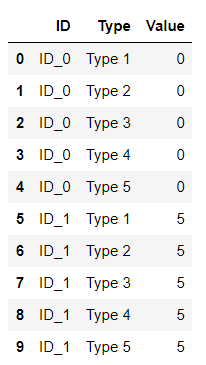
The dataset is a Pandas dataframe with ten rows. There are just two users: ID_0 and ID_1. For each user, there are five rows for the Type column. The values are:
[“Type 1”, “Type 2”, “Type 3”, “Type 4”, “Type 5”]
For simplicity for the first user the Value is always 0, while the second one is always 5. The table is in a long format with the advantages and disadvantages discussed above.
Now, we can create the Spark format:
## Create the Spark DataFrame
dataset_spark_df = spark.createDataFrame(dataset_pandas_df)
dataset_spark_df.show(truncate=False)
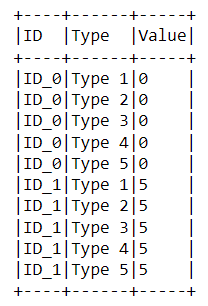
The output is shown in the following picture.
From Long to Wide
Transforming a DataFrame from Long to Wide means getting every value from the columns Type and adding a column for each value. The aim is to get the value linked with the type and fill the column with that value. This action must be performed for each user. An example of this first step is:
| ID  |  Type  | Value |
|:---:|:------:|:-----:|
|  1  | type_1 |   2   |
|  1  | type_2 |   5   |
|  1  | type_3 |   5   |
The output is this one:
| ID | Type   | Value_type_1 | Value_type_2 | Value_type_3 |
|:--:|:------:|:------------:|:------------:|:------------:|
|  1 | type_1 |      2       |      5       |      5       |
|  1 | type_2 |      2       |      5       |      5       |
|  1 | type_1 |      2       |      5       |      5       |
Now, we can see that the column type is useless, and we can remove it. Moreover, we can remove the duplicated rows:
| ID  | Value_type_1 | Value_type_2 | Value_type_3 |
|:---:|:------------:|:------------:|:------------:|
|  1  |      2       |      5       |      5       |
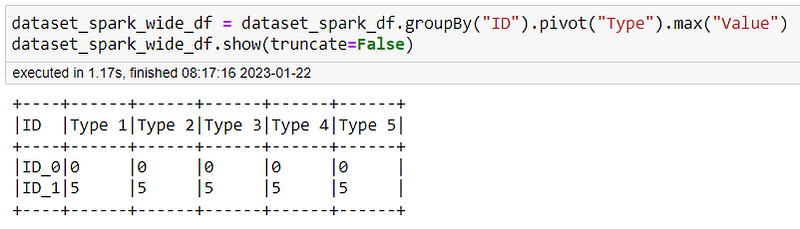
The above paragraph is an example logical approach to this transformation. Fortunately, Spark helps us with the pivot method [5] and [6]. This method works with GroupData that means that you need to perform the groupby. The code is:
dataset_spark_wide_df = dataset_spark_df.groupBy("ID").pivot("Type").max("Value")
dataset_spark_wide_df.show(truncate=False)
In detail, we first group the dataframe by the ID (the identification key), in this way, the pivot method work at this level. The method pivot will use the values of the Type column and aggregate using the Max value for the column Value. The result is the following:
From Wide to Long
Now we can use the dataframe created in the above paragraph to return to the original format. To do this, we can use the melt method.
dataset_spark_wide_df.to_koalas().melt(id_vars=['ID'],
            value_vars=['Type 1', 'Type 2', 'Type 3', 'Type 4', 'Type 5'],
            var_name ="Type",
            value_name = "Value")
The output is the following:
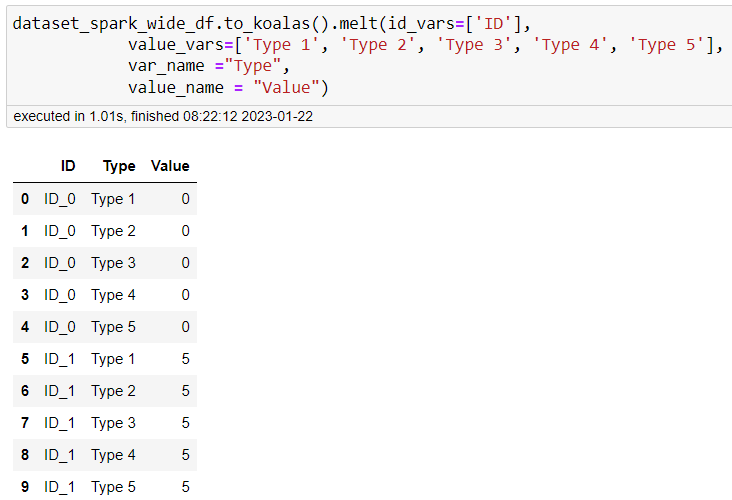
This method is provided by the Koala project [8]. The Koala project is the implementation of the pandas DataFrame API on top of Apache Spark. This project overcomes (single-node) DataFrame implementation of Pandas and allows big data processing. Moreover:
- You can be productive with Spark if you are already familiar with Pandas
- You can use a single codebase for small and big datasets
Summary
Congratulations, you now understand how to transform a dataset in Apache Spark from wide to long format. When the original data format is not suitable for your task is common in data analytics/science. Unfortunately, a data model that meets all the requirements does not exist.
References
- Hands-on Data Analysis With PySpark
- Pyspark Tutorial — Read and Write Static Data with Pyspark
- Reshaping a Pandas Dataframe: Long-to-Wide and Vice Versa
- Testing code on Spark
- PIVOT Clause
- PySpark Pivot
- Pyspark Pandas Pivot
- Koala Documentation
- How to Summarize Data With SQL
Level Up Coding
Thanks for being a part of our community! Before you go:
- 👏 Clap for the story and follow the author 👉
- 📰 View more content in the Level Up Coding publication
- 💰 Free coding interview course ⇒ View Course
- 🔔 Follow us: Twitter | LinkedIn | Newsletter
🚀👉 Join the Level Up talent collective and find an amazing job


