PySpark, Testing
Testing code on Spark
An introduction to Spark testing

I would share my experience writing Unit Tests on Spark and creating a simple project. First question: What is a Unit Test? This topic is well-known in ICT fields, but just in case, I cite Wikipedia:
In computer programming, unit testing is a software testing method by which individual units of source code, sets of one or more computer program modules together with associated control data, usage procedures, and operating procedures, are tested to determine whether they are fit for use.
In a few words, my code is formed by different methods with changes (fixing bugs, adding features, …). My code must produce at least a result (number, string, boolean, file, database, image, …). My goal is to be sure that a code’s change does not impact the correctness of the result. So, I have to define a set of couples of input and output. I will execute my code with some input use cases and check if the result is expected.
The count occurrences project
The project that I propose is a simple text analyzer tool that takes a Spark Dataframe and creates a dataframe with three columns:
- Word: the lowercase of each distinct word
- Occurrences: number of words
- Sentences: number of sentences where the word appears
The result will be in the words’ alphabetic order. For example, if the sentences are:
1. The woman has a house 2. The man has a car and a house
the output will be:
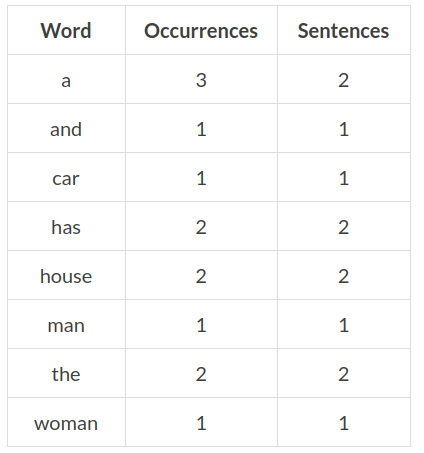
Testing Environment
For the test, I will use the environment anaconda with pyspark. Refer to this post if you want some installation details.
Coding
The spark function is quite simple:
def countText(text):
 return text.select(["id", explode(split(lower(col("text")), “ “)).alias("word")])\
 .groupBy("word").agg(count("Word").alias("Occurrences"), countDistinct("id").alias("Sentences"))\
 .orderBy("word")
Now, let’s see how to use it:
# Create the input test
SingleText = Row("id", "text")
text1 = SingleText(1, "The woman has a house")
text2 = SingleText(2, "The man has a car and a house")
listTexts = [text1, text2]<br># Create the dataframe
df = sqlContext.createDataFrame(listTexts)
# Perform calculation
output = countText(df)
# Show output
output.show(100, False)
The final output is:
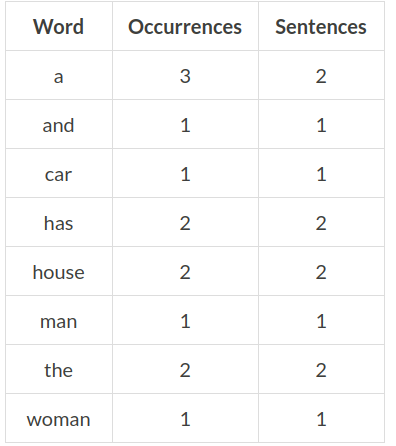
We can save the function countText on a file called libs.
For the testing, we can take into account the Spark Documentation:
Spark is friendly to unit testing with any popular unit test framework. Simply create a SparkContext in your test with the master URL set to local, run your operations, and then call SparkContext.stop() to tear it down. Make sure you stop the context within a final block or the test framework’s tearDown method, as Spark does not support two contexts running concurrently in the same program.
Now let’s write our first spark unit test using the package Unit test. First, we have to create a class that extends the unittest.TestCase. Then, we can create one test. Our test will perform the following steps:
- Create the Spark context
- Create a Spark Dataframe with the sample text
- Perform the count
- Create the expected results dataframe
- Compare the output with the result
- Close the Spark context
import libs
import unittest
import logging
import pandas as pd
from pyspark.sql import *
from pandas.util.testing import assert_frame_equal
class TestSpark(unittest.TestCase):def test1(self):
# Create the Spark context
sc = SparkContext(master="local[2]",
appName="Unit Test")
sqlContext = SQLContext(sparkContext=sc) # List the sample text
SingleText = Row("id", "text")
text1 = SingleText(1, "The woman has a house")
text2 = SingleText(2, "The man has a car and a house")
listTexts = [text1, text2]
df = sqlContext.createDataFrame(listTexts) # Perform the calculation
output = libs.countText(df) # Create the expected results dataframe
expectedResults = pd.DataFrame({'Word': ['a', 'and', 'car', 'has', 'house', 'man', 'the', 'woman'], 'Occurrences': [3, 1, 1, 2, 2, 1, 2, 1], 'Sentences': [2, 1, 1, 2, 2, 1, 2, 1]}) # Compare the output with the expected results
assert_frame_equal(expectedResults, output.toPandas(), check_dtype=False) # Close Spark Context
sc.stop()if __name__ == '__main__':
unittest.main()Let’s save the code in a file called unit.py.
Now, we can run the code and see the output where the test works:
bash-3.2$ python unit.py
--------------------------------------------------------------------
Ran 1 test in 25.254sOKNow, let’s go a bit deep inside the code. To perform the comparison, we have used the Pandas function assert_frame_equal. The method compares two DataFrames and outputs any differences. This function has a lot of input parameters. My suggestion is to learn it very well.
Conclusion
This is a methodology for writing a test for your spark application. You have to write hundreds of tests for a big project.
It is important to remember that the tests are a necessary but not sufficient condition.
Level Up Coding
Thanks for being a part of our community! Before you go:
- 👏 Clap for the story and follow the author 👉
- 📰 View more content in the Level Up Coding publication
- 💰 Free coding interview course ⇒ View Course
- 🔔 Follow us: Twitter | LinkedIn | Newsletter
🚀👉 Join the Level Up talent collective and find an amazing job


