
How to Summarize Data With SQL
Learn How to pivot Data. Theory and Practice Fully Explained!
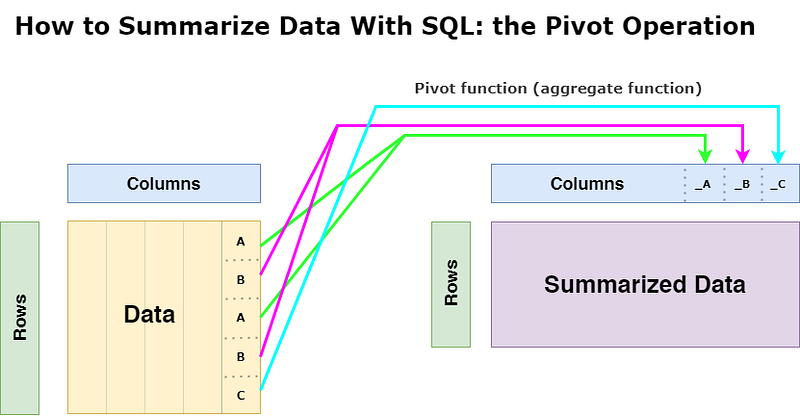
A pivot table is a way to summarize data by organizing the values of one property in rows and the values of another property in columns.
At the intersection of a row and a column, there will be an aggregation statistic: the sum or the average.
If you want to run all the queries shown, download the sample database. All examples have been tested with MySQL 8.
If I asked you to list the average sales and profits for any orders table that has the properties “order_date”, “sales” and “profit” as fields, I imagine you would write the following query:
The query is still easy to write if we introduce a “segment” field and we want to obtain the statistics for each segment.
Indeed, we only need to group again on the segment field:
Pivot to MySQL 8: Naive approach
Where it gets a bit tricky is when you want to “pivot” this table so that you have one column per segment with the value of the different statistics, i.e., “avg_sales_consumer”, “avg_profit_home_office” etc.. directly accessible for each order date.
If other software like Snowflake or PostgreSQL has elegant functions to make a pivot, MySQL 8 has yet to have this kind of function.
To “rotate” rows and columns, we group on the order date and use the chosen aggregation function (here AVG()) and a CASE for each value of the column considered by the aggregation:
So, we already note the main drawback of this “strategy”: the more possible values there are for the segment, the more CASE(s) we will have to write 🤔
This is lengthy, error-prone, and quite painful to maintain: on the other hand, what happens if we have no idea how many entries are in the “segment” property?
Let’s try to do a little better 🤓
Pivot in MySQL 8: Pseudo-dynamic approach
MySQL has two functions to generate code: GROUP_CONCAT() and CONCAT(). The strategy consists in developing a macro (a bit like in dbt, in a video game, or even in iMacros!) which will repeat for us the CASE(s) from the list of possible values of the “segment” property.
The reasoning is as follows:
- We prepare the macro, which expects a list of values: here, “Home Office”, “Consumer”, etc.
- We store the query (and not the result of the query ⛔) in a SQL variable;
- We prepare and execute the query;
Preparation of the macro
Since we already know which SQL query we need to generate, the first step is to use the GROUP_CONCAT(), and CONCAT() functions with the DISTINCT keyword so that we don’t iterate several times on the same segment value.
Be careful! MySQL limits the number of characters that can be concatenated using the GROUP_CONCAT() function, so you will have to adapt the value by updating the SESSION configuration:
As we can see, it is not the query that was executed (and so much the better, it is invalid since it is incomplete!) but the portion that corresponds to the necessary CASE(s).
It remains to build the complete query using our macro by reusing the CONCAT() function, which is decidedly handy 😜 :
Preparation and final execution of the request
At this point, all the complexity of the exercise is behind you! 🥳
To execute a prepared query, you need to use the PREPARE and EXECUTE statements by loading the contents of the “pivot_query” variable as you would for any other prepared query:
Prepared queries deserve their article as they can be helpful and seem unknown to most analysts, while web developers very much use them.
If you have any questions, feel free to comment, and if you enjoyed the article, follow me: you will receive a notification when I publish next.
Go from SELECT * to interview-worthy project. Get our free 5-page guide.


