
Where should we store the JWT for SPA? Memory, Cookie, or LocalStorage?

Introduction
I develop an SPA application on Django/DWF recently. I used JSON Web Token (JWT) to authorize users for login and other operations. It’s Okay for me to create endpoints with JWT secure, exchange JWT with social medias’ access token.
However, the security issue is a critical issue for JWT. Where should we store the JWT? I tried some ways and wrote this note.
It includes the following topics.
- The safest place: Browser’s Memory
- Should we store JWT in the LocalStorage?
- Double tokens policy: HttpOnly Cookie + CSRF token
- Summary
1. The safest place: Browser’s Memory
Browser’s memory like states is definitely the safest place to save. However, the application couldn’t persist the JWT if the user refresh the browser.
So we still have to consider to store JWT to the cookie or the localStorage.
2. Should we store JWT in the LocalStorage?
It’s common to save JWT in the localStorage and set it in the request header when the APIs authorizes the requests with JWT.
Store JWT in the localStorage / send requests with JWT
// Save JWT in localStorage form the memory
localStorage.setItem("token", token);
// Send the request with JWT
const headers = {
Authorization: `JWT ${token}`
}const updateProfileRes = await axios.post('/api/profile/', {
body: data
},{
headers: headers
});However, people don’t recommend to save JWT in the localStorage. The security reason for localStorage is Cross-Site Scripting(XSS). Attackers can use JavaScript to manipulate data in the localStorage.
3. Double tokens policy: HttpOnly Cookie + CSRF token
The HttpOnly tag for Cookie is one of solutions to defend XSS. The HttpOnly tag will restrict users to manipulate the Cookie by JavaScript.
It’s the reason people recommends us to save JWT in the HttpOnly Cookie instead of the localStorage.
Send response with JWT in the Cookie for Django/DRF
// Edit settings.py
JWT_AUTH = {
    ...
    'JWT_EXPIRATION_DELTA': datetime.timedelta(seconds=300),
    'JWT_ALLOW_REFRESH': True,
    'JWT_REFRESH_EXPIRATION_DELTA': datetime.timedelta(days=7),
    'JWT_AUTH_HEADER_PREFIX': 'JWT',
    'JWT_AUTH_COOKIE': 'token'
}
//Edit views.py...
response = Response(serializer.data)
response.set_cookie('token', serializer.data['token'], httponly=True)
return responseAnd we won’t have to do other things in the client-side.
However, the HttpOnly Cookie causes another threat — Cross-site request forgery (CSRF). Attackers can retrieve Cookie by sending requests to the website.
Can we use CORS whitelist to protect Cross-site request forgery (CSRF)?
Can we use CORS whitelist to protect CSRF? That’s review the Same-origin policy.
- Urls have the same schema, domain, and post
- The cross-domain requests from JavaScript are usually limited like XMLHttpRequest or Fetch API
- The cross-domain requests from HTML are usually unlimited like <script>, <img>, <link>, <iframe>, <video>
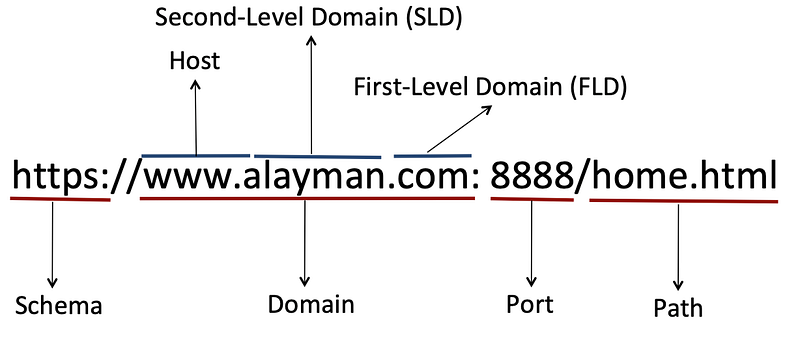
CORS does help prevent certain types of CSRF attacks from external sources. But it can’t prevent internal CSRF attacks.
It can restricts users to call endpoints from XMLHttpRequest(AJAX) andFetch. But users still call endpoints in HTML tags(img, script, etc).
Set Cross-Origin Resource Sharing (CORS) in Django/DRF
// Install packages
pip install django-cors-headers
//Edit settings.py
INSTALLED_APPS = (
...
'corsheaders',
...
)CORS_ORIGIN_WHITELIST = [
...
]CORS_ORIGIN_REGEX_WHITELIST = [
...
]MIDDLEWARE = [
...
'django.middleware.common.CommonMiddleware',
'corsheaders.middleware.CorsMiddleware']
Use CSRF token in Django/DRF
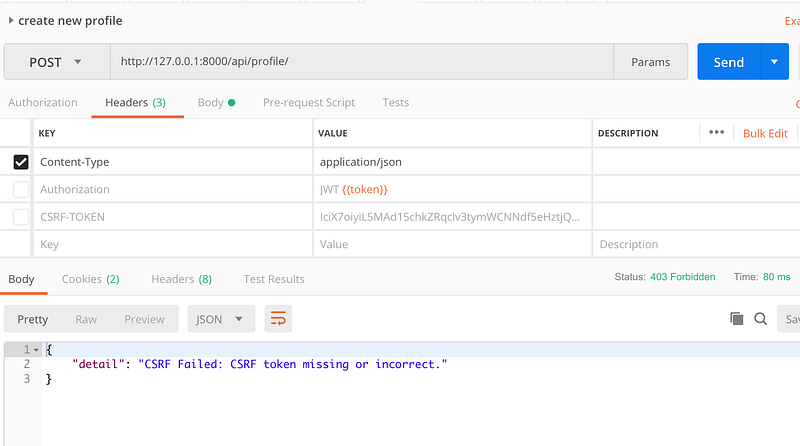
To defend CSRF, we can use the CSRF token with JWT. The server can response with CSRF token in the cookie.
REST_FRAMEWORK = {
    'DEFAULT_PERMISSION_CLASSES': (
         ...
    ),
    'DEFAULT_AUTHENTICATION_CLASSES': (
         'rest_framework_jwt.authentication.JSONWebTokenAuthentication',
'rest_framework.authentication.SessionAuthentication' ), }
The requests without the CSRF token will be rejected.
Summary
I thought there are a few things we have to do with JWT. Suppose that the client-side and the server-side are in the same domain.
- Store JWT in the HttpOnly Cookie
- Set CORS policy on the server
- Set CSRF token mechanism on the server
References
- 是誰在哈囉? 如何搞定 SPA 與 API Server 的登入驗證
- 深入探討 JSON Web Token (JWT)
- 讓我們來談談 CSRF
- CSRF protection — is a JWT and CORS whitelist combination sufficient
- Chrome 80 SameSite Cookie 的影響
- 重要的基礎:Cookie v.s Session Storage v.s Local Storage And Cookie-based v.s Token-based Authentication
- 淺談JWT的安全性與適用情境
- 原來 CORS 沒有我想像中的簡單
- [翻译] REST framework JWT Auth
- django 使用django-cors-headers 解决跨域问题
Summary
Thanks for your patient. I am Sean. I work as a software engineer.
This article is my note. Please feel free to give me advice if any mistakes. I am looking forward to your feedback.
Please feel free to clap if this article can help you. Thank you.
You can also subscribe my page on Facebook.
Related topics
How to use the two-way binding in Knout.js and ReactJS?
Learn how to use SignalR to build a chatroom application
My reflection of
IT & Network:
Database:
Software testing:
Debugging:
DevOps:


