
WebAuthn/FIDO2: Verifying assertion responses
In this article we will talk about procedures that server will need to perform in order to validate WebAuthn response. If you are interested in playing with WebAuthn first, you should read my article: “Introduction to WebAuthn API”
“Your employees are locked out of their laptops. Their data is gone. They don’t even know what meetings they have today and will be trying to recover for months.” (Sony Pictures)
“Your customer data has been released, including their credit card numbers and social security numbers. The data has been insidiously pilfered for months. Your company is the top headline of every news site and your shareholders are not happy. You watch as you stock price dives, knowing that this is only the beginning.”
Now lets’s wake up, have cuppa tea or coffee, and start building FIDO2 server so nothing like this would ever happen, because FIDO2 is here to kill phishing. Once and for all.
General FIDO2 response structure looks like this:
- rawId and id — is credential identifier on the device
- response — contains attestation or assertion data. I will get into specifics later.
- response.clientDataJSON — base64url encoded buffer of the JSON structure that contains session information. That’s the only response field I will describe for now.
- getClientExtensionResults — extensions results struct
- type — type of credential. Must be set to “public-key”
Lets explore clientDataJSON. You can decode it on the server side using base64url lib in Node.js:
Decoding ClientDataJSON reveals all the important information about the session:
- challenge —the challenge that was sent to authr
- type — type of the call. If you were creating credential(registering authr), then you will get type “webauthn.create”. If you were getting assertion(authenticating) you will get webauthn.get.
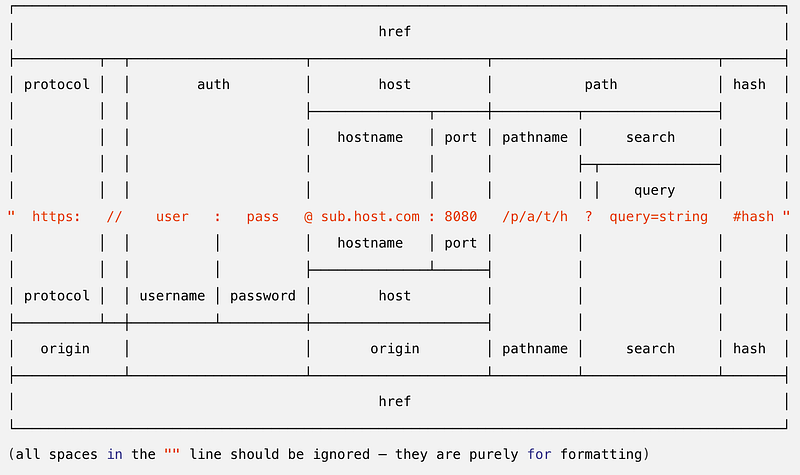
- origin — the origin of the website. To those who are not familiar with URLs, the origin is basically protocol, host and port. So if your are calling WebAuthn API while your use is located at “https://example.com/login”, then origin will be “https://example.com”. If he calls from “http://localhost:2823/test” then the origin will be “http://localhost:2823”. Please note that WebAuthn API will not work on pages loaded over HTTP, unless it is localhost, which is considered secure context.
All other fields can be ignored. Some browsers will put there some additional useful information, such as in current example Chrome team decided to let users know that they should not simply do template check. Please don’t.
Getting back to “response” field. Responses can be of two types:
1. Attestation response — for registering credential
2. Assertion response — for authenticating credential
Attestation
Example of attestation response we’ve seen earlier:
The attestationObject contains base64url encoded buffer of CBOR encoded attestation object. You can parse it using base64url and cbor libs in Node.js:
When parsed you will get this structure:
- fmt — attestation format. It can be “packed”, “fido-u2f”, “none”, “android-key”, “android-safetynet”, “tpm” and “apple”.
- authData — a raw buffer struct containing user info.
- attStmt — attestation statement data. The structure of the statement and the procedures to verify it are depending on the type of the format that is defined by “fmt”.
Now, I won’t be talking about verifying each attestation here. Instead I have written, and still writing, blog posts about verifying each format:
- Packed: https://readmedium.com/verifying-fido2-packed-attestation-a067a9b2facd
- FIDO-U2F: https://readmedium.com/verifying-fido-u2f-attestations-in-fido2-f83fab80c355
- TPM: https://readmedium.com/verifying-fido-tpm2-0-attestation-fc7243847498
- Android Keystore: https://readmedium.com/webauthn-fido2-verifying-android-keystore-attestation-4a8835b33e9d
- [DEPRECATED] Android SafetyNet: https://readmedium.com/verifying-fido2-safetynet-attestation-bd261ce1978d
- [DEPRECATED] Apple Anonymous Attestation: https://readmedium.com/webauthn-fido2-verifying-apple-anonymous-attestation-5eaff334c849
One of the attestation formats called “none”. When you getting it, that means two things:
1. You really don’t need attestation, and so you are deliberately ignoring it.
2. You forgot to set attestation flag to “direct” when making credential.
If you are getting attestation with “fmt” set to “none”, then no attestation is provided, and you don’t have anything to verify. Simply extract user relevant information as specified below and save it to the database.
User information is stored in authData. AuthData is a rawBuffer struct:
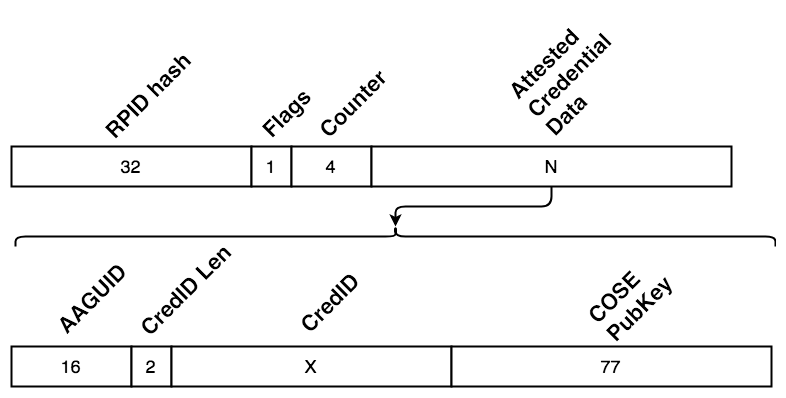
- RPIDHash — is the hash of the rpId which is basically the effective domain or host. For example: “https://example.com” effective domain is “example.com”
- Flags — 8bit flag that defines the state of the authenticator during the authentication. Bits 0 and 2 are User Presence and User Verification flags. Bit 6 is AT(Attested Credential Data). Must be set when attestedCredentialData is presented. Bit 7 must be set if extension data is presented.
- Counter — 4byte counter.
RPIDHash, Flags and Counter is mandatory for both Attestation and Assertion responses. AttestedCredentialData is only for attestation.
- AAGUID — authenticator attestation identifier — a unique identifier of authenticator model
- CredID — Credential Identifier. The length is defined by credIdLen. Must be the same as id/rawId.
- COSEPubKey — COSE encoded public key
Here is a method how to parse authData:
Assertion
The assertion response looks like this:
Instead of attestationObject, now you just have straight forward signature, userHandle, and authenticatorData(same as authData in attestation).
- signature — self explanatory
- authenticatorData —same as authData, but without attestedCredentialData
- userHandle — user.id that was send during credential creation. In U2F this field will always be empty.
Verifying response
For both Attestation and Assertion
- Decode ClientDataJSON
- Check that challenge is set to the challenge you’ve sent
- Check that origin is set to the the origin of your website. If it’s not raise the alarm, and log the event, because someone tried to phish your user
- Check that type is set to either “webauthn.create” or “webauthn.get”.
- Parse authData or authenticatorData.
- Check that flags have UV or UP flags set.
- If your RPID set to the origin, hash the domain part of the origin: hash(“example.com”). If you have different RPID, then hash that e.g. hash(“auth.example.com”). Save the hash to the ExpectedRPIDHash
- Verify that authData.rpIdHash matches ExpectedRPIDHash
If the type is set to “webauthn.create”:
- Verify attestation:
- Packed: https://readmedium.com/verifying-fido2-packed-attestation-a067a9b2facd
- FIDO-U2F: https://readmedium.com/verifying-fido-u2f-attestations-in-fido2-f83fab80c355
- TPM: https://readmedium.com/verifying-fido-tpm2-0-attestation-fc7243847498
- Android Keystore: https://readmedium.com/webauthn-fido2-verifying-android-keystore-attestation-4a8835b33e9d
- [DEPRECATED] Android SafetyNet: https://readmedium.com/verifying-fido2-safetynet-attestation-bd261ce1978d
- [DEPRECATED] Apple Anonymous Attestation: https://readmedium.com/webauthn-fido2-verifying-apple-anonymous-attestation-5eaff334c849
- Create new authenticator record and store counter, credId and publicKey in the DB
If the type is set to “webauthn.get”
- Hash clientDataJSON with SHA-256
- Concat authenticatorData with clientDataHash to create signatureBase
- Using previously saved public key, verify signature over signatureBase.
- If you can’t verify signature multiple times, potentially raise the alarm as phishing attempt most likely is occurring.
- If counter in DB is 0, and response counter is 0, then authr does not support counter, and this step should be skipped
- If response counter is not 0, check that it’s bigger than stored counter. If it’s not, potentially raise the alarm as replay attack may have occurred.
- Update counter value in database
- Profit!
If you like this post, you might like my WebAuthn tutorial as well: https://slides.com/fidoalliance/jan-2018-fido-seminar-webauthn-tutorial
Updates
- 2018/08/30 — Moved counter verification after signature verification. Thanks to @novmatake for raising the issue
- 2018/08/07 — Clarified counter value processing for authrs that don’t support counter
- 2019/02/05 — Fixed mixed terms with keyHandle/userHandle
- 2021/01/01 — Added Apple Anonymous Attestation
- 2021/06/01 — Added fix for ParseAuthData to account for ED public keys
License
This article is licensed under Creative Commons Attribution-NonCommercial-NoDerivatives 4.0 International (CC BY-NC-ND 4.0). So you are free to read, share, etc. If you are interested in commercial use of this article, or wish to translate it to a different language, please contact yuriy(at)webauthn(dot)works
The code samples are licensed under MIT license.


