
WebAuthn/FIDO2: Verifying SafetyNet Attestation
!!! THIS ATTESTATION BEEN DEPRECATED AND NO LONGED NEED TO BE SUPPORTED !!!
Please note that this is an advance post, and requires prior understanding of the FIDO2 attestations. You can read more about them here.
“If it keeps on rainin' levee's goin' to break” Led Zeppelin would sing over and over in their songs. But then Google put some crazy big-data on their Play Store, and suddenly infinite rain of data can be not just be handled, but actually used to ensure that apps installed are not doing something stupid, by just analysing their behaviour.
So to be up to date “If it keeps on rainin’ data, levee’s goin’… to protect your apps”
SafetyNet is a set of Google Play Services API’s, that are helpful for defence against security threats on Android, such as device tampering, bad URLs, malicious apps, and fake user accounts. Main solutions that SafetyNet provides are device attestation, safe browsing, re-captcha and app check APIs. I won’t be going into details on how to successfully work and deploy SafetyNet, or how it works under the hood. If you wish to learn deep technical details, Collin Mulliner gave a talk at 34C3 “Inside Android’s SafetyNet Attestation: Attack and Defense”
Our only interest today is Device Attestation and how to verify it in FIDO2.
Typical example of FIDO2 SafetyNet attestation looks like this:
As you can see there is “ver” and “response” fields. We can ignore version and get to “response” field. The response field is a buffer of JWT string of the SafetyNet attestation. In current example for simplicity it is hex encoded. So when we encode buffer to UTF-8 string we will get this:
JWT(pronounced as JOT) is stands for JSON Web Token. Not going to deep technical details, its basically base64url concatenation of signed header and payload with signature, separated by a full stop(.). You can play with my JTW by pasting at https://jwt.io/.
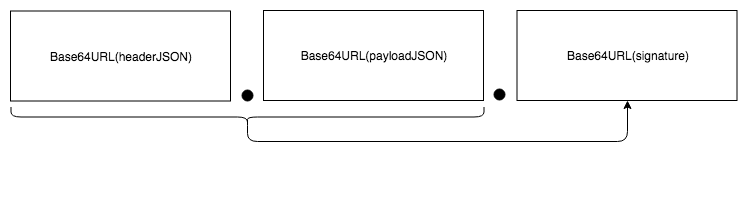
The steps to verify FIDO2 SafetyNet attestation are:
- Verify payload
- Verify header
- Verify signature over the concatenation of the payload and header joined by a full stop
Verifying payload
The payload is the second base64url encoded string
eyJub25jZSI6IlhQQjdWVGRSWGJEM01mMENvTFF5ZVJQclA5ZjIzYW9mVHBtVWd6cmlrbzA9IiwidGltZXN0YW1wTXMiOjE1NDA2NTE2ODQwOTMsImFwa1BhY2thZ2VOYW1lIjoiY29tLmdvb2dsZS5hbmRyb2lkLmdtcyIsImFwa0RpZ2VzdFNoYTI1NiI6ImVRYyt2elVjZHgwRlZOTHZYSHVHcEQwK1I4MDdzVUV2cCtKZWxlWVpzaUE9IiwiY3RzUHJvZmlsZU1hdGNoIjp0cnVlLCJhcGtDZXJ0aWZpY2F0ZURpZ2VzdFNoYTI1NiI6WyI4UDFzVzBFUEpjc2x3N1V6UnNpWEw2NHcrTzUwRWQrUkJJQ3RheTFnMjRNPSJdLCJiYXNpY0ludGVncml0eSI6dHJ1ZX0
Fun fact: if you see string that start with “ey”, it’s most likely JSON in Base64. If we decode it to UTF8 and JSON decode it, we will get this:
To verify the payload you need:
- Hash clientDataJSON using SHA256, to create clientDataHash
- Concatenate authData with clientDataHash to create nonceBase
- Hash nonceBase using SHA256 to create nonceBuffer.
- Base64 encode nonceBuffer to create expectedNonce
- Check that “nonce” is set to expectedNonce
- Check that “ctsProfileMatch” is set to true. If its not set to true, that means that device has been rooted and so can not be trusted to provide trustworthy attestation.
I won’t be discussing what other field are used for. If you are planing to implement your own SafetyNet authenticator, you should watch Collin’s video above.
Verifying header
The next step would be to verify header. Header is the first Base64url encoded string. When decoded:
To verify header we need to:
- If you are implementing Metadata Statement, or Metadata Service support: Verify that “alg” field is corresponds to the authenticationAlgorithm in the Metadata Statement.
- Get leaf certificate of x5c certificate chain, decode it, and check that it was issued for “attest.android.com”
- If you are using MDS or Metadata Statements, for each attestationRoot in attestationRootCertificates: append attestation root to the end of the header.x5c, and try verifying certificate chain. If none succeed, throw an error
- If you are not using MDS or Metadata Statements, then download “GlobalSign Root CA — R2” from Google PKI directory. Attach it to the end of header.x5c and try to verify it
Verifying JWT
If you have successfully verified header and payload, then you can finally verify the JWT.
- Concatenate Base64URL encoded header and payload with full stop, to create signatureBase
- Extract public key from leaf certificate
- Verify signature over signatureBase using the public key extracted from leaf certificate
Best practices
- Use well established libraries to verify JWT. jwt.io has a great list of libraries for basically every popular programming language there are.
References
- https://w3c.github.io/webauthn/#android-safetynet-attestation
- https://jwt.io/
- https://lapo.it/asn1js/
- https://developer.android.com/training/safetynet/
- https://www.youtube.com/watch?v=8lv_9mydrjg
Snippets
License
This article is licensed under Creative Commons Attribution-NonCommercial-NoDerivatives 4.0 International (CC BY-NC-ND 4.0). So you are free to read, share, etc. If you are interested in commercial use of this article, or wish to translate it to a different language, please contact ackermann(dot)yuriy(at)gmail(dot)com.
The code samples are licensed under MIT license.


