
WebAuthn/FIDO2: Verifying Android KeyStore Attestation
Please note that this is an advance post, and requires prior understanding of the FIDO2 attestations. You can read more about them here.
Security, yeah That’s all I want from you, oh now Security, yeah And a little love that will be true, oh — Otis Redding — Security
Android KeyStore is a key management container, that defends key material from extraction. Depending on the device, it can be either software or hardware backed. The main functionality of the KeyStore, manage and store keys, encrypt, decrypt and sign.
One of the important features of KeyStore is ability to provide attestation of the device. The attestation contains information about the security levels and features that device provides, that can be used by the RP to assess the risks for it particular case. Keystore attestation is very useful for authentication and payment solutions. For example Android pay system uses it to asses the device for payment purposes, and for selection of the payment modes. You can learn more about it in 34C3 talk — “Decoding Contactless (Card) Payments”. I as well highly advice “Android Security Internals” by Nikolai Elenkov.
KeyStore attestation first introduced in FIDO in 2016 as UAF1.1 extension. For the companies it is a really useful tools to ensure security levels they require. For example if authenticator required to be FIPS/CC/PCI/FIDO compliant, then it needs to be running on the device with FIPS/CC/PCI/FIDO compliant hardware, and it can be found getting KeyStore attestation. Banks for example can use keystore attestation to asses if the the device keystore is secure enough to store private keys for electronic payments, thus evaluating is the device can be used to emulate credit card or not.
Typical example of FIDO2 Android Keystore attestation looks like this:
As you can see, the structure looks somewhat similar to other attestation statements. To recap:
- “alg” — an algorithm that is used for the signature. -7 means ECDSA with NIST P256 curve and SHA256.
- “sig” — contains signature
- “x5c” — contains attestation certificate chain
Verifying attestation
- Concatenate authData with clientDataHash to create signatureBase
- Verify signature sig over the signatureBase using public key extracted from leaf certificate in x5c
Verifying attestation certificate
- Decode leaf attestation certificate
- Check that authData publicKey matches the public key in the attestation certificate
- Find Android KeyStore Extension with OID “1.3.6.1.4.1.11129.2.1.17” in certificate extensions. The extension looks like this:
Here is sample from the certificate:
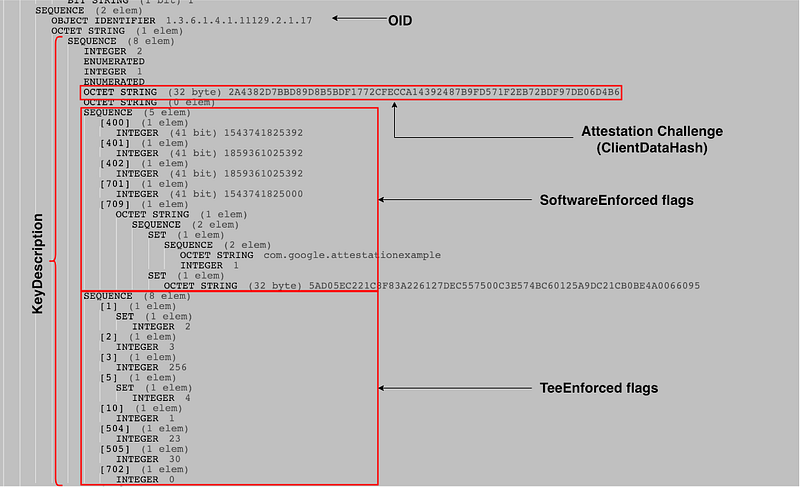
The important to us fields are attestationChallenge, as well as softwareEnforced and teeEnforced authorization lists. TeeEnforced and SoftwareEnforced structures contain information about security of the attestation, key type, curve, key length. They both have same type structure, the difference is that if you see key information in softwareEnforced, you know that device does not support hardware backed crypto. In the same time softwareEnforced will contain information that can only be enforced by software, such as callerApp and digest of the attestation certificate. You can find more info in the official docs[2]
4. Check that attestationChallenge is set to the clientDataHash.
5. Check that both teeEnforced and softwareEnforced structures don’t contain allApplications(600) tag. This is important as the key must strictly bound to the caller app identifier.
6. Check that root certificate(last in the chain) is set to:
At the moment of writing, Google does not publish this certificate, so this was extracted from one of the attestations.
7. Verify certificate path using the algorithm specified in RFC5280 section 6
8. PROFIT!
Here is the verification sample in NodeJS
References
- https://w3c.github.io/webauthn/#android-key-attestation
- https://developer.android.com/training/articles/security-key-attestation
- https://nostarch.com/androidsecurity
- https://www.youtube.com/watch?v=DChVE1NEME0
- https://github.com/herrjemand/AttestationExample
- https://tools.ietf.org/html/rfc5280#page-71
- https://lapo.it/asn1js/#MIICyjCCAnCgAwIBAgIBATAKBggqhkjOPQQDAjCBiDELMAkGA1UEBhMCVVMxEzARBgNVBAgMCkNhbGlmb3JuaWExFTATBgNVBAoMDEdvb2dsZSwgSW5jLjEQMA4GA1UECwwHQW5kcm9pZDE7MDkGA1UEAwwyQW5kcm9pZCBLZXlzdG9yZSBTb2Z0d2FyZSBBdHRlc3RhdGlvbiBJbnRlcm1lZGlhdGUwHhcNMTgxMjAyMDkxMDI1WhcNMjgxMjAyMDkxMDI1WjAfMR0wGwYDVQQDDBRBbmRyb2lkIEtleXN0b3JlIEtleTBZMBMGByqGSM49AgEGCCqGSM49AwEHA0IABDhJog_eJsNLAIg5GlgneD3_k4gLFlQIiq369XollUmhdDxLUkXPJoXPkQVDZ81Pr7lITnBZNlEBH8DcznYhxo-jggExMIIBLTALBgNVHQ8EBAMCB4AwgfwGCisGAQQB1nkCAREEge0wgeoCAQIKAQACAQEKAQEEICpDgte72J2LW98Xcs_syhQ5JIe5_VcfLrcr35feBtS2BAAwgYK_gxAIAgYBZ24u4XC_gxEIAgYBsOqNrXC_gxIIAgYBsOqNrXC_hT0IAgYBZ24u3-i_hUVOBEwwSjEkMCIEHWNvbS5nb29nbGUuYXR0ZXN0YXRpb25leGFtcGxlAgEBMSIEIFrQXsIhyPg6ImEn3sVXUAw-V0vGASWp3CHLC-SgBmCVMDOhBTEDAgECogMCAQOjBAICAQClBTEDAgEEqgMCAQG_g3gDAgEXv4N5AwIBHr-FPgMCAQAwHwYDVR0jBBgwFoAUP_ys1hqxOp6BILjVJRzFZbsekakwCgYIKoZIzj0EAwIDSAAwRQIgZ3c5CJOAVf1jTuQT6q_CHYrHqUQb35evY5FPmzsAr_4CIQC5wMiUWMJSjisl-ojE1j3cdeG8gPuU3MYiiVLQT4EkGA
License
This article is licensed under Creative Commons Attribution-NonCommercial-NoDerivatives 4.0 International (CC BY-NC-ND 4.0). So you are free to read, share, etc. If you are interested in commercial use of this article, or wish to translate it to a different language, please contact ackermann(dot)yuriy(at)gmail(dot)com.
The code samples are licensed under MIT license.


