
WebAuthn/FIDO2: Verifying TPM Attestation
Please note that this is an advance post, and requires prior understanding of the FIDO2 attestations. You can read more about them here.
If anything can intimidate you, that’s TPM. Written in the deep, dark caves under Barad-dûr, by Trusted Computing Group, it was never meant to be read by humans. Eight hundred and sixty one page of the dark spells and tables describing the most wicked of the hardware encryption modules. Those who manage to learn it all will be haunted by the nightmares… until they move to another project.
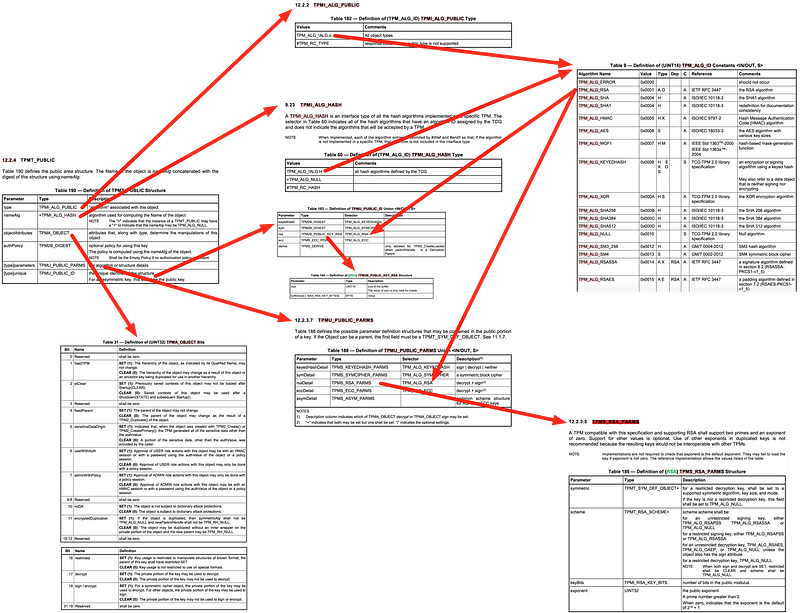
Now keeping LoTR universe behind, I will say that I will be keeping TPM specs out of this section as hard as I can. If you wish to go deep you are free to visit TPM specs, though you nerve system will thank you if you don’t.
Typical FIDO2 TPM attestation statement looks like this:
- “ver” — defines the version of TPM specs. In FIDO2 we support only version 2.0, so it must always be set to “2.0”
- “alg” — in current example it’s -65535 which is PKCS1.5 with SHA1 or RS1 per IANA registry
- “sig” — contains signature
- “x5c” — contains certificate chain with the first certificate being the AIK certificate, which will be important a little bit sooner.
- “certInfo” — is a signed structure that contains all of the important TPM information for validating attestation.
- “pubArea” — contains some more attestation info
Parsing certInfo and pubArea
Practically speaking this is what TPMT_ATTEST structure looks like:
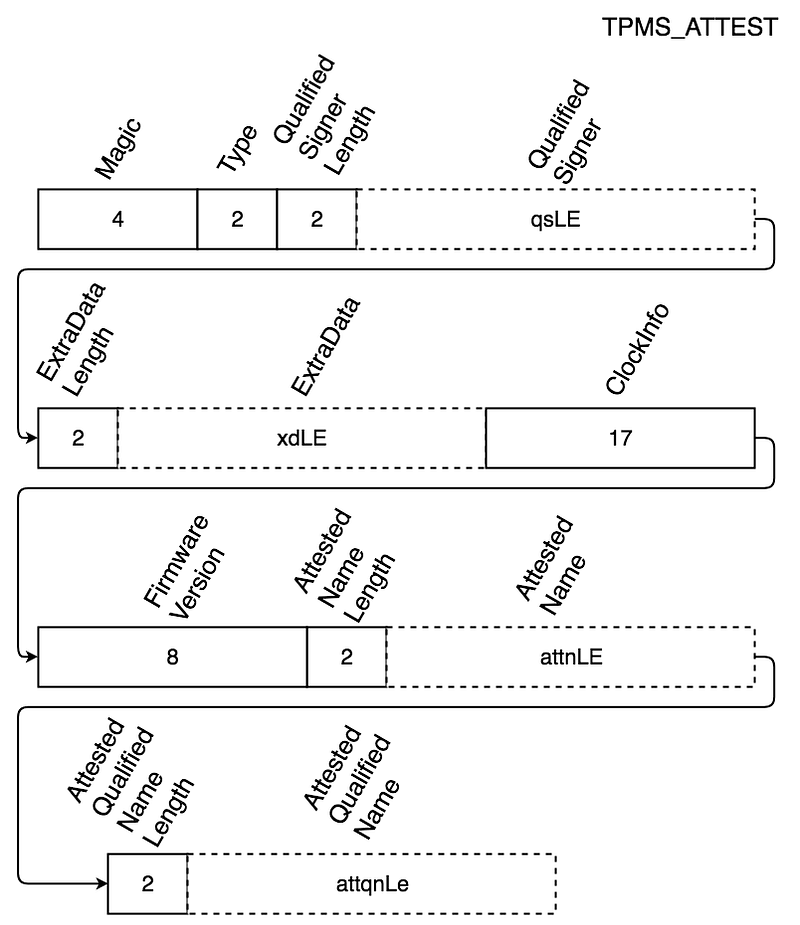
What basically certInfo does, is provides information about TPM state at the moment of signature. For the most part it’s useless to us, the only thing we want is to understand how to parse it, and how to evaluate it in terms of FIDO2 attestation. Let understand each of the values:
- magic — a special four byte constant stating that this is TPM generated structure. Must be set to TPM_GENERATED(0xFF544347)
- type — algorithm used for attestation
- qualified signer — a name of a parent entity. Ignore
- extra data — contains hash of the attsToBeSigned. The hashing algorithm is specified by the “alg” field
- clock info — contains information about TPP clock state. Clock, resetCount, restartCount and safe fields. Ignore
- firmware version — TPM-vendor-specific value identifying the version number of the firmware
- attested name — a concatenation of hashing algorithm identifier and the hash of the pubArea. More in verification section
- attested qualified name — Ignore
So the code for parsing certInfo would look something like this:
You can find helper functions and meta tags down below.
PubArea is just continuation of the certInfo, and it contains information about public key.
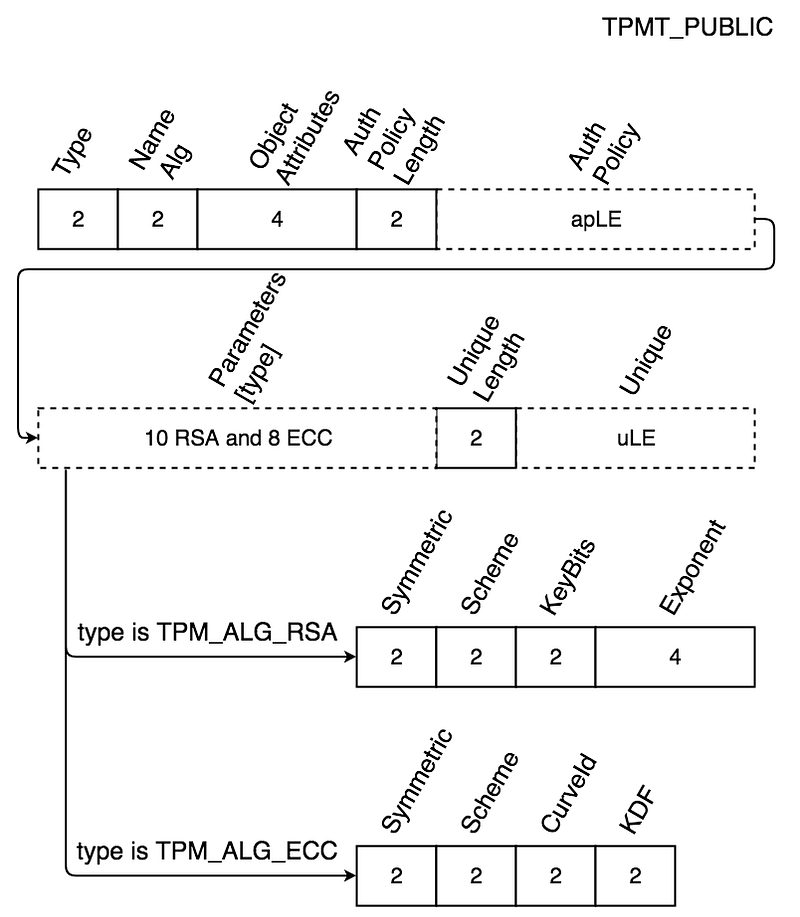
The purpose of pubArea is to provide information about generated keypair. Lets review its fields:
- type — type of key / key algorithm, i.e RSA, ECC. A member of TPM_ALG_ID
- name alg — an algorithm that was used to generate name field in certInfo. Must much algorithm in name
- object attributes — a bit map, with flags defining available key operations
- auth policy — a hash of the authentication policy. Ignore
- parameters — a list of key parameters.
- unique — generate public key. For RSA it’s the n coefficient, and for ECC it’s the concatenation of the X and Y coefficients. Must match newly generated public key in authData.
For parameters:
- symmetric — symmetric algorithm used for encryption. Must be set to NULL
- scheme — algorithm scheme, such as RSASSA(0x0014), RSAPSS(0x0016) for RSA and ECDSA(0x0018) for ECC. etc. Members of TPM_ALG_ID
If type is set to RSA:
- keyBits — length of key. 2048/4096 etc
- exponent — RSA key exponent. If set to 0x00, then exponent is a default RSA exponent of 2¹⁶+1(65537)
If type is set to ECC:
- curveId — curve identifier. Member of TPM_ECC_CURVE
- kdf — key derivative function identifier for symmetric encryption. Must be NULL.
So the method for parsing would look like:
Verifying attestation
To verify attestation you need to do two things: verify structures and verify signature and chain
Verifying structures
- Check that “ver” is set to “2.0”
- Check that the “alg” field is set to the equivalent value to the signatureAlgorithm in the metadata. You can find useful conversion tables in the appendix.
- Parse “pubArea”.
- Check that pubArea.parameters are corresponding the the chosen signatureAlgorithm in metadata.
- Check that pubArea.unique is set to the same public key, as the one in “authData” struct.
- Parse “certInfo”.
- Check that certInfo.magic is set to TPM_GENERATED(0xFF544347).
- Check that certInfo.type is set to TPM_ST_ATTEST_CERTIFY(0x8017).
- Hash pubArea to create pubAreaHash using the nameAlg in attested
- Concatenate attested.nameAlg and pubAreaHash to create attestedName.
- Check that certInfo.attested.name is equals to attestedName.
- Concatenate authData with clientDataHash to create attToBeSigned
- Hash attToBeSigned using the algorithm specified in attStmt.alg to create attToBeSignedHash
- Check that certInfo.extraData is equals to attToBeSignedHash.
Verifying signature
At that point no one supports ECDAA, so I will only explain FULL attestation.
- Pick a leaf AIK certificate of the x5c array and parse it.
- Check that certificate if of version 3(value must be set to 2).
- Check that Subject sequence is empty.
- Check that certificate is not expired and is started.
- Check that certificate contains subjectAltName(2.5.29.17) extension, and check that tcpaTpmManufacturer(2.23.133.2.1) field is set to the existing manufacturer ID. You can find list of TPM_MANUFACTURERS in the appendix.
- Check that certificate contains extKeyUsage(2.5.29.37) extension and it must contain tcg-kp-AIKCertificate (2.23.133.8.3) OID.
- If certificate contains id-fido-gen-ce-aaguid(1.3.6.1.4.1.45724.1.1.4) extension, check that it’s value is set to the same AAGUID as in authData.
- For attestationRoot in metadata.attestationRootCertificates, generate verification chain verifX5C by appending attestationRoot to the x5c. Try verifying verifX5C. If successful go to next step. If fail try next attestationRoot. If no attestationRoots left to try, fail.
- Verify signature over certInfo with the public key extracted from AIK certificate.
- Get Martini friend, you are done!
That’s all folks. If you have any questions, please leave the comment down below, or find me on twitter @herrjemand
Updates
30/07/18: Clarified exponent behaviour when set to 0
13/08/18: Clarified usage of the hashing algorithm for pubArea
11/10/18: Fixed typos. Thanks @devsarif *)
29/04/19: Fixed name algorithm mixup
References
- https://w3c.github.io/webauthn/#tpm-attestation
- https://www.trustedcomputinggroup.org/wp-content/uploads/TPM-Rev-2.0-Part-1-Architecture-01.38.pdf
- https://www.trustedcomputinggroup.org/wp-content/uploads/TPM-Rev-2.0-Part-2-Structures-01.38.pdf
- https://www.trustedcomputinggroup.org/wp-content/uploads/TPM-Rev-2.0-Part-3-Commands-01.38.pdf
- https://www.trustedcomputinggroup.org/wp-content/uploads/Credential_Profile_EK_V2.0_R14_published.pdf
Snippets
License
This article is licensed under Creative Commons Attribution-NonCommercial-NoDerivatives 4.0 International (CC BY-NC-ND 4.0). So you are free to read, share, etc. If you are interested in commercial use of this article, or wish to translate it to a different language, please contact ackermann(dot)yuriy(at)gmail(dot)com.
The code samples are licensed under MIT license.