
Using forward_hooks to Extract Intermediate Layer Outputs from a Pre-trained ResNet Model in PyTorch
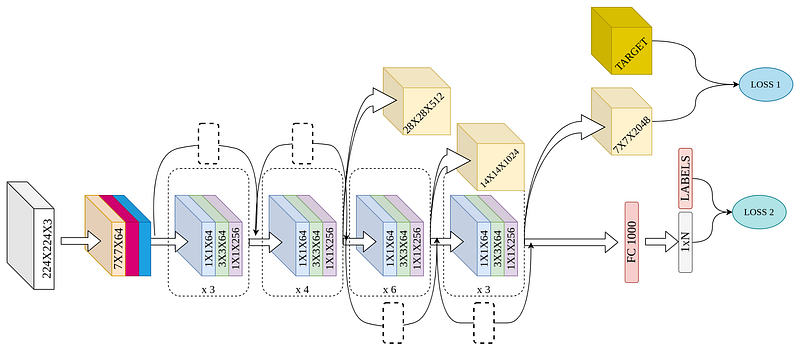
Here we are again with the fourth article in the “Feature Extraction” series. This article will describe another method (and possibly the best method) to extract features from an intermediate layer of a model in PyTorch. We have seen some methods in two of our previous articles (links are given below) which were quite different from this approach. These two methods do not use forward hooks but are based on inheriting the respective model classes and overriding some attributes and the forward function to obtain output from the desired layer. But these methods fail if we want to obtain the predictions also along with the output of an intermediate layer.
Another article which describes a method for VGG-Net can be found below
To avoid the issues associated with the above methods, it is better to use forward hooks to obtain output from intermediate layers. We can also use this (these) output(s) for calculating loss (and subsequently the gradients) with respect to the target output.
Hooks are functions which we can register on a Module or a Tensor. Hooks are of two types: forward and backward. These hooks are mainly triggered by forward or backward pass.
For the forward hook, the function is of the form
hook(module, input, output) -> None or modified outputinput is the input to the module and output is the output obtained after the input is passed through the module.
For the backward hook, the function is of the form
hook(module, grad_input, grad_output) -> Tensor or Nonegrad_input is the gradient of the input to the module and grad_output is the gradient of the output of the module with respect to the Loss. It does not give the gradients of the parameters with respect to the loss.
The forward hook is triggered every time after the method forward (of the Pytorch AutoGrad Function grad_fn) has computed an output. We can modify the output by returning the modified output from the hook. We can also modify the input in-place but it will not have an effect on the output as this hook is triggered after the computations in the forward (of the Pytorch AutoGrad Function grad_fn) method are complete.
The backward hook will be called every time the gradients with respect to module inputs are computed (whenever backward( ) of Pytorch AutoGrad Function grad_fn is called). grad_input and grad_output may be tuples if the module has multiple inputs or outputs. The hook should not modify its arguments, but it can optionally return a new gradient with respect to input that will be used in place of grad_input in subsequent computations.
There is also another type of hook forward_pre_hook which is triggered before every time the forward method is invoked. The signature for the forward_pre_hook is of the form
hook(module, input) -> None or modified inputUsing the forward_pre_hook the user can modify the input but returning the modified input value as a tuple or just a single modified value in the hook.
For a more detailed discussion on the PyTorch AutoGrad Function and automatic differentiation, readers can refer to this article.
Importing required libraries
Model with hooks
We create an instance of the model like this
model = NewModel(output_layers = [7,8]).to('cuda:0')We store the output of the layers in an OrderedDict and the forward hooks in a list self.fhooks. We enumerate over the layers in the pre-trained model and if the index of the layer matches with the numbers we passed as argument to the model, then a forward hook is registered and the handle is appended to the list self.fhooks. The handles can later be used for removing the hooks from the model. The hook simply creates key-value pair in the OrderedDict self.selected_out, where the output of the layers is stored with a key corresponding to the name of the layer. However, instead of the layer names, the index of the layer can also be used as keys.
The output obtained from the intermediate layers can also be used to calculate loss (provided there is a target/ground truth for that) and we can also back-propagate the gradients just by using
loss.backward()Example
Let, us create a random array with the same dimensions as ‘layer4’ (7th layer).
target_ft = torch.rand((2048,7,7), device = ‘cuda:0’)Let, us take an input (any random natural image will do)
x = imageio.imread(‘image_path’)
x = (x-128.0)/128.0
x = resize(x,(224,224),preserve_range = True)
x = np.repeat(np.expand_dims(x,0),8,0)
x = torch.movedim(torch.Tensor(x),3,1)
Output
out, layerout = model(x.to(‘cuda:0’))Now, layerout is an OrderedDict. We need to get the output from layer4 from it. We can easily do that since the layer name is the key
layer4out = layerout[‘layer4’]Let us create a dummy loss function first. Suppose, the loss is like this
loss = torch.sum((label-out)**2) + torch.sum(layer4out-target_ft)Last step
loss.backward()What if we want to modify the input before the input is fed to the module?
We can use forward_pre_hook.
Let us look at an example
First, add this method to the NewModel class
The function pre_hook can be modified as per requirements. Here, I am setting the input to an all-zero tensor. In addition to that, I have added two print statements before line 17 in the code for NewModel and also before line 3 in the code for the forward_pre_hook (above).
print(input)The print statement in the forward_pre_hook prints (as it is executed before the forward method of grad_fn)
tensor([[[[0.1342, 0.0525, 0.0210, …, 0.2578, 0.2857, 0.1806],
          [0.1682, 0.0721, 0.1772, …, 0.2345, 0.2021, 0.0656],
          [0.1483, 0.1108, 0.0943, …, 0.1353, 0.1450, 0.0922],
          …,
          [0.0526, 0.0000, 0.0000, …, 0.2418, 0.1614, 0.0844],
          [0.1251, 0.1400, 0.0840, …, 0.1964, 0.1850, 0.0707],
          [0.0000, 0.0752, 0.1551, …, 0.1493, 0.0917, 0.0000]],
The print statement in the forward_hook prints
tensor([[[[0., 0., 0., …, 0., 0., 0.],
          [0., 0., 0., …, 0., 0., 0.],
          [0., 0., 0., …, 0., 0., 0.],
          …,
          [0., 0., 0., …, 0., 0., 0.],
          [0., 0., 0., …, 0., 0., 0.],
          [0., 0., 0., …, 0., 0., 0.]],
Also the output out has changed
Before input modification
tensor([[-1.2440, -0.3849, -0.6822, …, -0.7914, 0.9842, 1.1522]],
        device='cuda:0', grad_fn=<SqueezeBackward0>))
After input modifcation
tensor([[-0.9874, -0.2133, -0.5294, …, -0.4161, 0.9420, 0.7546]],
        device='cuda:0', grad_fn=<SqueezeBackward0>))
Please clap if you like the article. Also give feedback, if any.


