
Extracting Features from an Intermediate Layer of a Pretrained ResNet Model in PyTorch (Hard Way)
PyTorch is an open-source machine learning library developed by Facebook’s AI Research Lab and used for applications such as Computer Vision, Natural Language Processing, etc.
In this article, we are going to see how we can extract features of the input, from an intermediate layer in a pre-trained network.
EDIT:
Before going further it is better to know that the method described in this article has a better alternative method in the article mentioned below.
Both the methods, the one described in the article mentioned above and the one described in this article yields the same result. The method described in this article does not require knowledge of the source code of the models we are dealing with, but only the model architecture. But the method described in the article mentioned above requires slight knowledge of the source code (required for importing the correct classes from the respective model source files).
If you have reached this far, then let’s continue to see how to extract features from an intermediate layer of a pre-trained model in PyTorch.
Initialize the Pre-trained model
Now, let us see how to build a new model which gives the output of the last ResNet block in ResNet-18 as output.
First, we will look at the layers.
The output will be
Children Counter: 0 Layer Name: conv1
Children Counter: 1 Layer Name: bn1
Children Counter: 2 Layer Name: relu
Children Counter: 3 Layer Name: maxpool
Children Counter: 4 Layer Name: layer1
Children Counter: 5 Layer Name: layer2
Children Counter: 6 Layer Name: layer3
Children Counter: 7 Layer Name: layer4
Children Counter: 8 Layer Name: avgpool
Children Counter: 9 Layer Name: fc
We intend to take the output from layer 4. So, we will discard the last two layers. To do that we will take a look at the modules in the pre-trained model.
rn18._modulesOutput:
OrderedDict([(‘conv1’,
Conv2d(3, 64, kernel_size=(7, 7), stride=(2, 2), padding=(3, 3), bias=False)), (‘bn1’,
BatchNorm2d(64, eps=1e-05, momentum=0.1, affine=True, track_running_stats=True)), (‘relu’,
ReLU(inplace=True)), (‘maxpool’,
MaxPool2d(kernel_size=3, stride=2, padding=1, dilation=1, ceil_mode=False)), (‘layer1’,
Sequential(
(0): BasicBlock( (conv1):
Conv2d(64, 64, kernel_size=(3, 3), stride=(1, 1), padding=(1, 1), bias=False) (bn1):
BatchNorm2d(64, eps=1e-05, momentum=0.1, affine=True, track_running_stats=True) (relu):
ReLU(inplace=True) (conv2):
Conv2d(64, 64, kernel_size=(3, 3), stride=(1, 1), padding=(1, 1), bias=False) (bn2):
BatchNorm2d(64, eps=1e-05, momentum=0.1, affine=True, track_running_stats=True) ) (1): BasicBlock( (conv1):
Conv2d(64, 64, kernel_size=(3, 3), stride=(1, 1), padding=(1, 1), bias=False) (bn1):
BatchNorm2d(64, eps=1e-05, momentum=0.1, affine=True, track_running_stats=True) (relu):
ReLU(inplace=True) (conv2):
Conv2d(64, 64, kernel_size=(3, 3), stride=(1, 1), padding=(1, 1), bias=False) (bn2):
BatchNorm2d(64, eps=1e-05, momentum=0.1, affine=True, track_running_stats=True) ) )), . . .To make a feature extractor with the pre-trained ResNet-18, we modify this OrderedDict and make a Sequential model using nn.Sequential.
How to do it?
In this code snippet, we take the OrderedDict self.pretrained._modules and discard the layers after the layer we want to take the output from. Then, build a new Sequential (nn.Sequential) model using the remaining modules. Finally, we assign None to self.pretrained to discard the original pre-trained model and free up space (although I hope there would be a more technical or PyTorch-ic way to do it). Finally, we build the forward method.
model = new_model(output_layer = 'layer4')
model = model.to(‘cuda:0’)
Summary of the model
from torchsummary import summary
summary(model,input_size=(3, 224, 224))
Summary:
— — — — — — — — — — — — — — — — — — — — — — — — — — — — — — — — Layer (type)                 Output Shape                Param # ================================================================ Conv2d-1                 [-1, 64, 112, 112]              9,408
BatchNorm2d-2            [-1, 64, 112, 112]                128
ReLU-3                   [-1, 64, 112, 112]                  0
MaxPool2d-4              [-1, 64, 56, 56]                    0
Conv2d-5                 [-1, 64, 56, 56]               36,864
                                 .
                                 .
                                 .
BatchNorm2d-64            [-1, 512, 7, 7]                1,024
ReLU-65                   [-1, 512, 7, 7]                    0
BasicBlock-66             [-1, 512, 7, 7]                    0
================================================================
Total params: 11,176,512
Trainable params: 11,176,512
Non-trainable params: 0
----------------------------------------------------------------Input size (MB): 0.57
Forward/backward pass size (MB): 62.78
Params size (MB): 42.64
Estimated Total Size (MB): 105.99
----------------------------------------------------------------
Another alternative way
Here, we iterate over the children (self.pretrained.children() or self.pretrained.named_children()) of the pre-trained model and add then until we get to the layer we want to take the output from. Then, build a new Sequential (nn.Sequential) model using the children submodules. And finally, we assign None to self.pretrained as we will not be using that anymore. However, in case we do need it for anything we can always do that before freeing up the occupied space.
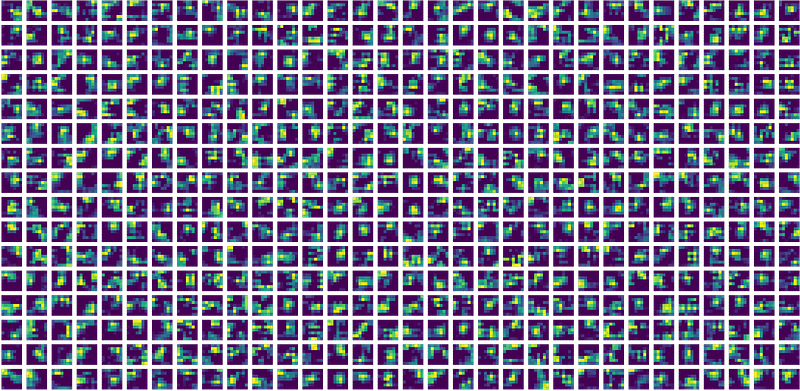
The output obtained from the layer4 of ResNet-18, after passing a randomly chosen frame from a randomly chosen video in the UCF-11 dataset is shown at the top. The image shows 512 feature maps of dimension 7 X 7.


