
The Only Project You Need To Have — A Machine Learning Pipeline
In this article, I present my project of a Machine Learning Pipeline from data collection to monitoring. If you are interested in the code, you can find it in this github repository.

Developing a portfolio in Data Science is a must have to show the skills and creativity that you have. It is also a proof of passion and motivation to always seek for building new things and trying to solve problems.
I honestly think that any type of project is beneficial whether it is helloworld projects such as classifying the survivors of the Titanic dataset, the MNIST handwritten digits or much bigger ones. Showing that you have done it and understood it is the real purpose of the projects. It is part of the learning process.
However, what is important is what is in the portfolio and what you want to showcase. You can put 100 projects, but you need to identify some of them as the ones that show your real skills. The people who will dive into your portfolio need to see directly the most important aspects of what you are good at.
That’s why I’m going to present a project that can show a variety of useful skills in a production environment. I’m not saying that my project is perfect or that everyone should do the same, but the fact that it can highlight a lot about someone’s work. Finally, I would like to add that my work has focused on MLOps and creating a pipeline of operations more than being the most accurate model possible.
Project Description
The project consists of a Machine Learning Pipeline based on some of the most important aspects of MLOps : Experiment Tracking, Workflow Orchestration, Model Deployment and Monitoring.
Here is the pipeline diagram I drew :
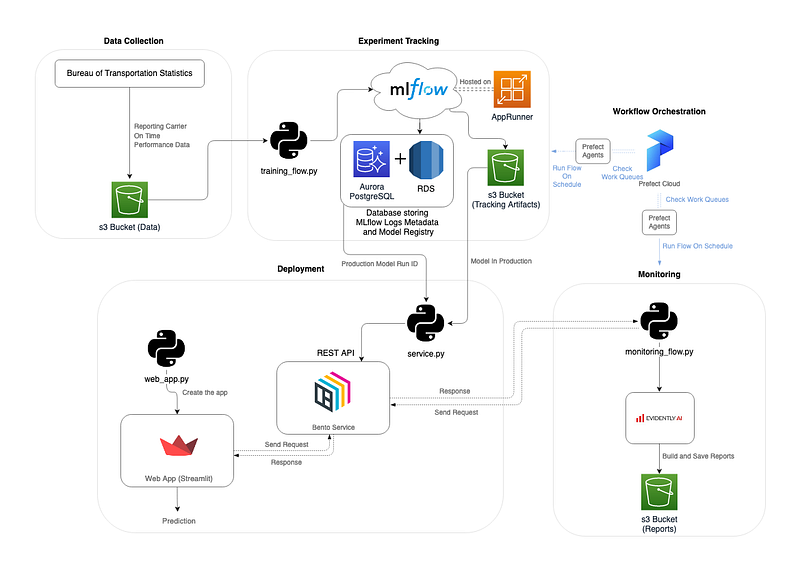
The idea is to solve a machine learning problem (or at least try to) by collecting data, training a model and putting it into production. However, instead of just having a model and deploying it, the real challenge is to have a pipeline that can replicate each process and work continuously. What I mean by continuous basis is the ability to re-train the model with new data and evaluate the performance of the deployed model (this is the monitoring I will introduce later).
The problem I wanted to work on was flight delays in France (since I am and live in France). This summer (2022) knows a lot of problems in the airports regarding flights and especially in terms of delays.
However, I could not find any quality dataset about this problem for French or European flights and I also needed frequently updated data.
I decided to choose US flights data about delay from the Bureau of Transportation Statistics. You can find the datasets here : Carrier On-Time Performance. They are composed of half a million flights with information about them and a column specifying the delay time. I turned the regression problem into a classification because I just wanted to know if the flight would be delayed.
Now that we have a context, let’s explore the different steps of the system…
Pipeline Steps
- Data Collection : get the data from the Bureau of Transportation Statistics and make it available.
- Experiment Tracking : build a model by comparing algorithms, parameter sets and store the results.
- Model Deployment : put the model in production (batch, web app or a streaming service).
- Monitoring : follow the correct functioning of previous steps.
- Workflow Orchestration : build flows from other steps to be orchestrate and run with a clear logic and potential schedule.
Data Collection
The data are stored in a s3 bucket to be available from anywhere as long as you have access to your aws account in the CLI.
To do so, I could not automate the collection because the data source do not allow it. Thus, in a production environment, the idea would be to download the data and put it into the s3 bucket.
Experiment Tracking
For this step, I chose to work with ML Flow because it is a complete tool both for experiments and the establishment of a model registry (you can find an article I wrote about it here).
To have a better experience and be ready for production, I decided to have the MLflow server where the experiments will be, on the cloud. Therefore, I can access it from anywhere.
To do so, I used the MLflow tracking server deployment from Doug Trajano (here) that provides a Terraform stack for creating and initializing the server in an App Runner (AWS). Thus, I have access to MLflow by specifying the following tracking uri : https://XXXXXXXXX.aws-region.awsapprunner.com/.
The code behind experiment tracking is in a python file training_flow.py. It preprocesses the data, adjusts the hyperparameters and stores the best model in an s3 bucket. I provided a better explanation in the readme of my github repository.
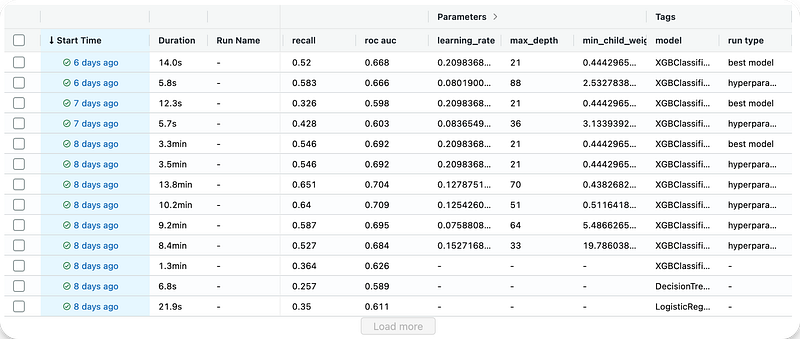
Here is how MLflow looks like from the App Runner and how the runs are presented :
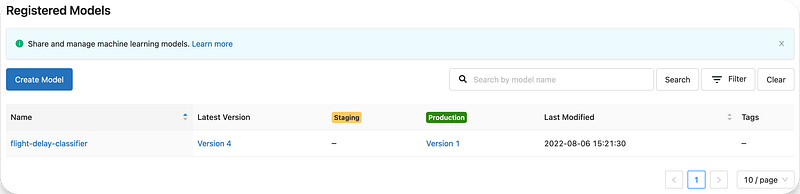
And here is the model registry that references the model in production :
Deployment
Now that we have the model, we have to put it in production and be used for real predictions.
I used BentoML framework and Streamlit to perform this step. The first tool will provide a REST API service from the model to send requests and get predictions. Streamlit will support our web application with inputs for the requests.
Once again, I described the steps on my repository.
Here is what the web application looks like and how it simply works :

Monitoring
This step is crucial when your system is in production as many failures and problems can occur. My last article was about the python library I used in my project and an explanation of how it works : Evidently.ai (the article).
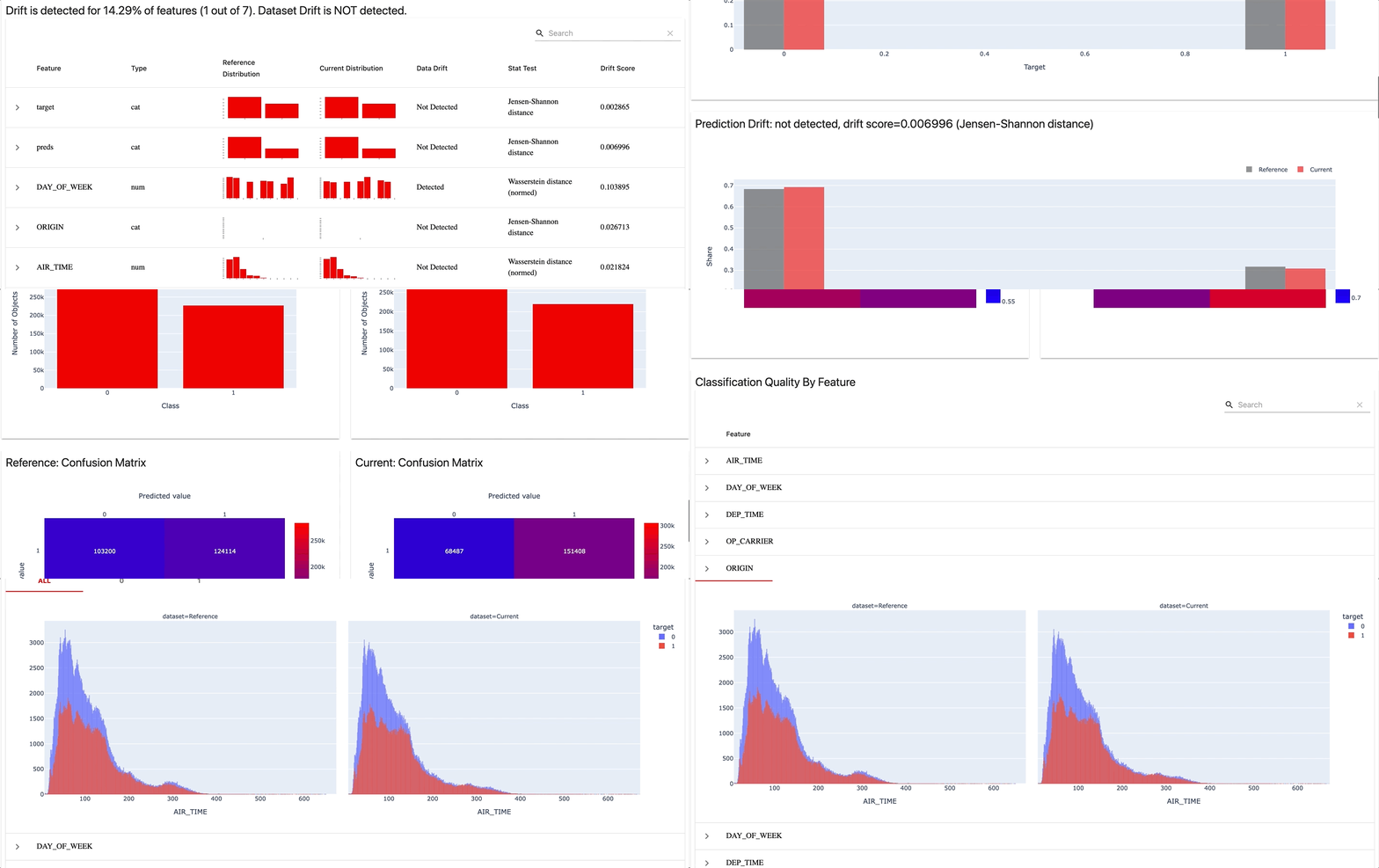
To perform this task, I decided to build 3 reports in a dashboard :
- Data Drift Report
- Categorical Target Drift Report
- Classification Performance Report
All the steps are in a unique python file : monitoring_flow.py.
The idea is to have the model and the data monitored in a recurring manner by having a dashboard created each times new data comes.
Here is how the results look like :
Workflow Orchestration
This step involves ensuring that some of the previous steps are completed on time and without failure. To perform it, I used Prefect and especially Prefect Cloud to be able to use the dashboard from everywhere (I wrote an article about Prefect here).
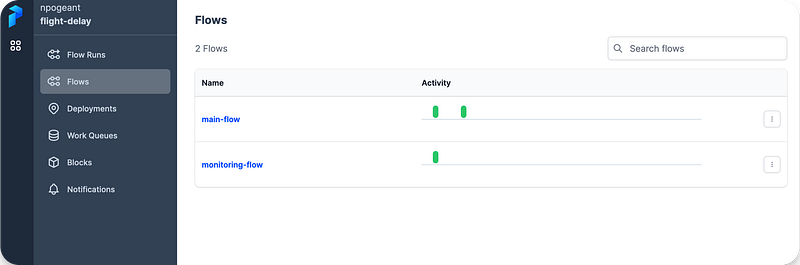
I created 2 flows, one for the training and one for the monitoring. The goal is to have those steps running with some frequency and keep the model up to date without drifts.
You can find any prefect task inside the python files training_flow.py and monitoring_flow.py for functions with the @task decorator. Flows are the 2 functions (one for each file) decorated with a @flow. Once the flows created, I deployed them in Prefect Cloud by login with my API key in the Prefect CLI API.
Here is how the flows and deployments look like in Prefect Cloud :
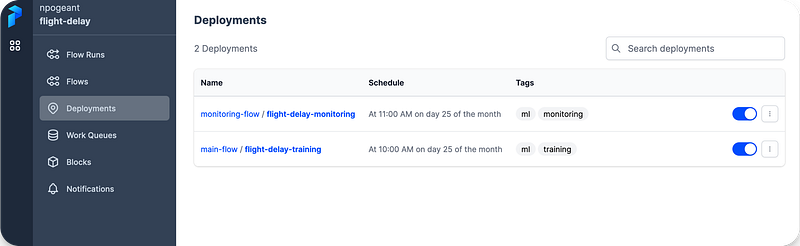
Finally, I created work queues to have my deployed flows executed when the times come.
Conclusion
Starting a portfolio is not easy and choosing the right projects is even harder. In this article, I have presented a project that brings together many aspects of Machine Learning in production and this is what companies need. Any project is useful but having a bigger one that can really create value is bound to be better. Obviously, my project has flaws but the idea is to show what works and what could be improved. I assure you that even if you fail, trying to build a machine learning pipeline allows you to learn a lot!
Thank you for reading the article, I hope that you it motivates you to create and learn always more !