
ML Flow — Track Your Machine Learning Experiments
This article is about a wonderful tool, ML Flow, available within python and improving the development of a Machine Learning Lifecycle.

Monitoring models is essential in the field of Machine Learning when the objective is to implement models in production. This corresponds to the field of MLOps (Machine Learning Operationalized) which corresponds to the fact of putting models into production, i.e. deploying, monitoring and maintaining them.
This is not an easy task because problems such as data leakage or data drift/shift can occur and compromise the model in production. However, being able to track this and be alerted requires more than just a jupyter notebook.
ML Flow is an open source platform for creating a Machine Learning Lifecycle. It was created and launched in 2018 by Data Bricks to allow everyone to be able to manage the release of models in the best possible way. In a more concrete way, ML Flow is a python package with 4 main components that we will see later.
The team behind ML Flow talks about 4 major problems in machine learning development: First, the multitude of algorithms and libraries used when first working with data. Then they talk about the difficulty of tracking experiments, i.e. the different parameters, results, metrics, data and environments used for each of the different models built and evaluated. The third difficulty is the reproducibility of the results because indeed, building a good model is great but being able to share it and have other Data Scientists/ML Engineers use it is even better. Finally, ML Flow also addresses one last problem, the deployment of the model because it is not always standardized and easy to do.
Before diving into the different components, let’s install it and show how it looks like…
Installation and Interface
ML Flow is available with a simple pip install command in a python environment :
pip install mlflowOnce installed, you have the possibility to see the interface of the platform by running :
mlflow uiIt will give you this on the http://localhost:5000 address.
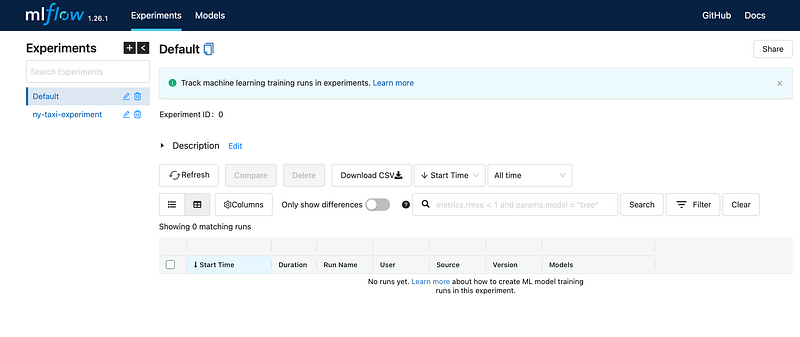
There are two important parameters for the initialization of your ML Flow Tracking Server :
- Backend Store : once the path and type specified, it will store all the information about experiments/runs. It can be done with local files (just a path to a folder) or in a Database (sqlite:///mlflow.db for example).
- Artifact Store : unlike the previous one, it does not store metadata but artifacts about the runs which can be large files such as models, pictures… It is possible to have it configured locally in a folder or on a remote/cloud storage such as Amazon S3 Buckets, Azure Blob Storage or Google Cloud Storage.
mlflow ui -backend-store-uri sqlite:///mlflow.db -default-artifact-root ./mlrunsThese configurations are crucial because without it, you won’t be able to keep track of your experiments which goes against ML Flow idea and ML Ops.
Depending on the size of the team and the use of ML Flow, it can be run in different installations :
- ML Flow in local (without any storage)
- ML Flow with a local database and tracking server (local storage)
- ML Flow in a remote server (for example on a EC2 instance from AWS), this one allow any Data Scientist to have access to the ML Flow interface and all the information on it.
Now that we know how to create and start a ML Flow tracking server, let’s look at each component of ML Flow : Experiment Tracking, Model Registry, Models and Projects.
Experiment Tracking
What is an experiment in Machine Learning ?
It is the process of building a model from the choice of its hyperparameters to the evaluation passing by feature engineering and more. Each trial of the model is called a run and can be compared with each other based on the elements that make up the run (parameters, training dataset..)
What is experiment tracking ?
Experiment tracking is the process of keeping track of the experiments and thus each run of it. Runs saved any information from the model and the environment it was tested in. From those information we can note the metrics, parameters, the developer of the model, the duration of the run and more.
Create a new experiment on ML Flow :
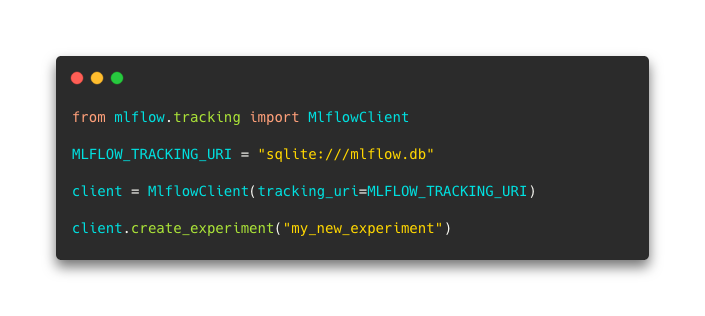
It imports the Client, specify the URI of the Database and create “my_new_experiment”.
Now that it is ready, you can set it as the experiment to use in your python code and start launching runs :
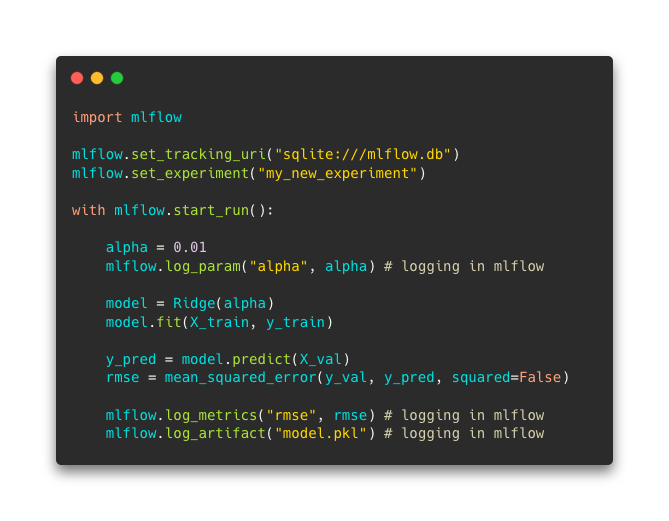
It is possible to log any information for runs. ML Flow offers also auto logging by calling :
mlflow.autolog()Once the run finished, you can have access to all the elements in the UI :

The doc for experiment tracking is here.
Model Serving
The idea behind Model Serving is that ML Flow provides a way to serve models in real time through a REST API or in batch mode. ML Flow models are stored with other files describing the use of the model in the artifact location. The main file apart of the model is the MLmodel one that specifies flavors which are the way the model will be load and used. For example, if one flavor is sklearn, it means that the model could be load as a scikit learn one from any tool that supports it.
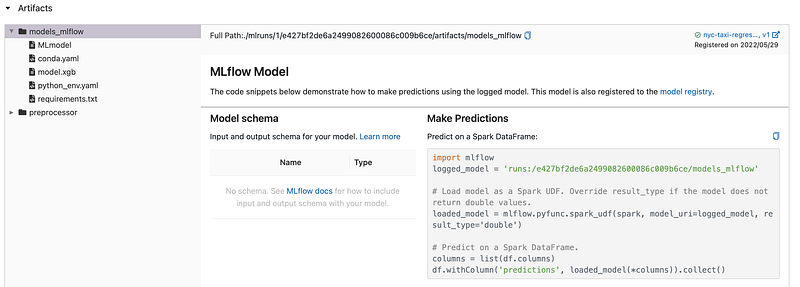
The model is stored as a pickle file (model.pkl) (depending on the specified format). Three other files that contain information about the environment either in conda, pipenv or directly with pip packages.
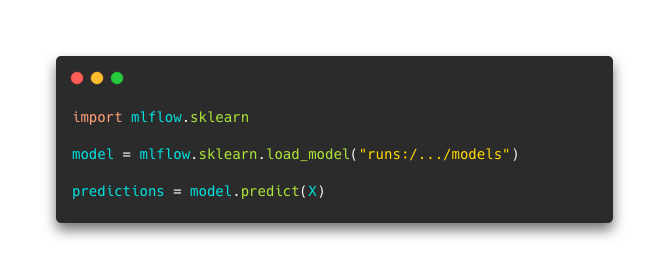
As you can see, you just need the run id to load the model in a flavor format and use it to make predictions. Here is an example of the use of a model in python :
The doc for models is here.
Model Registry
The model registry component takes the ML Lifecycle to another level as it allows the users to categorize models. It corresponds to the versioning and stage transitioning system of the Lifecycle.
Here are the concepts behind the model registry :
- Model Registering : place the model in the registry and assign it characteristics such as a version, a unique name, the model’s lineage (all the elements that were used to create this model) and more.
- Model Versioning : specify a version of a model.
- Model Staging : indicate the stage of a model (Staging, Production or Archived).
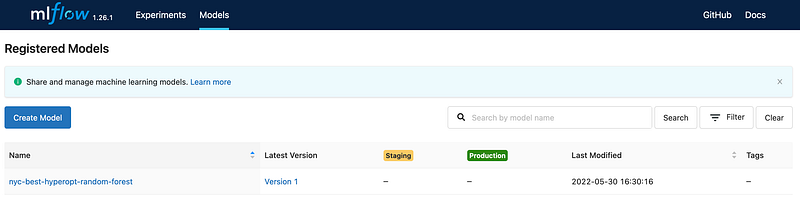
The ML Flow API can be used to register, load, change description or stage of any model in the registry.
For example, sending a model to the registry with the API (you can also do it with the user interface directly), and changing its stage looks like this:
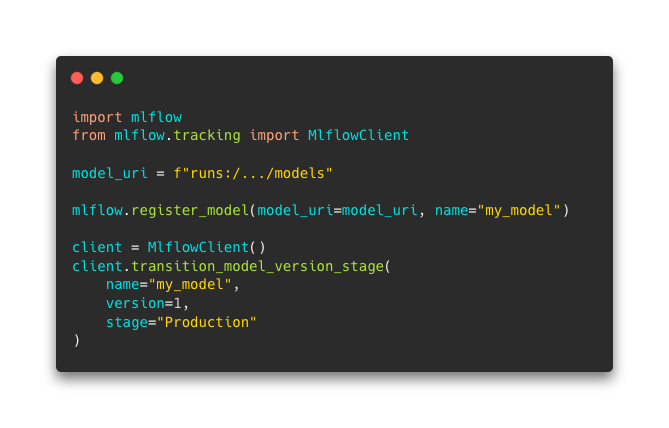
This is clearly an important part of the flow of ML development as Data Scientists, ML Engineers and others can access to the different models as well as information about it.
The doc about model registry is here.
Projects
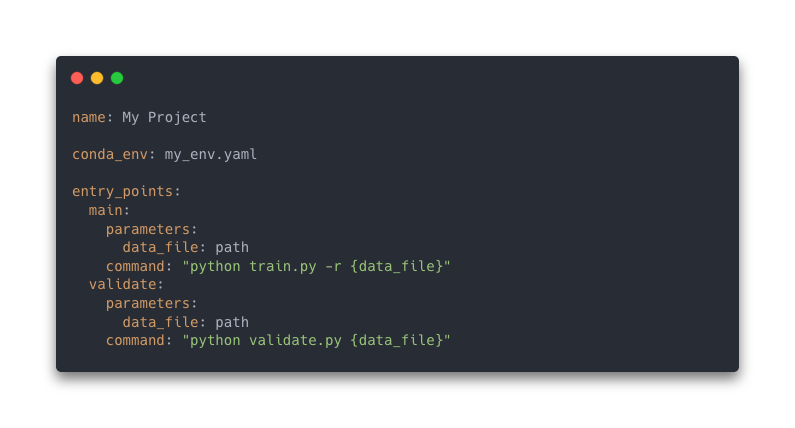
ML Flow project uses YAML formatted text file that packages reusable code and make it accessible with an API. As it is mentioned in the doc, a MLproject is just a “file directory or a git repository” but the YAML file provides structure and rigor.
In the MLproject (YAML) file, you can indicate three properties :
- The name of the project
- The environment (conda environment, virtual environment, docker environment)
- The entrypoints which are commands based on .py or .sh file that can either run the project entirely or some task like validation, training…
Here is what the file looks like :
The doc about projects is here.
Conclusion
Machine Learning Development is so important as the field grows more and more. Building models, comparing it to previous ones, putting some in production and maintaining it against issues of all kinds is not an easy task. It requires platforms, interfaces, modules or other tools to create an comprehensive Lifecycle of Machine Learning models.
ML Flow is an open source platform and API that answers to a part of it by creating a place where all your experiments are stored with various customizable metadata and artifacts. Beyond this, it is also allowing the use of models directly from the platform as it is based on a backend and artifacts storage.
Thanks you for reading this article, I hope you discovered ML Flow which I think is fantastic !