avatarNicolas Pogeant

Free AI web copilot to create summaries, insights and extended knowledge, download it at here

5274

Abstract

w. It is declared with a <b><i>@task</i></b> decorator to any type of function. Moreover, task functions can have inputs or outputs, parameter that specify if the task has to retry and more.</li></ul><figure id="e07d"><img src="https://cdn-images-1.readmedium.com/v2/resize:fit:800/1*QZ8m94hvthpO5n2KiFxBFg.png"><figcaption></figcaption></figure><ul><li><b>Flows</b> are containers (as the <a href="https://orion-docs.prefect.io/concepts/flows/">doc</a> explains) because it wraps all the tasks and dependencies between them. It is used with the <b><i>@flow</i> </b>decorator to a python function in which you can organize the tasks as you want and prefect will create links between them. It is possible to specify some parameters like the <b><i>task_runner</i></b> which is one that defines how the flow has to run (Concurrently or Sequentially for example). Prefect flows object automatically logs a lot of information about flow runs. You can have flows in another flow, that we call <b>subflows</b>.</li></ul><figure id="4b62"><img src="https://cdn-images-1.readmedium.com/v2/resize:fit:800/1*SGHLjWXPN6z99p2_XJm3kg.png"><figcaption></figcaption></figure><p id="0bc5">Having a <b>flow to run</b> can be done either manually by calling the script of the flow or by deploying it. <b>Deployment</b> is an important concept in Prefect. You can deploy a flow either in the <b>Prefect Cloud</b> (at a cost) or either locally (remotely on a VM also) within a <b>Prefect Orion Server</b> that we will now introduce.</p><p id="30d2">Prefect has an <b>UI</b> called Core or <b>Orion</b> (depending on the version) that makes possible the visualization of the flows with edges between tasks and the launch of flows directly with the API (from anywhere as long as an agent is available and the server up).</p><figure id="8c04"><img src="https://cdn-images-1.readmedium.com/v2/resize:fit:800/1*xlB741Yx0IY77FISuyCWvg.png"><figcaption></figcaption></figure><p id="6e4d">Once the UI is ready, you can access it at <a href="http://127.0.0.1:4200">http://127.0.0.1:4200</a> and find any <b>flow</b>, <b>deployments</b>, and <b>runs</b>. It is possible to filter by tags, date and more. If you want to know better about a flow run, you can have more information by selecting the one that you want. This is an example of the <b>Radar</b> <b>View</b> of a flow run :</p><figure id="85cc"><img src="https://cdn-images-1.readmedium.com/v2/resize:fit:800/1*GMELRFMMc0ANPcxI2oO3tg.png"><figcaption></figcaption></figure><p id="2f3f">It shows how the tasks were performed and the dependencies between each other.</p><p id="209f">Let’s talk a little bit about Deployment and Logging.</p><h2 id="3d62">Deployments in Prefect</h2><p id="5478"><b>Deployments</b> are packaging the flows into Prefect Orion Server allowing it to be run with the API (not just with a python script) and add schedule on it (to run alone).</p><p id="5bb6">Each deployment is backed by a flow, however, you can have multiple deployments for a unique flow and specify different parameters for example.</p><p id="622a">Here is an example :</p><figure id="db4d"><img src="https://cdn-images-1.readmedium.com/v2/resize:fit:800/1*7UsoJ4oUvzDsvAdLXwF0pA.png"><figcaption></figcaption></figure><p id="57a8">You can then run the following command to create the deployment :</p><p id="e550"><code>prefect deployment create file.py</code></p><p id="6a1e">That will create the schedules of the runs in the Prefect Orion Server but it will not run the flow, you need <b>Work Queues</b> and <b>Agents</b> to achieve this. Work queues are associated with specific runs from deployments (depending on filter criteria) and sends agents to launch these runs when the time comes.</p><p id="10f1">To know more about work queues and agent, check <a href="https://orion-docs.prefect.io/concepts/work-queues/">this link</a>.</p><h2 id="b46d">Logging in Prefect</h2><p id="0d11">It is possible to add any log you want, in addition to those integrated by Prefect, inside your task and flows by calling <b><i>get_run_logger</i></b> :</p><figure id="4eca"><img src="https://cdn-images-1.readmedium.com/v2/resize:fit:800/1*RjdG7ysDawjxr2JWBYVXTA.png"><figcaption></figcaption></figure><h1 id="f741">Conclusion</h1><p id="d271"><b>Workflow Orchestration</b> is a must have process when working with pipelines or a product/service involving various steps, all linked between each other. The idea behind tools like <b>Prefect</b> is to fight against negative engineering by having an eye on all the development pipeline and be able to fix quickly.</p><p id="e4a9">Naturally, orchestration is about having a logic on the elements that work together and those frameworks improve the way it is done. What I mean is that it is possible to create a large pipeline and tell any task in it some condition to not ruin the entire process. This is clearly more difficult without workflow orchestration tools, especially when many people are working on the project.</p><p id="5faf">Thanks for reading this article, I hope you enjoy it and discover what is Workflow Orchestration as well as Prefect which is a complete tool.</p><h2 id="959b">Resources :</h2><div id="52c9" class="link-block"> <a href="https://orion-docs.prefect.io/"> <div>

Options

         <div>
            <h2>Home</h2>
            <div><h3>Prefect is Air Traffic Control for your dataflows. It's the coordination plane that provides you with everything from…</h3></div>
            <div><p>orion-docs.prefect.io</p></div>
          </div>
          <div>
            <div style="background-image: url(https://miro.readmedium.com/v2/resize:fit:320/0*YXSrBMW_plEsPQhM)"></div>
          </div>
        </div>
      </a>
    </div><div id="3bcb" class="link-block">
      <a href="https://neptune.ai/blog/best-workflow-and-pipeline-orchestration-tools">
        <div>
          <div>
            <h2>Best Workflow and Pipeline Orchestration Tools: Machine Learning Guide - neptune.ai</h2>
            <div><h3>Machine learning is rampaging through the IT world, and driving a lot of high-end tech. It created a revolution of…</h3></div>
            <div><p>neptune.ai</p></div>
          </div>
          <div>
            <div style="background-image: url(https://miro.readmedium.com/v2/resize:fit:320/0*NPDkJahhWDHzNy2C)"></div>
          </div>
        </div>
      </a>
    </div><div id="40bd" class="link-block">
      <a href="https://subscription.packtpub.com/book/data/9781800562882/2/ch02lvl1sec07/concepts-and-workflow-of-mlops">
        <div>
          <div>
            <h2>Concepts and workflow of MLOps | Engineering MLOps</h2>
            <div><h3>In this section, we will learn about a generic MLOps workflow; it is the result of many design cycle iterations as…</h3></div>
            <div><p>subscription.packtpub.com</p></div>
          </div>
          <div>
            <div style="background-image: url(https://miro.readmedium.com/v2/resize:fit:320/0*uwq776NrmC4FI5q5)"></div>
          </div>
        </div>
      </a>
    </div><div id="1d51" class="link-block">
      <a href="https://towardsdatascience.com/workflow-orchestration-vs-data-orchestration-are-those-different-a661c46d2e88">
        <div>
          <div>
            <h2>Workflow Orchestration vs. Data Orchestration — Are Those Different?</h2>
            <div><h3>Let’s disambiguate the terms to understand workflow orchestration better — with a real-life analogy!</h3></div>
            <div><p>towardsdatascience.com</p></div>
          </div>
          <div>
            <div style="background-image: url(https://miro.readmedium.com/v2/resize:fit:320/1*Zrs38KATpASYL062hrQ0bw.jpeg)"></div>
          </div>
        </div>
      </a>
    </div><div id="2f29" class="link-block">
      <a href="https://readmedium.com/positive-and-negative-data-engineering-a02cb497583d">
        <div>
          <div>
            <h2>Positive and Negative Engineering</h2>
            <div><h3>Don’t Panic.</h3></div>
            <div><p>medium.com</p></div>
          </div>
          <div>
            <div style="background-image: url(https://miro.readmedium.com/v2/resize:fit:320/0*9gizj1DiblN9DWzg)"></div>
          </div>
        </div>
      </a>
    </div><div id="d5f2" class="link-block">
      <a href="https://towardsdatascience.com/airflow-prefect-and-dagster-an-inside-look-6074781c9b77">
        <div>
          <div>
            <h2>Airflow, Prefect, and Dagster: An Inside Look</h2>
            <div><h3>One of the great things about the Modern Data Stack is the interoperability with all the different components that make…</h3></div>
            <div><p>towardsdatascience.com</p></div>
          </div>
          <div>
            <div style="background-image: url(https://miro.readmedium.com/v2/resize:fit:320/0*JUnRi0Yl2YQqZCiV)"></div>
          </div>
        </div>
      </a>
    </div><div id="f7be" class="link-block">
      <a href="https://future.com/negative-engineering-and-the-art-of-failing-successfully/#:~:text=Negative%20engineering%20is%20the%20time,success%20of%20their%20primary%20objectives">
        <div>
          <div>
            <h2>What Is Negative Engineering?</h2>
            <div><h3>It was the second game of a double-header, and the Washington Nationals had a problem. Not on the field, of course: The…</h3></div>
            <div><p>future.com</p></div>
          </div>
          <div>
            <div style="background-image: url(https://miro.readmedium.com/v2/resize:fit:320/0*7-vkX8CQqDHxYz63)"></div>
          </div>
        </div>
      </a>
    </div><div id="279f" class="link-block">
      <a href="https://readmedium.com/mlearning-ai-submission-suggestions-b51e2b130bfb">
        <div>
          <div>
            <h2>Mlearning.ai Submission Suggestions</h2>
            <div><h3>How to become a writer on Mlearning.ai</h3></div>
            <div><p>medium.com</p></div>
          </div>
          <div>
            <div style="background-image: url(https://miro.readmedium.com/v2/resize:fit:320/1*6xCb1sNpjadaSBuVLPTFQQ.png)"></div>
          </div>
        </div>
      </a>
    </div></article></body>

Prefect — Orchestrate Your Machine Learning Workflow

In this article, we will dive into the relevance of Workflow Orchestration and a great tool that enables this process, Prefect.

Photo by Rob Simmons on Unsplash

My last article was about MLflow and experiment tracking which is the idea of keeping the most information possible about all the training models built from the data used, the metrics, parameters, results… As I explained, this process is apart of MLOps which corresponds to all the practices needed and applied to bring a model into production and maintain it. However, experiment tracking is just a part of Machine Learning Pipelines.

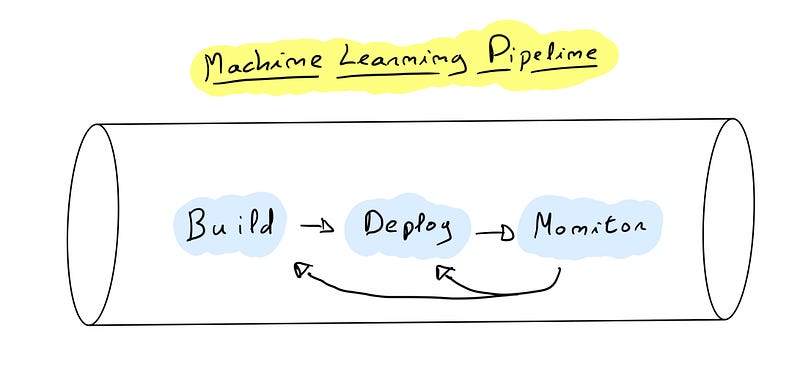
A Machine Learning Pipeline is a combination of several related steps that allow the ML Lifecycle to run smoothly. These pipelines are composed of 3 major steps that follow each other :

  • The first one is the Building step which consists of getting the data (data ingestion), training a model (data preprocessing, feature engineering, scaling, hyperparameter tuning), testing the model (evaluation) and versioning it (model packaging and registering).
  • Once the model ready, the next step of the pipeline is Deployment. As its name suggests this stage is about getting the model into production. Before that, a phase of production testing is done to prevent any issue when the production release happens.
  • Finally, the last step of the pipeline is the Monitoring. At this step, the model is doing its job (making predictions for example) and the purpose of monitoring is to examine its performance. Analyze with defined metrics and alert when something goes wrong. A well known issue is Model Drift/Data Drift which represents a situation where the model predicts a target that is not the correct one due to changes in the data itself. Thus,the accuracy vanished and the model must be trained with the new data to stay relevant.
As we know what a ML Pipeline is, let’s talk about the subject of this article : Workflow Orchestration.

Before seeing what does orchestration mean, a Workflow is basically the flow of the pipeline, from the building step to the monitoring one. It is possible to represent this flow by arrows from one stage to another. The pipeline is endless, as long as the product works, each step is linked within an infinite flow and it is therefore necessary to have control over it…

This is where workflow orchestration comes in, allowing it to be managed like a conductor manages his musicians. The main idea is to locate any failure in the pipeline during the workflow and reduce the consequences of those. An important concept exists in the development field and not only in Data Science, Negative Engineering.

Negative Engineering is defensive code written by developers, engineers so that the positive code (the one that is actually written for a specific purpose) works without issues. The main problem is that it takes up all the time of the person doing it (90% of the engineers’ time is spent on negative/defensive issues versus 10% on positive solutions.). Therefore, instead of waiting that a failure in the program happens, try to locate it and then fix it, Workflow Orchestration Frameworks provides the means to contain problems and prevent all surrounding codes and services from being affected.

Now let’s look at these frameworks…

Some example type of Machine Learning Workflow Orchestration Tools

As the subject is on Machine Learning here is 3 python based libraries/frameworks/platforms :

  • Apache Airflow : the pioneer of workflow orchestration tool.
  • Prefect : a newcomer since 2018 that builds on its idea of fighting negative engineering.
  • Dagster : a recent platform that is very popular because of its elegance, simplicity and efficiency.

Presentation of Prefect

Prefect is a modern Open Source python-based data stack used to build workflows as blocks. It works with decorators in a python script that defines the workflow and its element. Each step of the workflows is called a task but it can also take no task at all.

The 2 main attributes of Prefect Blocks are Tasks and Flows:

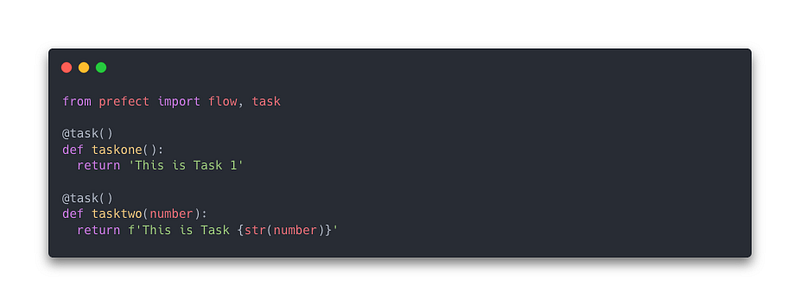
  • Tasks are as I said, each step that defines the flow. It is declared with a @task decorator to any type of function. Moreover, task functions can have inputs or outputs, parameter that specify if the task has to retry and more.
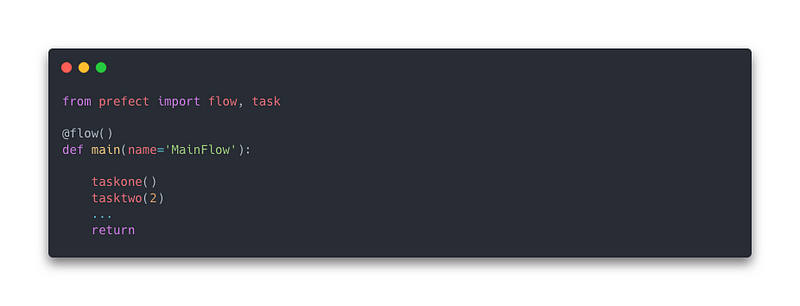
  • Flows are containers (as the doc explains) because it wraps all the tasks and dependencies between them. It is used with the @flow decorator to a python function in which you can organize the tasks as you want and prefect will create links between them. It is possible to specify some parameters like the task_runner which is one that defines how the flow has to run (Concurrently or Sequentially for example). Prefect flows object automatically logs a lot of information about flow runs. You can have flows in another flow, that we call subflows.
Having a flow to run can be done either manually by calling the script of the flow or by deploying it. Deployment is an important concept in Prefect. You can deploy a flow either in the Prefect Cloud (at a cost) or either locally (remotely on a VM also) within a Prefect Orion Server that we will now introduce.

Prefect has an UI called Core or Orion (depending on the version) that makes possible the visualization of the flows with edges between tasks and the launch of flows directly with the API (from anywhere as long as an agent is available and the server up).
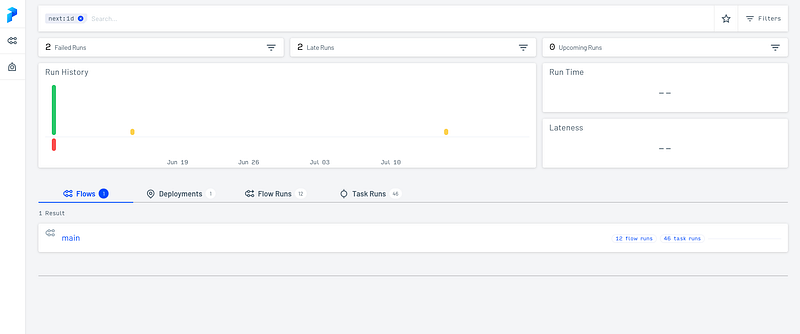
Once the UI is ready, you can access it at http://127.0.0.1:4200 and find any flow, deployments, and runs. It is possible to filter by tags, date and more. If you want to know better about a flow run, you can have more information by selecting the one that you want. This is an example of the Radar View of a flow run :
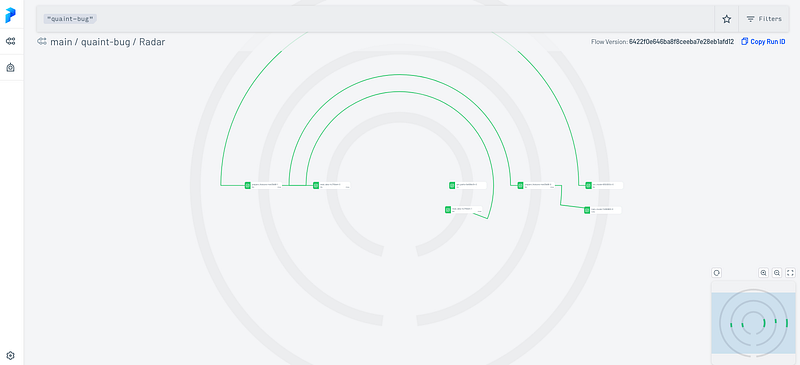
It shows how the tasks were performed and the dependencies between each other.

Let’s talk a little bit about Deployment and Logging.

Deployments in Prefect

Deployments are packaging the flows into Prefect Orion Server allowing it to be run with the API (not just with a python script) and add schedule on it (to run alone).

Each deployment is backed by a flow, however, you can have multiple deployments for a unique flow and specify different parameters for example.

Here is an example :
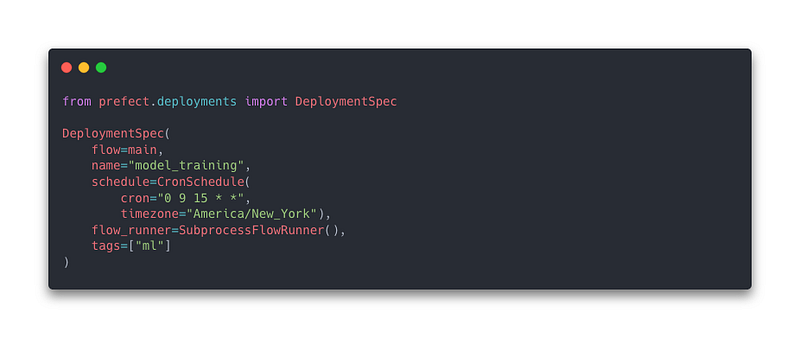
You can then run the following command to create the deployment :

prefect deployment create file.py

That will create the schedules of the runs in the Prefect Orion Server but it will not run the flow, you need Work Queues and Agents to achieve this. Work queues are associated with specific runs from deployments (depending on filter criteria) and sends agents to launch these runs when the time comes.

To know more about work queues and agent, check this link.

Logging in Prefect

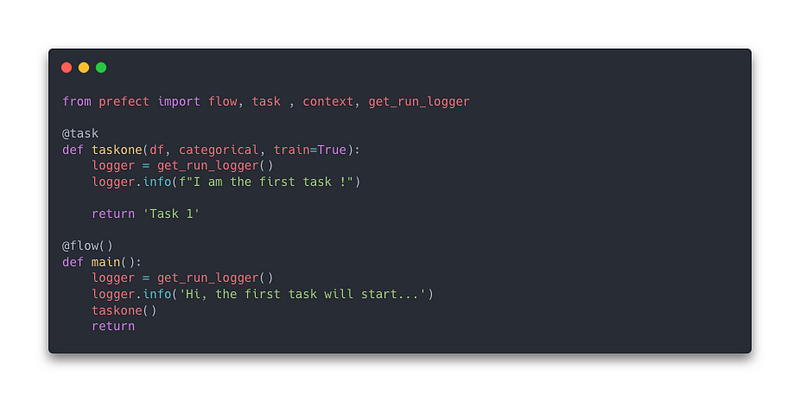
It is possible to add any log you want, in addition to those integrated by Prefect, inside your task and flows by calling get_run_logger :
Conclusion

Workflow Orchestration is a must have process when working with pipelines or a product/service involving various steps, all linked between each other. The idea behind tools like Prefect is to fight against negative engineering by having an eye on all the development pipeline and be able to fix quickly.

Naturally, orchestration is about having a logic on the elements that work together and those frameworks improve the way it is done. What I mean is that it is possible to create a large pipeline and tell any task in it some condition to not ruin the entire process. This is clearly more difficult without workflow orchestration tools, especially when many people are working on the project.

Thanks for reading this article, I hope you enjoy it and discover what is Workflow Orchestration as well as Prefect which is a complete tool.

Resources :

Workflow Orchestration
Prefect
Machine Learning
Mlops
Ml So Good
Recommended from ReadMedium