
Test Cases and Test Coverage for High Order Components
Examples on how to write test cases for high order components and how to measure test coverage

We recently wrote an article regarding headless UI components, which explored high order components (HOCs) and custom hooks. The next question is how to write test cases and measure test coverage. While testing custom hooks is covered in another article, here we’re going to walk through examples on how to test HOCs with Jest and the React Testing Library.
Terminologies
Unit test cases: Automated test cases written and run by developers. They isolate each part of the program and verify that the individual parts are correct.
Integration test cases: Automated test cases that combine individual parts and test them as a group.
Test coverage: A metric that measure the amount of testing performed by a set of test cases. Information is gathered regarding executed percentages of statements, branches, etc. There are also indications about which lines are yet to be tested.
Jest: A JavaScript testing framework to ensure the correctness of any JavaScript codebase. It is one of the most popular test runners and the default choice for React projects.
React Testing Library: A light-weight solution for testing React components. It provides utility functions on top of react-dom and react-dom/test-utils to test React components by the way they are used. React Testing Library along with Jest run unit test cases and integration test cases.
Higher Order Component: A function that takes a component and returns a new component. This is a composition approach to reuse component logic.
Create React App: A quick way to scaffold a React project. In this way, we focus on code, rather than building tools. It has built-in Jest and the React Testing Library, which are part of dependencies in package.json:
"dependencies": {
  "@testing-library/jest-dom": "^4.2.4",
  "@testing-library/react": "^9.5.0",
  "@testing-library/user-event": "^7.2.1"
}
Tests and Coverages for withColor
In the headless UI components article, we wrote the withColor HOC. This is a wrapper to set up color for the underlying component:
Writing a test case is similar to writing the actual code, in a simplified and isolated environment. For an HOC, we need to create a component to be wrapped that can show color: <div>Test Color</div>. This component is used to generate withColor HOC at line 6 in the below testing code:
Lines 7-10 render a snapshot test case, which takes a snapshot, and stores it under __snapshots__ directory as a reference (option —- updateSnapshot, or -u). Line 9 compares the new snapshot with the reference and verifies that the UI does not change unexpectedly.
Here’s the generated reference snapshot — it’s similar to the representation in a browser:
The snapshot presents a clear picture for the next two test cases:
- Verify the parent node has the default color
redwhen no color is specified (lines 12-15). - Verify the parent node has the color
bluewhen the color is specified asblue(lines 17-20).
Then we can run the tests: npm test.
It will run App.test.js and withColor.test.js in Create React App. How can we only run our HOC test cases?
npm has a —- option, which passes all the arguments after the -- directly to the script.
The following are some help messages:
$ npm test -- --helpUsage: test.js [--config=<pathToConfigFile>] [TestPathPattern]Options:
--help, -h Show help
--version, -v Print the version and exit
--collectCoverage Alias for --coverage.
--collectCoverageFrom A glob pattern relative to <rootDir> matching the files that coverage info needs to be collected from.
--coverage Indicates that test coverage information should be collected and reported in the output.
--testMatch The glob patterns Jest uses to detect test files.
--updateSnapshot, -u Use this flag to re-record snapshots.Then, the following command will run all HOC tests with the naming convention of with*.test.js:
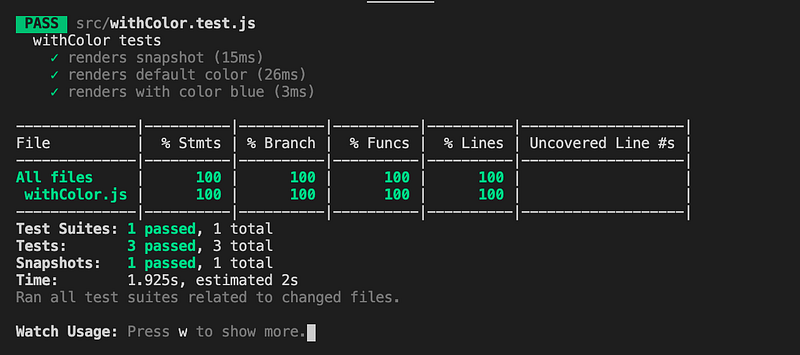
npm test -- --testMatch="<rootDir>/src/with*.test.js" --collectCoverage --collectCoverageFrom="src/with*.js"Running the command produces the following output. We’re happy to see that withColor.js has been tested by 100% coverage on statements, branches, functions, and lines.
Tests and Coverage for withFontStyle
Let’s move on to another HOC, withFontStyle. This is a wrapper to set up font style for the underlying component:
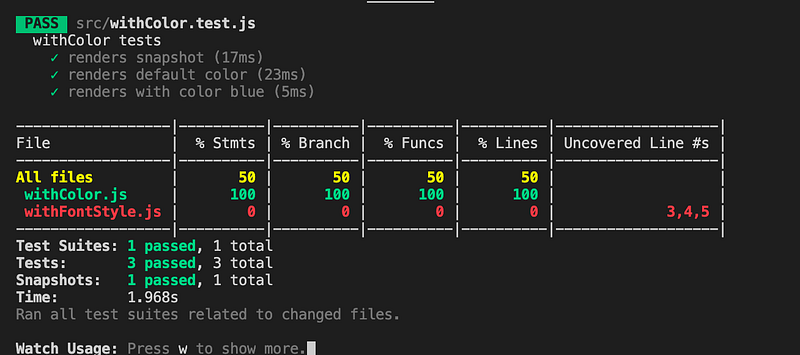
Running the test command, we find out withFontStyle.js has coverage 0%. It clearly itemizes that the above code needs to be tested at lines three, four, and five.
We create a component to be wrapped that can show font style: <div>Test Font Style</div>. This component is used to generate withFontStyle HOC at line six in the following testing code.
Another component is created at line 33. This component is wrapped by both withColor and withFontStyle:
Here are the generated snapshots, one is for withFontStyle tests and the other for testing a combination of withColor and withFontStyle:
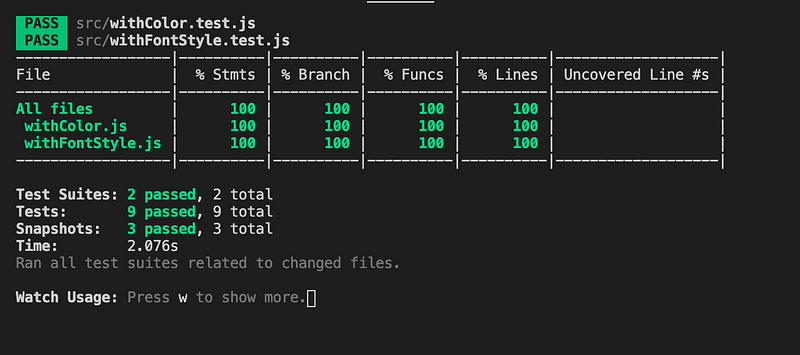
Now we have 100% coverage for withFontStyle.js as well:
Tests and Coverages for withMultipleValue
withMultipleValue is written a little differently. Instead of adding the div wrapper, it modifies props of the underlying component:
Here are the test cases:
This is the generated snapshot:
We run the test command and get the following result:
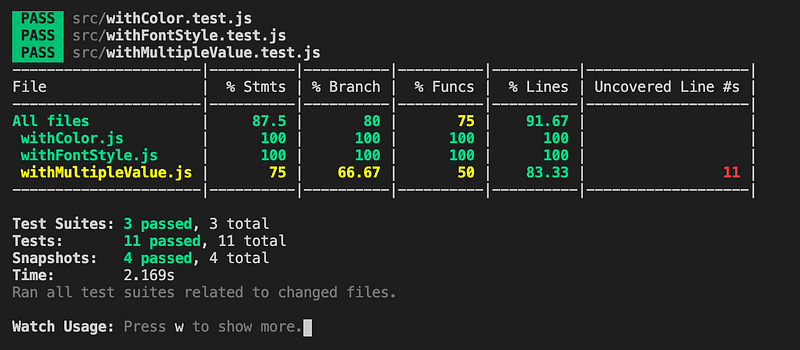
It says that the statement coverage is 75%. Line 11 of withMultipleValue.js has not been tested.
So, we add test cases at lines 27-40 to invoke the onClick callback:
We run the tests again — here’s the coverage report:
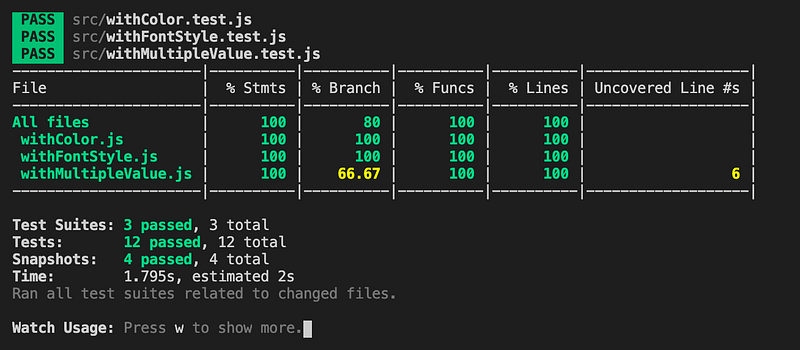
The statement coverage is 100%, but branches are not fully covered.
Line six in withMultipleValue.js is the conditional (ternary) operator, Number(props.value) ? props.value * factor : factor. We have tested the truthy condition, but not the falsy condition. Then the solution is adding the test case below at lines 20-25 for no initial value.
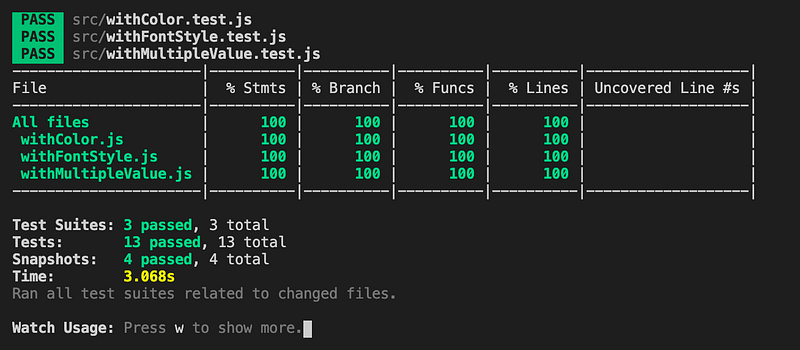
Now we reach 100% coverage for everything:
Conclusion
We have used the HOC examples to illustrate how to write test cases for HOCs. Along the way, we also showed how to improve test coverage.
In the real world, things are usually more complicated. There is asynchronous code, non-deterministic execution sequences, third-party libraries, and so on. It may not be possible to reach 100% coverage, and coverage of 70% — 80% is a reasonable goal, although it is worth the effort to aim high. Usually, it takes more effect for the last 10% — 20% coverage.
Thanks for reading. I hope this was helpful. You can see my other Medium publications here.


