
10 Fun Facts About Create React App
A few things you know and a few you probably don’t

React is a JavaScript library for building user interfaces. It’s one of the most popular libraries for building single-page applications. Create React App is a quick way to scaffold a React project. In this way, you focus on code, rather than building tools.
Fact #1: You Can Create a Fully-Fledged Project With a Single Command
This magic command can be invoked by one of three ways:
npx create-react-app my-app
npm init react-app my-app
yarn create react-app my-app
Facebook pledges that all of its underlying pieces — Webpack, Babel, ESLint, Jest, etc — work together seamlessly.
Out of the box, the following scripts are set up:
npm start: Runs the app in development mode, and open http://localhost:3000 to view it in the browser.npm run build: Builds the app for production to the build folder.
The build is minified and ready to be deployed.npm test: Runs the test watcher in an interactive mode. It runs tests related to files changed since the last commit.Fact #2: React Projects Can be Started With a Specific Template
The previous commands can be customized with a specific template:
npx create-react-app my-app --template [template-name]
npm init react-app my-app --template [template-name]
yarn create react-app my-app --template [template-name]
If you want to start with a React project with TypeScript, simply use the template, cra-template-typescript. The default template is cra-template.
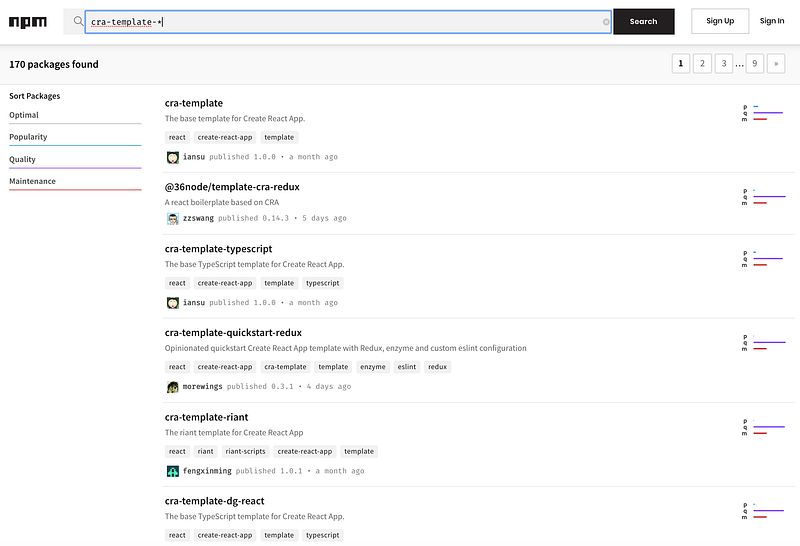
If you want to take advantage of the community resources, try this website. There are currently 170 templates available.
Fact #3: One Dependency Is the First Philosophy of Create React App, and This Build Dependency Is Not in the devDependencies Section
One Dependency is the first of three Create React App philosophies. Can you find this build dependency in the following package.json?
{
  "name": "my-react-app",
  "dependencies": {
    "react": "^16.12.0",
    "react-dom": "^16.12.0",
    "react-scripts": "3.2.0"
  },
  "scripts": {
    "start": "react-scripts start",
    "build": "react-scripts build",
    "test": "react-scripts test",
    "eject": "react-scripts eject"
  },
In package.json, we see three dependencies and nodevDependencies. Where is this one dependency?
It is react-scripts!
According to NPM dependencies definition, the build dependency, react-scripts, should be a devDependency. However, it is in the dependencies section along with react and react-dom.
In fact, react-scripts was a devDependency. For some practical reason, Facebook made it a dependency since react-scripts 1.0.8.
Fact #4: No Configuration Required Is the Second Philosophy of Create React App — But It’s Not Zero Configuration
Create React App has set up a reasonably good configuration for both development and production builds. A developer can focus on writing code. It’s possible to not configure anything.
The following is the out-of-box source code tree. We actually find one configure file, .gitignore, which is used for github’s source code version control.
my-react-app/
  node_modules/
  public/
    favicon.ico
    index.html
    logo192.png
    logo512.png
    manifest.json
    robots.txt
  src/
    App.css
    App.js
    App.test.js
    index.css
    index.js
    logo.svg
    serviceWorker.js
  .gitignore
  package-lock.json
  package.json
  README.md
Fact #5: No Lock-In Is the Third Philosophy of Create React App — And You Don’t Have to Eject a Project to Customize a Setup
No Lock-In is the opposite of one dependency. It allows you to eject the preconfigured settings for customization. Run a single command, react-scripts eject, and all the configuration and build dependencies will be moved directly into the project. The project is no longer one dependency. At this point, you’re on your own.
Does that sound scary?
Well, react-app-rewired comes to the rescue. It’s possible to rewire a project for customization, without ejecting it.
This can be achieved in three steps:
- Install
react-app-rewiredas adevDependency:npm install react-app-rewired --save-dev:
"devDependencies": {
  "react-app-rewired": "^2.1.5"
}
2. Create a config-overrides.js file in the root directory:
module.exports = (config, env) => {
 //do stuff with the webpack config…
 return config;
}
3. Flip the existing calls in package.json from react-scripts to react-app-rewired (except eject):
{
  "scripts": {
    "start": "react-app-rewired start",
    "build": "react-app-rewired build",
    "test": "react-app-rewired test",
    "eject": "react-scripts eject"
  },
}
Now you’re free to configure settings for Webpack, Babel, ESLint, Jest, etc.
Fact #6: “React-App-Rewired” Adds More Power by Configuring “Config-overrides.js”
In our React project development process, we took full advantage of react-app-rewired configuration capability.
Here are a few examples of how to use config-overrides.js:
Example 1: Resolving the issue whereby you have more than one copy of React in the same app, mentioned in my other article.
We use the monorepo lerna to structure micro-frontends’ multi-package repositories. Our application ends up with its own React dependency, as well as its dependency’s React devDependency. Usually, an application still works when there are multiple copies of packages. However, React breaks when it’s included twice, even if the versions are equal. The following example used an alias to resolve all React links to the application’s own copy.
const path = require('path');
module.exports = {
  webpack: (config, env) => {
    if (env === 'development') {
      config.resolve.alias = {
        react: path.resolve('node_modules/react'),
        'react-dom': path.resolve('node_modules/react-dom'),
      };
    }
    return config;
  },
};
Example 2: Resolve “How to load library source maps using webpack?” issue, mentioned in one of the solutions.
In the similar monorepo micro-frontends environment, a library source map is generated, but it is not loaded during the development debugger session. With the additional package, source-map-loader, the following code resolved the issue by setting the sourceMaps option to true.
Example 3: Resolve the dynamically loading issue by avoiding code-splitting an application.
From react-scripts 2.0.0, code splitting is enabled by default. An application is no longer compiled to a single file. Instead, it is split into several chunks that can be loaded onto the page independently. This loading optimization causes issue to mount and unmount micro-frontends. react-app-rewire-micro-frontends provides the following way to disable code splitting.
Beyond react-app-rewired, there are a number of react-scripts re-wirers: customize-cra, rescripts, react-scripts-rewired, and craco (Create React App Configuration Override)”.
Fact #7: Jest can use absolute paths
Jest is the default test runner for Create React App. By default, Jest runs all test cases in .js files in __tests__ folders, .test.js files, or .spec.js files.
This is App.test.js from Create React App. This test case uses a relative path:
If you change App to use an absolute path, as below, this test case will break:
You can fix it by adding the modulePaths option:
If you use react-app-rewired, you can also fix it by configuring config-overrides.js:
Fact #8: Create React App Can Handle CORS (Cross Origin Resource Sharing) Errors
Have you ever encountered the following error?:
Fetch API cannot load http://myhost.com:4000/api/todos. No 'Access-Control-Allow-Origin' header is present on the requested resource. Origin 'http://localhost:3000' is therefore not allowed access. If an opaque response serves your needs, set the request's mode to 'no-cors' to fetch the resource with CORS disabled.When APIs use a different host or port from the web server, this error will prevent your application from working.
Create React App provides a way to resolve this issue by adding a proxy entry in package.json:
{
  “proxy”: “http://myhost.com:4000",
}
This proxy option supports HTTP, HTTPS, and WebSocket connections.
What if there’s more than one API server?
The alternative solution needs to install http-proxy-middleware:
npm install --save http-proxy-middlewareIn addition, create and configure src/setProxy.js in the root directory. Below is an example of src/setProxy.js. A call to /api1/x will be forwarded to http://myhost1:4000/api1/x, and a call to /api2/y will be forwarded to http://myhost2:5000/api1/y.
Fact #9: Create React App Can Configure Which Browsers to Support
Out of the box, you can see the following browserslist in package.json.
"browserslist": {
    "production": [
      ">0.2%",
      "not dead",
      "not op_mini all"
    ],
    "development": [
      "last 1 chrome version",
      "last 1 firefox version",
      "last 1 safari version"
    ]
  }
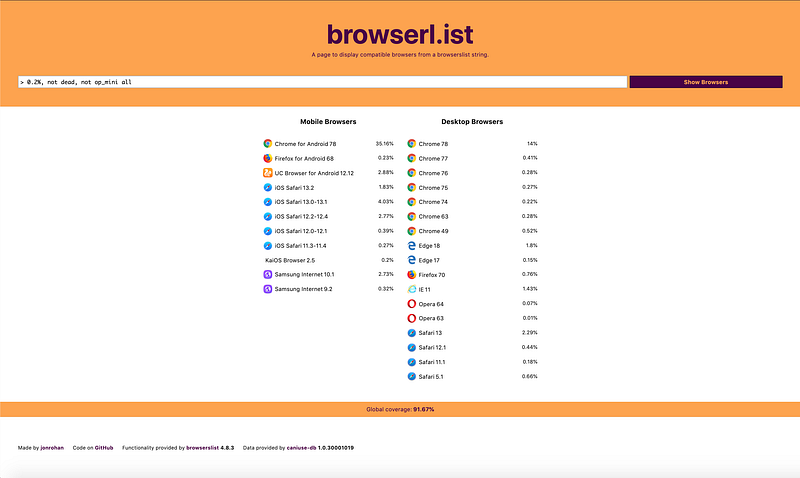
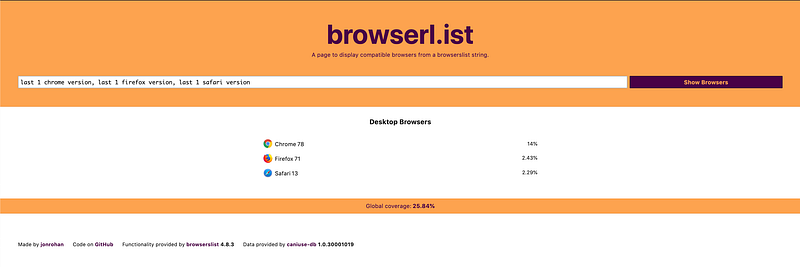
This configuration controls how Babel transpiles JavaScript to be compatible with specified browsers, for production and development. Check out https://browserl.ist for how to configure browserslist.
For the Create React App’s default browserslist’s configuration, the production code targets 92% of browsers:
For Create React App’s default browserslist configuration, the production code targets 26% of browsers:
Fact #10: Generated Bundles Can be Analyzed
Create React App hides a lot of details and complications under the hood. After a final bundle is generated, are you interesting to analyze its space usage?
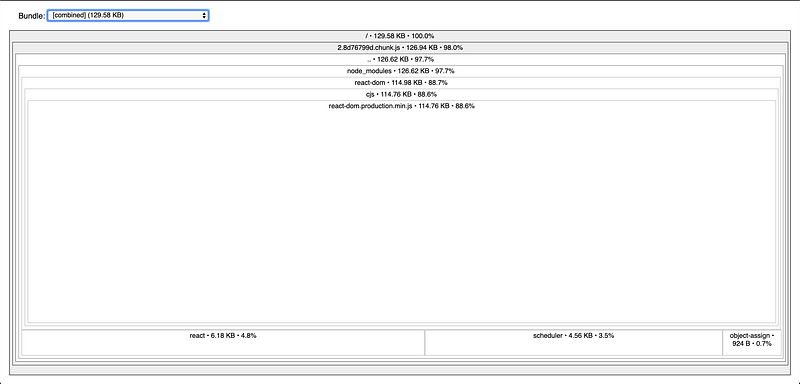
source-map-explorer gives you the ability to analyze and debug space usage through source maps. Install the source-map-explorer:
npm install --save source-map-explorerAdd the analyze script:
{
  "scripts": {
    "analyze": "source-map-explorer 'build/static/js/*.js'",
    "start": "react-scripts start",
    "build": "react-scriptsd build",
    "test": "react-scripts test",
    "eject": "react-scripts eject"
  },
}
Build and run the analyze command:
npm run build
npm run analyze
Then the bundle’s usage will be displayed on your default browser:
Having fun with Create React App? See Jennifer Fu’s other Medium publications here.


